
nextclaude
v1.3.6
Published
Multi-account Claude Code proxy with quota-based rotation and prompt-cache-aware account switching

Maintainers
 youlz
youlzReadme
Why
A single Claude Max/Pro account hits its 5-hour or weekly limit mid-task. NextClaude pools several accounts behind one local endpoint and hands off seamlessly. But naïve switching is expensive: Anthropic's prompt cache is per-account, so every switch re-bills your whole context as fresh tokens. NextClaude is built to make those switches rare and cheap — see How it saves tokens.
Quick start
Requires Node.js 18+.
npm install -g nextclaude        # or: npm i -g github:youyve/nextclaude

nextclaude login                 # add an account (opens browser) — repeat for more
nextclaude server                # start the proxy + live dashboard
nextclaude run                   # in another terminal: launch Claude Code through it
Already signed into Claude Code? Import its credentials instead: nextclaude import.
How it saves tokens
Switching is unavoidable once an account is exhausted, but the cache cost is not. For a task spanning N accounts' quota, NextClaude holds the cost to the N−1 floor and shrinks each rebuild:
- Stay on one account until it's truly empty. All your conversations share one big
system+toolsprefix; new ones pin to the account that's already warm — not the freshest. Everyone migrates forward together only when an account is actually exhausted, and never drifts back to a cache-cold one. - Switch at the cheap moment. Crossing the threshold only arms a switch; the proxy waits and lands it right after Claude Code auto-compacts, so the rebuild copies a small prefix instead of the full context. A hard ceiling forces it if needed — so it's never worse than switching early.
- Keep the most quota. When a switch is forced, it picks the account with the most 5h remaining, breaking ties by most weekly remaining.
- You stay in control. Press
sto pin all traffic to one account instantly (e.g. to spend one down first, or when another is overloaded). See Manual pin for exactly how the pin behaves.
It never rewrites your requests, pre-warms standby accounts, or injects long cache TTLs — tricks that corrupt the conversation or just move the cost around.
Manual pin
Pressing s marks an account with ★ manual. The pin is a sticky preferred primary, not a one-shot switch. While it's set:
- New conversations route to it, and it takes priority over the quota-based selection above (this is intentional — a manual choice outranks the automatic ranking).
- If it gets exhausted, traffic spills forward to another account — and then returns to it once its 5h/weekly window resets and it's serviceable again.
That return is the one sharp edge to know about: the pinned account's prompt cache died at the 5-minute TTL long before its quota reset, so coming back to it costs one cold rebuild (a full ✎ row at 0% hit). That's the price of insisting on a specific primary rather than letting NextClaude stay on whichever account is already warm. It can also pull traffic onto your lower-quota account — e.g. if the pinned one is nearly out of weekly quota while the current one is healthy, the pin still drags traffic back.
To stop this: press s on the pinned account again to toggle the pin off and hand routing back to the automatic quota-based logic (most 5h remaining, then most weekly). Pin only when you specifically want one account to be the primary; otherwise leave it on automatic.
When every account is exhausted
The 5-hour limit is a rolling window — capacity comes back gradually, often before the reset time Anthropic advertises. So when all accounts look spent, NextClaude doesn't just give up: on the next request it sweeps every account with one speculative probe (your real request), trying the soonest-to-reset first and serving the first one that has quietly recovered — straight back to you, no manual resend, no waiting out the full countdown. It probes all accounts (not just the soonest), so recovery on any one of them is caught. The whole sweep is throttled to at most once every 15s, so a retrying client can never hammer upstream.
If every account really is still over quota, you get a prompt 429 instead of a connection held open for hours. The retry-after is capped at 55s on purpose: Claude Code's client ignores any retry-after ≥ 60s, so a multi-hour value would be both useless and misleading — a small value lets its built-in retries quietly pick recovery back up. Either way, just resend if your turn ends first and the probe will catch the recovery.
Reading the dashboard
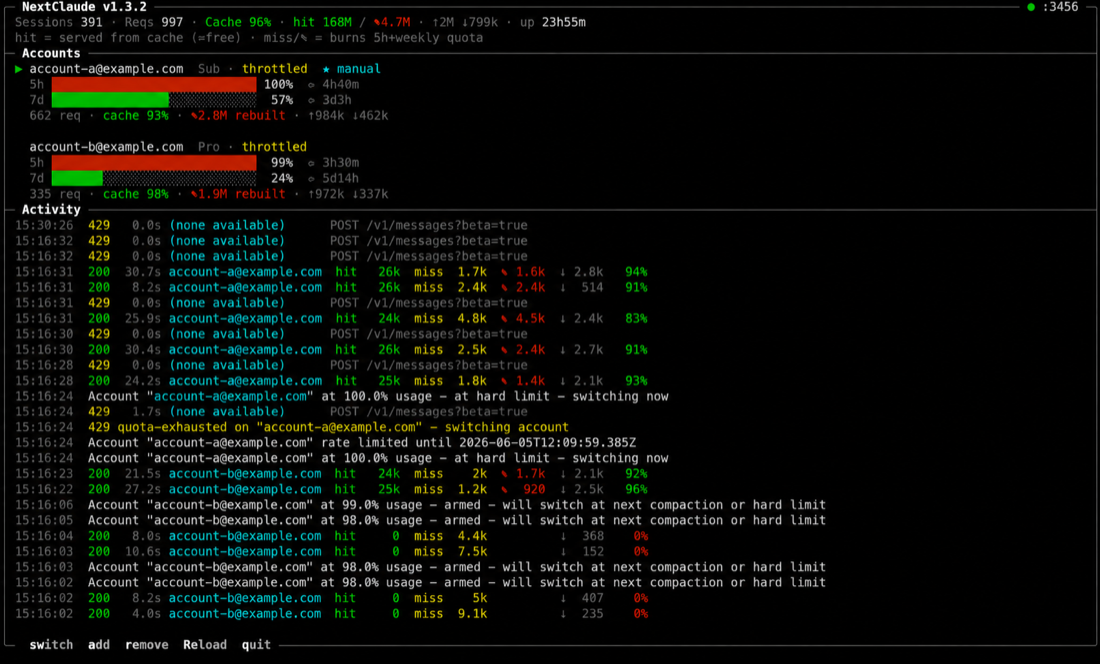
nextclaude server (in a TTY) shows a live dashboard; nextclaude status prints the same data headless. Every request is split into the part that's cheap vs the part that burns quota:
| Term | Meaning |
|------|---------|
| hit | cache_read — served from cache. ~Free: cached input doesn't count against your quota. |
| miss | input + cache_creation — processed fresh. This is what burns 5h / weekly quota. |
| ✎ | cache_creation — a cold rebuild (the whole context rewritten after a switch). A low hit % with a big ✎ is the expensive event NextClaude avoids. |
Per account you also get 5h and 7d bars with reset countdowns, cumulative cache <hit%>, ✎ rebuilt, ↑in ↓out, request count, and a ★ manual tag when pinned. The header summarizes pinned sessions, overall cache hit %, total tokens, and uptime; the activity log shows each request's hit/miss/✎/out and hit-rate, color-coded.
$ nextclaude status
NextClaude v1.3.x · 2 account(s) · 9 session(s) pinned
Active: [email protected] · switch at 98% · cache hit 90% overall · ↑44k ↓58k · 91 reqs

  [email protected]  (Pro, active)
    5h: 43% used (resets in 4h16m)
    7d: 30% used (resets in 5d3h)
    cache: 93% hit · 2.2M read · ✎120k rebuilt (1 cold)
    tokens: ↑42k in · ↓46k out · 84 requests

> [email protected]  (Pro, active)  ★ manual
    5h:  5% used (resets in 5h)
    cache: 77% hit · 520k read · ✎150k rebuilt (1 cold)
    tokens: ↑2k in · ↓12k out · 7 requests
Commands
| Command | What it does |
|---------|--------------|
| nextclaude login | Add a Claude subscription account via browser OAuth (--api for an API key) |
| nextclaude import [--from <path>] | Import credentials from Claude Code (re-import updates them) |
| nextclaude server [--log-to <dir>] | Start the proxy + dashboard (plain logs when not a TTY) |
| nextclaude run [-- <args>] | Launch Claude Code pointed at the proxy |
| nextclaude env | Print the ANTHROPIC_BASE_URL export to use the proxy manually |
| nextclaude status | Show live quota / cache stats (needs a running server) |
| nextclaude accounts [-v] | List accounts with tier and token status |
| nextclaude remove <name> | Remove an account |
Dashboard keys: s switch/pin account · a add · r remove · R reload from config · q quit. In a menu: j/k/arrows move, Enter confirms, Esc cancels.
Configuration
Stored at ~/.config/nextclaude.json (override with NEXTCLAUDE_CONFIG). A random proxy key is generated on first run; quota is cached separately in nextclaude-state.json so a restart resumes on the account with the most quota.
| Field | Description |
|-------|-------------|
| proxy.port | Local port the proxy listens on (default 3456) |
| proxy.apiKey | Key clients use to authenticate with the proxy |
| upstream | Upstream API base URL |
| switchThreshold | Soft utilization (0–1) that arms a switch; the proxy then waits for a cheap moment (default 0.98) |
{
  "proxy": { "port": 3456, "apiKey": "nc-…" },
  "upstream": "https://api.anthropic.com",
  "switchThreshold": 0.98,
  "accounts": [
    {
      "name": "[email protected]",
      "type": "oauth",
      "accessToken": "sk-ant-oat01-…",
      "refreshToken": "sk-ant-ort01-…",
      "expiresAt": 1774384968427
    }
  ]
}
License
MIT · derived from the MIT-licensed teamclaude.