
ng-go-board
v0.6.7
Published
[](https://www.npmjs.com/package/ng-go-board) [](https://travis-ci.org/shawnm0705/ng-go-board)


Readme
NgGoBoard


An Angular component that display a Go board.
This component depends on godash
Demo
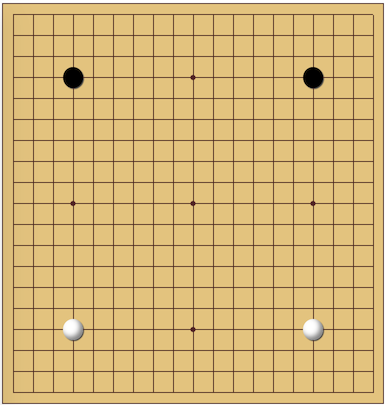
Getting Started
Install godash via npm.
npm install godashInstall ng-go-board via npm.
npm install ng-go-boardImport BoardModule into your app.module.ts
import { BoardModule } from 'ng-go-board';
@NgModule({
  declarations: [
    AppComponent
  ],
  imports: [
    BrowserModule,
    BoardModule
  ],
  providers: [],
  bootstrap: [AppComponent]
})
export class AppModule { }
You can now use <go-board> in your html file.
<go-board></go-board>
Properties
Board coordinate is from (0, 0) to (18, 18)
moves
Type
Array<{ x: number; y: number; color: string; }>
Description
It defines pre-exists moves(stones) when initialising the board
Example
<go-board
  moves="[
    {
      x: 3,
      y: 15,
      color: 'black'
    },
    {
      x: 15,
      y: 15,
      color: 'white'
    },
    {
      x: 3,
      y: 3,
      color: 'black'
    },
    {
      x: 15,
      y: 3,
      color: 'white'
    }
  ]"
></go-board>
next
Type
String
Description
It defines the color of stone for the next move.
Valid colors are black and white
If no next provided, it will check the last move(stone) in moves array. If it is white, the next color will be black, otherwise the next color will be white.
If no next and no moves provided, the next color will be black by default.
Example
<go-board
  next="'black'"
></go-board>
showStep
Type
Boolean
Default is false
Description
It defines whether display step number on the stone or not.
When showStep changed, it will only affact future stones. Existing stones will remain the same.
Example
<go-board
  showStep="true"
></go-board>
disabled
Type
Boolean
Default is false
Description
It defines whether allow user click on the board to move or not.
Example
<go-board
  disabled="true"
></go-board>
Methods
Methods can be used from BoardService
import { BoardService } from 'ng-go-board';
...
constructor(
  private board: BoardService
) { }
...
test() {
  board.reset()
}
reset()
Reset the board to the initial state
retract()
Retract the last move
addMove(x, y, color?)
Add a move to (x, y) with the current color or the color passed in. Same as when you click on this coordinate. color is optional
disable()
Disable the board, do not allow any moves
enable()
Enable the board, allow moves
normalColor()
Stone color will switch between black and white in turn
oneColor(color:string)
Stone color will be fixed to the color passed in. Valid color: black, white
Events
move
It is a move event that will trigger every time when a move happens.
The event is in type { x: number; y: number; color: string; }
e.g.
<go-board
  (move)=onMove($event)
></go-board>
In app.component.ts
onMove(event) {
  console.log('(', event.x, ', ', event.y, ') ', event.color);
}