
ng-katex-2
v21.0.1
Published
Angular module to write beautiful math expressions in TeX syntax boosted by [KaTeX](https://github.com/Khan/KaTeX) library. You can see a demo [here](https://garciparedes.github.io/ng-katex).


Readme
ng-katex-2
Angular module to write beautiful math expressions in TeX syntax boosted by KaTeX library. You can see a demo here.




About ng-KaTeX-2:
This repo was created for ng-katex library is compatible with Angular 18?
The reason for creation of this repository is because the original repo ng-katex has been archived and supports upto angular 13.
Since angular18 is throwing error for components not being standalone, I upgraded to version 14, so that it can be used for angular versions 14 and above.
All credits to the original author, I am just upgrading for it to work for latest versions of angular and future maintainenace if necessary.
Common Steps for standalone and modular:
First install
ng-katex-2:npm i ng-katex-2 --saveIf you want to use styling of
katexrefer the section katex include css
Usage with standalone components:
Using KatexDirective:
The KatexDirective requires KatexService, which needs to be provided, for this we need to add the importProvidersFrom(KatexModule) to our bootstrapApplication's providers array.
import { importProvidersFrom } from '@angular/core';
import { bootstrapApplication } from '@angular/platform-browser';
import { KatexModule } from 'ng-katex-2';

bootstrapApplication(App, {
  providers: [importProvidersFrom(KatexModule)],
});
Usage of other components:
The other component do not have any DI for KatexService, so you can just import and use them:
@Component({
  selector: 'app-root',
  imports: [KatexComponent],
  template: `
    <ng-katex [equation]="equation" [options]="options"></ng-katex>
  `,
})
export class App {
  equation: string = '\\sum_{i=1}^nx_i';
  options: KatexOptions = {
    displayMode: true,
  };
}
Usage with modules:
Using KatexDirective:
The KatexDirective requires KatexService, which needs to be provided, for this we need to add the KatexModule to imports array of AppModule.
We can also add KatexDirective to the declarations array and KatexService to the providers array of AppModule.
import {
  KatexComponent,
  KatexDirective,
  KatexHtmlComponent,
  KatexParagraphComponent,
  KatexService,
} from 'ng-katex-2';

@NgModule({
  declarations: [AppComponent],
  imports: [
    BrowserModule, // can be imported normally and used without providers.
    KatexComponent, // can be imported normally and used without providers.
    KatexDirective, // to use this we need to add KatexService to the providers array.
    KatexHtmlComponent, // can be imported normally and used without providers.
    KatexParagraphComponent, // can be imported normally and used without providers.
    // or just with a single line
    // KatexModule, // imports everything.
  ],
  providers: [KatexService], // service needed to use the directive.
  bootstrap: [AppComponent],
})
export class AppModule {}
Version Table With Example:
| Angular version | ng-katex-2 version | Stackblitz Standalone Demo | Stackblitz Modular Demo | | --------------- | ------------------ | -------------------------- | ------------------------ | | Angular 14 | 14.0.x | Stackblitz Demo - 14 | Stackblitz Demo - 14 | | Angular 15 | 15.0.x | Stackblitz Demo - 15 | Stackblitz Demo - 15 | | Angular 16 | 16.0.x | Stackblitz Demo - 16 | Stackblitz Demo - 16 | | Angular 17 | 17.0.x | Stackblitz Demo - 17 | Stackblitz Demo - 17 | | Angular 18 | 18.0.x | Stackblitz Demo - 18 | Stackblitz Demo - 18 | | Angular 19 | 19.0.x | Stackblitz Demo - 19 | Stackblitz Demo - 19 | | Angular 20 | 20.0.x | Stackblitz Demo - 20 | Stackblitz Demo - 20 | | Angular 21 | 21.0.x | Stackblitz Demo - 21 | Stackblitz Demo - 21 |
x -> stands for patch, where I post minor updates, can be ignored. But make sure you have ng-katex-2 set to ^15.2.11. Here ^ is important so that all minor and patch versions are considered, compared to ~ which only takes into account patch versions.
Troubleshooting:
If you find intellisense not working, kindly add
typeRootsto yourtsconfig.json(this will help with autocomplete of imports for bothng-katex-2andkatex).{ ... "compilerOptions": { ... "typeRoots": [ "node_modules/@types" ], ... } }If you want to get rid of the below error (Add the below line to your
angular.json)
angular.json:
...
"architect": {
  "build": {
    ...
    "options": {
      ...
      "allowedCommonJsDependencies": ["extract-math"],
      ...
    },
    ...
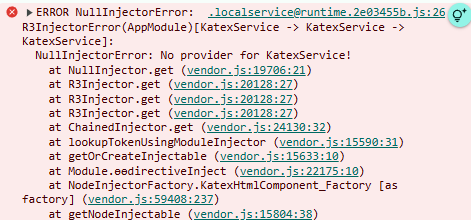
If you get the below error:
ERROR NullInjectorError: R3InjectorError(AppModule)[KatexService -> KatexService -> KatexService]: NullInjectorError: No provider for KatexService!
Then you should refer the sections Using Katex Directive - standalone and Using Katex Directive - modular.
Original ng-katex Readme.MD:
ng-KaTeX





Description
Angular module to write beautiful math expressions in TeX syntax boosted by KaTeX library. You can see a demo here.
Install
To install the module you can simply type it on your command line:
npm install ng-katex --saveTo add the module to your project add the KatexModule to import's field of your parent module:
import { NgModule } from '@angular/core';
import { BrowserModule } from '@angular/platform-browser';

import { KatexModule } from 'ng-katex';

import { AppComponent } from './app/app.component';

@NgModule({
  imports: [
    BrowserModule,
    KatexModule
  ],
  declarations: [AppComponent],
  bootstrap: [AppComponent]
})

class AppModule {}

platformBrowserDynamic().bootstrapModule(AppModule);
Styling
Important!
If you're using angular-cli, add the katex css import to your styles.css:
@import '~katex/dist/katex.css';If you're not using the angular-cli, import the stylesheet to your index.html:
<link rel="stylesheet" href="https://cdnjs.cloudflare.com/ajax/libs/KaTeX/0.11.0/katex.min.css">Usage
You can write a LaTeX equation as follows:
import { Component } from '@angular/core';

@Component({
  selector: 'my-app',
  template: `<ng-katex [equation]="equation"></ng-katex>`
})
export class AppComponent {
  equation: string = '\\sum_{i=1}^nx_i';
}
Also, you can add options to ng-katex components with:
import { Component } from '@angular/core';

import { KatexOptions } from 'ng-katex';

@Component({
  selector: 'my-app',
  template: `<ng-katex [equation]="equation" [options]="options"></ng-katex>`
})
export class AppComponent {
  equation: string = '\\sum_{i=1}^nx_i';
  options: KatexOptions = {
    displayMode: true,
  };
}
The options object structure is defined here.
If you want to write a paragraph with LaTeX equations, you can do it as follows:
import { Component } from '@angular/core';

@Component({
  selector: 'my-app',
  template: `<ng-katex-paragraph [paragraph]="paragraph"></ng-katex-paragraph>`
})
export class AppComponent {
  paragraph: string = `
    You can write text, that contains expressions like this: $x ^ 2 + 5$ inside them. As you probably know.
    You also can write expressions in display mode as follows: $$\\sum_{i=1}^n(x_i^2 - \\overline{x}^2)$$.
    In first case you will need to use \\$expression\\$ and in the second one \\$\\$expression\\$\\$.
    To scape the \\$ symbol it's mandatory to write as follows: \\\\$
  `;
}
If you want to write HTML with LaTeX equations, you can do it as follows: (Security Note: this bypasses Angular DOM Sanitization)
import { Component } from '@angular/core';

@Component({
  selector: 'my-app',
  template: `<ng-katex-html [html]="html"></ng-katex-html>`
})
export class AppComponent {
  html: string = `
    <div>You can write html, that contains expressions like this: $x ^ 2 + 5$ inside them. As you probably know. You also can write expressions in display mode as follows: $$\\sum_{i=1}^n(x_i^2 - \\overline{x}^2)$$. In first case you will need to use \\$expression\\$ and in the second one \\$\\$expression\\$\\$. To scape the \\$ symbol it's mandatory to write as follows: \\\\$</div><p>: <button>I'm a button</button></p>
  `;
}
Contributors
- Sergio García Prado @garciparedes
- Joshua Claxton @joshclax
Changelog
See changelog page to get info about release changes.
Contributing
See CONTRIBUTING.md
License
ng-katex is licensed under MIT license.