
ng2-alfresco-aos-editonline
v0.1.7
Published
Alfresco and AOS integration for ADF
Downloads
66

Maintainers
 mikel.asla
Readme
ng2-alfresco-aos-editonline
- Description
- Prerequisites
- Office client requisites
- Install
- Basic usage
- Screenshots
- Build from sources
- History
- Contributors
Description
This module provides the Edit on Ms Office action present in Alfresco Share to be used on ADF (Alfresco Development Framework) applications.
The module was developed during the Alfresco Global Hackathon 2017 and it was a lot of fun to do it. The idea of the "Alfresco Share ADF Components" project is to create angular reusable components holding functionalities present on Alfresco Share and often used by our clients.
Special thanks to Mario Romano for kindly and patiently responding all my questions.
Prerequisites
Before you start using this module, make sure you have properly installed and configured Alfresco Office Services (AOS) on your Alfresco Content Services installation, documentation.
For illustrating the use of the module I'll be using a demo application generated with the ng2-alfresco-app yeoman generator.
Office client requisites
Alfresco Office Services documentation
NOTE: Alfresco server and the ADF application must be accessible by a qualified hostname from within your Office client.
Example configuration
To configure a hostname for your ADF application with webpack-dev-server, just edit package.json and add --public parameter to the start script.
"start": "npm run server-versions && npm run webpack-dev-server -- --config config/webpack.prod.js --progress --public myapp.example.com:3000 --content-base app/",Next specify the externally accessible hostname for Alfresco on app.config-dev.json
"ecmHost": "http://acs.example.com:8080",Make sure you can access both services from the Office client.
Install
- Npm
Install the ng2-alfresco-aos-editonline module into your ADF application
npm install ng2-alfresco-aos-editonline --saveCompatibility Matrix
| package version | ADF version | | --- | --- | | 0.1.5 | 1.8.0 | | 0.1.6 | 1.9.0 |
Basic usage
- Generate a example ADF application and install the module
$ yo ng2-alfresco-app
$ cd example-app
$ npm install
$ npm install ng2-alfresco-aos-editonline --save- Add the module to your application
Edit the root module on your application to add the ng2-alfresco-aos-editonline module
app.module.ts
    ...
    import { Ng2AlfrescoAosEditonlineModule, AOSEditOnlineService } from 'ng2-alfresco-aos-editonline';
    ...
    @NgModule({
        imports: [
            ...
             Ng2AlfrescoAosEditonlineModule.forRoot()
        ],
        ...
        providers: [
            ...
            AOSEditOnlineService
]- Extend FilesComponent HTML template
For this example we are going to use the FilesComponent that comes with the application generated with yeoman. This component showcases the use of the ng2-alfresco-documentlist component which fits perfect to test the AOS action.
NOTE: Read the ContentAction component documentation for understanding the extension point here
src/app/components/files/files.component.html
   <adf-document-list>
        ...
        <content-actions>
            ...
            <content-action
                icon="build"
                target="document"
                permission="update"
                [disableWithNoPermission]="true"
                (permissionEvent)="handlePermissionError($event)"
                title="{{'AOS.ACTION.TITLE' | translate}}"
                (success)="onAosEditonlineActionSuccess($event)"
                (execute)="aosEditonline($event)">
            </content-action>
        </content-actions>
</adf-document-list>- Extend FilesComponent ts file
On the FileComponent controller we need to implement the aosEditonline(event) function, the name of the method is just and example and could be any other name, it only need to match the one defined in the HTML template.
src/app/components/files/files.component.ts
    import { AlfrescoTranslationService } from 'ng2-alfresco-core';
    import { AOSEditOnlineService } from 'ng2-alfresco-aos-editonline';
    ...
    constructor(
                ...
                private editOnlineService: AOSEditOnlineService,
                private alfrescoTranslationService: AlfrescoTranslationService) {
    }
    ...

    ngOnInit() {
        this.aosEditOnlineService.errorMessage
        .subscribe((messageId: string) => {
            let message: any = this.alfrescoTranslationService.get(messageId);
            this.notificationService.openSnackMessage(message.value, 3000);
        });
    }

    aosEditonline(event) {
        this.editOnlineService.onActionEditOnlineAos(event.value.entry.id);
}- Start the application
$ npm start- Test the action
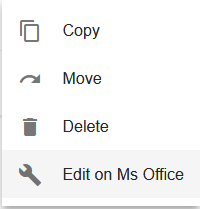
Access your application on http:///files (after successfully logged in), navigate to a Ms document and click on the actions menu
Screenshots
Execute "Edit on MS Office" action upon a ms file, for example a .pptx
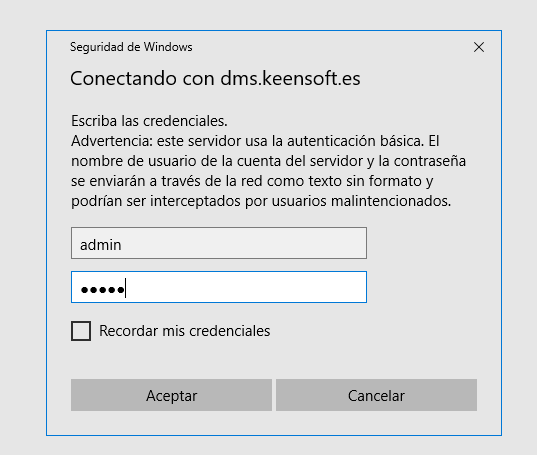
Give your Alfresco credentials
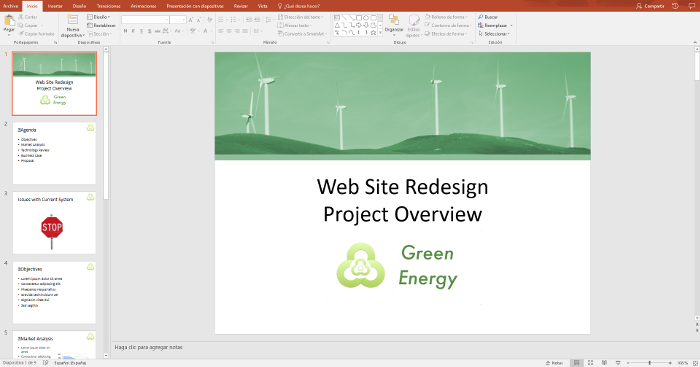
Work with Alfresco content from within your Ms Office
Build from sources
Alternatively you can build component from sources with the following commands:
npm install
npm run build
History
For detailed changelog, check Releases.