nginx-gui
v3.3.0
Published


Readme

A cross-platform GUI for managing nginx — server blocks, locations, live traffic topology, and access log streaming — backed by an Express API and a Vue 3 frontend.
Requirements
- Node 14+ (backend runtime)
- Windows or Linux
- nginx — downloaded automatically on Windows; install via package manager on Linux
Usage
Install globally via npm:
npm i -g nginx-guiThen run:
nginx-guiAccess the UI at http://localhost:9004
Start nginx automatically on launch:
nginx-gui --start-nginxFirst run
On first launch, if no nginx binary is found the UI shows a setup panel:
- Windows — pick a version from the list (fetched live from nginx.org) and click Download & Install. The binary is extracted to
~/.nginx-gui/nginx/. - Linux — install nginx via your package manager, then restart nginx-gui:
sudo apt install nginx   # Debian/Ubuntu
sudo yum install nginx   # RHEL/CentOS
Features
Nginx control
The left sidebar lets you start and stop nginx, monitor its status with a live indicator, and toggle auto-start on startup (persisted in the database). The --start-nginx CLI flag is the non-interactive equivalent.
Server & location management
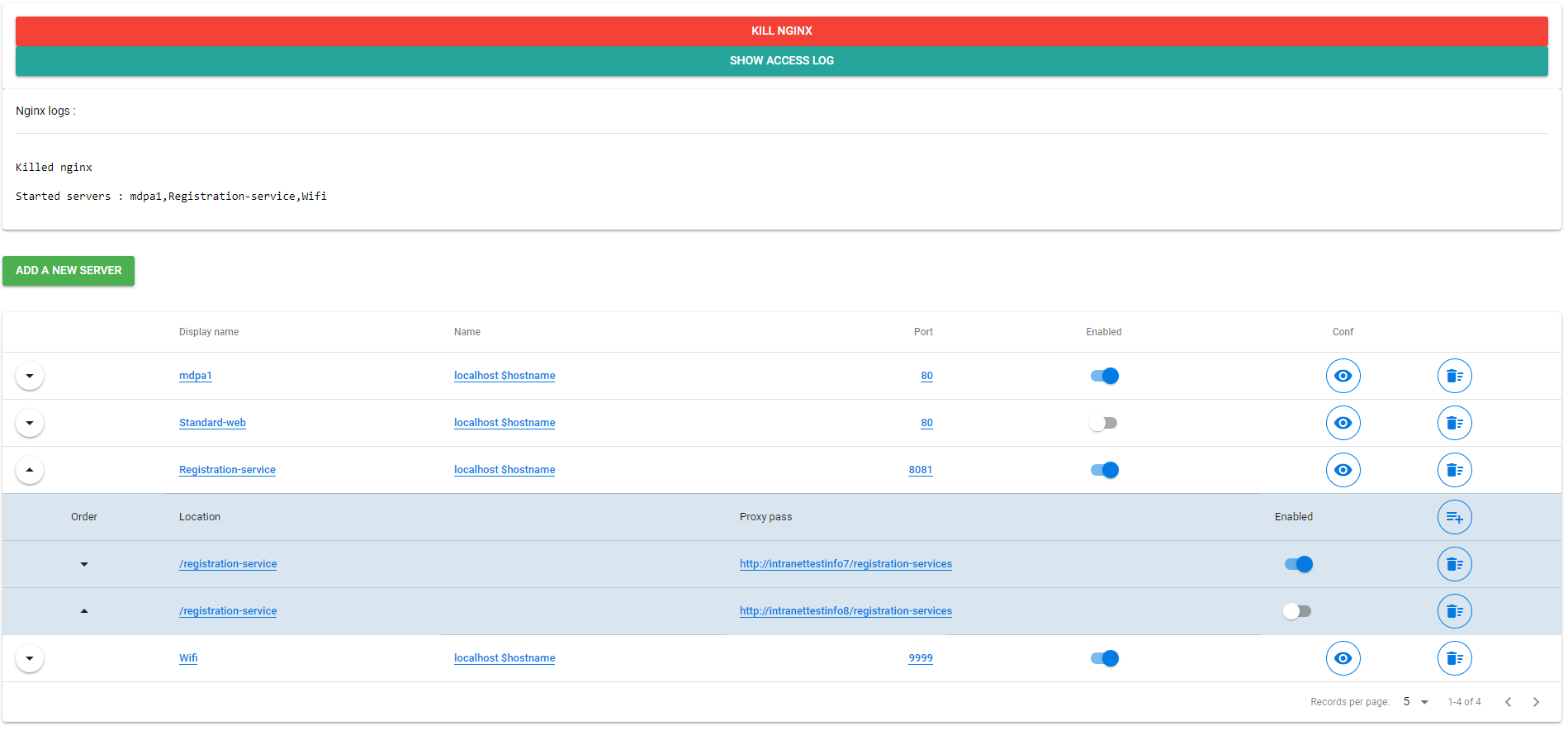
The Servers view shows all configured virtual servers in an expandable table:
- Add, edit, and delete servers with inline popover editing (display name, server names, port)
- Enable/disable individual servers — only one server per port can be active at a time
- Expand a server row to manage its locations (path + proxy_pass), reorder them by drag-and-drop, and toggle each independently
- Per-server and per-location extra config fields accept raw nginx directives appended to the generated block
- Properties dialog (sliders icon) exposes structured controls for the most common directives — no raw config needed:
- Server: max upload size (
client_max_body_size), gzip compression + MIME types, access log toggle, SSL/TLS (certificate, key, protocols) - Location: WebSocket support (auto-injects
proxy_http_version+ Upgrade headers), proxy timeouts (read/connect/send), proxy buffering, CORS, rate limiting (limit_req), HTTP basic auth
- Server: max upload size (
- Extract to Properties button inside the extra config editor parses raw nginx directives and migrates any recognized ones into the structured Properties fields, removing them from the freeform text
- Active properties are shown as inline badges on each row (GZIP, SSL, WS, CORS, RL, AUTH, NO LOG)
- View Conf shows the generated
server { }block for any server before committing
HTTP config
The HTTP Config tab provides a freeform editor for custom directives placed in the HTTP block (e.g. map, upstream, geo). Changes take effect the next time nginx is started.
Full config viewer
The View Config tab shows the complete generated nginx.conf with a copy-to-clipboard button.
Access logs
The Access Logs button opens a live log viewer that streams new entries via Server-Sent Events. The table shows:
remote_addr · time · server_name · correlation_id · request · status · bytes_sent · proxy_host
Access logs are written in JSON format and rotated automatically — daily or when the file exceeds 10 MB. Seven rotated files are kept.
Topology view
The Topology tab renders a D3.js force-directed graph of your nginx routing:
- Server nodes — each configured server block
- Upstream nodes — downstream proxy targets derived from location configs and access logs
- Dashed gray edges — configured proxy paths
- Solid blue edges — paths observed in access logs
- Animated orange dots — live requests traversing paths in real time, driven by the SSE log stream
Click an edge to inspect the paths it carries. Use the toolbar to copy the access log file path or open the log viewer.
Correlation ID tracking
nginx-gui injects an X-Correlation-ID header on every proxied request (generating a UUID if one is not already present) and adds a matching $correlation_id variable to the JSON log format. This enables end-to-end request tracing across all proxy hops visible in the topology view.
Runtime files
All data lives under ~/.nginx-gui/ and is never written to the project directory:
~/.nginx-gui/
  data.json                        # LokiJS database (servers, settings, http config)
  nginx.conf                       # generated config (Linux)
  nginx.pid                        # nginx master PID (Linux)
  nginx/                           # downloaded nginx (Windows)
    nginx.exe
    conf/nginx.conf                # generated config (Windows)
    logs/nginx.pid
  logs/
    access.log                     # nginx access log (JSON lines)
    nginx-error.log                # nginx error log
    access.YYYY-MM-DD.log          # rotated logs (7 days retained)
REST API
| Method | Path | Description |
|--------|------|-------------|
| GET | /api/nginx/running | Is nginx running? (true/false) |
| POST | /api/nginx/run | Start nginx |
| POST | /api/nginx/kill | Stop nginx |
| GET | /api/nginx/conf | Full generated nginx.conf text |
| GET | /api/nginx/servers | All servers |
| POST | /api/nginx/servers | Save/replace server list |
| GET/POST/DELETE | /api/nginx/servers/:id | Single server CRUD |
| GET | /api/nginx/servers/:id/conf | Generated config snippet for one server |
| GET/POST | /api/nginx/http | HTTP-block extra config |
| GET/POST | /api/nginx/settings | App settings (autoStartOnStartup, nginxBinaryPath) |
| GET | /api/nginx/logs/access | Last 1000 access log entries (JSON array, reversed) |
| GET | /api/nginx/logs/access/stream | SSE stream of new access log lines |
| GET | /api/nginx/logs/access/path | Access log file path |
| GET | /api/nginx/setup | Binary discovery info (found, binaryPath, source, version, platform) |
| GET | /api/nginx/versions | Available nginx versions from nginx.org (Windows, cached 1 h) |
| POST | /api/nginx/download | { version } → download + extract nginx to ~/.nginx-gui/nginx/ |
Development
Install dependencies:
npm install
cd app-vue && npm install
Run backend + frontend dev servers separately:
npm run server:dev        # Express API on :9004 (Node --watch)
cd app-vue && npm run dev # Vite dev server on :8881
The Vite dev server proxies /api/* to :9004, so only one URL is needed during development: http://localhost:8881
Build for production:
npm run build # compiles frontend to /public, served by ExpressExample