
ngx-annotate-text
v21.0.0
Published
This Angular component library is perfect for tasks like visualizing named entity recognition, part of speech tagging, or annotating text datasets. It allows for interactively highlighting and annotating parts of text.

Maintainers
 philenius
Keywords
Readme
ngx-annotate-text

This Angular component library is perfect for tasks like visualizing named entity recognition, part of speech tagging, or annotating text datasets. It allows for interactively highlighting and annotating parts of text.

Features
- 👆 Interactively mark text ranges such as sentences, words, or parts of words.
- 🗑️ Easily remove existing annotations.
- 🎉 Purely based on CSS, with no use of SVGs or canvas.
- 🛠️ Customize annotation rendering with your own Angular components.
Demo
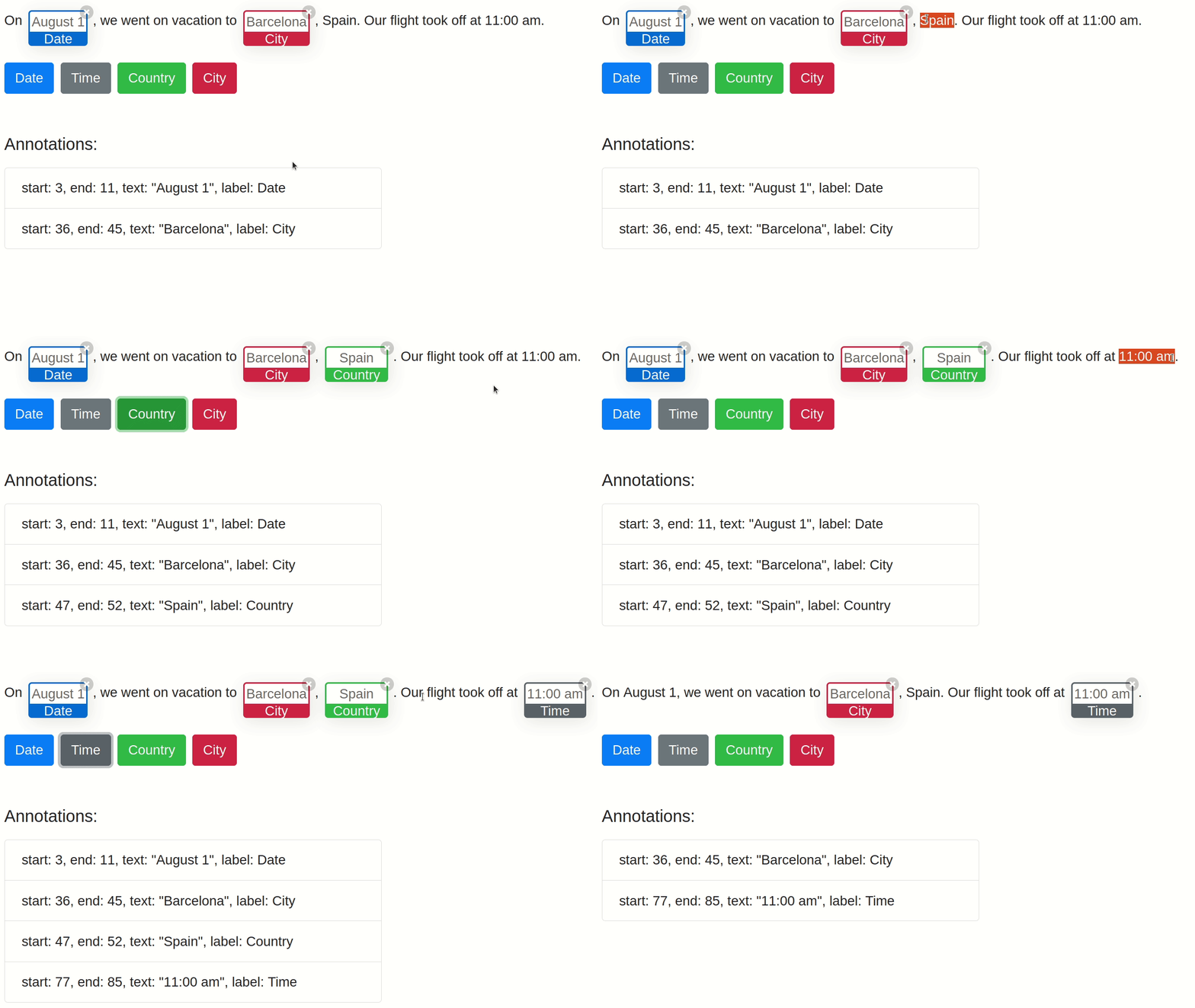
View and edit the live demo Angular app on codesandbox.io or look through the code of the demo app in ngx-annotate-text/src/app/.
Screen recording:
Usage
Install the NPM package:
npm install ngx-annotate-textIn your Angular component import the
NgxAnnotateTextComponentand create two properties for the text to be displayed and the list of annotations:import { Annotation, NgxAnnotateTextComponent } from 'ngx-annotate-text'; @Component({ selector: 'app-root', imports: [NgxAnnotateTextComponent], templateUrl: './app.component.html', styleUrl: './app.component.css', }) export class AppComponent { annotations: Annotation[] = [ new Annotation(3, 11, 'Date', '#0d6efd'), new Annotation(36, 45, 'City', '#dc3545'), new Annotation(47, 52, 'Country', '#198754'), new Annotation(77, 85, 'Time', '#6c757d'), ]; text = 'On August 1, we went on vacation to Barcelona, Spain. Our flight took off at 11:00 am.'; }Add the component
ngx-annotate-textto your component's template:<ngx-annotate-text [(annotations)]="annotations" [removable]="true" [text]="text" annotationClass="my-annotation" #annotateText > </ngx-annotate-text>Having set
annotationClass="my-annotation", a custom CSS styling can be applied by combining::ng-deepwith the class selector.my-annotation, e.g., to remove the border-radius:::ng-deep .my-annotation .annotation-parent, ::ng-deep .my-annotation .annotation-content { border-radius: 0rem !important; }
API - NgxAnnotateText
Inputs
| Input | Description | Type | Default value |
| :-------------------------- | ------------------------------------------------------------ | ------------------ | :------------ |
| annotations | Represents the parts of the given text which shall be annotated. | Annotation[] | [] |
| annotationClass | An optional CSS class applied to all elements which wrap the annotated parts of the given text. | string\|undefined | undefined |
| annotationRendererComponent | An optional Angular component that shall be used for rendering the annotation. By default, it uses the provided NgxAnnotationRendererComponent. You can implement your own annotation rendering component to customize the visualization of annotations. The custom component must implement the interface NgxAnnotationRendererComponentInterface. | NgxAnnotationRendererComponentInterface | NgxAnnotationRendererComponent |
| removable | Determines whether annotations shall have a small button in the top right corner so that the user can remove an annotation. | boolean | true |
| text | The text which shall be displayed and annotated. | string | empty string |
Outputs
| Output | Description | Type |
| ----------------- | ----------------------------------------------------------------------------------------------------------------------- | ---------------------------- |
| annotationsChange | Emits the list of existing annotations after an element has been removed by the user. | EventEmitter<Annotation[]> |
| clickAnnotation | Emits the selected annotation when the user clicks on an annotation's box, the label or text. | EventEmitter<Annotation> |
| removeAnnotation | Emits the selected annotation when the user removes it by clicking the annotation's X button in the upper right corner. | EventEmitter<Annotation> |
Methods
| Method | Description | Return type |
| ------------------------------------ | ------------------------------------------------------------ | ---------------------- |
| getCurrentTextSelection | Returns the start index and end index of the currently selected text range. Returns undefined if no text is currently selected. | ISelection|undefined |
| isOverlappingWithExistingAnnotations | Returns true if the given text selection is (partially) overlapping with an existing annotation. Returns false otherwise. | boolean |
Development
Recreate project from scratch
npm install -g @angular/cli@^21
ng new ngx-annotate-text-workspace
cd ngx-annotate-text-workspace/
ng generate library ngx-annotate-text
ng add angular-eslint@^21
ng g angular-eslint:add-eslint-to-project ngx-annotate-text-workspace
ng g angular-eslint:add-eslint-to-project ngx-annotate-text
npm install prettier --save-dev
ng build ngx-annotate-text
ng lint
ng test ngx-annotate-text
Build
Run ng build ngx-annotate-text to build the project. The build artifacts will be stored in the dist/ directory.
Running the demo app
Run ng serve --open to start the demo app in your browser.
Running linting tools
Run ng lint to execute ESLint.
Running unit tests
Run ng test --watch=true --coverage --ui ngx-annotate-text to execute the unit tests via Vitest.
Publish library as an npm package
:warning: Don't manually publish to npmjs.org, there is a pipeline that runs automatically when a new release is created.
ng build ngx-annotate-text --configuration production
cd dist/ngx-annotate-text
npm publish
Development server
Build the library in watch mode:
ng build ngx-annotate-text --watchRun the Angular dev server:
ng serve --openNavigate to http://localhost:4200/. The app will automatically reload if you change any of the source files.