
ngx-mat-toast
v22.0.6
Published
A toast notification library for Angular powered by Angular Material Snackbar.

Maintainers
 robin-bley
Readme
ngx-mat-toast
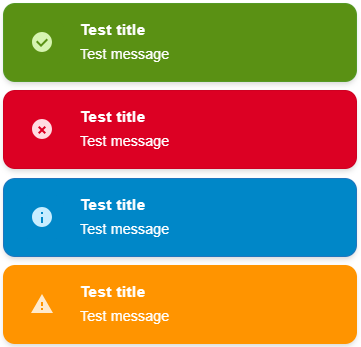
ngx-mat-toast is a modern Angular toast notification library for Angular 21+ built on top of Angular Material Snackbar.
It provides a familiar ngx-toastr-style API while leveraging Material's robust snackbar components and modern Angular patterns (standalone APIs, dependency injection, signals-ready).
Perfect for developers migrating from ngx-toastr, building Angular Material applications, or needing reliable toast notifications with Material Design aesthetics.
🚀 Migrating from
ngx-toastr?
ngx-toastris archived and no longer compatible with Angular 22+.ngx-mat-toastprovides a straightforward migration path with a compatibility adapter. See the migration guide for details.
Highlights
- Angular Material Snackbar powered
- standalone + NgModule support
- typed service API
- close button, progress bar, duplicate prevention, and max toast limits
- persistent toasts with
duration: 0 - optional
ToastrServicecompatibility adapter forngx-toastrmigrations - no Material Icons font dependency
Documentation
For the full documentation set, see the repository docs:
- Documentation hub
- Getting started
- Configuration guide
- API reference
- Customization guide
- Examples
- Migration guide
- Compatibility adapter guide
- Troubleshooting
Installation
npm install ngx-mat-toast@^22.0.0 @angular/material@^22.0.0 @angular/cdk@^22.0.0Compatibility matrix
| ngx-mat-toast | Angular | Material | CDK |
| ------------- | ------- | -------- | ------- |
| ^22.0.0 | ^22.0 | ^22.0 | ^22.0 |
| ^21.0.0 | ^21.0 | ^21.0 | ^21.0 |
Note:
ngx-mat-toastuses CSS-native motion and does not require an Angular animations provider for its own snackbar-based rendering. Just install the peer dependencies from your target Angular version.
Standalone usage
import { ApplicationConfig } from '@angular/core';
import { provideNgxMatToast } from 'ngx-mat-toast';

export const appConfig: ApplicationConfig = {
  providers: [
    provideNgxMatToast({
      duration: 3000,
      progressBar: true,
      position: { horizontal: 'end', vertical: 'top' },
    }),
  ],
};
import { Component, inject } from '@angular/core';
import { NgxMatToastService } from 'ngx-mat-toast';
@Component({
selector: 'app-profile',
template: `<button (click)="save()">Save</button>`,
})
export class ProfileComponent {
private readonly toast = inject(NgxMatToastService);
save(): void {
this.toast.success('Profile saved successfully.', 'Saved');
}
}NgModule usage
import { NgModule } from '@angular/core';
import { NgxMatToastModule } from 'ngx-mat-toast';

@NgModule({
  imports: [
    NgxMatToastModule.forRoot({
      duration: 3000,
      progressBar: true,
    }),
  ],
})
export class AppModule {}
Service API
Core methods
success(message: string, title?: string, options?: NgxMatToastOptions): NgxMatToastRef
error(message: string, title?: string, options?: NgxMatToastOptions): NgxMatToastRef
warning(message: string, title?: string, options?: NgxMatToastOptions): NgxMatToastRef
info(message: string, title?: string, options?: NgxMatToastOptions): NgxMatToastRef
show(message: string, type?: ToastType, title?: string, options?: NgxMatToastOptions): NgxMatToastRef
All toast creation methods return a NgxMatToastRef object that allows you to:
dismiss(id?: string): boolean– Programmatically dismiss a specific toast by ID (or dismiss all toasts if no ID provided)afterDismissed(): Observable<void>– Subscribe to be notified when the toast is dismissed
Utility methods
dismiss(id: string): boolean
clear(): void
Example: Creating and managing toasts
import { Component, inject } from '@angular/core';
import { NgxMatToastService } from 'ngx-mat-toast';

@Component({
  selector: 'app-example',
  template: `
    <button (click)="showSuccess()">Success</button>
    <button (click)="showPersistent()">Persistent</button>
    <button (click)="dismissAll()">Dismiss All</button>
  `,
})
export class ExampleComponent {
  private readonly toast = inject(NgxMatToastService);

  showSuccess(): void {
    this.toast.success('Profile saved successfully.', 'Saved');
  }

  showPersistent(): void {
    // Show a persistent toast with duration: 0
    const ref = this.toast.info('Sync in progress...', 'Background job', {
      duration: 0,
      closeable: true,
    });

    // Subscribe to dismissal
    ref.afterDismissed().subscribe(() => {
      console.log('Toast was closed by user');
    });

    // Optionally dismiss programmatically later
    setTimeout(() => {
      ref.dismiss();
    }, 5000);
  }

  dismissAll(): void {
    // Clear all visible toasts
    this.toast.clear();
  }
}
Configuration options
| Option | Default | Description |
| ---------------------- | -------------- | ------------------------------------------------------------------ |
| duration | 3000 | Auto-dismiss delay in milliseconds. Use 0 for persistent toasts. |
| position.horizontal | 'end' | Horizontal snackbar outlet position. |
| position.vertical | 'top' | Vertical snackbar outlet position. |
| closeable | true | Show a close button. |
| progressBar | false | Show a progress bar. |
| progressBarDirection | 'decreasing' | Progress animation direction. |
| tapToDismiss | true | Dismiss the toast when clicked. |
| preventDuplicates | false | Suppress duplicate title/message/type combinations. |
| maxToasts | 5 | Maximum visible toasts. Use 0 for unlimited. |
| enableDebug | false | Log toast activity in the browser console. |
Within a stack, the newest toast stays closest to the configured viewport edge.
Customization
Styling and theming
ngx-mat-toast respects your Angular Material theme. Customize appearance by:
Configuring your Material theme:
// styles.scss
@use '@angular/material' as mat;

@include mat.core();

$theme: mat.define-theme(
  (
    color: (
      theme-type: light,
      primary: mat.$blue-palette,
      tertiary: mat.$orange-palette,
    ),
  )
);

@include mat.all-component-themes($theme);

:root {
  --ngx-mat-toast-success-color: #2e7d32;
  --ngx-mat-toast-error-color: #c62828;
  --ngx-mat-toast-warning-color: #ed6c02;
  --ngx-mat-toast-info-color: #1565c0;
}
Overriding toast styles from a global stylesheet:
.ngx-mat-toast-snack-panel .ngx-mat-toast-item {
  border-radius: 12px;
  box-shadow: 0 4px 12px rgba(0, 0, 0, 0.15);
}
This is preferred because Material snackbars render in the CDK overlay container.
Per-toast configuration
Override global settings for individual toasts:
this.toast.success('Saved', 'Success', {
  duration: 2000,
  position: { horizontal: 'start', vertical: 'bottom' },
  closeable: false,
  progressBar: true,
});
Toast references and programmatic control
const ref = this.toast.info('Processing...', null, { duration: 0 });

ref.dismiss();

ref.afterDismissed().subscribe(() => {
  console.log('Toast dismissed');
});
Duplicate prevention and limits
Enable globally or per-toast:
// Global
provideNgxMatToast({ preventDuplicates: true, maxToasts: 3 });

// Per-toast
this.toast.success('Saved', null, { preventDuplicates: true });
Debug mode
Enable console logging for development:
provideNgxMatToast({ enableDebug: true });ngx-toastr compatibility
For simpler migrations, you can import the compatibility adapter:
import { ToastrService } from 'ngx-mat-toast';Supported compatibility options include:
timeOutdisableTimeOutcloseButtonprogressBartapToDismisspreventDuplicatesmaxOpenedpositionClassprogressAnimation
For migration details and adapter caveats, see:
License
MIT