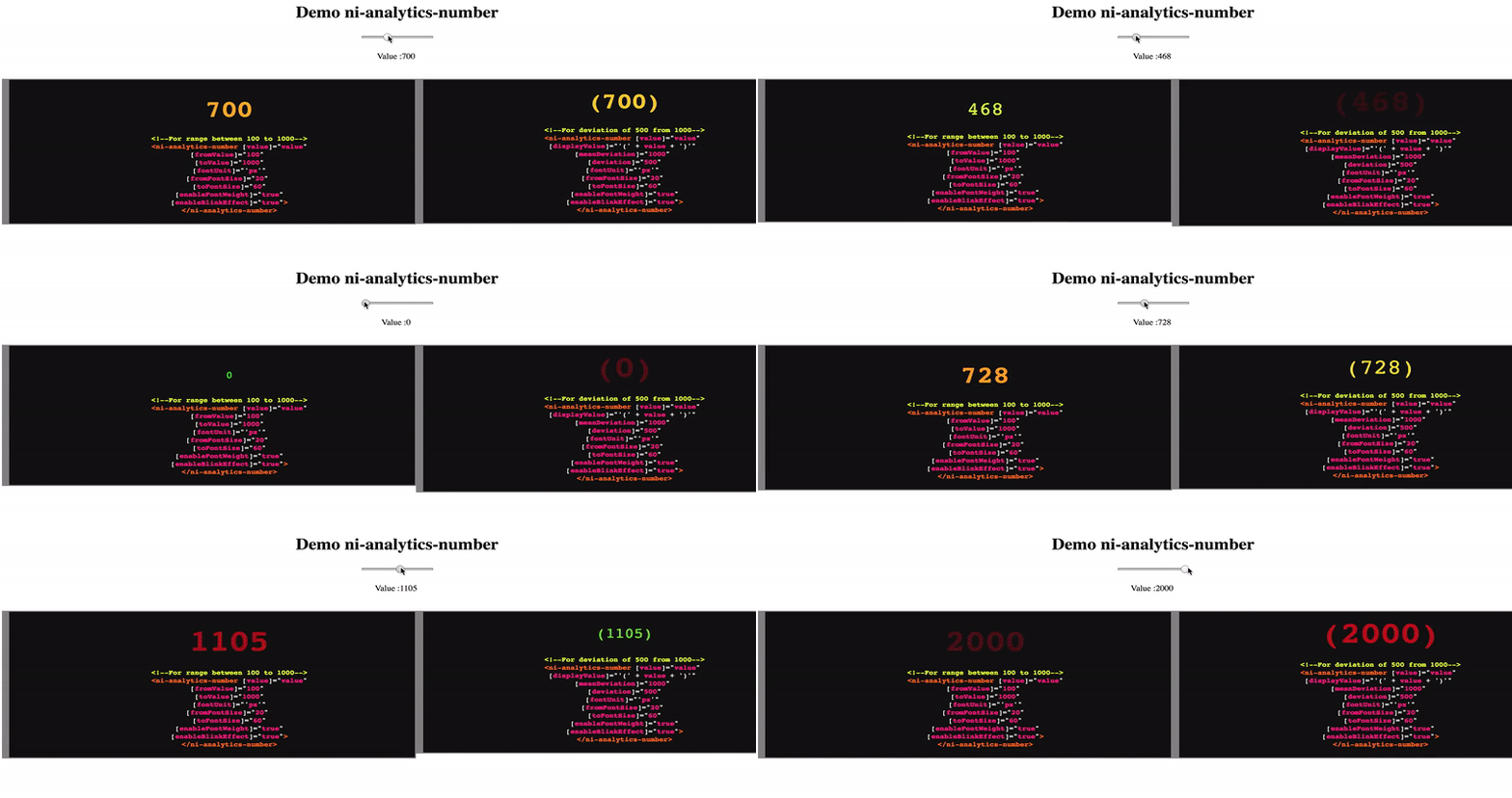
ni-analytics-number
v1.1.6
Published
[](https://travis-ci.com/injulkarnilesh/ni-analytics-number)


Readme
NiAnalyticsNumber

This is a small Angular library to show important numbers on any dashboard or transparency pages with features to highlight numbers with colors, font-size and effects.
Features Supported
Color
Shows number with good value in green, and more the value deviates the from good towards bad value it turns more red.
Font Size
Font size changes as value varies between good and bad values.
Font Weight
Font weight changes as value varies between good and bad values.
Blink Effect
If value reaches or crosses the bad threashold, the number shown will blink to get attention.
Different Display Value
Not limited to show actual number, value that changes could be different than what is displayed. Useful when value dislayed is some conversion, like more human redable format, of actual value to track.
Range with numbers or deviation
Can accept range of good-bad values in from-to way or deviation from some good value.
How Number is displayed depends on where it lies in the range configured.
Options Supported
value: number
Actual value to track.
displayValue: string [optional]
Value to display instead of value.
Good Bad Range
This is accepted with two values fromValue and toValue. This is not limited to be in any specific order.
If fromValue < toValue then value is considered good to be fromValue or lesser than that, and bad as it gets closer to toValue and more.
If fromValue > toValue then value is considered good to be fromValue or greater than that, and bad as it gets closer to toValue and lesser.
With this one can make configure the range in ascending or descending order.
Takes precedence over deviation range. If both from-to range and deviation range is configured, the from-to range is effecitve.
fromValue: number
Good value.
toValue: number
Bad value
Deviation Range
This is accepted with two values meanDeviation and deviation.
Value equal to meanDeviation is considered to be good, and as it deviates from it, in either direction, it is considered bad upto difference of deviation from meanDeviation. Value deviated from meanDeviation more than or equal to deviation is considered bad.
meanDeviation:number
Good value.
deviation:number
deviation, in both the directions, from meanDeviation to configure the range.
Font Change
Diplayed value can be shown in different font sizes, varying from fromFontSize to toFontSize as it varies from good value to bad value.
Configured with three options fontUnit, fromFontSize, toFontSize. All three must be provided to have desired effect, or will be ignored.
fontUnit:string
It takes a string out of supported values ['px', 'em', '%', 'pt'].
fromFontSize: number
Font size for good value.
toFontSize: number
Font size for bad value.
enableFontWeight: boolean
If enabled font-weight of the displayed value will change from 100 to 900 for good value to bad value.
enableBlinkEffect: boolean
If enabled, the displayed value will be blinking when value is equal to bad value or beyond according to range configured.
Usage
- Add
ni-analytics-numberto you package.json dependencies. - Run
npm install - Include
NiAnalyticsNumberModulein yourimportsof your Angular module. - Add to your template the
ni-analytics-numberelement with options. - Example snippet.
<ni-analytics-number [value]="value"
        [fromValue]="100" [toValue]="1000"
        [fontUnit]="'px'" [fromFontSize]="20" [toFontSize]="60"
        [enableFontWeight]="true"
        [enableBlinkEffect]="true">
</ni-analytics-number>
Example