
nilfam-editor
v1.3.15
Published
A powerful, customizable rich-text editor built with TipTap, React, and Tailwind CSS. Supports RTL/LTR text, resizable media (images/videos), tables, code blocks, font styling, and more for an enhanced content creation experience.

Maintainers
 mehr1300
Readme
Nilfam Editor




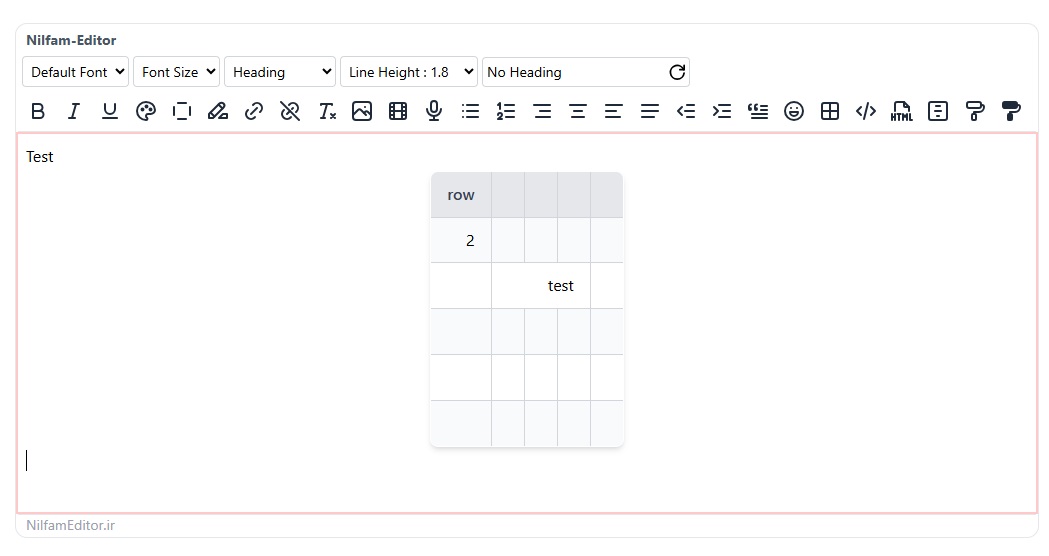
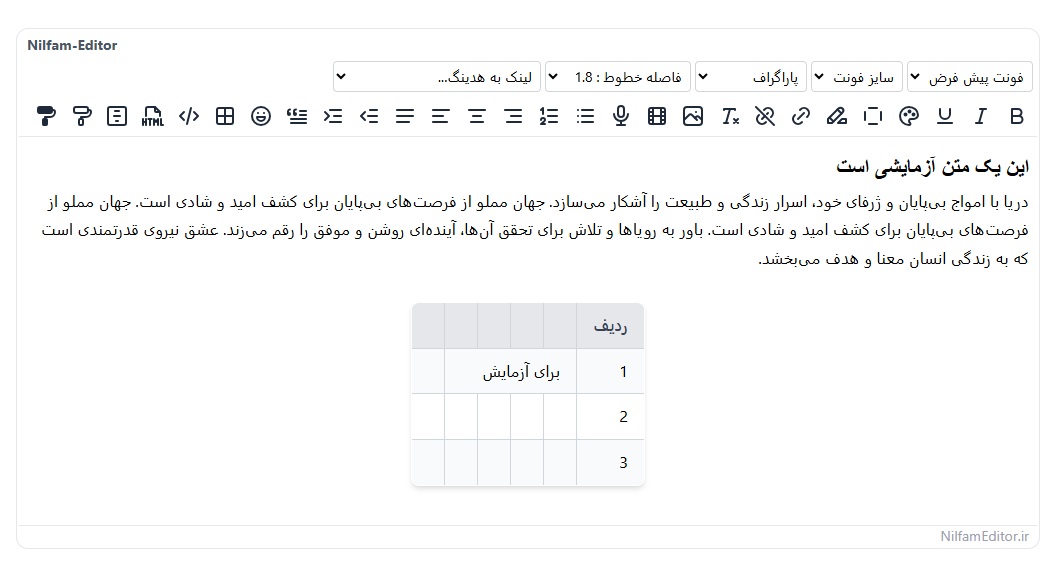
Nilfam Editor is a powerful, customizable, and feature-rich text editor built for React js using the Tiptap library. Designed to cater to both developers and end-users, it offers seamless support for right-to-left (RTL) languages like Persian (Farsi) and left-to-right (LTR) languages like English. Whether you're editing rich text, code blocks, tables, or multimedia content, Nilfam Editor provides a modern and intuitive experience with a sleek interface powered by Tailwind CSS.
Note: Nilfam Editor is designed to work seamlessly with both React and Next.js, making it a versatile choice for modern web applications.
This editor is perfect for React developers looking for a lightweight yet extensible rich text editor with advanced features like syntax-highlighted code blocks, media uploads, and custom tables—all under the permissive MIT License.
Features
- Multilingual Support: Fully optimized for RTL (e.g., Persian) and LTR (e.g., English) text directions.
- Code Editing: Syntax-highlighted code blocks supporting JavaScript, Python, CSS, PHP, Rust, Go, and more.
- Rich Text Tools: Font family, size, alignment, text color, highlighting, bold/italic, links, and lists.
- Media Management: Upload and resize images, videos, and audio files effortlessly.
- Custom Tables: Create, edit, and manage tables with advanced functionality.
- Code Copy Button: Easily copy code blocks with a single click (feature in progress).
- Extensible: Custom extensions for line height, font size, and more.
- Responsive Design: Styled with Tailwind CSS for a modern, visually appealing UI.
- Developer-Friendly: Modular components and easy integration into React projects.
Preview
English (LTR)
Persian (RTL)
Installation
To add Nilfam Editor to your React project, simply install it via npm:
npm i nilfam-editorUsage
Basic Usage (react-js)
After installing, import and use the NilfamEditor component in your React app:
import { useEffect, useState } from 'react';
import { NilfamEditor } from 'nilfam-editor';
import 'nilfam-editor/nilfam-editor.css';

function App() {
  const [content, setContent] = useState('<p>Start editing...</p>');

  useEffect(() => {
    console.log(content);
  }, [content]);

  return (
    <div className="flex flex-col p-20">
      <NilfamEditor value={content} onChange={setContent} dark={false} lang="en"/>
    </div>
  );
}

export default App;
Basic Usage with Formik
After installing, import and use the NilfamEditor component in your React app:
import { useEffect, useState } from 'react';
import { NilfamEditor } from 'nilfam-editor';
import 'nilfam-editor/nilfam-editor.css';
import {useFormik} from "formik";

function App() {
  const [content, setContent] = useState('<p>Start editing...</p>');

    const initialValues = {title: "", body: "",};

    const onSubmit = (values) => {console.log(values);};

    const formik = useFormik({
        initialValues,
        onSubmit
    });

  return (
    <div className="flex flex-col p-20">
      <NilfamEditor value={formik.values.body} dark={false} lang="en"
                    onChange={newContent => formik.setFieldValue("body", newContent)} />
    </div>
  );
}

export default App;
Persian (Farsi) and RTL Support (react-js)
To enable Persian language with RTL (right-to-left) support, set the lang prop to "fa":
import { useEffect, useState } from 'react';
import { NilfamEditor } from 'nilfam-editor';
import 'nilfam-editor/nilfam-editor.css';

function App() {
  const [content, setContent] = useState('<p>شروع ویرایش...</p>');

  const myFonts = [
    { label: 'ایران سنس', value: 'IRANSansXFaNum' },
    { label: 'فونت کلمه', value: 'Kalameh' },
    { label: 'فونت پلاک', value: 'Pelak' },
  ];

  useEffect(() => {
    console.log(content);
  }, [content]);

  return (
    <div className="flex flex-col p-20">
      <NilfamEditor
        lang="fa"
        value={content}
        onChange={setContent}
        fonts={myFonts}
      />
    </div>
  );
}

export default App;- Note: Setting
lang="fa"enables RTL mode automatically, aligning text right-to-left and using Persian as the default language.
English NextJS
To enable Persian language with RTL (right-to-left) support, set the lang prop to "fa":
"use client"
import React, {useEffect, useState} from 'react';
import {NilfamEditor} from "nilfam-editor";
import 'nilfam-editor/nilfam-editor.css';

const Editor = () => {
    const [content, setContent] = useState('<p>Start editing...</p>');

    useEffect(() => {
        console.log(content);
    }, [content]);

    return (
        <div className="flex flex-col p-20">
            <NilfamEditor value={content} onChange={setContent} />
        </div>
    );
};

export default Editor;
Adding Custom Fonts
To add custom fonts to the editor, follow these steps:
1. Define Fonts in CSS
Add your font files to your project and define them using @font-face in your CSS file (e.g., App.css):
@font-face {
  font-family: 'Kalameh';
  font-style: normal;
  font-weight: normal;
  src: url('assets/fonts/kalameh/Woff/KalamehWebFaNum-Regular.woff') format('woff'),
       url('assets/fonts/kalameh/Woff2/KalamehWebFaNum-Regular.woff2') format('woff2');
}

@font-face {
  font-family: 'Pelak';
  font-style: normal;
  font-weight: bold;
  src: url('assets/fonts/pelak/Woff/PelakFA-Bold.woff') format('woff'),
       url('assets/fonts/pelak/Woff2/PelakFA-Bold.woff2') format('woff2');
}- Tip: Ensure the font file paths are correct relative to your project structure.
2. Pass Fonts to the Editor
Create an array of fonts with label (display name) and value (font-family name), then pass it to the fonts prop:
const myFonts = [
  { label: 'font kalameh', value: 'Kalameh' },
  { label: 'font pelak', value: 'Pelak' },
];

<NilfamEditor
  lang="fa"
  value={content}
  onChange={setContent}
  fonts={myFonts}
/>;- Note: The
valuemust match thefont-familyname defined in your@font-facerules.
Customization
- Fonts: Extend the
fontsprop with your preferred font list as shown above. - Styling: Modify Tailwind CSS classes in
nilfam-editor/nilfam-editor.cssto match your design.
Changelog
Version 1.3.10
- Fixed audio file display issue on orientation change.
- Added feature to merge rows and columns in tables.
- Added ability to add headers to tables.
- Added ability to select table cells.
- Fixed quotation issue.
- Added ability to copy styles and transfer them to other parts (
Format Painter).
Version 1.3.6
- Added Underline.
- Fixed Iframe Video.
Version 1.2.0
- Added colored box feature for enhanced visual presentation.
- Fixed dark mode issues and resolved color inconsistencies.
- Corrected image display and responsiveness problems.
- Resolved conflicts with Formik integration.
- Fixed spacing issues in text content.
Version 1.1.1
- Fixed class conflict in Tailwind version 4.
- Added
dark modesupport. - Resolved alignment issues in lists for LTR and English languages.
- Addressed reported issues.
Version 1.0.4
- Version 1.0.5 - Fixed hook order issue, improved Next.js 15 compatibility with manual installation and Turbopack support, and updated dependencies.
Version 1.0.0 (Initial Release)
- Initial release with core features: rich text editing, code blocks, tables, and media support.
- Full RTL/LTR support with Persian optimization.
- Tailwind CSS integration for styling.
License
Nilfam Editor is licensed under the MIT License. Feel free to use, modify, and distribute it as you see fit.
MIT License

Copyright (c) 2025 NilfamEditor

Permission is hereby granted, free of charge, to any person obtaining a copy of this software...
Credits
- Built with Tiptap for the editor core.
- Styled using Tailwind CSS.
- Syntax highlighting powered by highlight.js via Lowlight.
Contact
Have questions or suggestions? Reach out via:
- GitHub Issues: Open an issue