
nl-lint
v0.3.7
Published
Use natural language to lint source code


Readme
nl-lint
Near-instant natural-language lint for your code.
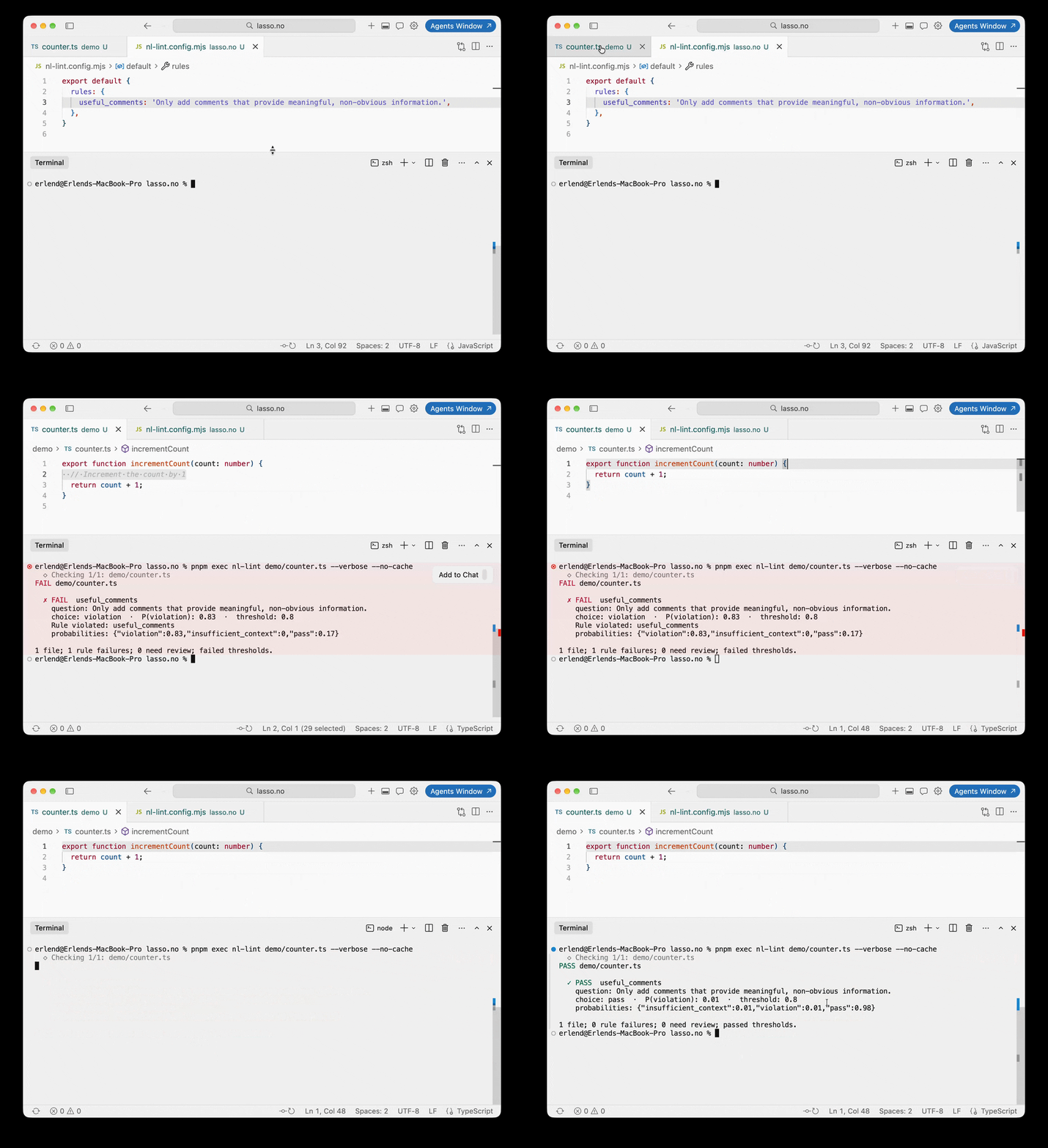
The demo shows nl-lint using a natural language prompt to check if a code comment is useful. Lint fails because it is not, but after deleting the comment, it passes.
Why
We are all becoming increasingly hands-off. This is a tool in the AI guardrail toolbox.
Sometimes, mechanical lint rules cannot answer the questions you need to ask about your code:
- Is this diff bloated?
- Is this component hard to read?
- Are the comments useful?
How
This package uses an AI classifier, currently supporting only Jev, to take text as input (your code), and produce structured decisions as output (your rules).
Quickstart
- Initialize nl-lint from your project root:
npx nl-lint@latest init- Edit the generated rules:
export default {
  rules: {
    useful_comments:
      "Comments in `source` must add information beyond the adjacent code. Preserve explanations of intent, documentation, licenses, and tool directives.",
  },
};- Get an API key from the TypeSafe dashboard, then export it in your shell:
export TYPESAFE_API_KEY='your-key'- Run it from your project:
npm run lint:nlExample output for a passing file:
PASS src/example.ts
1 file; 0 rule failures; 0 need review; passed thresholds.
FAIL means a rule reached its failure threshold. REVIEW means the model selected a violation below that threshold or lacked enough context. Review results are counted separately and can still exit 0. Use --verbose to inspect each rule's probabilities.
CLI
npx --no-install nl-lint src/component.tsx --verbose
npx --no-install nl-lint src test --json
npx --no-install nl-lint --diff
npx --no-install nl-lint --diff=origin/main --refresh
npx --no-install nl-lint --version
The CLI looks for the nearest nl-lint.config.mjs, starting in the working directory and searching parent directories. --config path selects an explicit file instead. Explicit config paths, input paths, reported filenames, and relative cache paths resolve from the working directory, not the config directory. Config files are trusted executable JavaScript.
--refresh skips cache reads; --no-cache disables reads and writes. Configuration is validated after these overrides and before file selection. Valid empty selections need no API key and make no service calls.
Files are processed sequentially. Interactive terminals show progress on stderr; --verbose also enables progress when redirected. --json suppresses progress and prints one JSON report after successful evaluation. Operational errors go to stderr without a partial success report.
Exit codes: 0 means no failure threshold was reached (review may still be needed), 1 means at least one rule failed, and 2 means a configuration, file, Git, or service error occurred. JSON output has the shape { passed, files }, including when rule failures produce exit 1.
CI
Commit your rules, npm script, dependency, and lockfile in the consuming project. Store TYPESAFE_API_KEY as a repository Actions secret. For example, this manual workflow checks src:
name: Natural-language lint
on: workflow_dispatch
permissions:
  contents: read
jobs:
  lint:
    runs-on: ubuntu-latest
    steps:
      - uses: actions/checkout@v7
        with:
          fetch-depth: 0
      - uses: actions/setup-node@v7
        with:
          node-version: "22"
          cache: npm
      - run: npm ci
      - run: npm run lint:nl
        env:
          TYPESAFE_API_KEY: ${{ secrets.TYPESAFE_API_KEY }}
For diff-based CI, fetch the intended base commit and pass it as --diff=<base-sha>. Plain --diff compares with HEAD and is usually empty in a clean CI checkout. --diff=ref uses that commit directly, not a merge base. Missing refs cause exit 2. Only run executable config with credentials on code you trust; this example uses a manual run on your chosen branch.
API
import { lintSource } from "nl-lint";

const report = await lintSource({
  file: "src/example.ts",
  source: "// Increment count\ncount++",
  threshold: 0.8,
  rules: {
    comments:
      "Comments in `source` must add useful information rather than restating adjacent code.",
  },
});

console.log(report.passed);
for (const result of report.results) {
  console.log(result.id, result.failed, result.choice, result.probabilities);
}
Each result contains id, title, message, failed, threshold, choice, and the probabilities for violation, pass, and insufficient_context. API confidence is preserved when present. Reports include the actual model, cache status, and token usage when available. Messages are authored by the rule; they are not generated explanations. No line numbers or automatic fixes are inferred.
How it works
nl-lint currently uses TypeSafe's Jev API. Jev is a System One Model designed for fast classification. It returns probabilities for each rule's outcomes, which nl-lint compares with your failure threshold. Unchanged inputs can reuse cached results.
Failure semantics
A rule fails when probabilities.violation >= threshold, including equality. The per-rule threshold overrides the shared threshold, whose default is 0.8. Thresholds range from 0 to 1. A threshold of 0 always fails; 1 requires a violation probability of 1.
This comparison uses the violation probability, not the selected choice or the API's separate confidence field. With a low threshold, a rule can fail even when another choice has the highest probability. All original choices remain in the report. passed means the configured failure policy passed, not that the model proved the code correct. Insufficient context below the failure threshold is shown as REVIEW in the CLI. A violation below threshold is also shown for review.
The 0.8 default is an initial policy choice, not a calibrated accuracy guarantee. Tune rules and thresholds against representative labeled examples. Model errors, missing context, and service errors are distinct: service errors and malformed responses throw instead of passing.
Rules and defaults
rules is a nonempty object keyed by your rule IDs. A value is either a natural-language string or an object with:
instructions: a string or nonempty array of strings; refer to source text assourceand the filename asfile.criteria: optional descriptions of all three choices (violation,pass,insufficient_context). Defaults describe breaking the rule, following/not applying, and missing evidence.title,message: display text; defaults are based on the rule ID.threshold: optional override.
Other options: model (default TYPESAFE_MODEL or pinned jev-1.13.0), apiKey (default TYPESAFE_API_KEY), timeoutMs (30,000), cache (true, false, or a directory path), refresh (false). evaluate(request) optionally supplies a custom transport or a test double returning the same TypeSafe response shape. HTTP errors are surfaced without automatic retries.
Scope and cache
nl-lint makes one request per complete source file, with all rules evaluated together. Imports and external CSS are not loaded automatically. The API accepts any source string; CLI discovery selects JS/TS files, skips declarations, symlinks, and common build/dependency folders, and deduplicates overlapping inputs. Folders must belong to a Git repository; tracked and nonignored untracked files are included.
Explicit file arguments must be regular .js, .jsx, .mjs, .cjs, .ts, .tsx, .mts, or .cts source files. Unsupported files, declarations, files in excluded folders, and explicit symlink paths cause exit 2 with a descriptive error before any file is evaluated, including when mixed with valid inputs. Folder and Git-diff discovery continue to skip unsupported and excluded files.
--diff compares the working tree with HEAD, including staged and unstaged changes. Untracked files must be staged to participate. --diff=ref compares against that commit, not an implicit merge base. Deleted files are skipped. The complete current file is evaluated, not only changed lines. With valid configuration, an empty folder or Git-diff selection makes no API calls and exits 0.
Uncached files are sent to TypeSafe. Results default to .cache/nl-lint under the working directory; add it to your project's .gitignore. Cache keys hash the model, filename, complete source and complete questions. Threshold/title/message changes reuse the same probabilities. Entries contain the response, not source text or credentials, and are written atomically after validation. Invalid cache entries are reevaluated. API failures are not cached.
Only pinned jev-x.y.z models are cached, and only if the response reports that same version. Moving aliases bypass caching. --refresh skips reads and replaces results. A cache-only run needs no API key. There is no automatic eviction; remove the cache directory when desired.
Development
From a repository checkout:
npm ci
npm run check
This runs offline tests, typechecks, and a fresh-consumer tarball check. See CONTRIBUTING.md for the module map and optional live check.
MIT. See LICENSE.