
node-crypt-tool
v2.2.0
Published
node encrypt tool include AES&RSA


Readme
node-encrypt-tool
适用范围
支持对称AES和非对称RSA加解密(今后会进行拓展......)
使用说明
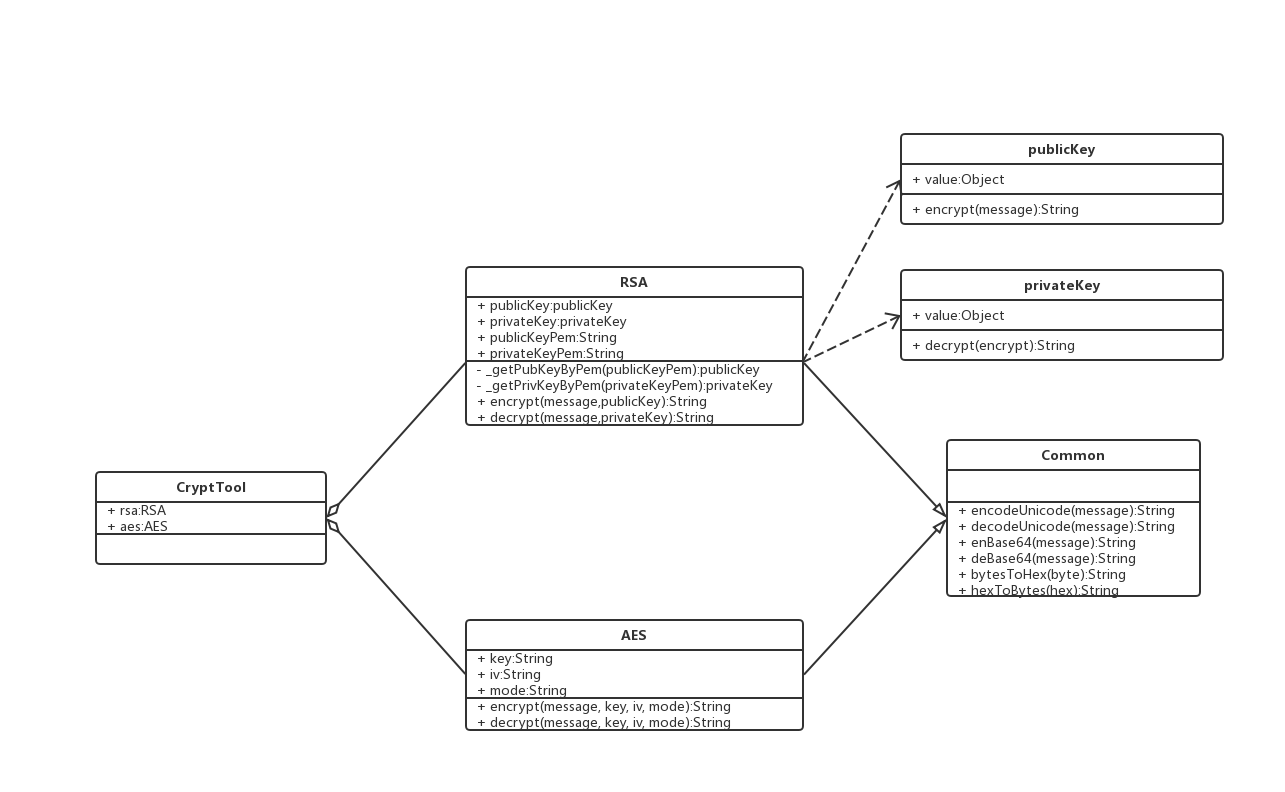
CryptTool(整体)
| 属性 | 说明 | 默认值 | 备注 | | ------- | ---------------------------------------- | ------ | ----------------------- | | rsa | RSA类的实例,详情见RSA | 无 | 使用此属性实现rsa加解密 | | aes | AES类的实例,详情见AES | 无 | 使用此属性实现aes加解密 | | options | 实例化CryptTool时传参属性,详情见options | {} | 无 |
Common(RSA和AES的父类,RSA和AES继承自Common)
| 属性 | 说明 | 默认值 | 备注 | | ------------- | -------------------------------------------------- | ------ | --------------------------------- | | encodeUnicode | 方法,为了实现中文加密解密,需要做unicode处理 | 无 | 参数必填,处理中文问题 | | decodeUnicode | 方法,为了实现中文加密解密,需要做unicode处理 | 无 | 参数必填,处理中文问题 | | enBase64 | 方法,将正常格式转换为base64格式 | 无 | 参数必填,便于前后端传递,用于RSA | | deBase64 | 方法,将base64格式转换为正常格式 | 无 | 参数必填,便于前后端传递,用于RSA | | bytesToHex | 方法,将字节类型的数据转换为16进制,方便前后端传输 | 无 | 参数必填,便于前后端传递,用于AES | | hexToBytes | 方法,将16进制的数据转换为字节类型,方便前后端传输 | 无 | 参数必填,便于前后端传递,用于AES |
RSA
| 属性 | 说明 | 默认值 | 备注 | | --------------- | ----------------------------------------------------- | ------------------------------ | --------------------------------------------------- | | publicKey | PublicKey类的实例,详情见PublicKey | 随机key | 此类中包含了key的真实值和加密方法 | | privateKey | PrivateKey类的实例,详情见PrivateKey | 随机key(和publicKey是配套的) | 此类中包含了key的真实值和解密方法 | | publicKeyPem | pem格式的publicKey,用户前后端传递 | publicKey的pem格式 | 无 | | privateKeyPem | pem格式的privateKey,用户前后端传递 | privateKey的pem格式 | 一般情况下不会传递 | | getPemByPubKey | 方法,通过publicKey生成pem格式的key | 无 | 参数必填,通常用户前后端交互 | | getPemByPrivKey | 方法,通过privateKey生成pem格式的key | 无 | 参数必填,通常用户前后端交互 | | getPubKeyByPem | 方法,通过pem格式的publicKey生成真正的publicKey | 无 | 参数必填,转换成key做处理,返回值是PublicKey的实例 | | getPrivKeyByPem | 方法,通过pem格式的privateKey生成真正的privateKey | 无 | 参数必填,转换成key做处理,返回值是PrivateKey的实例 | | encrypt | 方法,将unicode、base64和加密封装在一起,对用户友好 | 第一参数必传,第二参数选填 | 第二参数默认为自身生成的publicKey | | decrypt | 方法,将unicode、base64和解密密封装在一起,对用户友好 | 第一参数必传,第二参数选填 | 第二参数默认为自身生成的privateKey |
PublicKey
| 属性 | 说明 | 默认值 | 备注 | | ------- | --------------------------------------- | ------ | -------------------------------- | | value | 实例时传的value,是key类型的 | 无 | 参数必填 | | encrypt | 方法,传递message后加密,返回加密后数据 | 无 | 通常需要进行base64转换后进行传递 |
PrivateKey
| 属性 | 说明 | 默认值 | 备注 | | ------- | --------------------------------------------------- | ------ | -------------------------------- | | value | 实例时传的value,是key类型的 | 无 | 参数必填 | | decrypt | 方法,传递encrypt返回的数据进行解密,返回解密后数据 | 无 | 通常需要进行base64转换后进行传递 |
AES
| 属性 | 说明 | 默认值 | 备注 | | ------- | --------------------------------------------------------- | -------- | ------------------------------------------------------------ | | key | 一段用于加密的字符串 | 随机生成 | 和iv,mode进行组合加解密 | | iv | 偏移量 | 随机生成 | 和iv,mode进行组合加解密 | | mode | AES加密模式,暂时仅支持CBC模式 | AES-CBC | 和iv,mode进行组合加解密 | | encrypt | 方法,接收message, key,iv,mode参数,进行message加密并返回 | 无 | message必传,如果key,iv没有传,则使用自己生成的key和iv进行加密 | | decrypt | 方法,接收message, key,iv,mode参数,进行message解密并返回 | 无 | message必传,如果key,iv没有传,则使用自己生成的key和iv进行解密 |
options
options={
  rsaOption:{
    bits:1024//用于创建公私钥的字节长度,1024可以保证最基本的安全,越大越安全,太大没必要,前后端传递费时间,默认值1024。
  },
  aesOption:{
    mode:'AES-CBC'//用于创建加解密对象的mode,默认值AES-CBC
  }
}
UML类图
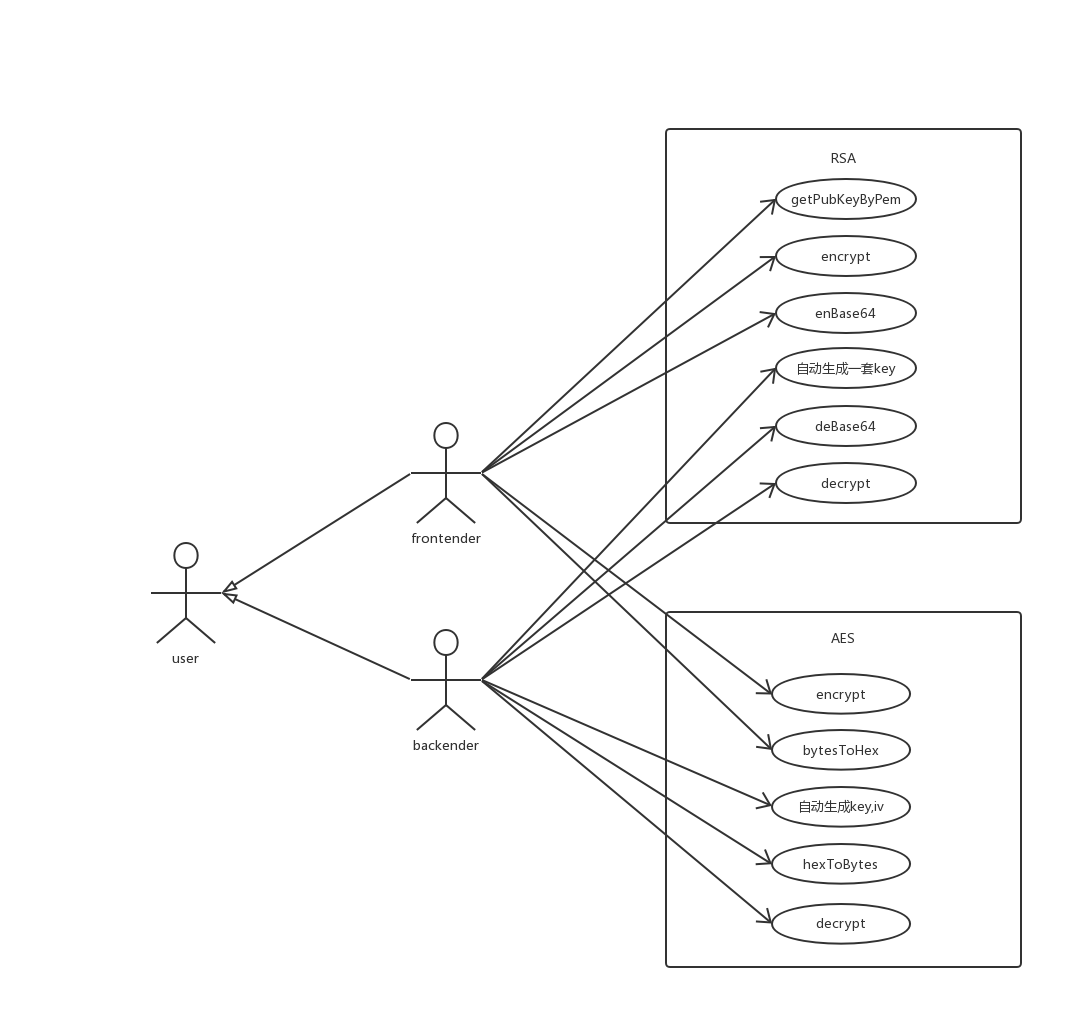
UML用例图
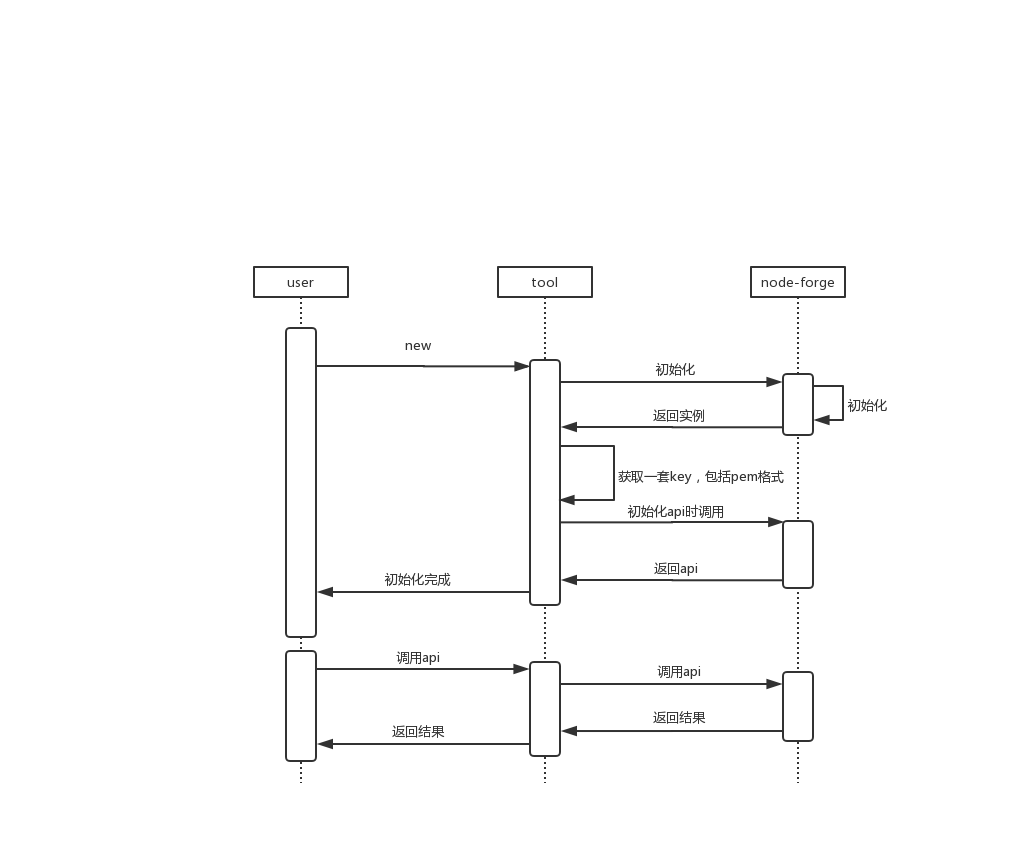
时序图
示例
RSA
const CryptTool = require('node-crypt-tool');
const cryptTool = new CryptTool({ rsaOption: { bits: 1024 } });
const { rsa } = cryptTool;
//待加密数据
const textStr = 'Hello RSA!';
//获取自动生成的私钥和公钥
const { privateKey, publicKey } = rsa;
//获取公钥的pem格式,以便传给前端
const _publicKeyPem = rsa.getPemByPubKey(publicKey.value);
const _privateKeyPem = rsa.getPemByPrivKey(privateKey.value);
//加密后返回的数据,可以传递pem格式的publicKey,默认使用生成的key
const encrypt = rsa.encrypt(textStr);
//执行解密操作,返回的_decrypted即是解密后数据,可以传递pem格式的privateKey,默认使用生成的key
const decrypt = rsa.decrypt(encrypt);

console.log(decrypt);
AES
const CryptTool = require('node-crypt-tool');
const cryptTool = new CryptTool({ aesOption: { mode:'AES-CBC' } });
const { aes } = cryptTool;
//待加密数据
const textStr = 'Hello AES!';
//获取key和偏移量
const { key, iv } = aes;
//进行aes加密
const encrypt = aes.encrypt(textStr, key, iv);
//将加密的数据进行解密
const decrypt = aes.decrypt(encrypt, key, iv);
//最后进行decode即可
console.log(decrypt);