
node-red-contrib-alpaca
v2.2.2
Published
Nodes for connecting to the Alpaca stock trading API.

Maintainers
 mdkrieg
Readme
References
- Alpaca API Documentation: https://alpaca.markets/docs/api-documentation/
- Official SDK on GitHub: https://github.com/alpacahq/alpaca-trade-api-js
Project Links
- GitHub: https://github.com/mdkrieg/node-red-contrib-alpaca
- NPM: https://www.npmjs.com/package/node-red-contrib-alpaca
- NodeRed Project: https://flows.nodered.org/node/node-red-contrib-alpaca
ATTENTION
If you migrated from v2.0.x or v2.1.x to v2.2.x
I've decided to re-integrate everything into one package again, v2.0 and v2.1 were both structured with two complementary packages one mandatory "auth-config" and one optional "simple" set of nodes. If you were using the node-red-contrib-alpaca-simple package then those nodes will give a "Type already registered" error - however it won't let you remove them through the palette manager, same with the alpaca-config node.
If you are getting these errors run from your .node-red directory:
npm remove node-red-contrib-alpaca-auth
npm remove node-red-contrib-alpaca-simple
If you have any problems, raise an issue on GitHub.
Alpaca Trading with Node-RED
This project wraps the official Node.js library for Alpaca into useful nodes for Node-RED.
Node-RED is a visual programming tool based on NodeJS. Alpaca is a US stock trading API.
Nodes
In v2.0.0 this package has been pared down to just two nodes.
If you updated and are now missing nodes, search instead for "node-red-contrib-alpaca-simple".
Alpaca

This node provides access to any of the basic functions in the official SDK. In general the node is designed to be the simplest possible wrapper for the SDK.
The internal processing can be described as follows:
- Incoming msg.payload is passed directly to the selected function
- Some functions require no input
- Some functions require an additional input (ie, msg.symbol or msg.watchlist
- Response from the API is output to msg.payload
- The original input msg.payload is copied to msg.request
The function can be set by msg.topic, or by using the dropdown in the node configuration panel. To guide your programming, an example / template input will appear in the config panel when the selection changes.
Please refer to the official API documentation for more details on individual functions' behavior.
Alpaca Websocket
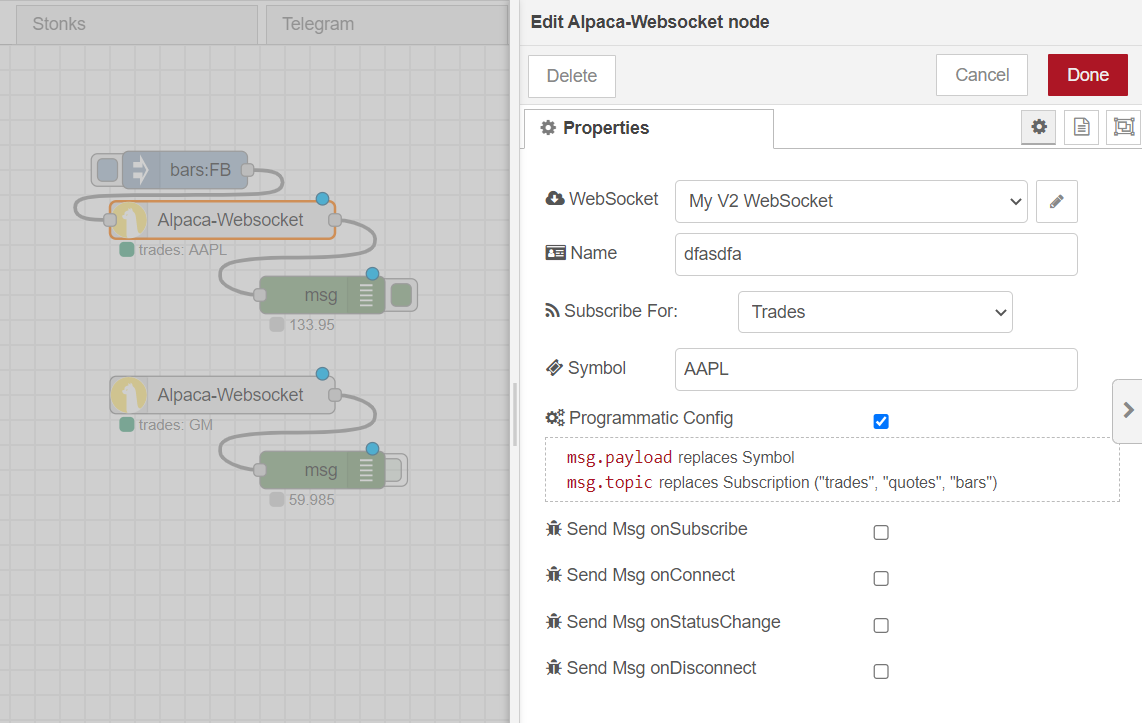
Official API Docs: https://alpaca.markets/docs/api-documentation/api-v2/market-data/alpaca-data-api-v2/real-time/
This node connects to the V2 websocket. The config node creates the connection which multiplexes the data to the individual nodes. Alpaca's free data plan currently limits to one connection which is accomplished by limiting your flow to use one config node.
By default the listener nodes connect to the symbol and subscription defined in the configuration panel. If you check the "Programmatic Config" option then an input connection becomes available. This input will accept a new symbol and/or subscription to update the listener in real time. Symbol will always be replaced by msg.payload but the subscription will only be replaced if it is one of the valid subscriptions: "trades", "quotes", or "bars".
Example Quotes Response:
{
	"topic": "onStockQuote",
	"payload": {
		"T": "q",
		"Symbol": "FB",
		"BidExchange": "V",
		"BidPrice": 339.41,
		"BidSize": 1,
		"AskExchange": "V",
		"AskPrice": 339.52,
		"AskSize": 1,
		"Condition": [
			"R"
		],
		"Tape": "C",
		"Timestamp": "2021-06-22T19:43:01.848529883Z"
	},
	"_msgid": "6665f836.954ab8"
}
Example Trades Response:
{
	"topic": "onStockTrade",
	"payload": {
		"T": "t",
		"ID": 5844,
		"Symbol": "FB",
		"Exchange": "V",
		"Price": 339.37,
		"Size": 23,
		"Conditions": [
			"@",
			"I"
		],
		"Tape": "C",
		"Timestamp": "2021-06-22T19:43:10.440076072Z"
	},
	"_msgid": "1f2edc2b.29cd24"
}
Example Bars Response:
{
	"topic": "onStockBar",
	"payload": {
		"T": "b",
		"Symbol": "FB",
		"OpenPrice": 339.41,
		"ClosePrice": 339.38,
		"HighPrice": 339.49,
		"LowPrice": 339.38,
		"Volume": 2287,
		"Timestamp": "2021-06-22T19:43:00Z"
	},
	"_msgid": "73754e51.b2361"
}
Roadmap / TODO
- [ ] Fix or rollback GetBarsV2
- [ ] Provide more examples (anyone want to contribute?)
- [ ] Allow websocket listeners to subscribe to more than one ticker per node
Release Notes
2.2.2
- forcing @alpacahq/alpaca-trade-api dependency to v2.3.0 as latest causes "not a function" error (lastQuote, probably others)
2.2.1
- fixing icon path
2.2.0
- Rolling everything back into one package
- ----In v2.0.0 I split things up into separate packages to avoid clutter, this was a mistake! It required me to put the auth config into yet a separate package and this wasn't loading properly if you install through the palette manager so I'm scrapping that and merging everything together. I'll put a note at the top of this readme about migration, but ugh, what a headache this has been. Not worth it! I found a way to hide the simple nodes so I'll implement that option later but for now, everything is better off as one package.
2.1.3
- Updated example JSON inputs to use quotes around the "parameter": instances so that it will copy and paste better.
2.1.1 - ..2
- Replaced GetBarsV2 with GetBars as V2 wasn't working
2.1.0
- Moving config node to separate npm package to avoid clashes with sibling project: "alpaca-simple" nodes
2.0.1 - ..3
- Fixed issue with Websocket label not accepting configured name
- Merging dropped changes in README
- Fixed store socket to context feature - maybe?
2.0.0
Major Changes
- Removed "simple" nodes and publishing to separate project
- Removed old socket nodes as I don't think they work (replacing with one that does work)
Minor Changes
- Added websocket v2 node (this one works!)
- Added Get Trade and Get Quote (aka "Get Last Trade/Quote") functions to main Alpaca node
- Added GetBarsV2 function to main Alpaca node
- Updated help for Watchlist functions
1.1.1
- Merged previous two updates and publish to NPM
1.1.0
- Developed Websocket node into Datasocket and Updatesocket
1.0.1
- Submit-order node had the wrong text in the html display (corrected to ".type")
1.0.0
- Created new universal "Alpaca" node which will pass msg.payload to any one of a long list of functions from the official API
- this provides a different way to access the same functionality as the previous nodes
- Can also use msg.topic to specify which function to use
- Embedded example codes (taken from the GitHub) into the configuration template
- Added the "dot-status" to the Alpaca node, also indicates paper/live with either ring/dot shapes
- (note: this is lost / missing) Added "inject account" node. playing around with the idea of it for now.
0.3.1
- Changed submit-order and get-order to forward entire msg.payload object. This will allow the use of Bracket Orders as explained in the docs here: https://alpaca.markets/docs/trading-on-alpaca/orders/
0.3.0
- Added on-event node for triggering on the following events:
- onStateChange
- onOrderUpdate
- onAccountUpdate
0.2.0
- Added market, limit, stop, or stop limit options for submit-order
- Added configuration node
- Same ENV vars from previous minor version still work
- Ability to select "cash trades"
- Added label features
- get-bars automatically shows symbol on node label
- configuration node automatically shows Cash or Paper
0.1.2
- Four basic nodes available:
- submit-order
- get-order
- get-bars
- get-account
- Two examples
- limit-spread
- basics