
node-red-contrib-amazon-echo
v0.1.19
Published
Alexa-controlled Node-RED nodes for the latest Amazon Echo devices.

Maintainers
 datech
Readme
node-red-contrib-amazon-echo
❗️Important (2026): Alexa local discovery is unreliable / may not work
As of 2026, users continue to report unstable or broken Alexa connectivity with node-red-contrib-amazon-echo, including:
- Devices not being discovered reliably (or at all)
- Previously discovered devices disappearing or showing “Device not responding”
- Voice commands sometimes executing with a delay while Alexa reports an error
This module relies on local Philips Hue Bridge (v1) emulation for Alexa discovery and control. Since August 2025, changes on Amazon’s side appear to have affected this approach.
For detailed analysis, community findings, and historical context, see:
- GitHub issue: “Device not responding – August 2025” #210
Alternatives
If you require a stable and future-proof Alexa - Node-RED integration, consider:
- Community-maintained alternatives listed at https://www.voicenodes.com
- DuloNode - an Alexa Smart Home Skill-based solution created by the author of
node-red-contrib-amazon-echo
Node-RED Contrib Amazon Echo module
Alexa controlled Node-Red nodes supporting the latest Amazon Echo devices
NO Alexa Skills required.
NO cloud dependencies.
Installation
Install from your Node-RED Manage Palette
or
Install using npm
$ npm install node-red-contrib-amazon-echoHow to use
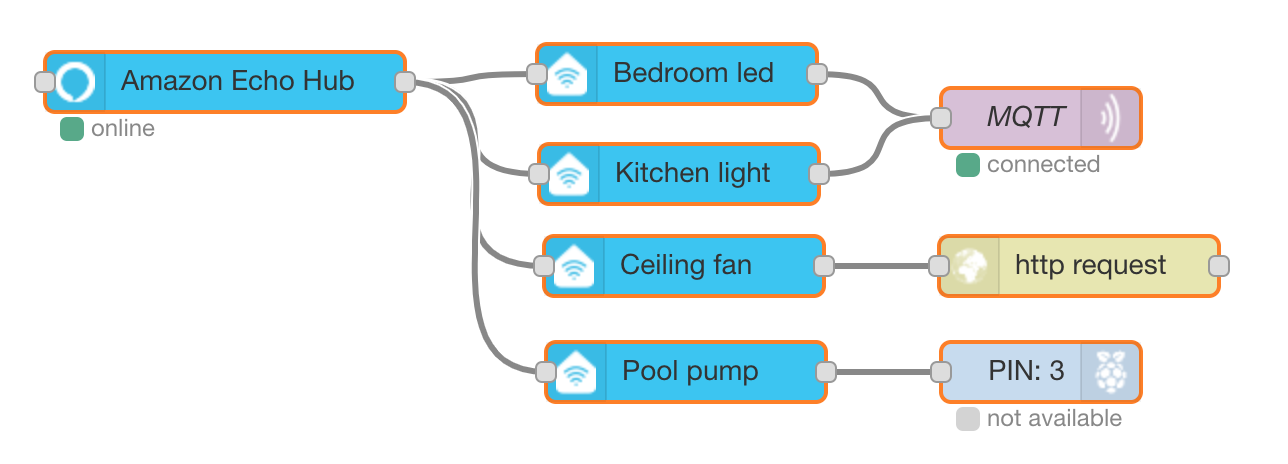
- Add Amazon Echo Hub node to your flow.
- Add multiple Amazon Echo Device nodes linked to the Amazon Echo Hub node.
- Note: Use unique names for device nodes. Alexa will use the node name to manage your smart device.
- Ask "Alexa, discover devices" or start the discovery procedure from the Alexa mobile app.
Features
- Turning on/off
- Dimming
- Setting the light color
Supported devices
- All Echo devices
Example Alexa commands
- "Alexa, turn on/off {device}"
- "Alexa, switch on/off {device}"
- "Alexa, set {device} to 50%"
- "Alexa, turn my {device} light green"
- "Alexa, set the {device} light to orange"
- "Alexa, make the {device} warmer"
- "Alexa, brighten {device} to 60 percent"
- "Alexa, dim the {device} lights"
Requirements
The Amazon Echo Hub node starts a service listening on port 80, which requires the Node-RED process to be started with root privileges or requires firewall rules to redirect the traffic.
Troubleshooting
Detailed troubleshooting instructions can be found on the Wiki.
Bugs and feature requests
Please create an issue on GitHub.