
node-red-contrib-dulonode
v1.0.11
Published
Alexa integration for Node-RED. Voice-control lights, blinds, locks, thermostats, TVs, and more using Node-RED.

Maintainers
 dulonode
Readme
node-red-contrib-dulonode
DuloNode simplifies home automation by integrating Amazon Alexa with Node-RED. It serves as a bridge between Alexa voice commands and Node-RED payloads, providing reliable communication through an Alexa Skill. By using DuloNode, you can create dynamic and flexible home automation systems with minimal setup.
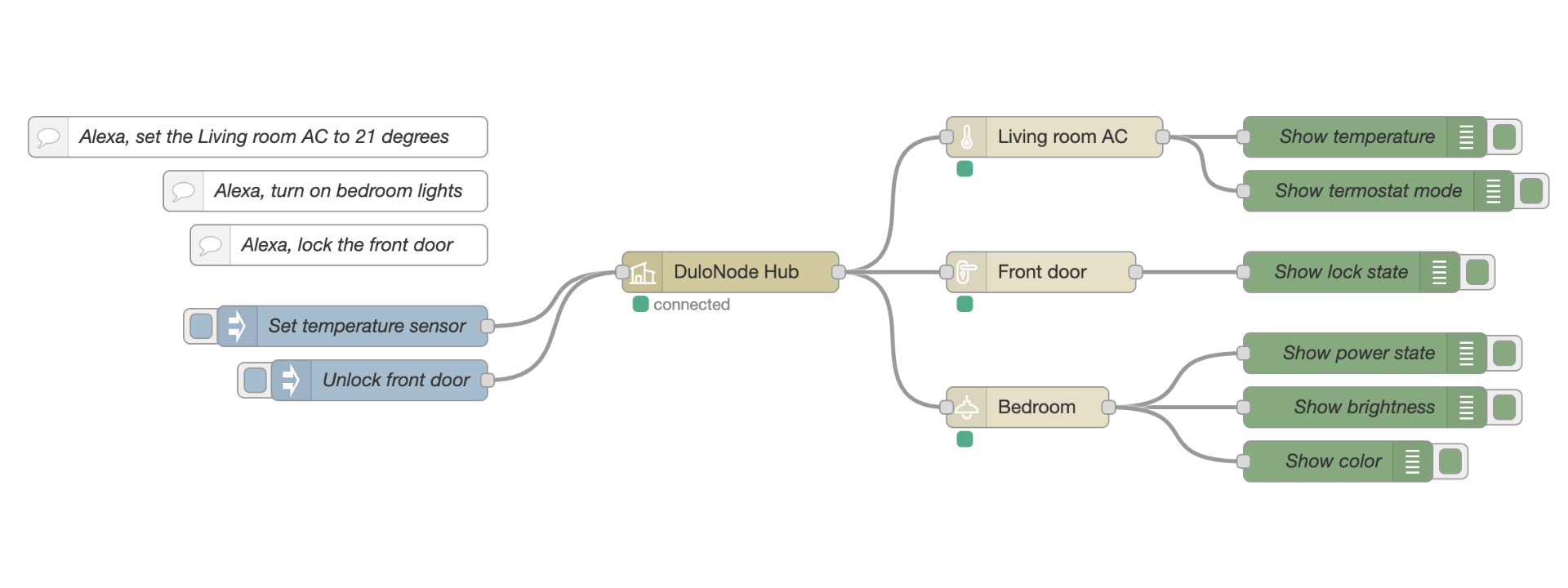
Example Commands
- "Alexa, turn on the living room light."
- "Alexa, set the thermostat to 21 degrees."
- "Alexa, close the garage door."
- "Alexa, dim the bedroom lamp to 50%."
- "Alexa, make the fan speed low."
Supported Devices
| Device Type | Features | | --------------- | ----------------------------------------- | | Switch | On/Off | | Light | On/Off, Brightness, Color, Temperature | | Fan | On/Off, Speed Control, Oscillation | | Thermostat | Temperature Control, Modes, Sensors | | Speaker | Playback, Volume Control | | TV | On/Off, Volume, Channels, Input Selection | | Garage Door | Open/Close | | Lock | Lock/Unlock | | Blind | Lift Control | | Scene | Scene Activation |
Setup Overview
Getting started with DuloNode is quick and straightforward. The setup consists of the following steps:
Create a DuloNode account
Sign up for a DuloNode account at https://www.dulonode.com. This account is used to link Alexa with your Node-RED flows.Enable the DuloNode Alexa Skill
Enable the DuloNode skill from the Amazon Alexa Skill Store and link it using your DuloNode account. The skill is available in multiple locales, including English, French, German, Italian, Portuguese, and Spanish.Set up Node-RED
Install thenode-red-contrib-dulonodemodule, import the provided basic flow, and sign in using the DuloNode Hub node.Discover your devices
Once deployed, ask Alexa to discover devices. Your Node-RED flows will be exposed to Alexa and ready for voice control.
For full setup instructions, supported devices, JSON payloads, and detailed configuration guides, visit the official DuloNode website:
https://www.dulonode.com