
node-red-contrib-gyazo-api
v0.0.3
Published
Node-RED nodes for Gyazo API


Readme
Gyazo API SDK for Node-RED
GyazoのAPIをNode-REDで簡単に利用できるカスタムノード集です。
インストール
npm install node-red-contrib-gyazo-apiまたは、Node-REDのパレット管理から node-red-contrib-gyazo-api を検索してインストールしてください。
利用可能なノード
1. Gyazo Config(設定ノード)
Gyazo APIのアクセストークンを設定します。他のすべてのノードで共通して使用されます。
設定方法:
- 各ノードの設定画面で「Gyazo設定」の鉛筆アイコンをクリック
- Gyazo APIからアクセストークンを取得して入力
2. Get List(画像一覧取得)
ユーザーの画像一覧を取得します。
入力パラメータ(オプション):
msg.payload = {
    page: 1,        // ページ番号(デフォルト: 1)
    per_page: 20    // 1ページあたりの画像数(デフォルト: 20、最大: 100)
}
出力:
msg.payload = [
    {
        "image_id": "8980c52421e452ac3355ca3e5cfe7a0c",
        "permalink_url": "http://gyazo.com/8980c52421e452ac3355ca3e5cfe7a0c",
        "thumb_url": "https://i.gyazo.com/thumb/afaiefnaf.png",
        "url": "https://i.gyazo.com/8980c52421e452ac3355ca3e5cfe7a0c.png",
        "type": "png",
        "created_at": "2014-05-21 14:23:10+0900",
        "metadata": { ... }
    },
    ...
]
3. Get Image(特定画像取得)
指定したIDの画像情報を取得します。
入力パラメータ(必須):
msg.payload = {
    image_id: "8980c52421e452ac3355ca3e5cfe7a0c"  // 取得する画像のID
}
出力:
msg.payload = {
    "image_id": "27a9dca98bcf5cafc0bd84a80ee9c0a1",
    "permalink_url": "...",
    "thumb_url": "...",
    "url": "...",
    "type": "png",
    "created_at": "2018-07-24T07:33:24.771Z",
    "metadata": { ... },
    "ocr": {
        "locale": "en",
        "description": "..."
    }
}
4. Upload(画像アップロード)
画像をGyazoにアップロードします。
入力パラメータ: 詳細はGyazo API Uploadを参照してください。
使い方の例
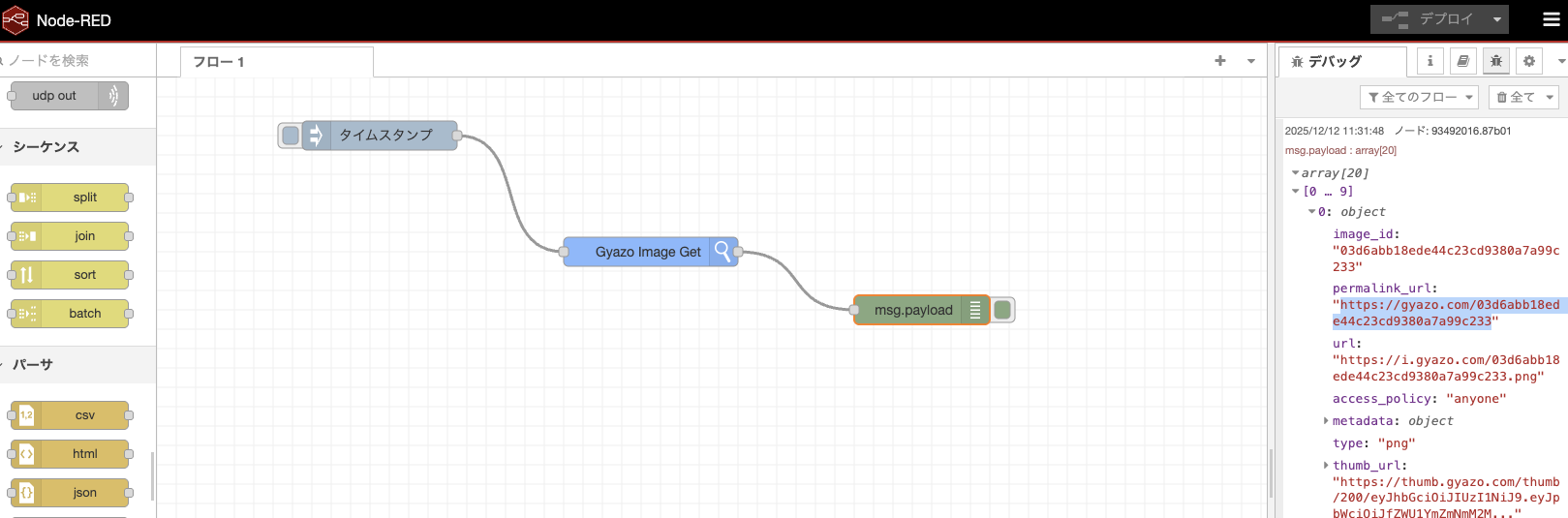
例1: 画像一覧を取得してデバッグ表示
[Inject] → [Get List] → [Debug]例2: 最新の画像を取得
[Inject] → [Get List] → [Function] → [Get Image] → [Debug]Functionノードの内容:
// 一覧から最初の画像IDを抽出
msg.payload = {
    image_id: msg.payload[0].image_id
};
return msg;
例3: ページネーションで2ページ目を取得
[Inject] → [Function] → [Get List] → [Debug]Functionノードの内容:
msg.payload = {
    page: 2,
    per_page: 10
};
return msg;
API仕様
詳しいAPI仕様は公式ドキュメントを参照してください: https://gyazo.com/api/docs
ライセンス
Apache 2.0