
node-red-contrib-image-info
v0.1.1
Published
A Node Red node to get information about an image

Maintainers
 bartbutenaers
Readme
node-red-contrib-image-info
A Node Red node to get information about an image
Install
Run the following npm command in your Node-RED user directory (typically ~/.node-red):
npm install node-red-contrib-image-infoUsage
This node can be used to get the following information about the image, arriving in the input msg.payload:
- Format: the format of the image in pixels.
- Width: the width of the image in pixels.
- Height: the height of the image in pixels.

[{"id":"b40ce94f.94d888","type":"http request","z":"47b91ceb.38a754","name":"","method":"GET","ret":"bin","url":"","tls":"","x":870,"y":460,"wires":[["8a97966a.ed9828"]]},{"id":"43ad92cb.8cc7ec","type":"inject","z":"47b91ceb.38a754","name":"Png 640x480","topic":"","payload":"https://dummyimage.com/640x480.png&text=png+of+640+x+480","payloadType":"str","repeat":"","crontab":"","once":false,"onceDelay":0.1,"x":480,"y":420,"wires":[["3a8476de.7d91aa"]]},{"id":"3a8476de.7d91aa","type":"change","z":"47b91ceb.38a754","name":"","rules":[{"t":"set","p":"url","pt":"msg","to":"payload","tot":"msg"}],"action":"","property":"","from":"","to":"","reg":false,"x":680,"y":460,"wires":[["b40ce94f.94d888"]]},{"id":"65e09b54.00b1f4","type":"inject","z":"47b91ceb.38a754","name":"Jpg 320x240","topic":"","payload":"https://dummyimage.com/320x240.jpg&text=jpg+of+320+x+240","payloadType":"str","repeat":"","crontab":"","once":false,"onceDelay":0.1,"x":480,"y":460,"wires":[["3a8476de.7d91aa"]]},{"id":"975f5022.973f6","type":"inject","z":"47b91ceb.38a754","name":"Gif 1280x960","topic":"","payload":"https://dummyimage.com/1280x960.gif&text=gif+of+1280+x+960","payloadType":"str","repeat":"","crontab":"","once":false,"onceDelay":0.1,"x":480,"y":500,"wires":[["3a8476de.7d91aa"]]},{"id":"8a97966a.ed9828","type":"image-info","z":"47b91ceb.38a754","name":"","x":1051,"y":460,"wires":[["20bb38a7.4549d8"]]},{"id":"20bb38a7.4549d8","type":"debug","z":"47b91ceb.38a754","name":"","active":true,"tosidebar":true,"console":false,"tostatus":false,"complete":"true","x":1209,"y":460,"wires":[]}]In the above flow, the image is represented as a Buffer object. However this node also allows the image to be base64 encoded, although this will have negative impact on performance (since a base64 decoding is required underneath):

This node is based on the image-size library, where you can find a list of all allowed image formats.
Output message
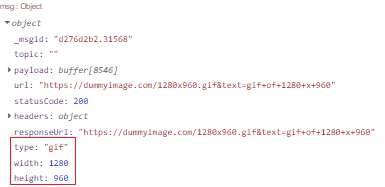
The information will be displayed in the node status, but the same information will be added to the input message:
- Format: the format will be stored in the output
msg.format. - Width: the width will be stored in the output
msg.width. - Height: the heigth will be stored in the output
msg.heigth.
Error handling
Two different type of error situations will be handled, which becomes visible both in the node status and in the log:
Invalid input: The input needs to be a Buffer or a string. If the string is not base64 encoded, then this node will automatically encode it. However when another input type is passed in the
msg.payloadthen node status will become "invalid input". In the following example a simple timestamp is being injected:
In the log a line with "Invalid input type" will appear.
Unknown format: when the input type is correct but the image information cannot be determined, then the node status will become "unknown format". In the following example a random buffer (representing corrupt image data) is being injected:

In the log a line with "Unknown image format" will appear.