
node-red-contrib-mitsubishi
v1.2.3
Published
三菱 MC Protocol 3E/4E 采集节点 — 纯TCP长连接池, 零依赖, 支持Q/L/iQ-R/iQ-F/FX5U

Maintainers
 chunhailiu
Readme
node-red-contrib-mitsubishi



三菱 MC Protocol 3E/4E 以太网采集节点。一个节点读 N 个点位,零外部依赖,纯 TCP 长连接池实现。
截图
为什么选这个节点?
| 痛点 | 其他 MC 节点 | 本节点 | |------|-------------|--------| | 读 50 个点位 | 拖 50 个节点 | 拖 1 个节点,填表格 | | 读 D200 是 FLOAT32 | 自己写 function 解码 | 表格选 FLOAT32,自动解码 | | 原始值 2530 → 实际 253.0℃ | 自己写 function 换算 | 填斜率 0.1,自动变换 | | PLC 返回错误码 0xC052 | 只会说 "timeout" | "Address out of range" | | serialNo 不递增 | 4E 帧可能串包 | 每帧自增 + 响应校验 |
特性
- 独立可用 — 纯 Node.js
net+Buffer,不依赖任何第三方库或后端服务 - 长连接池 🆕 — TCP 连接持久复用,省端口 + 省握手,跨轮采集无需重复建连
- 请求队列串行化 🆕 — 多节点共享同一 PLC 时自动排队,防止读写交错
- TCP Keepalive 🆕 — 30 秒探测保活,防止空闲连接被交换机/防火墙断开
- 断线自动重建 🆕 — 连接断开或超时自动检测并重建,对上层透明
- deviceId 归一化 🆕 — 输出始终为数字,兼容下游
edge_commStatus索引 - 表格编辑器 — 一个节点配置 N 个点位,自动按寄存器类型和地址聚类,合并为批量读取
- 6 种数据类型 — INT16 / UINT16 / INT32 / UINT32 / FLOAT32 / BOOL
- 8 种软元件 — D / W / R / X / Y / M / L / B,位元件(X/Y/M/L/B)自动逐位拆包
- 斜率偏移变换 —
engValue = rawValue × slope + offset,节点直接输出工程值 - 动态 IP 覆盖 —
msg.payload.plcIp可覆盖 config 固定 IP,一个节点采多台 PLC - 4E serialNo 完整支持 — 每帧自增,响应校验,防止串包
- 批量保护 — 单次读取字数超 960 自动拆包,防 PLC 报
0xC059 - 错误诊断 — 19 个 MC 错误码映射为中文/英文可读信息
- 模拟模式 —
RED.settings.mcSimulationMode = true不连 PLC 即可测试 - 零依赖 — 仅使用 Node.js 内置
net+Buffer - 防重入保护 —
safeSend确保每次触发只输出一条消息
安装
cd ~/.node-red
npm install node-red-contrib-mitsubishi
重启 Node-RED,左侧节点栏 edgelink 分类下出现 MC 读取 节点。配置节点在 config 侧边栏:
| 节点 | 类型 | 说明 |
|------|------|------|
| PLC 连接配置 | config | 存储 PLC IP、端口、帧格式等连接参数 |
| MC 读取 | input/output | 配置点位表格,触发采集,输出数据 |
支持的 PLC
| 系列 | 帧格式 | 状态 | |------|--------|------| | Q 系列(QnU / QnUDV) | 3E / 4E | ✅ | | L 系列 | 3E / 4E | ✅ | | iQ-R | 4E | ✅ | | iQ-F(FX5U) | 4E | ✅ | | FX3U + 以太网模块(FX3U-ENET) | 3E | ✅ | | A 系列 | 1E / 2E | ❌ (仅支持 3E/4E) |
使用方法
1. 添加 PLC 连接配置
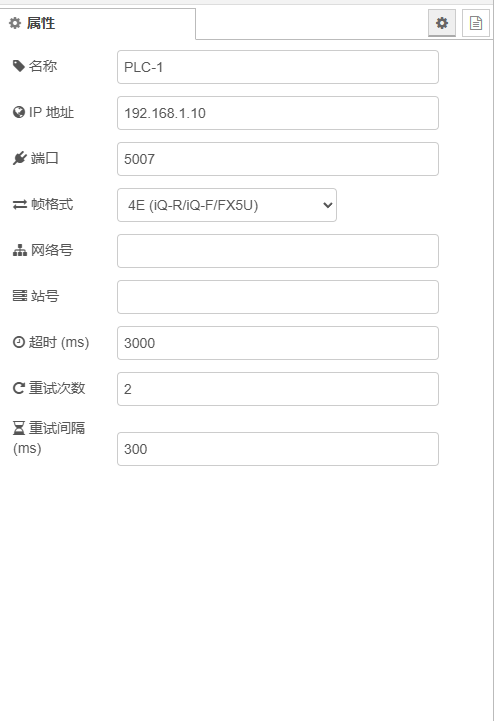
拖入 PLC 连接配置 节点,双击配置:
| 参数 | 默认值 | 说明 |
|------|--------|------|
| 名称 | PLC-1 | 显示名称 |
| IP 地址 | 192.168.1.10 | PLC 以太网模块 IP |
| 端口 | 5007 | 3E 默认 5007 / 4E 默认 5008 |
| 帧格式 | 3E | 3E(Q/L/FX3U)或 4E(iQ-R/iQ-F/FX5U) |
| 网络号 | 0 | 多跳网络用,直连填 0 |
| 站号 | 0 | 目标站号,直连 CPU 填 0 |
| 超时 (ms) | 3000 | TCP 读写超时 |
| 重试次数 | 2 | 失败重试次数(不含首次) |
| 重试间隔 (ms) | 300 | 重试等待时间 |
2. 配置点位表格
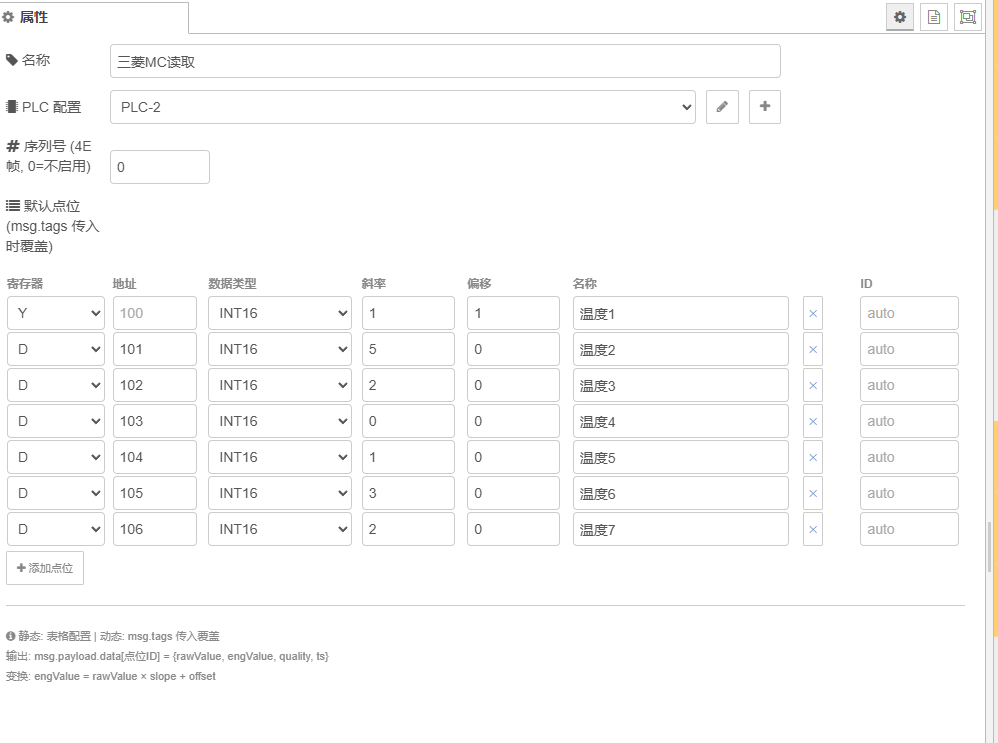
拖入 MC 读取 节点,关联 PLC 配置,在表格中添加点位:
| 寄存器 | 地址 | 数据类型 | 斜率 | 偏移 | 名称 | |--------|------|----------|------|------|------| | D | 100 | INT16 | 0.1 | 0 | 温度 | | D | 200 | FLOAT32 | 1 | 0 | 压力 | | X | 0 | BOOL | — | — | 开关 | | D | 300 | UINT16 | 1 | 0 | 计数器 |
斜率/偏移公式:
engValue = rawValue × slope + offset例如 PLC 存温度原始值 2530(实际 253.0℃),设斜率 = 0.1,偏移 = 0,输出 engValue = 253.0
3. 触发采集
inject 节点 → MC 读取节点,部署后点击 inject 按钮即可采集。
4. 动态点位(高级)
上游节点传入 msg.tags 会覆盖表格配置,适配 EdgeLink 采集管线:
msg.tags = [
  { id: "温度", regType: "D", addr: 100, dataType: "INT16", slope: 0.1, offset: 0 },
  { id: "压力", regType: "D", addr: 200, dataType: "FLOAT32" }
];
输出格式
正常采集
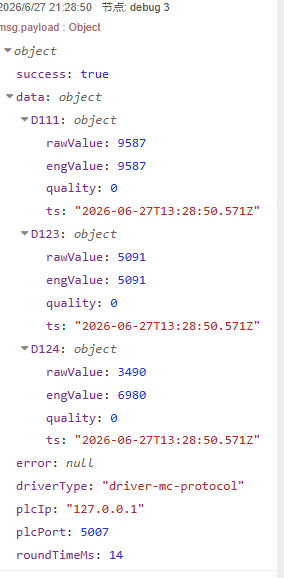
msg.payload = {
  success: true,
  deviceId: "PLC-1",          // 适配 edgelink-pg-store 动态分表
  data: {
    "温度": {
      rawValue: 2530,         // PLC 原始 int16
      engValue: 253.0,        // 解码后 × 斜率 + 偏移
      quality: 0,             // 0=正常 2=异常
      ts: "2026-06-30T08:00:00.000Z",
      regType: "D"            // 寄存器类型
    },
    "压力": {
      rawValue: 4123,
      engValue: 41.23,
      quality: 0,
      ts: "2026-06-30T08:00:00.000Z",
      regType: "D"
    },
    "开关": {
      rawValue: 1,
      engValue: 1,
      quality: 0,
      ts: "2026-06-30T08:00:00.000Z",
      regType: "X"
    }
  },
  error: null,
  driverType: "driver-mc-protocol",
  plcIp: "192.168.1.10",
  plcPort: 5007,
  roundTimeMs: 12
}
PLC 读取失败
msg.payload = {
  success: false,
  deviceId: "PLC-1",
  data: {},
  error: "[PLC 0xC052] Address out of range",
  driverType: "driver-mc-protocol",
  plcIp: "192.168.1.10",
  plcPort: 5007,
  roundTimeMs: 3012
}
网络故障
msg.payload = {
  success: false,
  deviceId: "PLC-1",
  data: {},
  error: "[NETWORK] TCP closed (no data)",
  ...
}
架构
┌──────────┐     ┌──────────────────────────────────────┐     ┌──────────┐
│ inject / │     │     mitsubishi-read v1.2.2            │     │ 三菱 PLC │
│ 动态tags │────→│                                       │────→│          │
└──────────┘     │  1. 校验 + 清洗点位                   │     │ Q / L /  │
                 │  2. 去重 + 聚类分组                   │     │ iQ-R /   │
                 │  3. 长连接池 ──→ 逐组 3E/4E 帧请求   │     │ FX5U     │
                 │  4. 解码 + 斜率变换                   │     └──────────┘
                 │  5. 输出 {raw,eng,quality,ts}         │
                 └──────────────────────────────────────┘

 连接池: CONN_POOL["host:port"] → { socket, inUse, queue[] }
 生命周期: getConnection(复用/排队/新建) → 采集 → releaseConnection(交付下个等待者)
 空闲回收: 每 5 分钟清理 > 10 分钟未用的空闲连接
 断线恢复: socket.destroyed 检测 → destroyConnection → getConnection 重建
与 node-red-contrib-mcprotocol 对比
| 维度 | 本节点 | mcprotocol |
|------|--------|------------|
| 点位数量 | N 个 / 节点 | 1 个 / 节点 |
| 连接模型 | 🆕 长连接池 + 请求队列 | 短连接 (每请求新建销毁) |
| TCP 断线恢复 | 🆕 自动检测重建 | ⚠️ 已知 BUG (不自恢复) |
| TCP Keepalive | 🆕 30s 探测 | ❌ |
| 批量优化 | 智能聚类合并 | 库内优化 (黑盒) |
| 数据类型 | 6 种 (INT16/UINT16/INT32/UINT32/FLOAT32/BOOL) | 基础类型 |
| 位元件 | 自动拆包 | 不支持 |
| 斜率偏移变换 | 内置 rawValue × slope + offset | 无 |
| 32位/浮点 | 自动读相邻寄存器 + 拼接 | 无 |
| serialNo | 每帧自增 + 回显校验 | 固定不变 |
| 动态 IP 覆盖 | 🆕 msg.payload.plcIp | ❌ |
| deviceId 归一化 | 🆕 输出始终为数字 | ❌ |
| 模拟模式 | ✅ mcSimulationMode=true | ❌ |
| 写入能力 | ❌ (仅读) | ✅ mcprotocol-write |
| UDP 支持 | ❌ (仅 TCP) | ✅ |
| 1E 帧 / ASCII | ❌ (仅 3E/4E) | ✅ |
| 错误诊断 | 19 个 MC 错误码可读 | 基础 |
| 依赖 | 0 (纯 Node.js) | mcprotocol 依赖 |
| 维护状态 | ✅ 活跃 (2026-07) | ⚠️ 停更 (2021-01) |
选择建议:需要写入/UDP/1E帧/老A系列PLC → mcprotocol。高频多PLC TCP采集 → 本节点。
模拟模式
在 Node-RED settings.js 中添加:
mcSimulationMode: true重启后所有 MC 读取 节点不连 PLC,直接返回随机仿真数据。用于离线开发、CI 测试、Demo 演示。
与 EdgeLink 生态集成
┌──────────────────┐     ┌──────────────────────┐     ┌──────────────────┐
│ node-red-contrib │     │ node-red-contrib     │     │ PostgreSQL /     │
│ -mitsubishi      │────→│ -edgelink-pg         │────→│ TimescaleDB      │
│ (本节点)         │     │ (PG 批量写入)        │     │                  │
└──────────────────┘     └──────────────────────┘     └──────────────────┘
本节点输出的 deviceId、regType、rawValue、engValue、quality、ts 字段可由 edgelink-pg-store 自动识别为 MC 驱动格式,零配置写入数据库。
FAQ
Q: 连接如何管理?
采用长连接池架构(v1.2.0+)。TCP 连接建立后保持复用,跨轮采集不再重复握手。同一 PLC 的多个采集节点通过请求队列串行化,防止并发读写交错。连接空闲 > 10 分钟自动回收,断开自动检测重建。生产环境推荐长连接池模式。
Q: 能同时读多个 PLC 吗?
可以。每个 PLC 连接配置 配置一个 PLC。多个 MC 读取 节点关联不同配置即可。连接池按 host:port 隔离,不同 PLC 独立管理各自的 TCP 连接。同一 PLC 多节点场景通过队列串行化保证安全。
Q: 点位地址能写成 "D100" 格式吗?
可以。地址字段兼容 "D100" 格式(自动提取数字部分),也支持纯数字 100。
Q: switch 元素一次最多读多少个点位?
字元件单次最多 960 字,位元件单次最多 15360 点。超出自动拆组,无需手动干预。
Q: 支持 FX3U 吗?
带以太网模块(FX3U-ENET)支持 3E 帧。不带以太网模块的 FX3U 不支持(需要 1E 帧或串口)。
许可证
MIT · 可自由商用、修改、再发布