
node-red-contrib-viewtron
v2.0.0
Published
Receive AI detection events from Viewtron IP cameras — license plate recognition (LPR/ALPR), human detection, vehicle detection, face detection. On-camera AI, no cloud required.

Maintainers
 haldas
Readme
node-red-contrib-viewtron
Viewtron AI camera node for Node-RED. Receives AI detection events from Viewtron IP cameras and NVRs. License plate recognition (LPR/ALPR), human detection, vehicle detection, face detection, people counting, and intrusion detection — all processed on the camera with no cloud service required. Supports both direct camera connections (IPC v1.x) and NVR forwarding (v2.0) with automatic version detection. LPR is fully tested with the Viewtron LPR-IP4 camera and NVR. Other AI event types coming soon.
Install
In Node-RED: Menu > Manage palette > Install > search node-red-contrib-viewtron
Or via command line:
cd ~/.node-red
npm install node-red-contrib-viewtron
How It Works
Viewtron AI cameras process detection on-device and push HTTP POST events when they detect a license plate, person, vehicle, or face. The Viewtron AI Camera node receives those events directly, parses the XML, and outputs structured JSON messages to your flow.
Viewtron Camera --> HTTP POST (XML) --> Viewtron AI Camera node --> JSON msg --> Your FlowNo middleware, no bridge, no cloud API. The node listens on a configurable port and the camera posts directly to it.
Camera Setup
1. Add the node to your flow
Drag the Viewtron AI Camera node from the palette onto the canvas and set the listen port.
2. Configure HTTP POST on the camera
Open your camera's web interface and navigate to Network > Advanced > HTTP Notification.
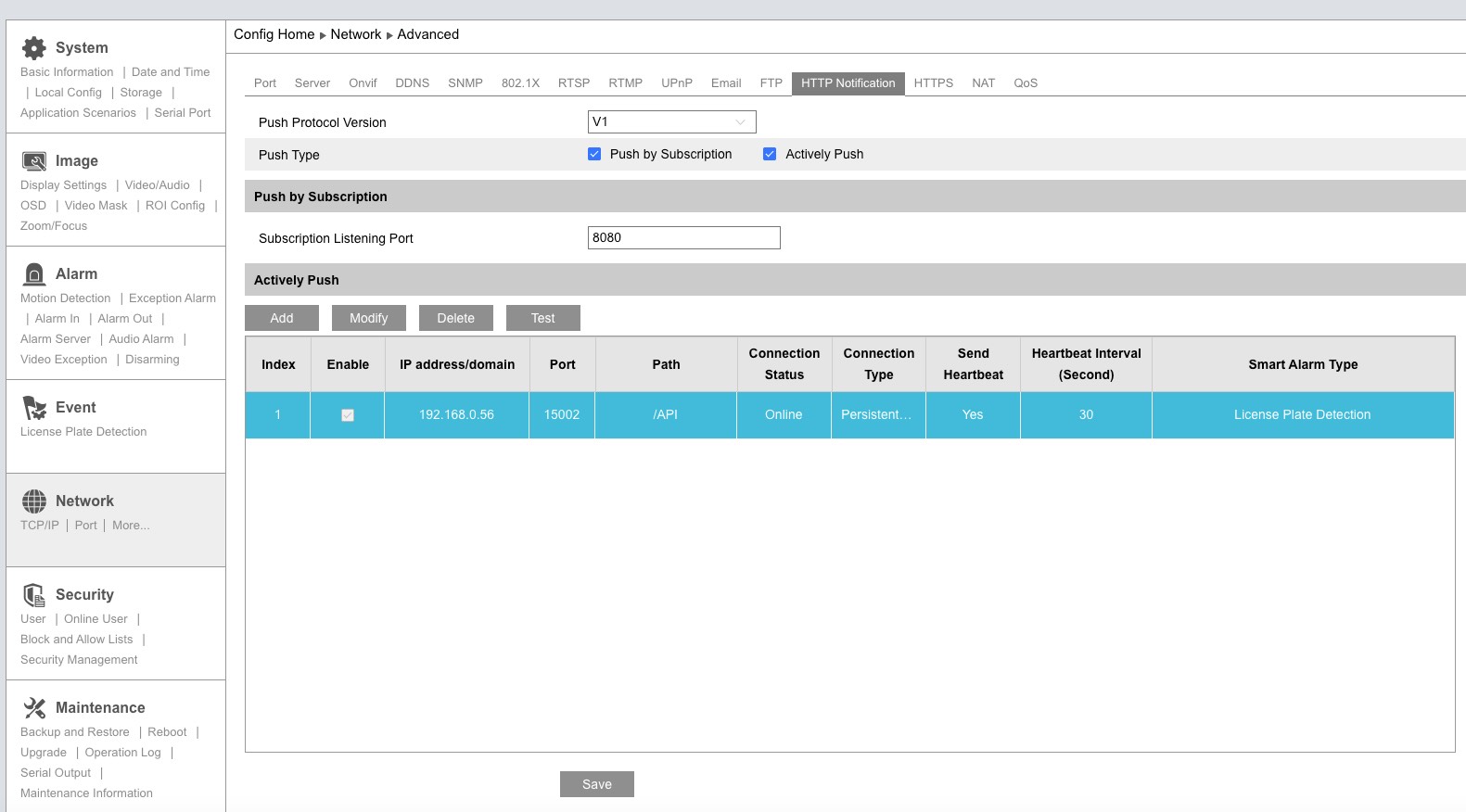
Set the Push Protocol Version to V1, then click Add to create a server entry.
3. Configure the server connection
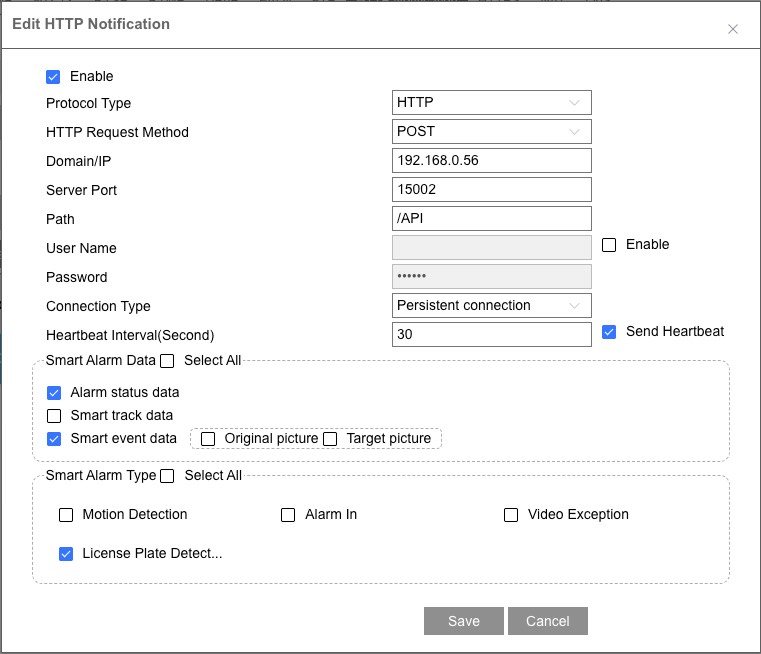
| Setting | Value |
|---------|-------|
| Enable | Checked |
| Domain/IP | Your Node-RED machine's IP address |
| Server Port | Port configured in the node (default: 5002) |
| Path | /API |
| Connection Type | Persistent connection |
| Send Heartbeat | Checked |
| Heartbeat Interval | 30 seconds |
| Smart Alarm Data | Check Smart event data |
| Original picture | Check to include full scene image in events |
| Target picture | Check to include cropped target image in events |
| Smart Alarm Type | Select the detection types you want (e.g., License Plate Detection) |
Click Save, then deploy your flow in Node-RED. Events start arriving immediately.
Connection status
The camera maintains a persistent HTTP connection and sends heartbeats to confirm the server is reachable. The node status shows a green dot when listening and updates with the latest event data (e.g., plate number and status).
Outputs
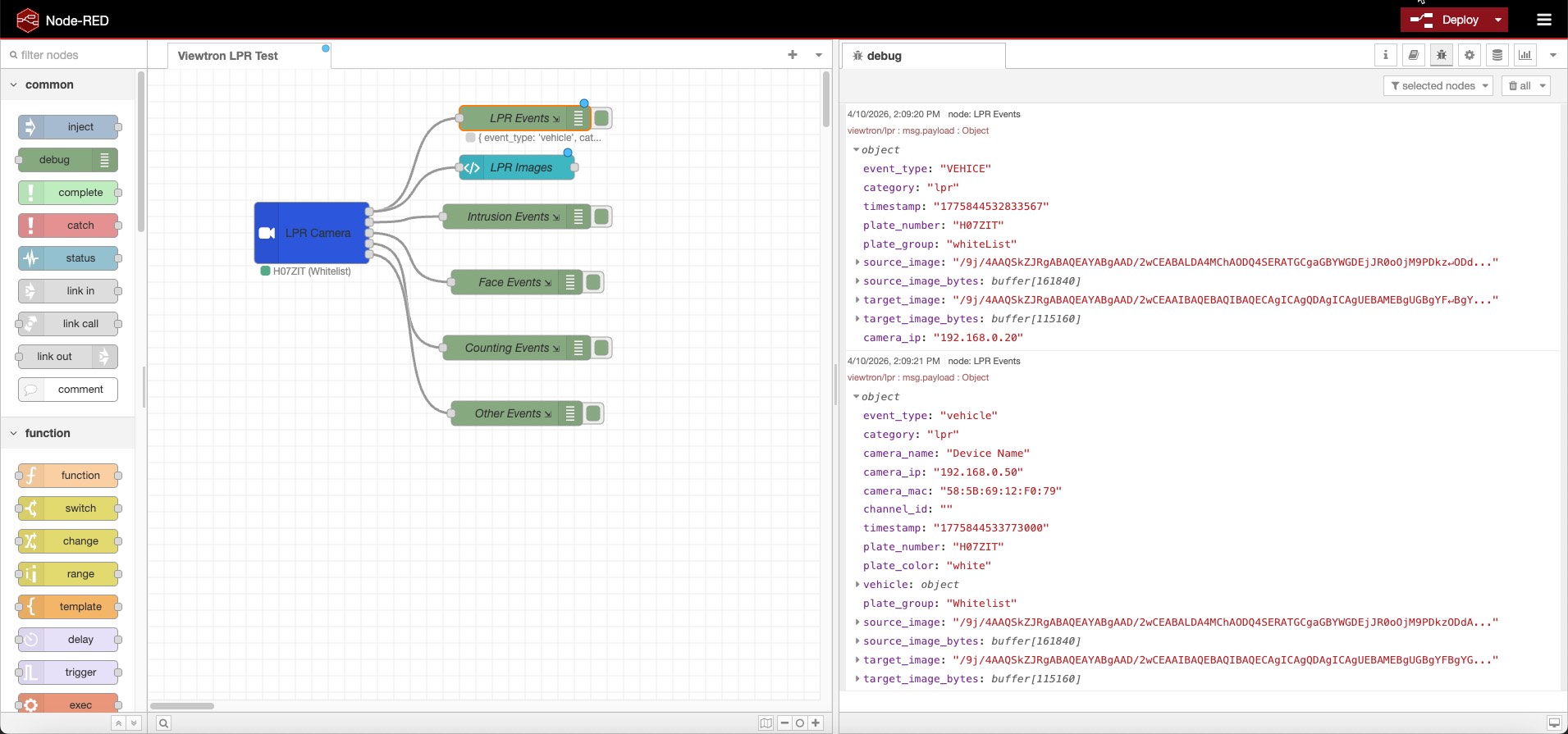
The node has 5 outputs, one per detection category:
| Output | Category | Key Fields |
|--------|----------|------------|
| 1 | LPR | plate_number, plate_group (raw value from camera/NVR plate database), vehicle (brand, color, type — NVR only), car_owner (NVR only) |
| 2 | Intrusion | target_type (person, car, motorcycle), event_id, status |
| 3 | Face | face.age, face.sex, face.glasses, face.mask |
| 4 | Counting | target_type, boundary |
| 5 | Other | Video metadata and unclassified events |
Wire each output to the flow logic you need — separate handling for plates vs. people vs. faces.
LPR Fields (Output 1)
| Field | IPC | NVR | Description |
|-------|-----|-----|-------------|
| plate_number | Yes | Yes | Detected license plate text |
| plate_group | Yes | Yes | Plate database group — see Plate Groups |
| plate_color | No | Yes | Plate color (e.g., "white") |
| vehicle.type | No | Yes | Vehicle type (e.g., "sedan", "SUV") |
| vehicle.color | No | Yes | Vehicle color |
| vehicle.brand | No | Yes | Vehicle brand (e.g., "Toyota") |
| vehicle.model | No | Yes | Vehicle model |
| car_owner | No | Yes | Owner name from NVR plate database |
| source_image | Yes | Yes | Overview image (base64 JPEG) |
| source_image_bytes | Yes | Yes | Overview image (Buffer) |
| target_image | Yes | Yes | Plate crop image (base64 JPEG) |
| target_image_bytes | Yes | Yes | Plate crop image (Buffer) |
IPC vs NVR
You can connect cameras directly to Node-RED (IPC mode) or route them through an NVR (NVR mode). Both work — the node detects the format automatically.
| | IPC (Direct) | NVR (Forwarded) | |---|---|---| | Connection | Camera → Node-RED | Camera → NVR → Node-RED | | XML Version | v1.x | v2.0 | | Plate detection | Yes | Yes | | Plate database groups | Fixed: whiteList, blackList, temporaryList | User-defined: any group name | | Vehicle attributes | No | Yes (brand, color, type, model) | | Owner from database | No | Yes | | Camera name | Device name | Device name | | Channel ID | No | Yes (which NVR channel) | | Images | Yes (both) | Yes (both) |
Common fields
Every event message includes:
| Field | Description |
|-------|-------------|
| msg.payload.event_type | Raw alarm type from camera (e.g., VEHICE, PEA) |
| msg.payload.category | Normalized category: lpr, intrusion, face, counting, metadata |
| msg.payload.camera_ip | IP address of the camera that sent the event |
| msg.payload.timestamp | Event timestamp from the camera |
| msg.topic | Set to viewtron/{category} for easy MQTT republishing |
Images
When Original picture and Target picture are enabled on the camera, events include both base64 strings and decoded Buffer bytes:
| Field | Type | Description |
|-------|------|-------------|
| source_image | string | Full scene image as base64 JPEG |
| source_image_bytes | Buffer | Full scene image as decoded JPEG bytes |
| target_image | string | Cropped target (plate, face) as base64 JPEG |
| target_image_bytes | Buffer | Cropped target as decoded JPEG bytes |
The Buffer fields are ready to pipe directly to file nodes, dashboard image widgets, or MQTT nodes. The base64 fields are useful for embedding in HTML or sending via API.
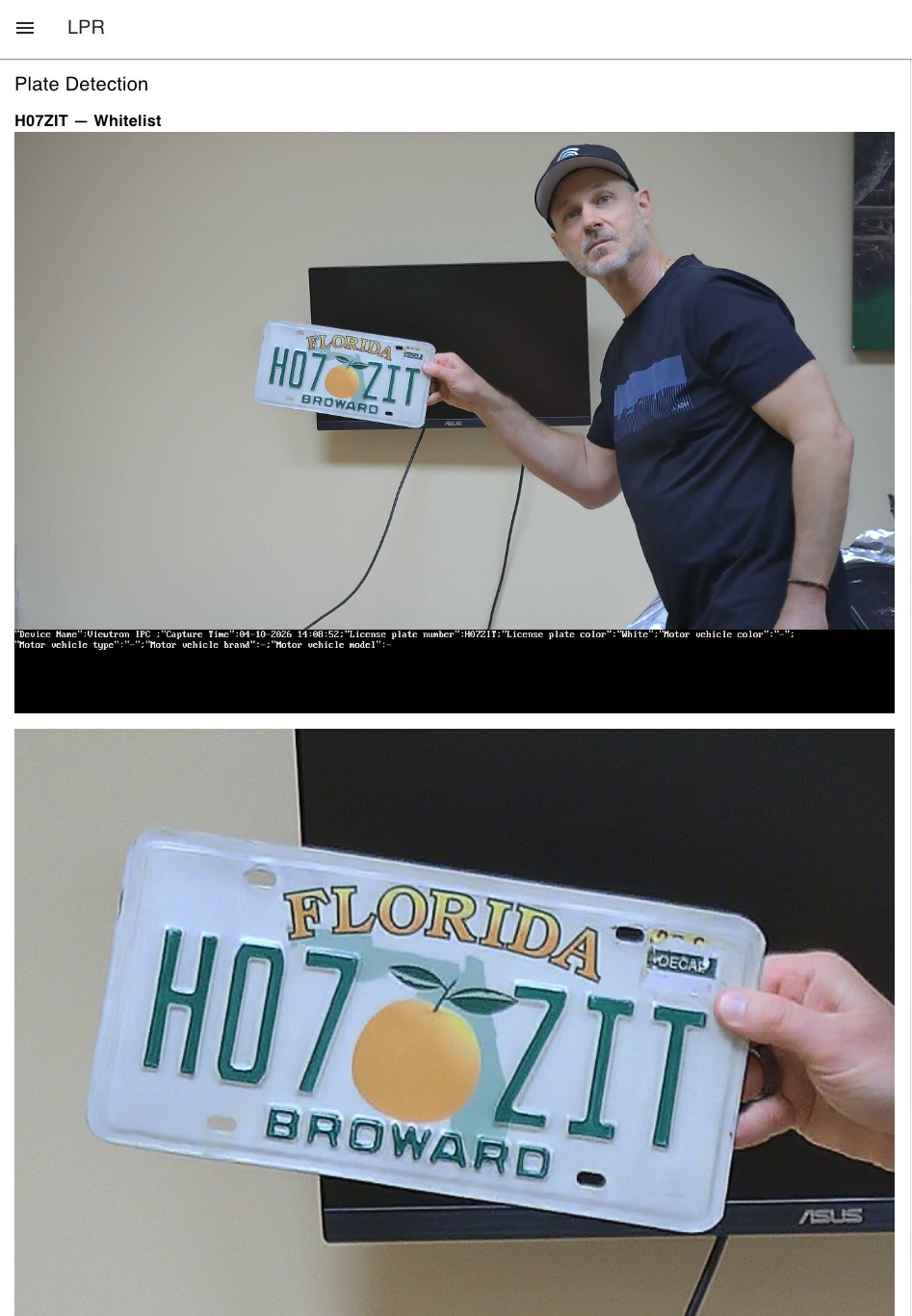
Screenshot of source_image and target_image displayed in a Dashboard 2.0 template widget. To recreate this, wire the LPR output (output 1) to a ui-template node with this content:
<div v-if="msg?.payload?.plate_number">
  <h3>{{ msg.payload.plate_number }} — {{ msg.payload.plate_group || "unknown" }}</h3>
</div>
<div v-if="msg?.payload?.source_image" style="margin-bottom:10px">
  <img :src="'data:image/jpeg;base64,' + msg.payload.source_image" style="width:100%" />
</div>
<div v-if="msg?.payload?.target_image">
  <img :src="'data:image/jpeg;base64,' + msg.payload.target_image" style="width:100%" />
</div>
Requires @flowfuse/node-red-dashboard (Dashboard 2.0).
These payloads can be large (300KB+) — the Include images checkbox on the node controls whether images are passed through to the output or stripped.
Example: LPR Gate Access
Import this flow to get started with license plate gate access control. The Viewtron AI Camera node reads plates, and a Switch node routes plates based on their group.
[
    {
        "id": "viewtron1",
        "type": "viewtron-camera",
        "name": "Gate Camera",
        "port": "5002",
        "includeImages": false,
        "wires": [["switch1"], [], [], [], []]
    },
    {
        "id": "switch1",
        "type": "switch",
        "name": "Check Group",
        "property": "payload.plate_group",
        "rules": [
            {"t": "eq", "v": "whiteList"},
            {"t": "else"}
        ],
        "outputs": 2,
        "wires": [["gate_open"], ["notify"]]
    },
    {
        "id": "gate_open",
        "type": "debug",
        "name": "Open Gate"
    },
    {
        "id": "notify",
        "type": "debug",
        "name": "Alert: Unknown Vehicle"
    }
]
Plate Groups
The plate_group field contains the raw value from the camera or NVR plate database. Your flow decides what each group means.
IPC cameras use fixed group names (these are the raw XML values):
| plate_group | Camera UI Label |
|-------------|----------------|
| whiteList | Allow list |
| blackList | Block list |
| temporaryList | Temporary vehicle |
| (empty) | Not in database |
NVRs use user-defined group names — you create groups and name them whatever you want (e.g., "Whitelist", "Residents", "Banned"). The plate_group field shows the group name, or empty if the plate is not in the database.
Plates are added to the camera's database through its web interface or programmatically via the viewtron Python SDK (pip install viewtron).
Supported Event Types
IPC v1.x (Direct from Camera)
| Alarm Type | Category | Detection |
|-----------|----------|-----------|
| VEHICE / VEHICLE | lpr | License plate recognition |
| VFD | face | Face detection |
| PEA | intrusion | Perimeter intrusion |
| AOIENTRY | zone_entry | Zone entry |
| AOILEAVE | zone_exit | Zone exit |
| LOITER | loitering | Loitering detection |
| VSD | metadata | Video metadata |
| PASSLINECOUNT | counting | People/vehicle counting |
NVR v2.0 (Forwarded via NVR)
| Alarm Type | Category | Detection |
|-----------|----------|-----------|
| vehicle | lpr | LPR with vehicle brand, color, type, model |
| videoFaceDetect | face | Face with age, sex, glasses, mask attributes |
| regionIntrusion | intrusion | Perimeter intrusion |
| lineCrossing | line_crossing | Tripwire line crossing |
| targetCountingByLine | counting | Counting by line |
| targetCountingByArea | counting | Counting by area |
| videoMetadata | metadata | Continuous object detection |
Version detection is automatic — the node handles both formats.
Node Settings
| Setting | Default | Description |
|---------|---------|-------------|
| Port | 5002 | HTTP listener port for camera events |
| Include images | Off | Pass base64 JPEG images through to output (source_image, target_image) |
Compatible Cameras
Any Viewtron AI security camera or NVR with HTTP POST support:
- LPR-IP4 — 4MP LPR camera with on-camera plate recognition. Fully tested with Node-RED.
- AI security cameras — person, vehicle, and face detection. Testing scheduled.
- NVRs — forward events from all connected cameras. LPR tested and working.
All Viewtron products are NDAA compliant.
Troubleshooting
Camera shows "Online" but no events appear: The camera's persistent connection is alive (heartbeats work) but alarm events may not be flowing. Try:
- Reboot the camera — required after changing HTTP POST settings
- Check that Smart event data and the correct Smart Alarm Type are enabled
- For NVR: ensure License Plate Detection is enabled in the HTTP Post settings
Debug tool: A standalone debug server is included for diagnosing connection issues:
node debug-server.js 5002This logs every HTTP POST with full headers, body preview, and post classification (keepalive, alarm data, etc.) — no filtering.
Documentation
- Viewtron API Developer Docs — full API reference
- HTTP POST Setup Guide — camera configuration walkthrough with screenshots
- Python SDK —
pip install viewtronfor Python projects - Home Assistant Integration — MQTT bridge for Home Assistant
Related Projects
- viewtron-home-assistant — Home Assistant integration via MQTT
- viewtron-python-sdk — Python SDK (
pip install viewtron) - IP-Camera-API — API documentation, XML examples, Docusaurus site
Author
Mike Haldas — CCTV Camera Pros