
node-tao
v1.0.2
Published
Lightweight, fast, and powerful embedded JS template engine

Maintainers
 greenflag31
Readme
Node Tao
TAO is a simple, lightweight and very fast embedded JS templating. It emphasizes great performance, security, and developer experience.
🌟 Features
- 🚀 Super Fast
- 🔧 Configurable
- 🔥 Caching
- ⚡️ Support for partials
- 📝 Easy template syntax (no prefix needed)
- 💻 Developer experience
- 🧩 Support for local and global helpers
- 🛡️ Security by design
- 🟦 Official VS Code Extension
Get Started
Define a template simple.html inside a view directory templates
<!-- templates/simple.html -->
<h1>Hi <%= name %>!</h1>
import { Tao } from 'tao';
const tao = new Tao({ views: path.join(__dirname, 'templates') });
const res = tao.render('simple', { name: 'Tao' });
console.log(res); // <h1>Hi Tao!</h1>Helpers
Helpers are functions that can be used inside a template. Helpers can be local (only available in a particular render) or global (available everywhere on the instance).
import { Tao } from 'tao';

const tao = new Tao({ views: path.join(__dirname, 'templates') });

// Global helper
function nPlusTwo(n: number) {
  return n + 2;
}
// Global helper need to be registered on the instance
tao.defineHelpers({ nPlusTwo });

// Define a dedicated interface for data and helpers passed to the template
interface SimpleData {
  name: string;
  nPlusOne: (n: number) => number;
}

// Render a template
app.get('/', (req, res) => {
  // Local helper
  function nPlusOne(n: number) {
    return n + 1;
  }

  // Data and helpers are merged into a single object
  const res = tao.render<SimpleData>('simple', { name: 'Tao', nPlusOne });
  console.log(res); // <h1>Hi Tao!</h1>
});
Usage:
// simple.html
<%= nPlusOne(1) %>
NB: Always escape (=) the output of a helper function when it includes user-controlled data.
It is also possible to register helpers on globalThis without providing them to the template engine, but it can lead to name collision.
Include
In your template, you might want to include other templates:
<h1>Hi <%= name %>!</h1>
<!-- include "article" template and provide data -->
<%~ include('article', { phone: 'Tao T9' }) %>
Child components will inherit from data provided in the parent component.
Template prefix options
There are three differents template prefixes:
<!-- Evaluation (''): no escape (ideal for js execution) -->
<% const age = 33; %>
<!-- Interpolation (=): escaping (ideal for data interpolation) -->
<p><%= `Age: ${age}` %></p>
<!-- Raw (~): no escape (ideal for HTML inclusion) -->
<%~ include('product') %>
NB: Those prefix are configurable in the options.
Template paths resolution
TAO will recursively add all templates matching the containing views path definition
import { Tao } from 'tao';

const tao = new Tao({ views: path.join(__dirname, 'templates') });
...such that following structure is ok :
| /templates
|   - simple.html         ✔️
|   /products
|     - article.html      ✔️
|     /...
|       - nested.html     ✔️
By default, fileResolution is set to flexible, which means that you can just provide the unique end of the path:
const res = tao.render('nested'); // accepted ✔️
const res = tao.render('products/.../nested'); // not necessary ❌
TAO will successfully identify the nested templates without providing the subfolder(s).
Programmatically defined templates
You might want to define programmatically templates:
const headerPartial = `
  <header>
    <h1><%= title %></h1>
  </header>
`;

tao.loadTemplate('@header', headerPartial);
const rendered = tao.render('@header', { title: 'Computer shop' });
Cache Storage
TAO uses cache stores to manage caching. You might want to interact with those stores to retrieve or delete an entry:
tao.helpersStore.remove('myHelperFn');Security by design
By default, TAO assume you are running your app in production, so no error will be thrown, such that error stack traces are not visible in your browser. Errors will be displayed in your editor console, and visual error representation (see developer experience) is available in your browser by setting debug: true at option initialisation.
🟦 Official VS Code Extension
This extension provides Typescript hovering and validation along other tags or structure completions.
Make sure to link your template with an interface to activate Typescript support:
const template = tao.render<UserDashboardData>('user-dashboard', userData);
Developer experience
All methods, properties are correctly typed and documented, so you should get help from your editor.
In case of an error, a visual representation is available in your browser, giving you all the details and the precise line of the error (if available).
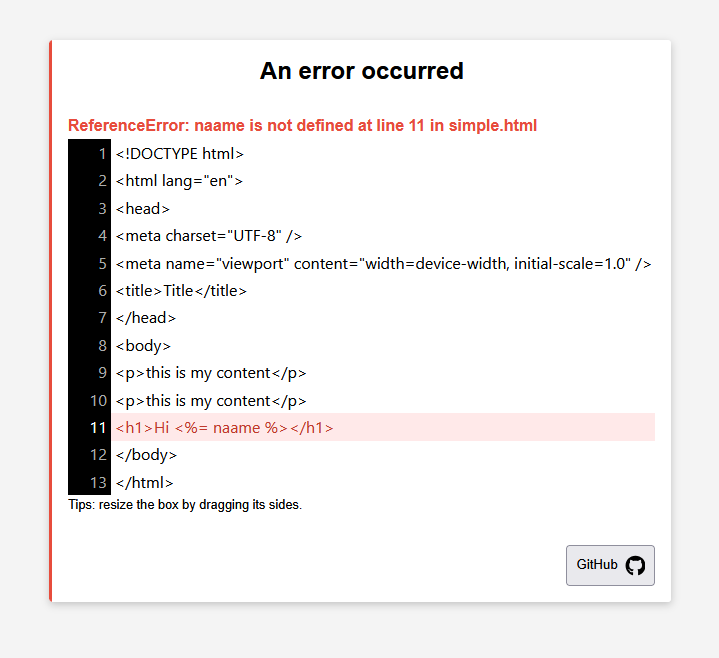
NB: set development: true to activate this option. Do not activate this option in production.
DevTools widget
When development: true is set, a floating Tao DevTools button (τ) appears in the bottom-right corner of every rendered page. Clicking it opens a panel that shows:
| Field | Description |
| -------------------- | -------------------------------------------------------------- |
| Template | Name of the rendered template |
| Render time | Rendering time in ms |
| Cache | Whether the template cache is enabled or disabled |
| Cache hit | Whether this render was served from cache |
| Children | Included sub-templates for this render |
| Data keys | Number of data keys passed to the template |
| Helpers | Number of local helpers passed to the template |
| Mapped templates | Full list of all templates discovered in the views directory |
Integration with Web Framework
Fastify:
import { Tao } from 'node-tao';
import Fastify from 'fastify';
const fastify = Fastify();

const tao = new Tao({ views: 'src', development: true });

declare module 'fastify' {
  interface FastifyReply {
    html(payload: string): FastifyReply;
  }
}

fastify.decorateReply('html', function (payload: string) {
  return this.type('text/html').send(payload);
});

fastify.get('/tao', (request, reply) => {
  const result = tao.render('test', { name: 'Fastify' });
  return reply.html(result);
});

try {
  await fastify.listen({ port: 3000 });
} catch (err) {
  fastify.log.error(err);
  process.exit(1);
}
Express:
import express from 'express';
import { Tao } from 'node-tao';
export const app = express();
app.use(express.json());

const tao = new Tao({ views: 'src', development: true });

app.get('/tao', (req, res) => {
  const result = tao.render('test', { name: 'Express' });
  res.send(result);
});

app.listen(3000, () => {
  console.log('listening on *:3000');
});
FAQs
It started as a fork of eta, but became a dedicated library because the changes made were too significant. If you know eta, the API will be familiar.
- Tao set security by design: Stack traces are not visible in the browser. Increased security in files mapping.
- Increased developer experience: Visual error representation, metrics, configuration options are checked.
- Immutability: Data provided in the template is immutable, ie. template data modification does not affect original data.
- Clearer API: Scope is well defined and restricted, which also improves security. Clean code practices are enforced.
- Clearer template syntax: No prefix are needed.
- Helpers: Global and local helpers, which are clearer and more suitable for little template logic.
- Flexible template path resolution: With
fileResolutionmode set toflexible, only end unique paths can be provided, which increases file path readability (aka.namespaces). - Vscode extension: Official vscode extension.
- Performance: Various performance optimization.
- Lexer: A lexer offers more accuracy and is more scalable.
- Testing: Modern and up to date numerous tests.
No async support: Supporting async rendering (e.g.,
await include) within templates encourages placing too much logic in the view layer and can be considered as an anti-pattern. Templates should be responsible for displaying data, while controllers should handle logic. Async behavior in templates would also require error handling (e.g.,try/catch), adding complexity and possible errors. Async logic in template make it impossible de optimize through aPromise.allor any parallelism, hard to test and debug. In short: if you have async data, fetch it beforehand and render it synchronously (or use client side Javascript).No
layouts: Layouts are essentially includes and add unnecessary complexity to the rendering process.No
rmWhitespace: Stripping whitespace at the template level yields negligible HTML size savings. Using compression (e.g., via Nginx or other proxies) is far more effective and scalable.
If you think those features are absolutely necessary, please open a new discussion on github and provide an example.
Change logs
V0.0.2: Fix node modules exclusion in files matching for the error template.
V0.0.3: Data exchange for the official extension, and various improvements.
V0.0.4: Fix NaN or Infinity value provided inside an object into the template.
V0.0.5: Fix character escape triggering an invalid js syntax.
V1.0.0: Transforming the basic template expression extraction (inherited from ETA) to a lexer. Adding a widget to developer experience. Render method accepts now a generic and two params, the second param containing data and helpers.
V1.0.2: Improved error management. More modern error template in case of an error when development is set to true. Removed inclusion error which was triggering false positive.
Credits
- Syntax and some parts of compilation were based on
etain the versions < 1.0.0.