
nodebb-plugin-topic-icons
v1.3.1
Published
Topic icons and covers for NodeBB 4: authors pick an icon from an admin-managed library in the composer; icons appear in topic lists and topic headers. Topics without a thumbnail can show the first image of their first post or a per-category default cover

Maintainers
 nairda218
Readme
nodebb-plugin-topic-icons


Topic icons for NodeBB 4: authors pick an icon from an admin-managed library in the composer, and the icon is shown next to the topic in topic lists and in the topic header. Since 1.1 it also gives topics covers: topics without a thumbnail can show the first image of their first post or a default cover of their category, all in one uniform frame.
- Author: nairda · Licence: MIT
- Source and issues: github.com/nairdaweb/nodebb-plugin-topic-icons
Screenshots
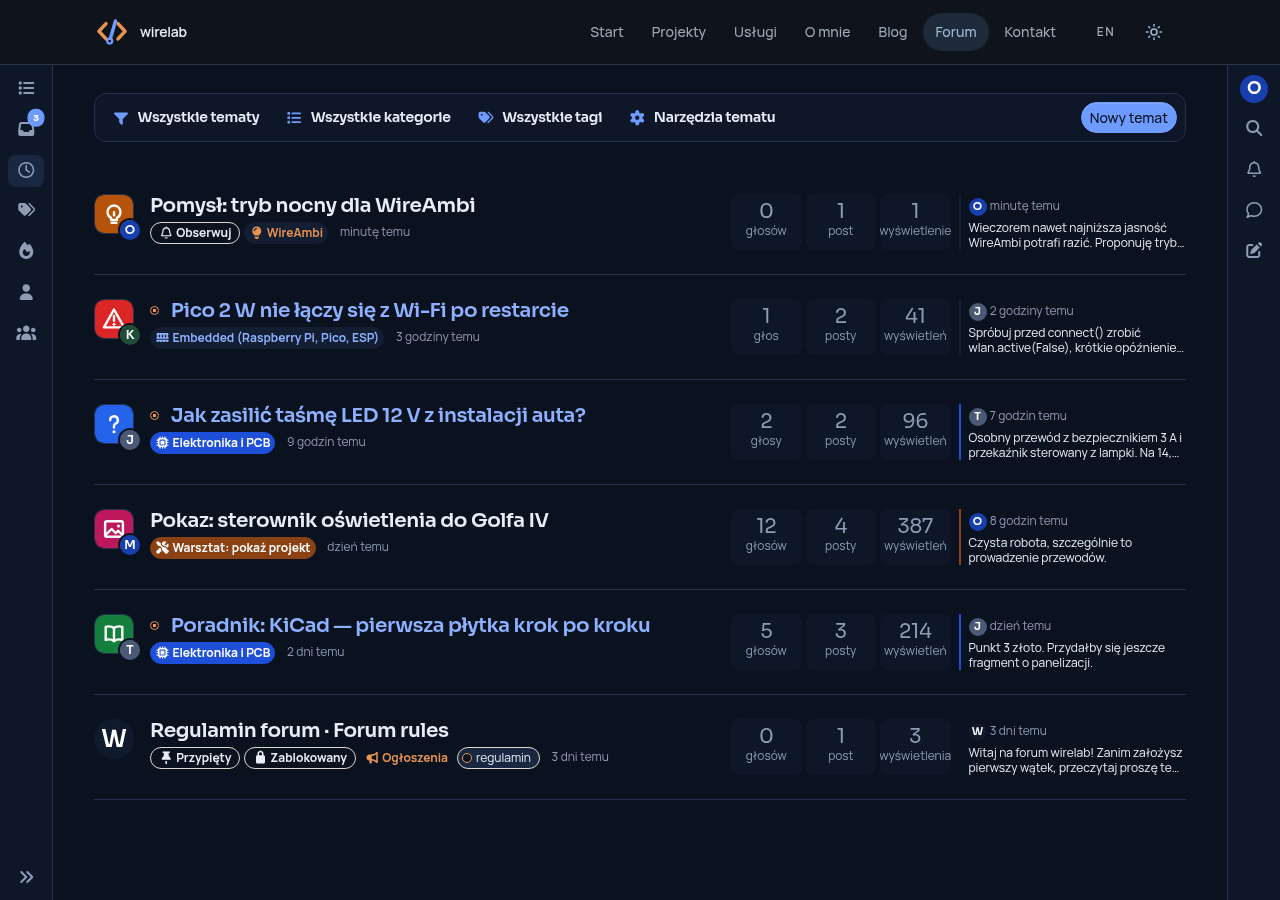
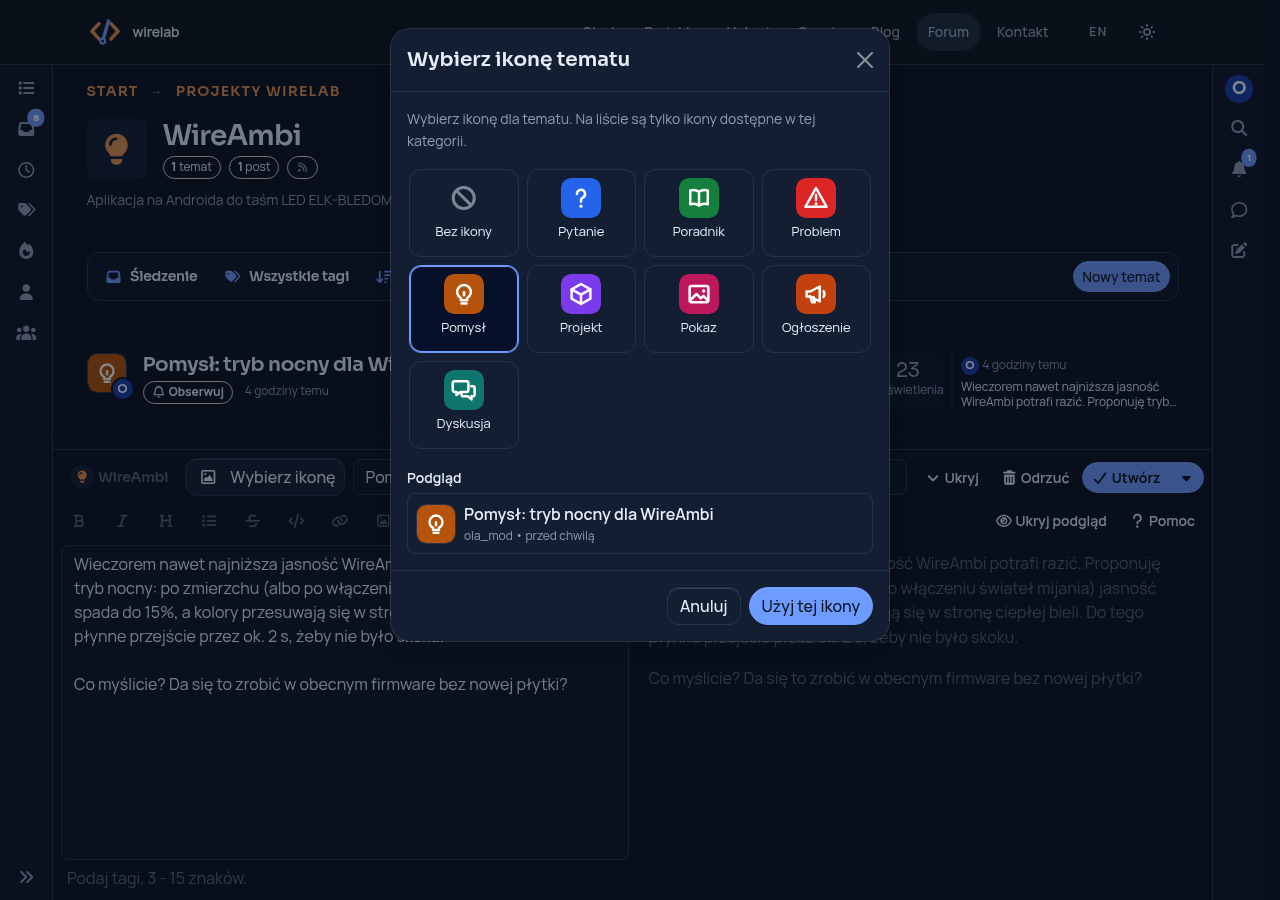
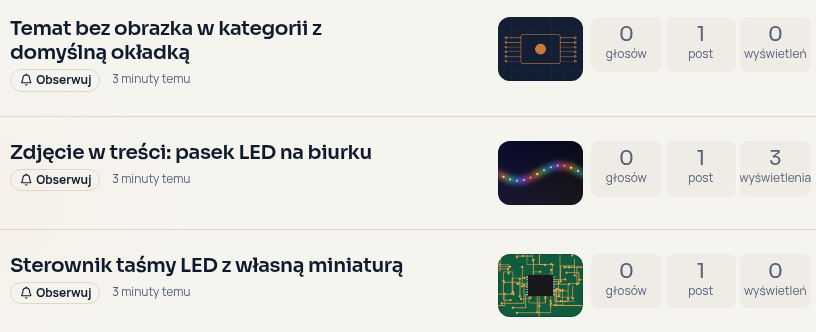
Screenshots in Polish, with a custom theme that puts the icon in place of the avatar; with Harmony the icon is shown in front of the title.
Features
- Picker in the composer: a "Choose icon" button next to the title opens a grid of the icons available in the selected category, with a preview of the topic row. The icon can be changed when editing the first post; a current icon that is no longer available is shown as such and can be replaced or removed. The pick is kept in composer drafts. Keyboard: arrow keys, Home and End.
- Library in the ACP: upload (PNG, WebP, GIF, SVG up to 512 KB; animated GIF/WebP work, wide logos keep their aspect ratio), rename, reorder, limit to categories, switch off, remove. Eight neutral built-in icons: question, guide, problem, idea, project, showcase, announcement, discussion.
- Per-category sets and defaults: each icon can be limited to some categories; each category can have a default icon (plus one forum-wide default) for topics without one.
- Permissions: everyone who can create topics, members of one group, or moderators only (see Privileges). Users choose from the library only; they cannot upload images.
- Server-side validation: the icon must exist, be active, be available in the category and the user must be allowed to choose, also to remove it; only the topic author or a moderator can change it. Topics that go to the post queue are checked when they are submitted. Refused choices return a translated error.
- Viewer's language for icon names on full page loads, ajaxify navigation and the plugin's API
routes (guests: the browser language when "auto-detect language" is on);
altand tooltip carry the icon name. Topic lists loaded through NodeBB's API v3 (e.g. infinite scroll) are rendered in the account or forum language and fixed up in the browser. - No tables of its own: the library is stored in the plugin settings, the picked icon in the
topic object (
topic:<tid>→iconId) and a per-icon sorted set of topics (topic-icons:icon:<id>:tids) lets a removed icon be cleared from its topics; it works with Redis, MongoDB and PostgreSQL. - Fast: the library is cached in memory (invalidated on save, also across processes through NodeBB's pubsub); rendered icons are kept in an LRU cache; topic lists need no extra topic query (users' language settings are cached for a minute).
- Topic covers: a default cover per category and the first image of the first post as the cover of topics without a thumbnail; one frame for all topic thumbnails (4:3 or square, cropped, rounded), also on phones. See Topic covers.
- Translated: en-GB and pl (other languages fall back to en-GB).
Compatibility
- NodeBB
^4.15.0(the ACP page uses the{{tx()}}template helper that core switched its admin templates to in 4.15), tested with NodeBB 4.16, nodebb-plugin-composer-default 11 and the Harmony theme. NodeBB 4.14 and older are not supported. - Node.js 22 or newer.
- The picker needs nodebb-plugin-composer-default (NodeBB's default composer).
Installation
Install and activate it in ACP → Extend → Plugins (search for topic-icons), or from the command line:
cd /path/to/nodebb
npm install nodebb-plugin-topic-icons
./nodebb activate nodebb-plugin-topic-icons
./nodebb build
./nodebb restart
Then configure it in ACP → Plugins → Topic icons. The eight built-in icons are available in every category right away.
Uninstalling leaves the iconId and coverScan fields in topics, the
topic-icons:icon:<id>:tids sorted sets and the settings:topic-icons hash in the database; they
are not used by anything else.
Configuration
ACP → Plugins → Topic icons
- Who can choose an icon — everyone who can create topics / members of a group (and moderators) / moderators and administrators only.
- Display — show icons in topic lists and in the topic header; forum-wide default icon.
- Icon library — order (= order in the picker), name, image (upload or a site path / https URL ending in .png, .webp or .svg), categories (none selected = all), active. Names of built-in icons come from the language files unless you type one.
- Topic covers — see Topic covers.
- Category defaults — icon for topics without one, and default cover, per category.
Settings are validated in the browser and again on the server before they are saved. A partial
save (e.g. meta.settings.setOne('topic-icons', 'showInList', 'off')) is merged with the stored
settings. The group for "members of a group" must exist and cannot be guests, spiders,
fediverse or banned-users; the ACP marks a stored group that was deleted or renamed.
What happens to a topic's icon
- Switched-off icon: no longer offered; topics that already use it keep it.
- Removed icon: when the settings are saved, it is cleared from the topics that used it (the
category default is shown instead), so an icon added again later under the same id does not
come back on old topics. Its uploaded image is deleted, as is an image replaced by a new upload.
Images uploaded but never saved in the library stay in
uploads/topic-icons/. - Topic moved to a category where its icon is not available: the icon is cleared and the default of the new category is shown. Limiting an icon to some categories later does not change topics elsewhere.
- Post queue: the icon is checked when the topic is submitted. If it is no longer valid when a moderator approves the topic (icon removed or switched off, topic moved to another category in the queue, author no longer allowed), the topic is posted without it.
- Editing: sending the current icon again is not a change, even when it is no longer available; the picker does not send it. With "moderators only", an author cannot change or remove an icon.
- Fork and merge: a topic created by forking or by merging under a new title starts without an icon (the category default is shown); merging into an existing topic keeps that topic's icon.
Topic covers
NodeBB lets authors add thumbnails to a topic ("topic thumbs"); themes show the first one in topic lists and all of them in the topic header, where a click opens NodeBB's image viewer. The plugin works with these thumbnails and never changes them. A topic without a thumbnail gets a cover, in this order:
- its own thumbnails (left alone);
- the first image of its first post, when Use the first image of the first post is on: an
image uploaded to the forum (
/assets/uploads/…), or, only when Also use images from other sites is on, an http(s) image of another site; - the default cover of its category, when Show the category's default cover is on;
- nothing.
The cover is added when topics are shown (filter:topics.get, filter:topic.get) as an extra
entry of thumbs in NodeBB's own shape, so it appears wherever the theme shows thumbnails, in the
viewer on the topic page and in og:image. It is not saved as a thumbnail: a new category cover
shows on every topic at once, switching a feature off removes its covers, and the composer's
thumbnail manager does not list them.
- First image: found in the Markdown (
, reference images) or HTML (<img src>) of the first post, skipping code blocks, inline code and HTML comments. It is looked up once per first post and kept in the topic fieldcoverScan(with the post id), written when the first post is edited and, for topics without it (older topics, new topics), the first time they are listed, with one post query for the whole list. Lists of topics already looked up cost no extra query, and an edit that removes the image removes the cover right away. Forum uploads are hidden from guests when NodeBB's private uploads is on, as NodeBB does with thumbnails. - Images from other sites are off by default: every visitor's browser would load them from that site (which sees their IP address), and they may vanish or change there.
- Category covers: set per category in Category defaults (upload PNG, JPEG, WebP, GIF or SVG up to 2 MB, or enter a site path or an https URL). Uploads are for administrators only and are checked like icon uploads; a cover that is removed or replaced deletes its uploaded file on save.
- Uniform frame (on by default): all topic thumbnails in lists and in the topic header get
the same size and ratio (4:3 or square),
object-fit: cover, rounded corners and a hairline border; the counter is hidden when there is a single image. With also on phones, thumbnails in topic lists are shown below 1200 px as well (Harmony hides them there). Colours come from Bootstrap's variables, so light and dark modes follow the theme. The topic title becomes thealttext of each thumbnail. - If NodeBB's Show post uploads as thumbnails is on, forum uploads in the first post are already thumbnails (step 1); the plugin still adds external images and category covers.
Defaults: category covers on, first image off, images from other sites off, uniform frame on (4:3, also on phones).
Privileges
- Choosing an icon is controlled by the Who can choose an icon setting, on top of NodeBB's own
privileges (the user must be able to create the topic or edit its first post):
- everyone who can create topics (default);
- members of a group (plus moderators and administrators);
- moderators and administrators only.
- Only the topic author (when allowed by the setting) or a moderator of the category can change or remove a topic's icon.
- The ACP page is open to administrators and to users with the
admin:settingsprivilege; uploading images is restricted to administrators.
For theme authors
Topics in lists (topics) and the topic page carry topicIcon:
{ "id": "question", "name": "Question", "url": "/assets/…/question.svg", "isDefault": false, "html": "<span class=\"topic-icon\">…</span>" }Topic lists are those that go through NodeBB's filter:topics.get (categories, recent, popular,
unread, tags, user profiles); search results are posts and carry no topicIcon.
html is built on the server with the name escaped ([ and ] as [ / ], so names
never turn into translation tokens) and can be printed raw, e.g. in partials/topics_list.tpl:
{{{ if ./topicIcon }}}{{./topicIcon.html}}{{{ end }}}Themes without such a slot get the icon in front of the topic title from public/client.js.
Sizes are CSS custom properties: --topic-icon-size, --topic-icon-size-header,
--topic-icon-size-inline, --topic-icon-max-width, --topic-icon-radius. The icon picker dialog is
--topic-icons-picker-width wide at most (default 60rem, from tablet width up; phones keep a full-width dialog).
Covers need no template changes: they are entries of thumbs ({ id, name, path, url, cover },
cover being "auto" or "category"). Topics that show a picture also carry
topicCover: { url, source } with source "own", "auto" or "category". The uniform frame
uses the body classes topic-covers, topic-covers--4-3 / topic-covers--square and
topic-covers--phones, NodeBB's thumbnail markup (.topic-thumbs .topic-thumb in lists,
[component="topic/thumb/list"] in the topic header) and these custom properties:
--topic-cover-width, --topic-cover-width-header, --topic-cover-radius, --topic-cover-bg,
--topic-cover-border. The thumbnail <img> markup itself comes from the theme, so native lazy
loading (loading="lazy") depends on the theme's templates.
Other plugins can get icons for any topics in one database call (at most 500 per call; no
privilege checks, so pass only topics the viewer may see; lang must be an installed language):
const topicIcons = require.main.require('nodebb-plugin-topic-icons');
const icons = await topicIcons.getTopicIcons([1, 2, 3], { lang: 'pl' });
API
GET /api/v3/plugins/topic-icons/choices?cid=<cid>,?pid=<pid>or?tid=<tid>— icons the viewer may pick for a new topic or when editing the first post (used by the composer).GET /api/v3/plugins/topic-icons/icons?tids=1,2,3— rendered icons of up to 100 readable topics in the viewer's language.topics.post/posts.editaccepticonId(""removes the icon).POST /api/admin/plugins/topic-icons/upload— ACP icon upload, administrators only, CSRF token required.POST /api/admin/plugins/topic-icons/upload-cover— ACP category cover upload, same rules.
Requests are limited per user (guests: per IP address) in each NodeBB process with
express-rate-limit: 20 uploads, 60 ACP page loads and 300 API requests per minute; above that the
answer is 429.
Security notes
Review and scanning. Every release runs the unit tests and the linter. In October 2026 the code went through an independent code review and a Snyk Code scan; all reported issues were fixed, and the scan showed no open findings at that time. This is a point-in-time result, not a guarantee. Please report vulnerabilities privately — see SECURITY.md.
- Uploads: administrators only (the ACP page is open to
admin:settings, but the upload button and route are not); extension, MIME type and file content must agree (PNG, WebP, SVG); SVGs with scripts, event handlers, external links or external resources in styles (url(…)other than#id,@import) are refused, and NodeBB sanitises SVG uploads as well; files get new unique names. - Cover uploads follow the same rules (administrator check before the file is received, type, content and size checks, SVG filter, unique names) with PNG, JPEG, WebP, GIF and SVG up to 2 MB.
- Icons are always shown through
<img>(scripts in SVG files do not run there) withreferrerpolicy="no-referrer". - Cover URLs taken from posts must be forum uploads (
/assets/uploads/…, no./..segments, image extension) or, when allowed, http(s) URLs without user names, quotes, spaces or angle brackets; anything else (javascript:,data:, other site paths) is ignored. Category cover URLs must be site paths or https URLs ending in an image extension. - Image URLs must be site-relative or https, without backslashes, quotes,
./..segments (also percent-encoded) or encoded slashes. - An https image from another site is loaded by every visitor's browser from that site, which
sees their IP address (not the page, thanks to
no-referrer). Upload images to keep them local.
Translations
en-GB and pl are included; other languages fall back to en-GB. Strings live in
languages/<code>/topic-icons.json (forum) and languages/<code>/admin/plugins/topic-icons.json
(ACP); pull requests with new languages are welcome. Names typed in the ACP are the same in every
language; built-in icons without a typed name use the language files.
Update notices
Once a day the plugin asks updates.wirelab.pl whether a newer version exists, and shows "Version X is available — what's new" on its ACP page when it does.
- What is sent: nothing beyond a plain
GET https://updates.wirelab.pl/api/nodebb-plugin-topic-icons.json. No query string, no cookies, no forum URL, user or usage data. TheUser-Agentheader isnodebb-plugin-topic-icons/<installed version>. As with any web request, the server (GitHub Pages) sees the forum server's IP address. - How often: at most once a day, in the background and when the ACP page is opened (from a cache kept in the database). 5 s timeout; network errors are logged at verbose level only.
- Switching it off: ACP → Plugins → this plugin → "Check for updates". When it is off, no request is made at all.
Development
npm install
npm test      # node:test — rules, validation, upload checks, rendering, settings store, covers
npm run lint  # eslint
lib/ holds the logic (rules.js, icons.js, covers.js, upload.js, config-store.js, lang.js, lru.js);
library.js wires it into NodeBB hooks and routes.
Roadmap
- State overlays on the icon: pinned, locked and "solved" (the latter only when the
isSolvedfield of nodebb-plugin-question-and-answer is present; no hard dependency). - Optional icon of the latest topic in the category list.
- Update the icon in the topic header right after the first post is edited (now shown after the next page load).
- Keep the icon when a topic is forked or merged under a new title.
Changelog
See CHANGELOG.md.
Licence
MIT © nairda, see LICENSE. The built-in icons in static/icons/ are part of this package and
under the same licence.