
nodedump
v0.0.8
Published
Outputs variables in a visual, easy to read format based on Adobe ColdFusion's CFDump tag. Think of it as console.log on steroids.

Maintainers
 ragamufin
Readme
nodedump
Outputs variables in a visual, easy to read format based on Adobe ColdFusion's CFDump tag with enhancements unique to node.js such as the syntax highlighting of functions. Think of it as console.log on steroids.
nodedump works both server and client side.
For example, simply doing nodedump(user) gives us:
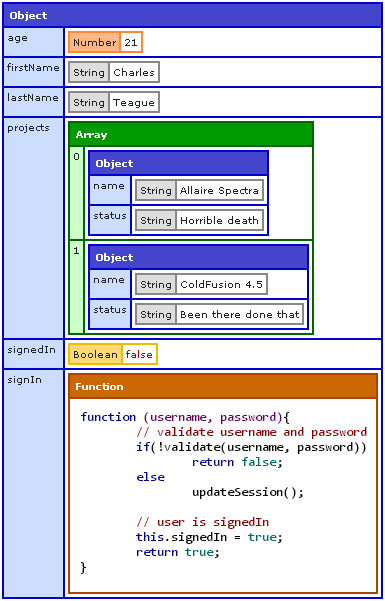
The above is a dump of the variable user created like so:
signIn = function(username, password){
	// validate username and password
	if(!validate(username, password))
		return false;
	else
		updateSession();

	// user is signedIn
	this.signedIn = true;
	return true;
};

var user = {
	firstName: 'Charles'
	,lastName: 'Teague'
	,age: 21
	,signedIn: false
	,signIn: signIn
	,projects: [
		{
			name: 'Allaire Spectra'
			,status: 'Horrible death'
		}
		,{
			name: 'ColdFusion 4.5'
			,status: 'Been there done that'
		}
	]
};
With console.log(user) we get:
{ firstName: 'Charles',
  lastName: 'Teague',
  age: 21,
  signedIn: false,
  signIn: [Function],
  projects:
   [ { name: 'Allaire Spectra', status: 'Horrible death' },
     { name: 'ColdFusion 4.5', status: 'Been there done that' } ] }
Which is the typical output we have to rely on usually to do our debugging. As our variables become more complicated this becomes a painful way to know what's going on within them.
nodedump is based on the CFDump tag of Adobe's ColdFusion which has long been a unique feature allowing developers to understand what's in any variable. Once you get accustomed to the color coding and layout of dumped output, your brain will be able to quickly see and understand what's in any variable you dump with just a glance. Pretty much all the options available for CFDump have been included in nodedump.
INSTALLATION
Run this from your bash or command line:
$ [sudo] npm install nodedumpUSAGE
First, require nodedump:
require('nodedump');This will create a global function called nodedump. Then in your view or wherever you output to the browser, whenever you want to dump the contents of a variable do:
nodedump(vartodump);See the calling nodedump section section for the various ways to call and name the function that is used for dumping.
CLIENT-SIDE
To use nodedump client-side simply include the nodedump-client.js (available in the nodedump-client directory) file in your page and then dump any variable you'd like. For instance:
<!DOCTYPE html>
<html>
<head>
	<title>nodedump client side example</title>
	<script src="nodedump-client-min.js"></script>
</head>
<body>
	<script>
	    // dump something
	    document.write(nodedump(location));
	</script>
</body>
</html>
EXAMPLE
The following example sets up a server, creates a test object and dumps it to the browser. Try it!
var http = require('http');
nodedump = require('nodedump').dump;

signIn = function(username, password){
	// validate username and password
	if(!validate(username, password))
		return false;
	else
		updateSession();

	// user is signedIn
	this.signedIn = true;
	return true;
};

var server = http.createServer(function(request, response) {
	console.log('Request received',new Date());
	console.log('url:',request.url);
	// skip requests for favicon
	if (request.url.indexOf('favicon.ico') > -1) {
		console.log('favicon requested');
		response.writeHead(500);
		response.end();
		console.log('Request ended');
		return;
	}

	// start output to the browser
	response.writeHead(200, {"Content-Type": "text/html"});

	var user = {
		firstName: 'Charles'
		,lastName: 'Teague'
		,age: 21
		,signedIn: false
		,signIn: signIn
		,projects: [
			{
				name: 'Allaire Spectra'
				, status: 'Horrible death'
			}
			,{
				name: 'ColdFusion 4.5'
				,status: 'Been there done that'
			}
		]
	};

	//capture dump
	var output = nodedump(user);

	// write response to the browser
	response.write(
		'<html>'
			+ '<head>'
				+ '<title>nodedump example!</title>'
			+ '</head>'
			+'<body>'
				+output
			+'</body>'
		+'</html>'
	);
	response.end();

	console.log('Request ended');
	//console.log('global.bnodedumpinited',global.bnodedumpinited);
}).listen(3000);

console.log("Server has started.");
OPTIONS
Options can be passed as an object whenever you nodedump a variable as the second parameter, e.g. nodedump(vartodump, options)
The available options are:
label- String. Output on the header of the dump.expand- Boolean/Array. Defaults totrue. The dump can be collapsed entirely by passingfalse. Simply click on the headers in order to expand them. An array of complex types can be passed and those types of objects will be expanded while everything else will remain collapsed. For e.g.['Array', 'Object', 'Function']collapse- Boolean/Array. Defaults tofalse. Works opposite the wayexpanddoes. The dump can be collapsed entirely by passingtrue. An array of types can be passed and those types of objects will be collapsed wherever they are in the dump. For e.g.['Array', 'Object', 'Function']show- Array. A list of object keys / array positions to show. Others not in the list will be hidden.hide- Array. A list of object keys / array positions to hide.hideTypes- Array. A list of complex types of objects to exclude from being output. e.g.['RegExp', 'Function'].top- Number. The number of array positions of the dump variable to show. For objects, this is the number of keys of the top level to show.levels- Number. How many nested levels of an object to dump down to.sortKeys- Boolean. Defaults totrue. Tells nodedump to output the keys of objects sorted alphabetically. Iffalse, keys will be output in whatever order node.js returns them (usually the order in which they were added).syntaxHighlight- Boolean. Defaults totrue. Tells whether or not the dump of functions should be syntax highlighted (color-coded).dumpFunctionName- String. Defaults to'nodedump'. Name to use for the nodedump function. E.g. if this is changed to'dump'then in addition to doingnodedump(vartodump)you can dodump(vartodump).
OPTIONS IN ACTION
###expand and label
nodedump(user1, {expand: false, label: 'User1'});
nodedump(user2, {expand: false, label: 'User 2'});
Outputs:
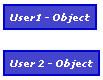
Clicking on the header of collapsed sections will expand them.
###top with an object
nodedump(user, {top:4});Outputs:
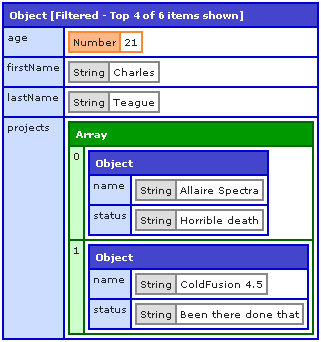
Notice that though the object has 6 keys, only the top 4 were output.
###top with an array
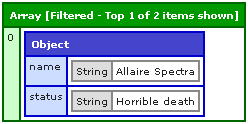
nodedump(user.projects, {top:1});Outputs:
###levels
nodedump(user, {levels:2});Outputs:
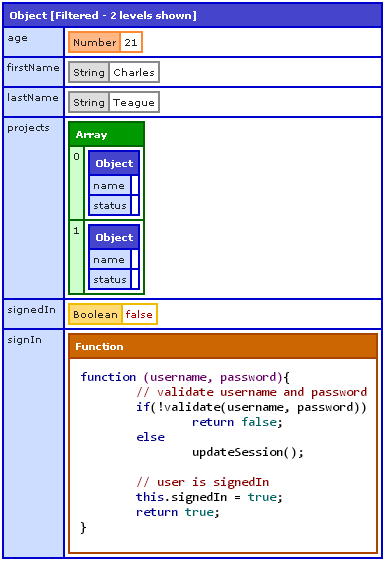
Notice that in the projects sub-array that the 3rd level is not shown.
###show
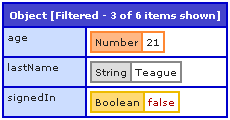
nodedump(user, {show:['signedIn','age','lastName']});Outputs:
###hide
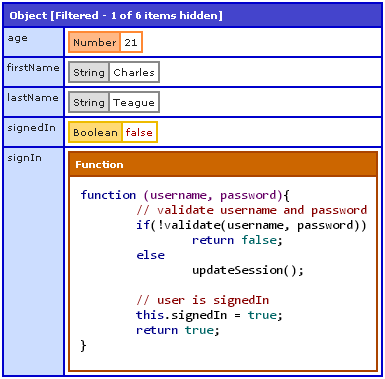
nodedump(user, {hide:['projects']});Outputs:
OVERRIDING DEFAULT OPTIONS
Default options can be overriden by calling the init method on nodedump. E.g.
require('nodedump').init({
	dumpFunctionName: 'dump'
	,top: 100
	,sortKeys: false
	,expand: false
});
The above would set the default for all nodedumps as follows:
- You could do
dump(vartodump)insteadnodedump(vartodump). Keep in mind that the latter would still work. - Output no more than 100 top keys.
- Not sort object keys.
- Show all nodedumps collapsed.
CALLING NODEDUMP
require('nodedump') will create the global function nodedump that can be used to dump variables. As you've seen with the dumpFunctionName option you can add another name for the function and use that instead. Another way to do this is to set your variable directly to the dump function. E.g.:
d = require('nodedump').dump;So now you'd be able to dump variables using d(vartodump).
You can do this even when initializing nodedump with default options:
d = require('nodedump').init({ expand: false }).dump;