npm package discovery and stats viewer.

Discover Tips

  • General search

    [free text search, go nuts!]

  • Package details

    pkg:[package-name]

  • User packages

    @[username]

Sponsor

Optimize Toolset

I’ve always been into building performant and accessible sites, but lately I’ve been taking it extremely seriously. So much so that I’ve been building a tool to help me optimize and monitor the sites that I build to make sure that I’m making an attempt to offer the best experience to those who visit them. If you’re into performant, accessible and SEO friendly sites, you might like it too! You can check it out at Optimize Toolset.

About

Hi, 👋, I’m Ryan Hefner  and I built this site for me, and you! The goal of this site was to provide an easy way for me to check the stats on my npm packages, both for prioritizing issues and updates, and to give me a little kick in the pants to keep up on stuff.

As I was building it, I realized that I was actually using the tool to build the tool, and figured I might as well put this out there and hopefully others will find it to be a fast and useful way to search and browse npm packages as I have.

If you’re interested in other things I’m working on, follow me on Twitter or check out the open source projects I’ve been publishing on GitHub.

I am also working on a Twitter bot for this site to tweet the most popular, newest, random packages from npm. Please follow that account now and it will start sending out packages soon–ish.

Open Software & Tools

This site wouldn’t be possible without the immense generosity and tireless efforts from the people who make contributions to the world and share their work via open source initiatives. Thank you 🙏

© 2026 – Pkg Stats / Ryan Hefner

norn-cli

v1.5.0

Published

A powerful REST client for making HTTP requests with sequences, variables, scripts, and cookie support

Downloads

4,011

Readme

Norn - REST Client

A powerful REST client extension for VS Code with sequences, assertions, environments, script execution, and CLI support for CI/CD pipelines.

VS Code Version License

Features

  • HTTP Requests: Send GET, POST, PUT, DELETE, PATCH, HEAD, OPTIONS requests from .norn files
  • API Definitions: Define reusable headers and endpoints in .nornapi files
  • Variables: Define and reference variables with var name = value and {{name}}
  • Environments: Manage dev/staging/prod configurations with .nornenv files
  • Sequences: Chain multiple requests with response capture using $N.path
  • Test Sequences: Mark sequences as tests with test sequence for CLI execution
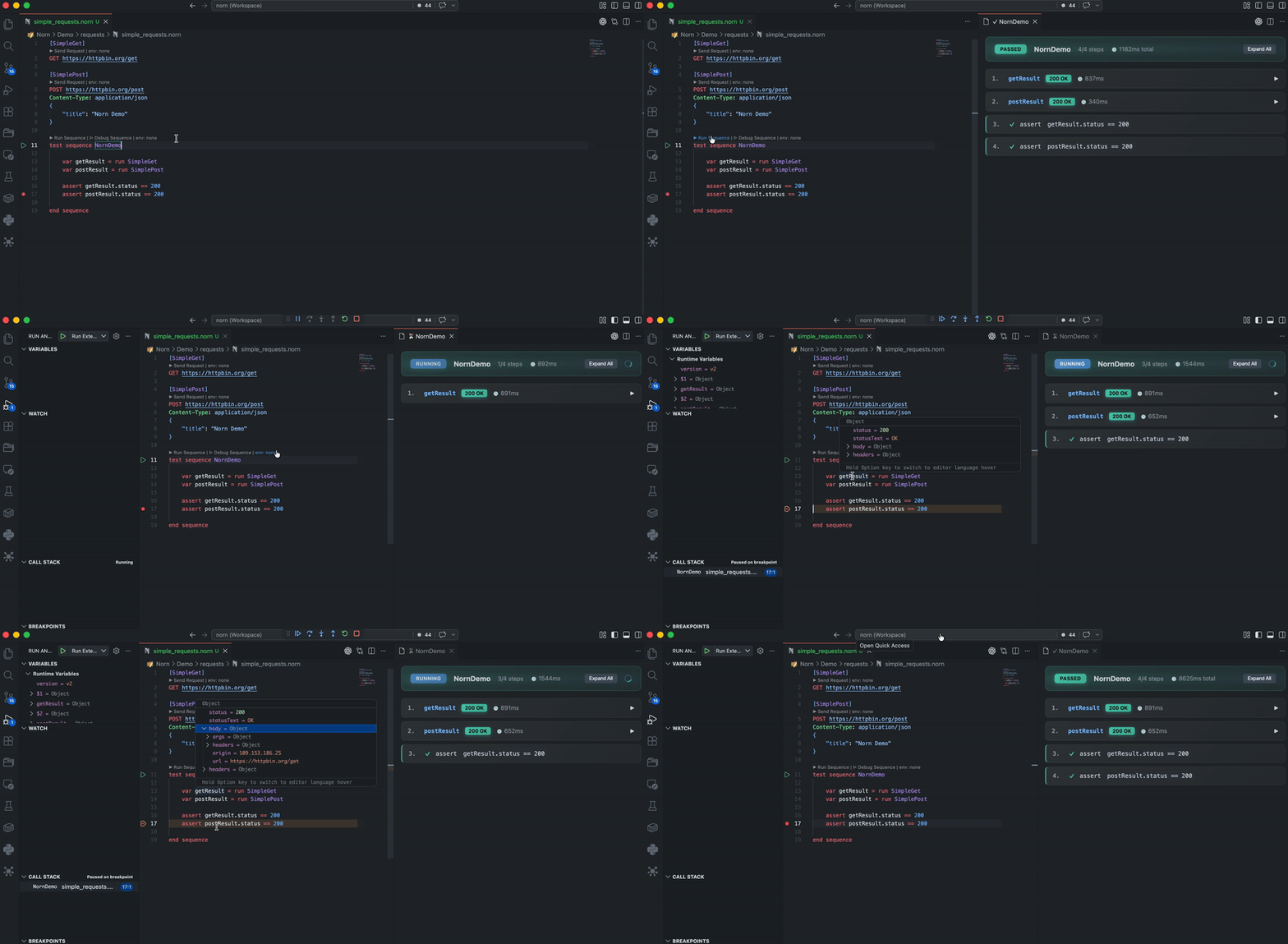
  • Test Explorer: Run tests from VS Code's Testing sidebar with colorful output
  • Swagger Coverage: Track API coverage with status bar indicator and detailed panel
  • Parameterized Tests: Data-driven testing with @data and @theory annotations
  • Sequence Tags: Tag sequences with @smoke, @team(CustomerExp) for filtering in CI/CD
  • Secret Variables: Mark sensitive environment variables with secret for automatic redaction
  • Assertions: Validate responses with assert statements supporting comparison, type checking, and existence
  • Named Requests: Define reusable requests with [RequestName] and call them with run RequestName
  • Conditionals: Control flow with if/end if blocks based on response data
  • Wait Commands: Add delays between requests with wait 1s or wait 500ms
  • Retry and Backoff: Automatically retry failed requests with retry 3 backoff 200 ms
  • JSON File Loading: Load test data from JSON files with run readJson ./file.json
  • Property Updates: Modify loaded JSON data inline with config.property = value
  • Script Execution: Run bash, PowerShell, or JavaScript scripts within sequences
  • Print Statements: Debug and log messages during sequence execution
  • Cookie Support: Automatic cookie jar with persistence across requests
  • Response Comparison: Compare any two API responses side-by-side with VS Code's diff view
  • Clickable JSON: Click any JSON value in the response panel to auto-generate assertions
  • Syntax Highlighting: Full syntax highlighting for requests, headers, JSON bodies
  • IntelliSense: Autocomplete for HTTP methods, headers, variables, keywords, and Swagger-based request body keys/templates for endpoint POST/PUT/PATCH calls
  • Diagnostics: Error highlighting for undefined variables
  • CLI: Run tests from terminal with JUnit/HTML reports for CI/CD automation

Quick Start

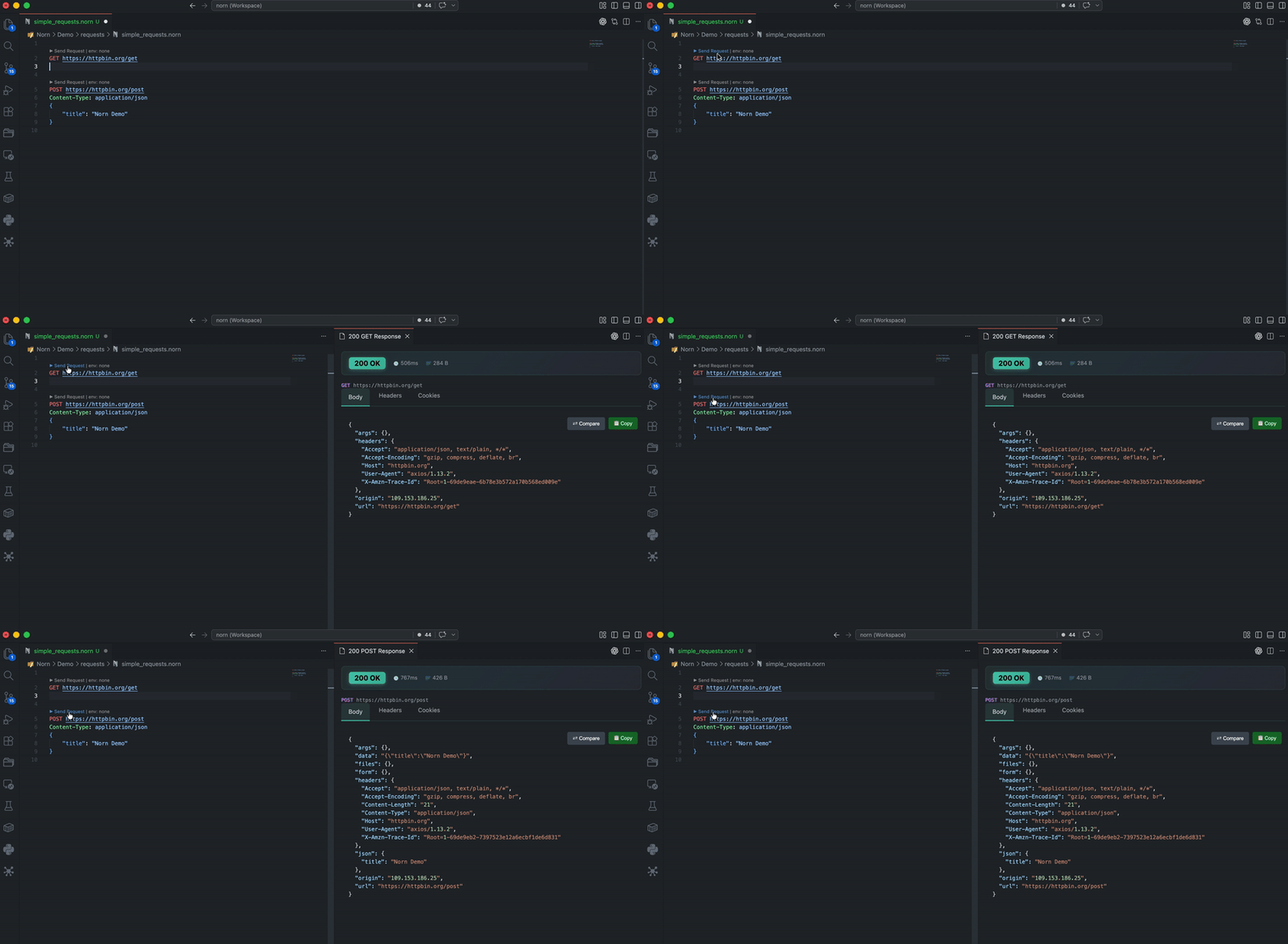
  1. Create a file with .norn extension
  2. Write your HTTP request
  3. Click "Send Request" above the request line

Usage

Basic Request

GET https://api.example.com/users
Authorization: Bearer my-token

Variables

Variables can hold literal strings or be assigned from expressions:

# Literal string (quotes optional for simple values)
var baseUrl = https://api.example.com
var name = "John Doe"

# Use variables with {{}}
GET {{baseUrl}}/users
Authorization: Bearer {{token}}

Variable Assignment in Sequences

Inside sequences, you can assign variables from expressions:

sequence Example
    var data = run readJson ./config.json
    
    # Extract a value from JSON variable (evaluated)
    var userId = data.users[0].id
    
    # Literal string with interpolation
    var message = "User ID is {{userId}}"
    
    # Response capture
    GET https://api.example.com/users/{{userId}}
    var userName = $1.body.name
    
    print "Result" | "{{message}}, Name: {{userName}}"
end sequence

| Syntax | Type | Example | |--------|------|---------| | var x = "text" | Literal string | var name = "John" | | var x = "Hi {{y}}" | String with interpolation | var msg = "Hello {{name}}" | | var x = someVar.path | Expression (evaluated) | var id = data.users[0].id | | var x = $1.body.id | Response capture | var token = $1.body.token | | var x = run ... | Script/JSON result | var data = run readJson ./file.json |

Request with Body

POST https://api.example.com/users
Content-Type: application/json
{
    "name": "John Doe",
    "email": "[email protected]"
}

If the request uses an imported endpoint (POST/PUT/PATCH EndpointName) backed by a cached Swagger spec, typing { on the body line offers Insert request body template (required fields only). As you type JSON keys, IntelliSense suggests schema properties for that object.

Sequences (Chained Requests)

Chain multiple requests and capture response data:

sequence AuthFlow
    POST https://api.example.com/login
    Content-Type: application/json

    {"username": "admin", "password": "secret"}

    var token = $1.accessToken

    GET https://api.example.com/profile
    Authorization: Bearer {{token}}
end sequence

Click "▶ Run Sequence" above the sequence line to execute all requests in order.

Sequence Composition

Sequences can call other sequences, enabling modular test design and natural setup/teardown patterns:

# Define reusable setup sequence
sequence Login
    POST {{baseUrl}}/auth/login
    Content-Type: application/json
    {"username": "admin", "password": "secret"}
    var token = $1.body.accessToken
    print "Logged in" | "Token: {{token}}"
end sequence

# Define reusable teardown sequence
sequence Logout
    POST {{baseUrl}}/auth/logout
    Authorization: Bearer {{token}}
    print "Logged out"
end sequence

# Main test sequence uses setup/teardown
sequence UserTests
    # Run setup - token variable becomes available
    run Login
    
    # Run actual tests
    GET {{baseUrl}}/users/me
    Authorization: Bearer {{token}}
    assert $1.status == 200
    
    # Run teardown
    run Logout
end sequence

Key behaviors:

  • Variables set in called sequences are available to the caller (token from Login)
  • Sequences can be nested to any depth
  • Circular references are detected and reported as errors
  • If a called sequence fails, the parent sequence stops

Sequence Parameters

Sequences can accept parameters with optional default values:

# Required parameter
sequence Greet(name)
    print "Hello, {{name}}!"
end sequence

# Optional parameter with default
sequence Login(username, password = "secret123")
    POST {{baseUrl}}/auth/login
    Content-Type: application/json
    {"username": "{{username}}", "password": "{{password}}"}
    
    var token = $1.body.accessToken
    return token
end sequence

# Call with positional arguments
run Greet("World")
run Login("admin", "mypassword")

# Call with named arguments (any order)
run Login(password: "pass123", username: "admin")

# Use defaults - only provide required params
run Login("admin")  # uses default password

Rules:

  • Required parameters (no default) must come before optional parameters
  • Positional arguments are bound in order
  • Named arguments can be in any order
  • Cannot mix positional arguments after named arguments

Sequence Return Values

Sequences can return values that the caller can capture and use:

sequence FetchUser(userId)
    GET {{baseUrl}}/users/{{userId}}
    var name = $1.body.name
    var email = $1.body.email
    return name, email
end sequence

sequence MyTests
    # Capture return values
    var user = run FetchUser("123")
    
    # Access individual fields
    print "User name" | "{{user.name}}"
    print "User email" | "{{user.email}}"
    
    # Use in requests
    POST {{baseUrl}}/messages
    Content-Type: application/json
    {"to": "{{user.email}}", "subject": "Hello {{user.name}}"}
end sequence

IntelliSense: When you type {{user., you'll see name and email as completions based on the sequence's return statement.

Sequence Tags

Tag sequences for filtering during test execution. Tags support simple names and key-value pairs:

# Simple tags
@smoke @regression
sequence AuthFlow
    POST {{baseUrl}}/auth/login
    Content-Type: application/json
    {"username": "admin", "password": "secret"}
    assert $1.status == 200
end sequence

# Key-value tags for categorization
@team(CustomerExp)
@priority(high)
@jira(NORN-123)
sequence CheckoutFlow
    GET {{baseUrl}}/checkout
    assert $1.status == 200
end sequence

# Mixed tags on multiple lines
@smoke
@team(Platform)
@feature(payments)
sequence PaymentValidation
    POST {{baseUrl}}/payments
    assert $1.status == 201
end sequence

Tag Syntax:

  • Simple tags: @smoke, @regression, @wip, @slow
  • Key-value tags: @team(CustomerExp), @priority(high), @jira(NORN-123)
  • Multiple tags can be on the same line or separate lines
  • Tag names follow the pattern: [a-zA-Z_][a-zA-Z0-9_-]*
  • Tag matching is case-insensitive

CLI Filtering:

# Run sequences tagged @smoke
npx norn tests/ --tag smoke

# AND logic: must have BOTH tags
npx norn tests/ --tag smoke --tag auth

# OR logic: match ANY tag
npx norn tests/ --tags smoke,regression

# Key-value exact match
npx norn tests/ --tag team(CustomerExp)

# Combine with environment
npx norn tests/ --env staging --tag smoke

Behavior:

  • When a sequence calls run OtherSequence and tag filtering is active, non-matching sequences are silently skipped
  • Untagged sequences run when no tag filter is specified
  • Tags can only be applied to sequences (diagnostics warn on misplaced tags)

Imports

Organize your tests by importing named requests and sequences from other files:

# common.norn - shared utilities
var baseUrl = https://api.example.com

[AuthRequest]
POST {{baseUrl}}/auth/login
Content-Type: application/json
{"username": "admin", "password": "secret"}

sequence SharedSetup
    run AuthRequest
    var token = $1.body.accessToken
end sequence
# main-test.norn - imports shared utilities
import "./common.norn"

sequence MyTests
    # Use imported sequence
    run SharedSetup
    
    # Use imported request
    run AuthRequest
    
    # Token from SharedSetup is available
    GET {{baseUrl}}/users/me
    Authorization: Bearer {{token}}
    assert $1.status == 200
end sequence

Key behaviors:

  • Import paths are relative to the current file
  • Nested imports are supported (imported files can import other files)
  • Circular imports are detected and reported as errors
  • Only named requests [Name] and sequences are imported
  • Variables are resolved at import time (baked in), not exported
  • .nornenv resolution is file-aware: Norn walks up from the running file and uses the closest .nornenv

API Definition Files (.nornapi)

Define reusable API configurations with header groups and named endpoints in .nornapi files.

Header Groups

Header groups define reusable sets of HTTP headers:

# api.nornapi

headers Json
Content-Type: application/json
Accept: application/json
end headers

headers Auth
Authorization: Bearer {{token}}
X-API-Key: {{apiKey}}
end headers

headers Form
Content-Type: application/x-www-form-urlencoded
end headers
  • Header values can include {{variables}} that are resolved at runtime
  • Multiple header groups can be applied to a single request

Named Endpoints

Define named endpoints with path parameters using {param} syntax:

endpoints
    # Basic CRUD operations
    GetUser: GET {{baseUrl}}/users/{id}
    GetAllUsers: GET {{baseUrl}}/users
    CreateUser: POST {{baseUrl}}/users
    UpdateUser: PUT {{baseUrl}}/users/{id}
    DeleteUser: DELETE {{baseUrl}}/users/{id}
    
    # Multiple path parameters
    GetUserPosts: GET {{baseUrl}}/users/{userId}/posts
    GetUserPost: GET {{baseUrl}}/users/{userId}/posts/{postId}
    
    # All HTTP methods supported
    CheckHealth: HEAD {{baseUrl}}/health
    GetOptions: OPTIONS {{baseUrl}}/api
end endpoints
  • Endpoint names are case-sensitive (e.g., GetUser, CreateUser)
  • Path parameters use single braces: {id}, {userId}
  • Environment variables use double braces: {{baseUrl}}

Swagger/OpenAPI Import

Import endpoints directly from OpenAPI/Swagger specifications:

# api.nornapi

swagger https://petstore.swagger.io/v2/swagger.json

Click "Import Swagger" CodeLens above the statement to fetch and generate endpoint definitions from the spec.

Using .nornapi in .norn Files

Import your API definitions and use them in requests:

import "./api.nornapi"

# Standalone request with endpoint and header group
GET GetUser(1) Json

# Inside a sequence
sequence UserTests
    # Basic endpoint call with parameter
    GET GetTodo(1) Json
    assert $1.status == 200
    
    # Multiple header groups (space-separated)
    GET GetUser(1) Json Auth
    
    # Header groups on separate lines
    POST CreateUser
    Json
    Auth
    {"name": "John", "email": "[email protected]"}
    
    # Capture response to variable
    var user = GET GetUser(1) Json
    print "User" | "{{user.body.name}}"
    
    # Use variables in endpoint parameters
    var userId = 5
    GET GetUser({{userId}}) Json
    
    # Quoted string parameters
    GET GetUser("123") Json
end sequence

Endpoint Syntax Reference

| Syntax | Description | |--------|-------------| | GET EndpointName(param) | Call endpoint with positional parameter | | GET EndpointName(param1, param2) | Multiple positional parameters | | GET EndpointName(id: "123") | Named parameter | | GET EndpointName(1) Json | With header group | | GET EndpointName(1) Json Auth | Multiple header groups | | var x = GET EndpointName(1) Json | Capture response to variable |

Assertions

Validate response data with powerful assertion operators:

sequence ValidateAPI
    GET https://api.example.com/users/1
    
    # Status and comparison assertions
    assert $1.status == 200
    assert $1.status < 300
    
    # Body value assertions
    assert $1.body.id == 1
    assert $1.body.name == "John"
    assert $1.body.age >= 18
    
    # String assertions
    assert $1.body.email contains "@"
    assert $1.body.name startsWith "J"
    assert $1.body.name endsWith "ohn"
    assert $1.body.email matches "[a-z]+@[a-z]+\.[a-z]+"
    
    # Timing assertions
    assert $1.duration < 5000
    
    # Existence checks
    assert $1.body.id exists
    assert $1.body.deletedAt !exists
    
    # Type assertions
    assert $1.body.id isType number
    assert $1.body.name isType string
    assert $1.body.active isType boolean
    assert $1.body.tags isType array
    assert $1.body.address isType object
    
    # Header assertions
    assert $1.headers.Content-Type contains "application/json"
    
    # Custom failure messages
    assert $1.status == 200 | "API should return success status"
end sequence

Environments

Create a .nornenv file to manage environment-specific variables.
Norn resolves the closest .nornenv by walking up from the file being run (or edited):

# .nornenv file
# Common variables (always available)
var timeout = 30000
var version = v1

[env:dev]
var baseUrl = https://dev-api.example.com
var apiKey = dev-key-123

[env:staging]
var baseUrl = https://staging-api.example.com
var apiKey = staging-key-456

[env:prod]
var baseUrl = https://api.example.com
var apiKey = prod-key-789

Select the active environment from the VS Code status bar. Environment variables override common variables.

Named Requests

Define reusable requests and call them from sequences:

# Define a reusable login request
[Login]
POST {{baseUrl}}/auth/login
Content-Type: application/json
{"username": "admin", "password": "secret"}

# Define a profile request
[GetProfile]
GET {{baseUrl}}/users/me
Authorization: Bearer {{token}}

###

sequence AuthFlow
    # Run the named request
    run Login
    var token = $1.body.accessToken
    
    # Run another named request
    run GetProfile
    print "Profile" | "Welcome, {{$2.body.name}}!"
end sequence

Conditionals (if/end if)

Control execution flow based on response data:

sequence ConditionalFlow
    GET https://api.example.com/users/1
    
    # Execute block only if condition is true
    if $1.status == 200
        print "Success" | "User found!"
        
        GET https://api.example.com/users/1/orders
        assert $2.status == 200
    end if
    
    # Check for errors
    if $1.status == 404
        print "Error" | "User not found"
    end if
    
    # Conditions support all assertion operators
    if $1.body.role == "admin"
        print "Admin" | "User has admin privileges"
    end if
end sequence

Wait Commands

Add delays between requests (useful for rate limiting or async operations):

sequence RateLimitedFlow
    POST https://api.example.com/jobs
    var jobId = $1.body.id
    
    print "Waiting" | "Job submitted, waiting for completion..."
    
    # Wait 2 seconds
    wait 2s
    
    GET https://api.example.com/jobs/{{jobId}}
    
    # Wait 500 milliseconds
    wait 500ms
    
    GET https://api.example.com/jobs/{{jobId}}/result
end sequence

Retry and Backoff

Automatically retry failed HTTP requests with configurable backoff:

sequence RetryExample
    # Retry up to 3 times with 200ms linear backoff (200ms, 400ms, 600ms)
    var result = GET "https://api.example.com/flaky-endpoint" retry 3 backoff 200 ms
    
    # Works with named endpoints from .nornapi files
    var user = GET UserEndpoint retry 2 backoff 500 ms
    
    # Works with named requests
    var data = run FlakyRequest retry 3 backoff 100 ms
    
    # Retry only (uses default 1 second backoff)
    var simple = GET "https://api.example.com/status" retry 2
end sequence

Retries trigger on:

  • 5xx server errors (500, 502, 503, etc.)
  • 429 rate limiting
  • Network failures and timeouts

Time units:

  • ms or milliseconds - e.g., backoff 200 ms
  • s or seconds - e.g., backoff 2 s

The response panel shows a retry indicator (🔄 retried 2x) when retries occurred.

JSON File Loading

Load test data from external JSON files:

sequence DataDrivenTest
    # Load JSON configuration
    var config = run readJson ./test-config.json
    
    # Access properties
    print "Config" | "Using API: {{config.baseUrl}}"
    
    # Use in requests
    GET {{config.baseUrl}}/users/{{config.testUser.id}}
    
    # Access nested values and arrays
    print "First Role" | "{{config.testUser.roles[0]}}"
    
    # Modify loaded data inline
    config.baseUrl = https://api.updated.com
    config.testUser.name = Updated Name
    
    print "Updated" | "New URL: {{config.baseUrl}}"
end sequence

Example test-config.json:

{
    "baseUrl": "https://api.example.com",
    "testUser": {
        "id": 1,
        "name": "Test User",
        "roles": ["admin", "user"]
    }
}

Script Execution

Run scripts within sequences for setup, data generation, or validation:

sequence TestWithScripts
    # Run a setup script
    run bash ./scripts/seed-db.sh

    # Generate a signature and capture output
    var signature = run js ./scripts/sign.js {{payload}}

    # Use the signature in a request
    POST https://api.example.com/verify
    X-Signature: {{signature}}
end sequence

Scripts receive variables as environment variables with NORN_ prefix (e.g., NORN_TOKEN).

Capturing Structured Data from Scripts

When scripts output JSON, you can access properties directly:

sequence DatabaseQuery
    # PowerShell script that outputs JSON
    var dbResult = run powershell ./scripts/query-db.ps1
    
    # Access properties from the JSON output
    print "User Found" | "ID: {{dbResult.id}}, Name: {{dbResult.name}}"
    
    # Use in requests
    GET https://api.example.com/users/{{dbResult.id}}
end sequence

Automatic Format Detection: Norn automatically parses multiple output formats:

| Format | Example | Access | |--------|---------|--------| | JSON | {"Id": 123, "Name": "John"} | {{result.Id}} | | PowerShell Table | Id Name-- ----123 John | {{result.Id}} | | PowerShell List | Id : 123Name : John | {{result.Id}} |

Norn also strips ANSI color codes automatically, so formatted terminal output won't corrupt your data.

Print Statements

Add debug output to your sequences:

sequence DebugFlow
    print "Starting authentication..."
    
    POST https://api.example.com/login
    Content-Type: application/json
    {"user": "admin"}
    
    var token = $1.token
    print "Token received" | "Value: {{token}}"
end sequence

Use print "Title" | "Body content" for expandable messages in the result view.

Response Panel Tools

The response panel provides interactive tools that accelerate test development:

Response Comparison

Compare any two API responses side-by-side using VS Code's built-in diff view:

  1. Click ⇄ Compare on the first response body
  2. Click ⇄ Compare on the second response
  3. VS Code opens a diff view showing differences between the two responses

This is useful for comparing responses across environments, before/after changes, or expected vs actual results.

Clickable JSON Values

Generate assertions instantly by clicking on JSON values in the response:

  1. Expand a response body in the panel
  2. Hover over any value (string, number, boolean, null) - it highlights with a + badge
  3. Click to automatically insert an assertion at the end of your sequence

For example, clicking on "active" in {"status": "active"} generates:

assert $response.body.status == "active"

Works with nested paths and arrays:

  • body.user.emailassert $user.body.user.email == "[email protected]"
  • body.items[0].idassert $order.body.items[0].id == 123

CLI Usage

Run tests from the command line for CI/CD pipelines. Only sequences marked with test are executed.

# Run all test sequences in a file
npx norn api-tests.norn

# Run all test sequences in a directory (recursive)
npx norn tests/

# Run a specific sequence
npx norn api-tests.norn --sequence AuthFlow

# Run with a specific environment
npx norn api-tests.norn --env staging

# Generate JUnit XML report for CI/CD
npx norn tests/ --junit --output-dir ./reports

# Generate HTML report
npx norn tests/ --html --output-dir ./reports

# Verbose output with colors
npx norn api-tests.norn -v

# Show help
npx norn --help

CLI Options

| Option | Description | |--------|-------------| | -s, --sequence <name> | Run a specific sequence by name | | -e, --env <name> | Use a specific environment from .nornenv | | --tag <name> | Filter by tag (AND logic, can repeat) | | --tags <list> | Filter by comma-separated tags (OR logic) | | -j, --json | Output results as JSON | | --junit | Generate JUnit XML report | | --html | Generate HTML report | | --output-dir <path> | Save reports to directory (auto-timestamps filenames) | | -v, --verbose | Show detailed output with colors | | --no-fail | Don't exit with error code on failed tests | | -h, --help | Show help message |

Test Explorer

Run tests directly from VS Code's Testing sidebar:

  • Automatic Discovery: Test sequences appear in the Testing view
  • Tag Grouping: Tests organized by tags (@smoke, @regression, etc.)
  • Colorful Output: ANSI-colored results with icons and status codes
  • Persistent Output: Select a test to see its full output anytime
  • Failure Details: Expected vs actual diffs, request/response info

Parameterized Tests

Use @data for data-driven testing - each data row becomes a separate test:

# Single parameter - runs 3 times with id = 1, 2, 3
@data(1, 2, 3)
test sequence TodoTest(id)
    GET {{baseUrl}}/todos/{{id}}
    assert $1.status == 200
    assert $1.body.id == {{id}}
end sequence

# Multiple parameters - runs 2 times
@data(1, "delectus aut autem")
@data(2, "quis ut nam facilis")
test sequence TodoTitleTest(id, expectedTitle)
    GET {{baseUrl}}/todos/{{id}}
    assert $1.status == 200
    assert $1.body.title == "{{expectedTitle}}"
end sequence

# Typed values (numbers, booleans, strings)
@data(1, true, "active")
@data(2, false, "inactive")
test sequence UserStatusTest(userId, isActive, status)
    GET {{baseUrl}}/users/{{userId}}
    assert $1.status == 200
end sequence

Use @theory for external data files:

@theory("./testdata.json")
test sequence DataFileTest(id, name)
    GET {{baseUrl}}/items/{{id}}
    assert $1.body.name == "{{name}}"
end sequence

Where testdata.json contains:

[
  {"id": 1, "name": "Widget"},
  {"id": 2, "name": "Gadget"}
]

CI/CD Example (GitHub Actions)

jobs:
  api-tests:
    runs-on: ubuntu-latest
    steps:
      - uses: actions/checkout@v4
      
      - name: Setup Node.js
        uses: actions/setup-node@v4
        with:
          node-version: '20'
      
      - name: Run API Tests
        run: npx norn ./tests/ --junit --output-dir ./reports
      
      - name: Upload Test Results
        uses: actions/upload-artifact@v4
        if: always()
        with:
          name: test-results
          path: ./reports/*.xml

Syntax Reference

Swagger API Coverage

Track how much of your OpenAPI/Swagger spec is covered by tests:

  • Status Bar: Shows coverage percentage when a .nornapi file has a swagger URL
  • Coverage Panel: Click the status bar to see detailed per-endpoint coverage
  • Per Status Code: Each response code (200, 400, 404) counts separately toward 100%
  • Wildcard Support: Assert 2xx to match 200, 201, 204, etc.
  • Test Sequences Only: Only test sequence blocks count toward coverage
  • CodeLens: Coverage shown on swagger import lines

Coverage is calculated by analyzing your test sequences for:

  1. API calls by endpoint name (e.g., GET GetPetById)
  2. Status assertions (e.g., assert $1.status == 200)
# In your .nornapi file:
swagger https://petstore.swagger.io/v2/swagger.json

GetOrderById: GET https://petstore.swagger.io/v2/store/order/{orderId}
# In your .norn test file:
test sequence OrderTests
    # This covers GET /store/order/{orderId} with 200
    var order = GET GetOrderById(1)
    assert order.status == 200
    
    # This covers GET /store/order/{orderId} with 404
    var notFound = GET GetOrderById(999999)
    assert notFound.status == 404
end sequence

| Syntax | Description | |--------|-------------| | var name = value | Declare a variable (literal) | | var name = "text" | Declare a string variable | | var x = other.path | Assign from expression (in sequences) | | {{name}} | Reference a variable | | {{name.path}} | Access nested property of JSON variable | | {{name[0].prop}} | Access array element in JSON variable | | ### | Optional request separator | | [RequestName] | Define a named reusable request | | run RequestName | Execute a named request | | sequence Name | Start a helper sequence block | | test sequence Name | Start a test sequence (runs from CLI) | | test sequence Name(params) | Test sequence with parameters | | @tagname | Simple tag on a test sequence | | @key(value) | Key-value tag on a test sequence | | @data(val1, val2) | Inline test data for parameterized tests | | @theory("file.json") | External test data file | | end sequence | End a sequence block | | var x = $1.path | Capture value from response 1 | | $N.status | Access status code of response N | | $N.body.path | Access body property of response N | | $N.headers.Name | Access header of response N | | $N.duration | Access request duration in ms | | $N.cookies | Access cookies from response N |

Assertions

| Syntax | Description | |--------|-------------| | assert $1.status == 200 | Equality check | | assert $1.body.count != 0 | Inequality check | | assert $1.body.age > 18 | Greater than | | assert $1.body.age >= 18 | Greater than or equal | | assert $1.body.age < 100 | Less than | | assert $1.body.age <= 100 | Less than or equal | | assert $1.body.email contains "@" | String contains | | assert $1.body.name startsWith "J" | String starts with | | assert $1.body.name endsWith "n" | String ends with | | assert $1.body.email matches "regex" | Regex match | | assert $1.body.id exists | Property exists | | assert $1.body.deleted !exists | Property does not exist | | assert $1.body.id isType number | Type check (number, string, boolean, array, object, null) | | assert $1.duration < 5000 | Duration/timing check | | assert ... \| "message" | Custom failure message |

Control Flow

| Syntax | Description | |--------|-------------| | if <condition> | Start conditional block (uses assertion operators) | | end if | End conditional block | | wait 2s | Wait 2 seconds | | wait 500ms | Wait 500 milliseconds |

Scripts & Data

| Syntax | Description | |--------|-------------| | run bash ./script.sh | Run a bash script | | run powershell ./script.ps1 | Run a PowerShell script | | run js ./script.js | Run a Node.js script | | var x = run js ./script.js | Run script and capture output | | var data = run readJson ./file.json | Load JSON file into variable | | data.property = value | Update loaded JSON property | | print "Message" | Print a message | | print "Title" \| "Body" | Print with expandable body |

Environments (.nornenv)

| Syntax | Description | |--------|-------------| | var name = value | Common variable (all environments) | | [env:name] | Start environment section | | # comment | Comment line | | resolution | Closest ancestor .nornenv from the current .norn/.nornapi file |

API Definitions (.nornapi)

| Syntax | Description | |--------|-------------| | headers Name | Start header group definition | | end headers | End header group definition | | HeaderName: value | Define a header (inside headers block) | | endpoints | Start endpoints block | | end endpoints | End endpoints block | | Name: METHOD path | Define named endpoint (e.g., GetUser: GET /users/{id}) | | {param} | Path parameter placeholder | | swagger https://... | Import from OpenAPI/Swagger URL | | import "./file.nornapi" | Import .nornapi file |

Keyboard Shortcuts

| Shortcut | Command | |----------|---------| | Ctrl+Alt+R / Cmd+Alt+R | Send Request |

Extension Commands

  • Norn: Send Request - Send the HTTP request at cursor
  • Norn: Run Sequence - Run the sequence at cursor
  • Norn: Select Environment - Choose the active environment from .nornenv
  • Norn: Clear Cookies - Clear all stored cookies
  • Norn: Show Stored Cookies - Display cookies in output

Requirements

  • VS Code 1.108.1 or higher
  • Node.js 22+ (for CLI and script execution)

Release Notes

1.0.14

  • Variable Expression Assignment: var id = data.users[0].id - extract values directly
  • String Literals: var name = "John" - use quotes for string values
  • PowerShell Auto-Parsing: Table and list output automatically converted to JSON
  • ANSI Code Stripping: Clean PowerShell output without color code corruption
  • Improved Syntax Highlighting: Different colors for strings, numbers, variables, booleans
  • IntelliSense in Assignments: Shows defined variables after var x =
  • Invalid Assignment Diagnostics: Red squiggly for unquoted strings with spaces

1.0.13

  • Assertions: Full assertion system with comparison, type checking, existence, and regex operators
  • Environments: .nornenv file support with dev/staging/prod configurations
  • Named Requests: Define reusable requests with [RequestName] syntax
  • Conditionals: if/end if blocks for conditional execution
  • Wait Commands: wait 2s / wait 500ms for delays
  • JSON File Loading: run readJson to load test data from JSON files
  • Property Updates: Modify loaded JSON data inline
  • CLI Environments: --env flag to select environment in CLI

1.0.0

  • HTTP request support (GET, POST, PUT, DELETE, PATCH, HEAD, OPTIONS)
  • Variables with var and {{}}
  • Sequences with response capture ($N.path)
  • Script execution (run bash/powershell/js)
  • Print statements with title and body
  • Cookie jar with automatic persistence
  • Full syntax highlighting
  • IntelliSense for methods, headers, variables, keywords
  • Diagnostic errors for undefined variables
  • CLI for CI/CD pipelines
  • JSON output mode for automation

License

Free for Personal Use - You may use Norn for personal projects, learning, education, and non-commercial open-source projects at no cost.

30-Day Commercial Evaluation - Businesses may evaluate Norn free for 30 days before purchasing a license.

Commercial Use Requires a License - After the evaluation period, use within a business, by employees during work, or in CI/CD pipelines for commercial projects requires a license. Contact us for commercial licensing options.

See the LICENSE file for full terms.


Enjoy using Norn!