
notion-gardener
v1.1.0
Published
Audit a Notion workspace for stale, empty, untitled, and duplicate pages. Score its hygiene, then clean it up with your sign-off.

Maintainers
 vedevpatel
Readme
notion-gardener


Notion workspaces rot. Untitled pages pile up, notes from eight months ago sit next to the actual source of truth, and nobody can tell what's current. notion-gardener audits a workspace through the Notion API, scores its hygiene, and cleans up the dead weight — with your sign-off before anything gets archived.
npx notion-gardener scan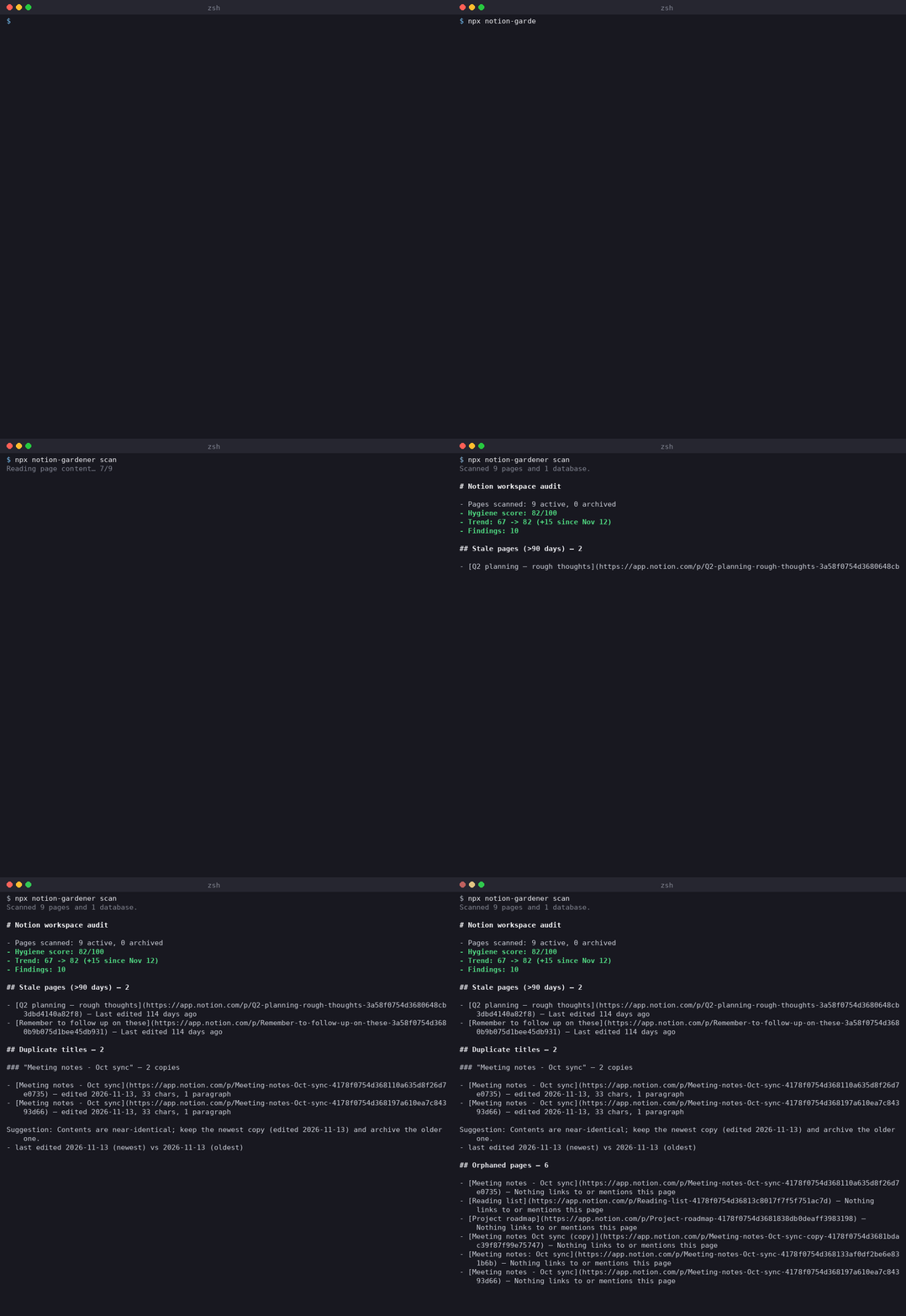
What it does
- Scans every page and database your integration can see, via the Notion search API
- Flags eight kinds of rot: untitled pages, empty pages, stale pages (no edits in 90 days, configurable), duplicate titles, orphaned pages (nothing links to or mentions them — being a child in the sidebar tree doesn't count as a link), dead links (external URLs that return 404/410), empty databases (zero rows), and hollow pages (no content left, but an active comment thread)
- Scores the workspace 0–100 and prints a markdown or JSON report. Every scan is recorded locally, so the report shows the trend (
67 -> 94, +27 since Nov 12) instead of a one-off number - Duplicate titles come with a diff: what actually differs between the copies and a concrete suggestion for which to keep (see Duplicate diffs)
fixwalks you through the cleanup page by page in a terminal — archive or skip each with the arrow keys, and only what you pick gets archived. Piped or scripted runs stay dry-run unless--applyis passedscan --htmlwrites a self-contained report page you can send anyone- Optionally groups stale and duplicate findings into clusters and summarizes each with an LLM, so "keep or kill" becomes a 30-second decision
- Runs as an MCP server, so an agent in Claude or Cursor can run the audit itself
- Configurable per project: a
.gardener.ymlsets the stale window, protects pages from ever being flagged or archived, and ignores noisy ones (see Configuration)
Nothing is ever auto-archived. Duplicates, dead links, hollow pages and empty databases are flags only — the tool shows you what it found and a human makes the call.
Setup
Two minutes, guided:
npx notion-gardener initThe wizard walks you through creating an integration at notion.so/my-integrations, checks the token against the Notion API, saves it so you never paste it again (a git-ignored .env, or .gardener.yml — your pick), and shows you which pages the integration can see, with the exact share steps if it can't see anything yet. Running scan with no token offers the same wizard. (The demo GIF above predates init — setup is one command now.)
Manual setup (CI and scripts): create an internal integration, share pages with it, and give the tool the token. Precedence: --token flag, then NOTION_TOKEN, then ./.env (auto-loaded), then the token: key in .gardener.yml. Optional, for cluster summaries: set OPENAI_API_KEY. Any OpenAI-compatible endpoint works via OPENAI_BASE_URL and OPENAI_MODEL (defaults to gpt-4o-mini). Without a key, scan --summarize just prints the plain report.
Usage
npx notion-gardener init        # first time: guided token setup, then you're set

notion-gardener scan            # markdown report to stdout

# from a clone: npm install, then npm run scan
npm run scan -- --json       # machine-readable, pipe it wherever
npm run scan -- --html report.html   # also write a standalone HTML report you can send anyone
npm run scan -- --stale-days 30
npm run scan -- --config team.yml   # settings file other than ./.gardener.yml

npm run fix                  # interactive walkthrough in a terminal: archive/skip each page
npm run fix -- --yes         # scripted mode: prints the archive plan, changes nothing
npm run fix -- --yes --apply # asks for "yes", then archives
npm run fix -- --yes --apply --include-stale   # also archives stale pages

npm run history              # recent scores from .gardener-history.jsonl

npm run scan -- --summarize  # adds an LLM-written summary per stale/duplicate cluster
Every scan appends one line to .gardener-history.jsonl in the current directory. It's local state, already in .gitignore — keep it out of version control.
Shareable HTML report
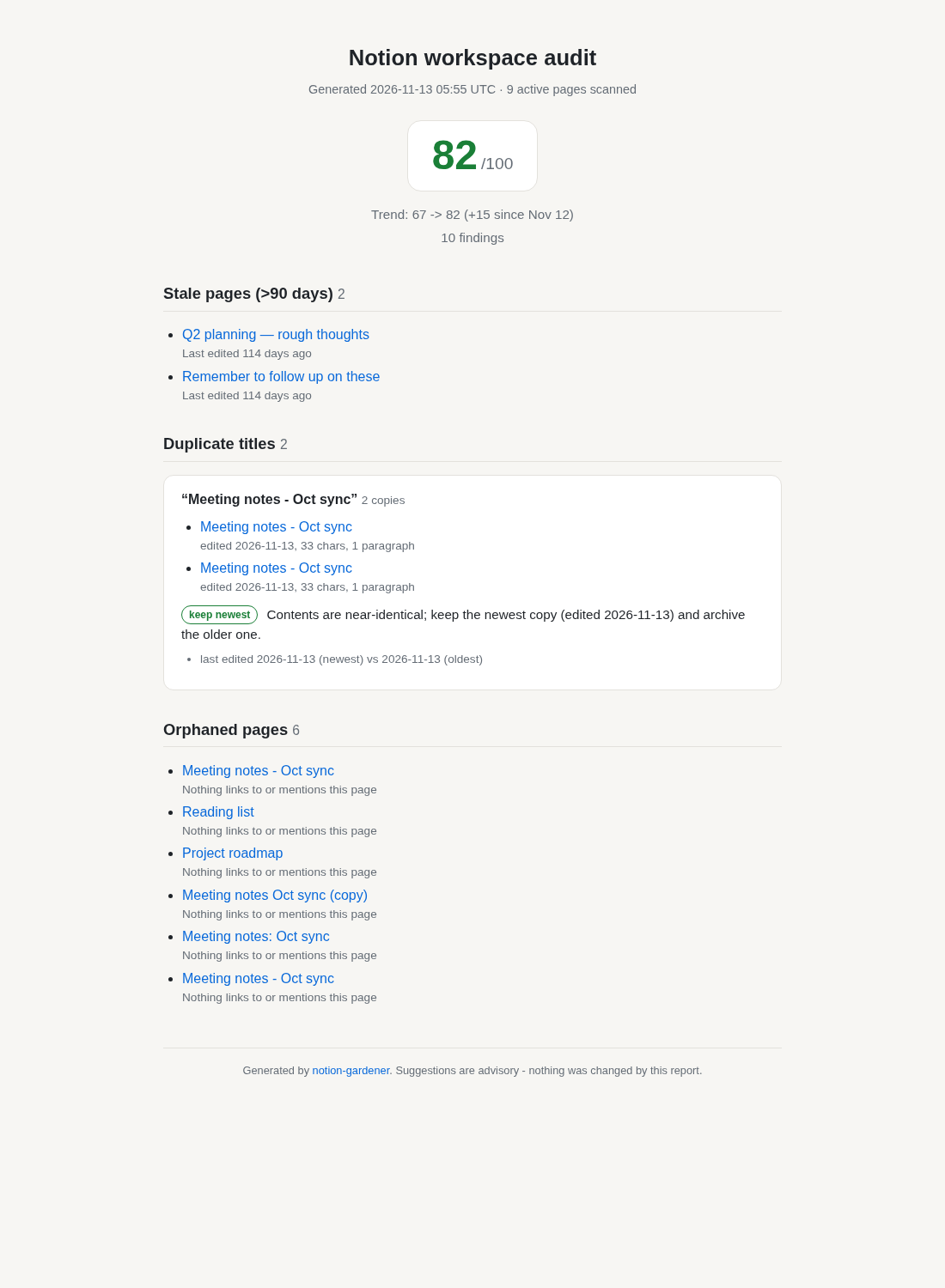
scan --html report.html writes one self-contained file next to the markdown output: the score (color-coded by health), the trend, every finding grouped by kind, the duplicate diffs with their keep/archive suggestions, and how many findings your config suppressed. No scripts, no external assets, dark-mode aware — attach it to an email or drop it in a shared drive and it just opens. Titles and page content are escaped, so a weird page name can't break the page.
Configuration
Drop a .gardener.yml in the directory you run the tool from (or pass --config path/to/file.yml). No file means the built-in defaults, with zero behavior change. A broken file is never silently ignored: invalid YAML, an unknown key, a wrong type, or a --config path that doesn't exist all stop the run with a clear error (exit code 2) before anything touches Notion.
# .gardener.yml - every key optional (see .gardener.example.yml)
staleDays: 60

protectedPages:
  - Company handbook                   # whole title, case-insensitive
  - "Onboarding*"                      # * matches any run of characters
  - 0123456789abcdef0123456789abcdef   # page or database ID, dashes optional

ignore:
  - "Scratch*"
  - "Meeting notes 2023"
| Key | Type | Meaning |
| --- | --- | --- |
| staleDays | positive integer | Days without an edit before a page is stale. Precedence: --stale-days flag, then this, then the STALE_DAYS env var, then 90. |
| protectedPages | list of strings | Pages the tool never touches. |
| ignore | list of strings | Pages whose findings are dropped. |
| token | string | Notion integration token. Lowest precedence — --token, NOTION_TOKEN and ./.env all win. Keep this file out of git if you use it. |
Entries are IDs (32 hex characters, dashes optional) or title patterns. Titles match the whole title, case-insensitively, with * as a wildcard; Wiki does not match Wiki 2025 but Wiki* does. Quote anything YAML could read as a number.
Protected vs ignored. Protected pages are treated as if they weren't in the workspace for every detector: no untitled/empty/stale/orphan/dead-link/hollow/empty-database findings, and they don't take part in duplicate grouping. fix refuses them a second time at plan time, so even a bug upstream can't archive one. They still count as link sources, so a protected index page keeps the pages it links to from looking orphaned. Ignored pages are analyzed normally and then their findings are dropped from the report, score and fix plan; an ignored page is still the twin of a same-titled page, so the other copy is still reported as a duplicate. Use protectedPages for "never touch this", ignore for "stop nagging me about this".
When the config hides anything, the report says so (3 findings suppressed by config (2 on protected pages, 1 ignored)), --json carries a suppressed object, and the MCP tools return it too.
MCP server mode
npm run serve # stdio MCP serverIt exposes two tools: audit_workspace (the full report, markdown or JSON) and get_hygiene_score (just the score and finding counts). Point a client at it, e.g. in Claude Desktop's config:
{
  "mcpServers": {
    "notion-gardener": {
      "command": "npx",
      "args": ["tsx", "/path/to/notion-gardener/src/integrations/mcp.ts"],
      "env": { "NOTION_TOKEN": "secret_..." }
    }
  }
}
The MCP server reads .gardener.yml from its working directory, or the file named by the GARDENER_CONFIG env var; a staleDays argument to the tool wins over the file. Archiving is reversible in Notion (they land in Trash), but the tool still treats every change as opt-in.
How the score works
100 minus weighted penalties, each capped per category so one messy corner can't tank an otherwise healthy workspace:
| Finding | Penalty | Cap | | --- | --- | --- | | Untitled page | 5 | 25 | | Empty page | 3 | 20 | | Stale page | 1 | 30 | | Duplicate title | 2 | 25 | | Orphaned page | 2 | 20 | | Dead link | 1 | 10 | | Empty database | 2 | 10 | | Hollow page | 1 | 5 |
An "empty" page is one with no content blocks and no subpages. The scanner reads every page's top-level blocks (three at a time, to stay inside Notion's rate limit), so the content check is real rather than guessed from titles — and the same pass builds the link graph the other detectors run on.
An "orphaned" page is one nothing else in the workspace links to or mentions. Workspace roots and database rows are exempt (people reach those directly); what's left is pages whose only path in is the sidebar tree, which is containment, not a link. Orphans can join the fix archive plan.
A "dead link" is an external URL in page content that returns 404 or 410. The checker tries HEAD and falls back to GET, with a short timeout and bounded concurrency. Anything inconclusive — timeouts, 403 bot walls, 5xx, a flaky network — counts as unknown and is never flagged. Notion-internal links are tracked as page references instead, and media files are skipped (Notion-hosted files use expiring signed URLs).
A "hollow" page has no content but has comments — the page died and the discussion survived. It needs the integration to have comment access; without it, the scan says so and skips the check rather than guessing.
Duplicate diffs
Two pages called "Meeting notes" used to mean an afternoon of clicking back and forth. The scan fingerprints every page's content while it reads blocks (text, block-type mix, significant words), so the duplicate section of the report shows, per shared title: which copy was edited most recently, how long each copy is, what kinds of blocks hold the content, and which words appear in only one copy. Then it suggests a call:
- contents near-identical → keep the newest copy, archive the older one(s)
- one copy empty → keep the one with content
- both copies carry unique content → review by hand (the diff lists what's unique to each)
The suggestion is advisory. fix never archives duplicates, whatever the diff says.
Development
npm install
npm test                   # 193 tests
npm run build
The detectors are pure functions over plain page records, and the Notion layer takes a structural client interface, so the whole pipeline — detection, duplicate diffing, link extraction, link checking, database and comment scans — is covered without touching the network. The suite is held to a simple bar: break the behavior a test names and that test must fail. No snapshot-of-whatever-the-code-does, no mocks so loose the code path isn't exercised.
src/
  cli.ts                 # entry point: scan, fix, history, serve (prompt layer lives here)
  core/
    config.ts            # .gardener.yml: parsing, validation, protected/ignore matching
    detectors.ts         # pure finding detection over page records (all eight kinds)
    duplicates.ts        # duplicate diffing: what differs between same-title copies + suggestion
    report.ts            # hygiene score + markdown/JSON rendering
    report-html.ts       # shareable single-file HTML report (scan --html)
    fix.ts               # archive planning and confirmation flow
    interactive.ts       # page-by-page fix walkthrough (decision flow, prompt-agnostic)
    history.ts           # score history: append/read .gardener-history.jsonl, trend line
  integrations/
    audit.ts             # the full pipeline: fetch, link graph, detectors, score
    notion.ts            # Notion API client: pages, blocks, databases, comments
    linkcheck.ts         # external link checker (HEAD with GET fallback, dead = 404/410 only)
    prompt.ts            # interactive fix picker (arrow keys, line fallback)
    summarize.ts         # LLM cluster summaries (optional, keyless no-op)
    mcp.ts               # MCP server over stdio
Tests sit next to what they cover (*.test.ts).
Why I built it
Every team I've worked in treats Notion as the system of record and then lets it decay until search is useless. The fix is always the same manual sweep someone does once a year. This is that sweep as a tool: run it in CI, run it before onboarding a new teammate, run it when search starts returning garbage.
Roadmap
- Scheduled sweeps with a Slack digest of the report
fixsuggestions driven by the cluster summaries (archive these, keep those)
MIT license.