
novada-mcp
v0.9.52
Published
One MCP server for all web data. Scrape, search, crawl, and AI research in one install.

Maintainers
 tw260
Keywords
Readme
This folder IS the npm package published as
novada-mcp— a local stdio MCP server (npx novada-mcp). It lives inside the novada-mcp monorepo; the hostedmcp.novada.comwrapper is inhosted-server/.
Novada MCP
Web search, page extraction and structured platform data for AI agents, backed by Novada's own proxy network.
Quickstart · Get your key · How to choose a tool · Troubleshooting · Built for agents · Links
Free to start: $10 in free credits, no credit card. There is no monthly call cap — usage is billed to your Novada account.
What it is good at
- Structured data from 14 sources, no HTML parsing. One typed tool per platform (Amazon, Google, LinkedIn, TikTok, YouTube and more) with a closed
operationlist, so a wrong value is rejected before any call. - Pages that block bots.
novada_extractescalates from a plain fetch to JS render to a real browser, and names the blocker when it cannot get through (for exampleanti_bot:kasada). - Cited research in one call.
novada_researchreturns numbered source passages from several searches, not a generated summary.
Quickstart
Novada is hosted-first — there's nothing to install. Point your client at the hosted URL and you're done. Every client below also has a local self-host fallback (npx novada-mcp) if you'd rather run the server yourself.
Security note: the hosted endpoint never accepts your API key as a URL query parameter or path segment — only an
Authorization: Bearer <key>header, or OAuth sign-in, is accepted. This keeps the key out of URLs, server logs, proxies, and browser history. Never share your key or paste it into a URL.
claude.ai (web)
- Go to Settings → Connectors → Add custom connector.
- Name it
Novada. - Paste the bare URL and sign in with your Novada account when prompted (OAuth):
https://mcp.novada.com/mcp - Click Add.
claude.ai runs entirely in the browser, so only the hosted endpoint applies here — there's no local variant for this client.
Claude Desktop
Uses the same Settings → Connectors → Add custom connector flow as claude.ai above — paste the same hosted URL and sign in via OAuth. Prefer a config file instead? Edit claude_desktop_config.json:
Hosted:
{
  "mcpServers": {
    "novada": {
      "url": "https://mcp.novada.com/mcp",
      "headers": { "Authorization": "Bearer YOUR_KEY" }
    }
  }
}
Local (self-host):
{
  "mcpServers": {
    "novada": {
      "command": "npx",
      "args": ["-y", "novada-mcp"],
      "env": { "NOVADA_API_KEY": "your_key" }
    }
  }
}
Claude Code
Hosted:
claude mcp add --transport http novada https://mcp.novada.com/mcp --header "Authorization: Bearer YOUR_KEY"Local (self-host):
claude mcp add novada -e NOVADA_API_KEY=your_key -- npx -y novada-mcpCursor
Edit ~/.cursor/mcp.json (global) or .cursor/mcp.json (project-scoped):
Hosted:
{
  "mcpServers": {
    "novada": {
      "url": "https://mcp.novada.com/mcp",
      "headers": { "Authorization": "Bearer YOUR_KEY" }
    }
  }
}
Local (self-host):
{
  "mcpServers": {
    "novada": {
      "command": "npx",
      "args": ["-y", "novada-mcp"],
      "env": { "NOVADA_API_KEY": "your_key" }
    }
  }
}
Windsurf
Edit ~/.codeium/windsurf/mcp_config.json:
Hosted:
{
  "mcpServers": {
    "novada": {
      "serverUrl": "https://mcp.novada.com/mcp",
      "headers": { "Authorization": "Bearer YOUR_KEY" }
    }
  }
}
Local (self-host):
{
  "mcpServers": {
    "novada": {
      "command": "npx",
      "args": ["-y", "novada-mcp"],
      "env": { "NOVADA_API_KEY": "your_key" }
    }
  }
}
VS Code
Edit .vscode/mcp.json (top-level key is servers, not mcpServers):
Hosted:
{
  "servers": {
    "novada": {
      "type": "http",
      "url": "https://mcp.novada.com/mcp",
      "headers": { "Authorization": "Bearer YOUR_KEY" }
    }
  }
}
Local (self-host):
{
  "servers": {
    "novada": {
      "type": "stdio",
      "command": "npx",
      "args": ["-y", "novada-mcp"],
      "env": { "NOVADA_API_KEY": "your_key" }
    }
  }
}
OpenCode
Add Novada from the CLI (writes to the current project; add --global for every project):
opencode mcp add novada --url https://mcp.novada.com/mcpThen open OpenCode, run /mcps, select novada, and sign in with your Novada account (OAuth).
Prefer an API key? Set NOVADA_API_KEY in your environment and use opencode.json:
{
  "$schema": "https://opencode.ai/config.json",
  "mcp": {
    "servers": {
      "novada": {
        "type": "remote",
        "url": "https://mcp.novada.com/mcp",
        "oauth": false,
        "headers": { "Authorization": "Bearer {env:NOVADA_API_KEY}" }
      }
    }
  }
}
Self-host: opencode mcp add novada --env NOVADA_API_KEY=your_key -- npx -y novada-mcp
Tested on OpenCode V2 (v2.2.6, OAuth sign-in).
Try it
novada_setup()                                          — validates your key, shows balance
novada_search({query: "Claude MCP tutorials"})          — web search
novada_extract({url: "https://example.com"})            — read any URL
novada_research({question: "how do MCP servers work?"}) — parallel multi-source research
Self-hosting? Always use
npx -y novada-mcp(not a global install) — a globally installed binary can silently shadow the package and run an old cached version.
Get your key
- Sign up at novada.com — no credit card required.
- Copy your API key from novada.com.
- You start with $10 in free credits. There is no monthly call cap — every call bills your Novada account balance directly. Light tools (search, extract) draw down a small fraction of that per call; heavier tools (browser, scrape, proxy) cost more per call and can exhaust the starter balance quickly. Check what's left any time with
novada_account({section: "balance"})ornovada_setup().
How to choose a tool
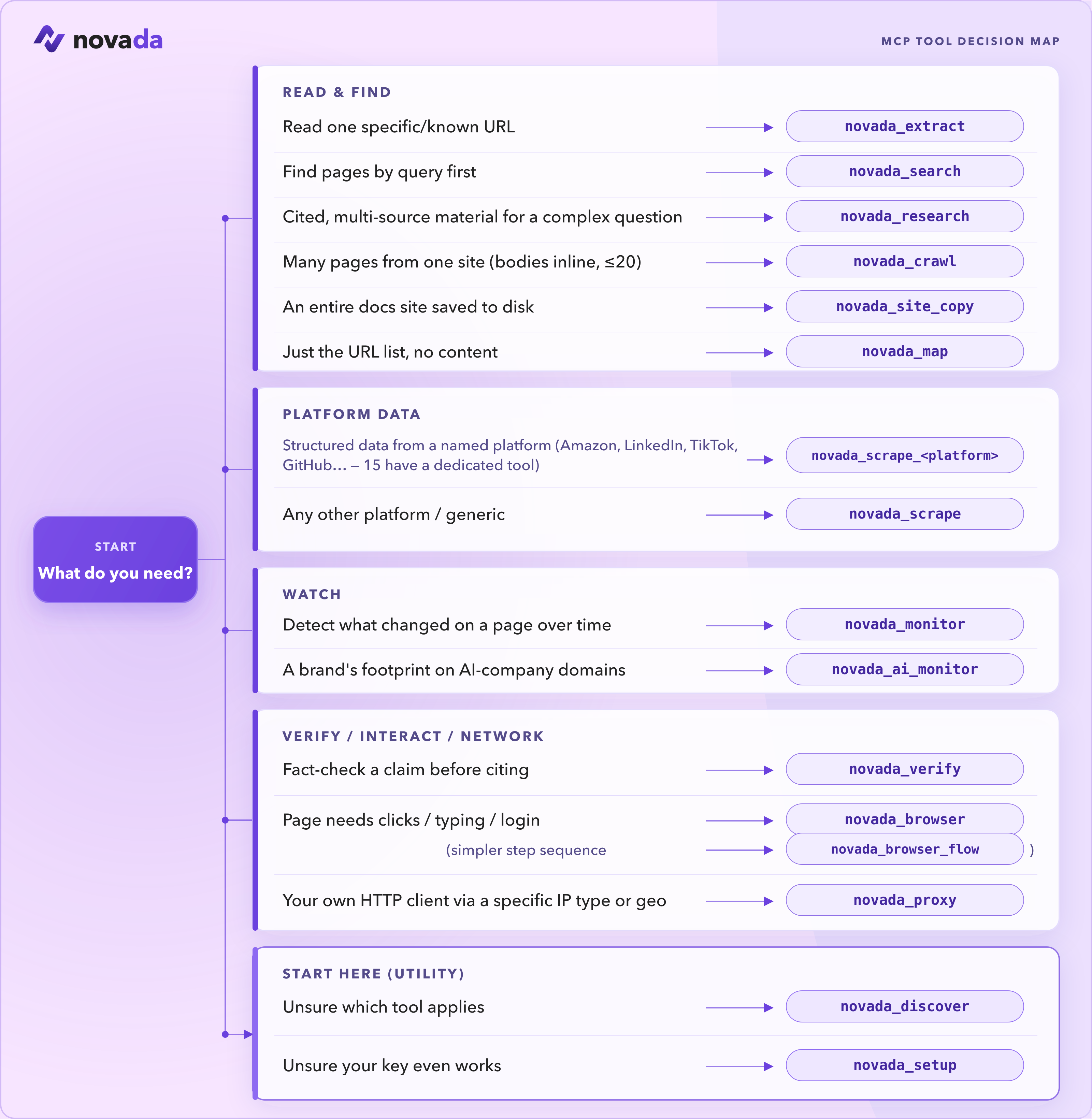
These are the tools you reach for most:
| Tool | Use it when |
|------|-------------|
| novada_setup | First run — validate your key and see your balance. Start here. |
| novada_search | Find pages by query (google / duckduckgo / yandex; time, domain, geo filters). |
| novada_extract | Read one known URL — or up to 10 in parallel — through anti-bot pages. |
| novada_research | Answer a complex question — parallel multi-source search + extraction in one call. |
| novada_scrape | Structured records from 14 platforms (Amazon, LinkedIn, TikTok, …). Plus 14 typed per-platform tools — novada_scrape_amazon, _google, _linkedin, … — each a closed operation enum. |
| novada_crawl | Pull content from a bounded set of related pages (≤20) on one site. |
| novada_map | Discover what URLs exist on a site before fetching. |
| novada_browser | Self-host only. Interact with a page — click, type, screenshot, run JS. |
| novada_proxy | Route your own HTTP client through a specific IP type / country / session. |
Not sure? Call novada_discover and it returns the full catalog with each tool's status.
📚 Full reference — all 37 tools →
37 tools. Self-host (npx novada-mcp) exposes all 37. The hosted default surface (mcp.novada.com) exposes 29 — the same registry minus 8 tools that don't apply to a stateless serverless endpoint: novada_browser / novada_browser_flow (both need a persistent CDP WebSocket session a serverless isolate can't hold), novada_site_copy (writes files to disk), novada_ip_whitelist / novada_capture_apikey (write-gated account ops), novada_session_stats / novada_search_feedback (per-process in-memory state), and novada_verify — it is core-derived, not a hand-curated subset. novada_static_ip_mgmt IS hosted-visible (its list/export actions work on hosted); only its open/renew/reveal_credentials actions are refused there, at the action level — reveal_credentials needs a human-in-the-loop confirmation (MCP elicitation) the stateless hosted endpoint can't perform, so it's local-only like open/renew. Call novada_discover on your connection to see exactly what's available on it.
Where does it run?
| Tool | Local (npx novada-mcp) | Hosted (mcp.novada.com) |
|------|:--:|:--:|
| novada_search | ✅ | ✅ |
| novada_extract | ✅ | ✅ |
| novada_crawl | ✅ | ✅ |
| novada_research | ✅ | ✅ |
| novada_map | ✅ | ✅ |
| novada_site_copy | ✅ | ❌ writes to local disk |
| novada_search_feedback | ✅ | ❌ per-process in-memory state |
| novada_scrape | ✅ | ✅ |
| novada_scrape_amazon … _perplexity (14 platform tools) | ✅ | ✅ |
| novada_ai_monitor | ✅ | ✅ |
| novada_monitor | ✅ | ✅ |
| novada_verify | ✅ | ❌ not on novada_discover's hosted listing |
| novada_proxy | ✅ | ✅ |
| novada_browser | ✅ | ❌ needs a persistent CDP WebSocket session |
| novada_browser_flow | ✅ | ❌ needs a persistent browser session |
| novada_account | ✅ | ✅ |
| novada_proxy_account_create | ✅ | ✅ |
| novada_proxy_account_list | ✅ | ✅ |
| novada_ip_whitelist | ✅ | ❌ write-gated account op |
| novada_capture_apikey | ✅ | ❌ write-gated account op |
| novada_static_ip_mgmt | ✅ | list/export only — ❌ open/renew/reveal_credentials (write/credential actions, refused at the action level) |
| novada_discover | ✅ | ✅ |
| novada_setup | ✅ | ✅ |
| novada_session_stats | ✅ | ❌ per-process in-memory state |
Full per-tool reference (same column) → docs/TOOLS.md.
Configuration (self-host)
Only relevant if you're running npx novada-mcp yourself — hosted users only need an Authorization: Bearer header (or OAuth sign-in).
| Variable | Required | Purpose |
|----------|----------|---------|
| NOVADA_API_KEY | Yes | Covers search, extract, crawl, scrape, research, browser, and account tools. |
| NOVADA_BROWSER_WS | No | Browser API WebSocket URL. Auto-provisioned from your API key if not set. |
| NOVADA_PROXY_ENDPOINT | No | Proxy host:port. Required only if you use novada_proxy with your own HTTP client. |
| NOVADA_TOOLS | No | Load specific tools only, e.g. "search,extract,research". |
| NOVADA_GROUPS | No | Load tool groups, e.g. "search,proxy,browser". Groups: search, proxy, browser, scraper, health, account. |
Troubleshooting
- Confirm the server registered: for Claude Code run
claude mcp list; for other clients, check the connector/server status in settings. - If using the hosted URL, make sure it's exactly
https://mcp.novada.com/mcpwith a realAuthorization: Bearer YOUR_KEYheader configured (or complete the OAuth sign-in) — the endpoint rejects a key placed in the URL with a 401, it is never read from there. - If self-hosting, always use
npx -y novada-mcp(never a global install) — a stale globally-installed binary can silently shadow the package and run an old cached version with a different tool list. - Call
novada_discoveronce connected. Hosted and self-host expose different catalogs, so a "missing" tool may simply not be on the surface you're connected to.
- Double-check the URL has no extra whitespace or line breaks — some clients mangle a pasted URL across lines.
- Confirm your key is active: call
novada_setup()or check the dashboard. - If you're behind a corporate proxy or firewall, confirm outbound HTTPS to
mcp.novada.comis allowed.
- Keys are case-sensitive with no surrounding whitespace — copy directly from the dashboard, don't retype it.
- Call
novada_setup()— it validates your key against the live account API and tells you exactly what's wrong. It never hard-errors on a missing key, so if you see something else, read the returnedagent_instruction. - Rotated or reset a key recently? Old copies left in other config files won't work — update every client config that references it.
- claude.ai's free tier currently limits custom connectors to one at a time. If you need a different connector too, upgrade your claude.ai plan or remove the existing connector before adding Novada.
- This is a claude.ai plan limit, not a Novada limit — the same key works without restriction in Claude Desktop, Claude Code, Cursor, Windsurf, and VS Code.
- Balance = your wallet's dollar credits (starts at $10 free). Quota/plan = a separate per-product allocation (e.g. a purchased proxy traffic plan), if you have one.
- Call
novada_account({section: "summary"})for both at once, orsection: "balance"/section: "plans"for just one. - Running out of balance stops every tool. Running out of a specific plan's quota only affects that product — a maxed-out proxy plan doesn't block
novada_search.
Built for agents
- Callable onboarding.
novada_discoverandnovada_setupare tools your agent can call itself to find the right tool or validate a key, without reading this README. - Two-step approval token for every write. Mutating tools (proxy sub-account creation, IP whitelist changes, static IP purchases, capture-key resets) first return a preview and an approval token; the write only happens when you re-call with that token.
- Named anti-bot failures. On an unresolvable target the response names the blocker (for example
anti_bot:kasada) instead of a generic error, so an agent can branch on it. - Keyless basic extract.
novada_extractworks without a key for a basic fetch; render escalation and every other billed tool needNOVADA_API_KEY.
Links
- Website: novada.com
- Get an API key: novada.com
- Sign up (free): novada.com
- npm: npmjs.com/package/novada-mcp
- GitHub: github.com/NovadaLabs/novada-mcp
- Issues: github.com/NovadaLabs/novada-mcp/issues
License
MIT