
now-playing-glass
v0.3.2
Published
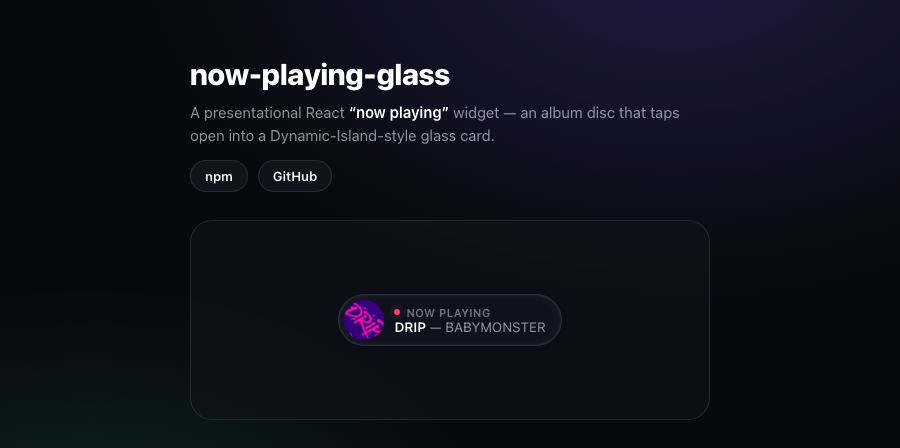
A presentational React "now playing" widget — an album disc that taps open into a Dynamic-Island-style glass card (shared-element cover morph, equalizer, ambient backdrop, marquee). Bring your own data source (Last.fm, Spotify, Apple Music…).

Maintainers
 kv.chen
Readme
now-playing-glass — 正在聽玻璃小卡
A presentational React "now playing" widget: an album disc that taps open into a Dynamic-Island-style glass card — shared-element cover morph, bouncing equalizer, blurred-cover ambient backdrop, gentle title marquee, live halo. Bring your own data source (Last.fm, Spotify, Apple Music, anything).
🔗 Live demo · in the wild: kvcc.me (the disc at the top-left)
English
Why
It's purely visual. You hand it a song; it renders the widget. No fetching,
no polling, no provider lock-in — pair it with whatever scrobbler/API you like.
Install
npm i now-playing-glassreact (≥18) is a peer dependency (your app already provides it). framer-motion
ships as a dependency, so it installs automatically — nothing else to add.
Use
import { NowPlaying } from 'now-playing-glass';
import 'now-playing-glass/styles.css';

function Header({ song, refetch }) {
  return (
    // `song` shape: { name, artist, art?, url?, nowplaying?, color? }
    <NowPlaying
      song={song}            // null → renders nothing
      variant="mini"         // "mini" (disc → card morph) | "card" (static chip)
      align="left"           // "left" | "right" — flip for right-corner placement
      lang="en"              // built-in labels: "en" | "zh"
      onRefresh={refetch}    // fired on open — re-fetch so it shows the live track
    />
  );
}
You can wire your own fetching, or use the bundled useNowPlaying hook,
which handles initial load + polling + pause-while-hidden + on-demand refresh
(see below). Either way the widget stays presentation-only.
Props
| Prop | Type | Default | Notes |
|---|---|---|---|
| song | Song \| null | — | null or no name → renders nothing |
| variant | "mini" \| "card" | "card" | mini = disc that morphs open; card = static chip |
| align | "left" \| "right" \| "auto" | "left" | (mini) expand direction. "right" for a right-hand corner; "auto" picks the side with more room (measured on open) |
| lang | "en" \| "zh" | "en" | built-in label language |
| labels | { nowPlaying?, recentlyPlayed? } | — | override labels for full i18n |
| onRefresh | () => void | — | called when opened — re-fetch your data here |
| open / onOpenChange | boolean / (open) => void | — | (mini) make the open state controlled; onOpenChange fires on every change |
| openOnHover | boolean | false | (mini) open on hover (desktop pointers) |
| className | string | — | extra class on the root |
Song: { name, artist, art?, url?, nowplaying?, color?, progress?, duration? }.
Set nowplaying: true for the live treatment (halo + spinning cover + bouncing
equalizer). color tints the halo/equalizer (falls back to green). Set
duration (and progress) in ms to show a playback progress bar.
useNowPlaying (optional)
Data-source-agnostic plumbing so you don't re-implement load + poll + refresh:
import { NowPlaying, useNowPlaying } from 'now-playing-glass';

const { song, refresh } = useNowPlaying({
  // Return a Song, `null` to clear, or `undefined` to keep the current track.
  // `fresh` is true on user-triggered refreshes — bust your cache then.
  fetcher: ({ fresh }) =>
    fetch(fresh ? `/api/now-playing?t=${Date.now()}` : '/api/now-playing')
      .then(r => (r.ok ? r.json() : null))
      .then(d => d?.song ?? null),
  interval: 25000, // poll ms; pauses while the tab is hidden; 0 disables
});

<NowPlaying song={song} variant="mini" onRefresh={refresh} />;
It only touches react — your data source (Last.fm, Spotify, your own API
route) stays entirely yours, so no provider lock-in and no exposed API keys.
useLastfm (optional, drop-in)
The most common source, wired for you (Last.fm read keys are safe client-side):
import { NowPlaying } from 'now-playing-glass';
import { useLastfm } from 'now-playing-glass/lastfm';

const { song, refresh } = useLastfm({ user: 'YOUR_USER', apiKey: 'YOUR_KEY' });
<NowPlaying song={song} variant="mini" onRefresh={refresh} />;
Draggable (recipe)
Dragging isn't built in (a now-playing widget is usually a fixed corner element).
If you want it, wrap the widget in your own draggable container — align="auto"
keeps the card expanding toward the side with room as it moves:
import { motion } from 'framer-motion';

<motion.div drag dragMomentum={false} style={{ position: 'fixed', top: 16, left: 16 }}>
  <NowPlaying song={song} variant="mini" align="auto" onRefresh={refresh} />
</motion.div>;
Theming
Self-contained out of the box. It reads --label, --fill and
liquid-glass-kit's --lg-* tokens when present, so it melts into an
existing design system; otherwise the baked light/dark defaults apply. Dark
mode follows prefers-color-scheme, and an ancestor [data-theme="light|dark"]
overrides it. Respects prefers-reduced-motion.
The refraction is frosted-glass via backdrop-filter; it degrades gracefully
where that isn't supported.
More by kv
Part of the kvcc.me ecosystem of small, focused libraries.
Credit
The Dynamic-Island morph idea is Apple's; the glass material follows the liquid-glass family. Built by kv.
繁體中文
這是什麼
一個純呈現的 React「正在聽」小卡:頂部一顆專輯封面圓盤,點開以 Dynamic-Island 式形變展開完整玻璃卡 —— 共享封面 morph、動態等化器、模糊封面 氛圍底、歌名輕柔捲動、live 光環。資料來源自己接(Last.fm / Spotify / Apple Music 都行)。
安裝
npm i now-playing-glassreact(≥18)是 peer dependency(你的 app 已提供);framer-motion 是一般依賴、會自動裝,不用再加。
用法
import { NowPlaying } from 'now-playing-glass';
import 'now-playing-glass/styles.css';

// song 形狀:{ name, artist, art?, url?, nowplaying?, color? }
<NowPlaying
  song={song}            // null → 不渲染
  variant="mini"         // "mini"(圓盤→卡片形變) | "card"(靜態 chip)
  align="left"           // "left" | "right" —— 放右上角就用 "right",卡片才不會撐出畫面
  lang="zh"              // 內建文案語言:"en" | "zh"
  onRefresh={refetch}    // 點開時觸發 —— 在這裡重抓資料,卡片才顯示「現在」這首
/>
它不抓資料:自己接 song,或用內建的 useNowPlaying hook(幫你處理
首載+輪詢+背景分頁暫停+手動刷新,見下方)。
Props
| Prop | 型別 | 預設 | 說明 |
|---|---|---|---|
| song | Song \| null | — | null 或沒有 name → 不渲染 |
| variant | "mini" \| "card" | "card" | mini=圓盤形變展開;card=靜態 chip |
| align | "left" \| "right" \| "auto" | "left" | (mini) 展開方向;右側角落用 "right";"auto" 開卡時量空間自動挑邊 |
| lang | "en" \| "zh" | "en" | 內建文案語言 |
| labels | { nowPlaying?, recentlyPlayed? } | — | 覆寫文案,完整 i18n 控制 |
| onRefresh | () => void | — | 點開時呼叫 —— 在此重抓資料 |
| open / onOpenChange | boolean / (open) => void | — | (mini) 受控開合;onOpenChange 每次變更觸發 |
| openOnHover | boolean | false | (mini) 桌機滑鼠移上去就展開 |
| className | string | — | 根元素額外 class |
Song:{ name, artist, art?, url?, nowplaying?, color?, progress?, duration? }。
nowplaying: true 進 live 樣式(光環+封面慢轉+等化器跳動);color 為光環/等化器上色(沒給退綠);
給 duration(+progress)(ms)會畫播放進度條。
useNowPlaying(選用)
與資料源無關的 plumbing,免得每次重寫「首載+輪詢+刷新」:
import { NowPlaying, useNowPlaying } from 'now-playing-glass';

const { song, refresh } = useNowPlaying({
  // 回傳 Song、null(清空) 或 undefined(維持現狀)。fresh=true 是使用者手動刷新 → 繞快取
  fetcher: ({ fresh }) =>
    fetch(fresh ? `/api/now-playing?t=${Date.now()}` : '/api/now-playing')
      .then(r => (r.ok ? r.json() : null))
      .then(d => d?.song ?? null),
  interval: 25000, // 輪詢 ms;背景分頁自動暫停;0 = 不輪詢
});

<NowPlaying song={song} variant="mini" onRefresh={refresh} />;
只依賴 react,資料源(Last.fm / Spotify / 自家 API)完全是你的,不綁特定供應商、不外洩 key。
useLastfm(選用、即插即用)
最常見的來源直接幫你接好(Last.fm read key 可安全放前端):
import { NowPlaying } from 'now-playing-glass';
import { useLastfm } from 'now-playing-glass/lastfm';

const { song, refresh } = useLastfm({ user: 'YOUR_USER', apiKey: 'YOUR_KEY' });
<NowPlaying song={song} variant="mini" onRefresh={refresh} />;
可拖曳(recipe)
拖曳不內建(now-playing 多半是固定角落元件)。要的話用自己的拖曳容器包起來,
align="auto" 會隨它移動自動往有空間的那側展開:
import { motion } from 'framer-motion';

<motion.div drag dragMomentum={false} style={{ position: 'fixed', top: 16, left: 16 }}>
  <NowPlaying song={song} variant="mini" align="auto" onRefresh={refresh} />
</motion.div>;
主題
開箱即用、自帶樣式。偵測到 --label、--fill 或 liquid-glass-kit 的 --lg-*
token 就吃它們,自然融入既有設計系統;沒有就用內建的明/暗預設。深色跟隨
prefers-color-scheme,祖層 [data-theme="light|dark"] 可覆寫。尊重
prefers-reduced-motion。
折射用 backdrop-filter 霜化玻璃,不支援的環境會優雅降級。
More by kv
kvcc.me 生態系裡一組小而專注的共用庫之一。
授權
Dynamic-Island 形變的點子源自 Apple;玻璃材質沿用 liquid-glass 家族。由 kv 製作。