
nozes
v2.5.0
Published
Declarative tool to create plain javascript components

Maintainers
 henriquegogo
Readme
Nozes
Declarative tool to create plain javascript components
5 minutes example
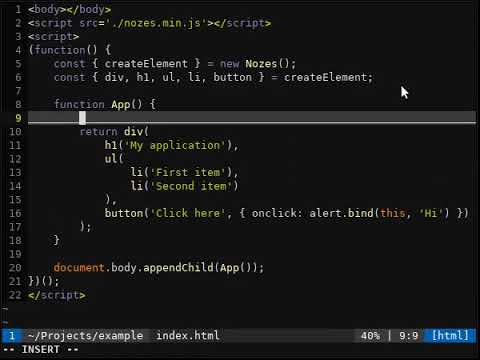
Get started
<script src="./nozes.js"></script>
<script>
(function() {
  const { createElement, watch, dispatch } = new Nozes();
  const { div, p, button, h1 } = createElement;

  function Message(msg) {
    var handleClick = function() {
      dispatch('print', 'HI!');
    };

    return div(
      p({ className: 'message' }, msg),
      button({ onclick: handleClick }, 'Click here')
    );
  }

  function App() {
    return div(
      h1('Hello, world'),
      Message('Lorem ipsum')
    );
  }

  watch('print', alert.bind(this));

  document.body.appendChild(App());
})();
</script>
Elements
Has a constructor for each HTML tag that receive parameters that could be objects, functions, strings, numbers or HTML element instances.
The return of any of these constructors are HTML elements created with document.createElement function.
- If a parameter is an object, their attributes will be assigned to that element.
- If it's another HTML element, this will be appended as child of that.
- If it's a string or a number, a TextNode will be created with the value and appended as child of the element.
- If a function, it'll be called with the element as first parameter.
- If an array, each item of this array will be evaluated like others constructor parameters.
div(
  h1('hello, world'),
  a({ href: '#' }, 'click here'),
  function(me) { console.log("ref:", me) }
)
You have different ways to create an element using createElement:
createElement.div()
createElement('div')
Styling
Create unique style definitions and return its class name. Even if a style is defined multiple times, if the definitions content was the same, just one style will be created and the function returns the unique class name.
var doubleSizeFont = styleClass('font-size:2em');
section(
  div({ className: doubleSizeFont }, 'This is a text with 2em'),
  p({ className: styleClass('font-size:2em') }, 'This paragraph will reuse the same class name created above')
)
Nested definitions are accepted. The "&" character will be replaced by auto generated class name. Just one nesting level is accepted.
var className = styleClass(`
  cursor: pointer;
  &:hover { background: gray }
  & img.helper { display: inline-block }
`);
It's possible to set style as a string property or an object.
section(
  div({style: 'max-width: 200px'}, 'Limited width container'),
  div({style: { maxWidth: '200px' }}, 'Limited width container')
)
Watch
Create an event listener that call a function if dispatched. An event can belong to a group.
Every time the watch function is invoked, a listener is created unless the event belong to a specific group that already exists. In this case, just the callback function will be replaced.
An event can be a blank string. In this case, this listener will be called every time any event is dispatched.
watch('log', alert.bind(this), 'view');  // A listener was created with a group
watch('print', console.log);             // Another listener was created
watch('log', prompt.bind(this), 'view'); // That first listener function was replaced
watch('print', console.log);             // Another listener was created (now this event will console.log two times)
watch('', alert.bind(this));             // Will call alert if any event is dispatched
Dispatch
Call a function assigned to an event and pass a message as argument. These messages are stored internally as key/value (event/message) if the event value is a string.
If a message is an object, their attributes will be assigned to an previously stored object to that event.
A function or an object can be dispatched as event. In this case the Function.name or Object.name will be used as event and nothing will be stored.
dispatch('log', 'Hello, view');
dispatch('print', 'Hello, console');
dispatch('person', { nick: 'Me' });        // Listener will receive { nick: 'Me' }
dispatch('person', { fingers: 5 });        // Listener will receive { nick: 'Me', fingers: 5 }
dispatch({ name: 'person' }, { age: 18 }); // The same listener will receive { age: 18 }
Connect
The "connect" function can be used to attach an "element updater" event. It's just a wrapper for a function that return an Element that update its reference every time "dispatch" is called with current event. You can use multiple watch/dispatch events just with spaces between them or setting as array. Each connected function will set 'this' as the rendered element that should be updated on return. If it's the first call, 'this' is a document-fragment. You can verify if 'this' is rendered in DOM using WebAPI this.isConnected boolean.
document.body.appendChild(
  connect(['notify', 'log'], function() {
    if (this) console.log('Element to be replaced:', this);
    else console.log('First time call. No old element reference');
    return div(Date().toString());
  });
);
Router
router({
  index: () => a({ href: '#/hello/world/earth' }, 'Home page'),
  '/hello/{param}/{name}': (param, name) => a({ href: '#' }, 'Hello, ' + param + ' (' + name + ')')
})
Router is a function with an object that defines routes and function callbacks that will be invoked when some hash router is called.
Run tests
node testBuild minified
npx uglify-js nozes.js -cm > dist/nozes.min.jsExamples
Examples in 'examples' folder
Why 'Nozes'?
It's a joke, an old brazilian meme called "As árvores somos nozes", that could be translated as "The tree are us". Nozes it's about DOM tree.
Special thanks
Bruno Facundo that tested first implementations, suggested improvements and did pair programming on "watch / connect / dispatch" implementations.
License
MIT