
npm-package-analyser
v0.0.3
Published
Smart Dependency Report: direct + transitive deps (lockfile), latest versions, OSV security, CLI and optional PDF

Maintainers
 itsanujraghuvanshi
Readme
npm-package-analyser
CLI for Node.js / npm projects: reads package.json and a lockfile (package-lock.json or Yarn v1 yarn.lock), fetches latest versions from the public npm registry, checks known vulnerabilities via the OSV API, and prints a colorized table plus a text summary. Optional PDF export to your Documents folder.
Requirements
- Node.js 18+ (uses built-in
fetch) - A project directory that contains
package.json(npm / Node dependency manifest)
How to use (npm / npx)
npx npm-package-analyser PATH_TO_PROJECTExamples:
npx npm-package-analyser .
npx npm-package-analyser /Users/you/projects/my-app
Optional flags (after the path):
npx npm-package-analyser /path/to/app --no-interactive --no-pdfUseful flags: --no-pdf, --no-interactive, --major-only, --sort=name|update-type|security. Full list:
npx npm-package-analyser --helpNot a Node project?
If package.json is missing (e.g. Python-only, Go-only, or wrong folder), the CLI exits immediately with a clear error and does not run analysis or prompts. Only directories with a valid package.json file are supported.
Developing from a clone
cd package-analyser && npm install
node bin/cli.js PATH_TO_PROJECT
If you use npm run report from this repo, put -- before the path and flags so npm forwards them:
npm run report -- /path/to/project --no-interactive --no-pdfReport format
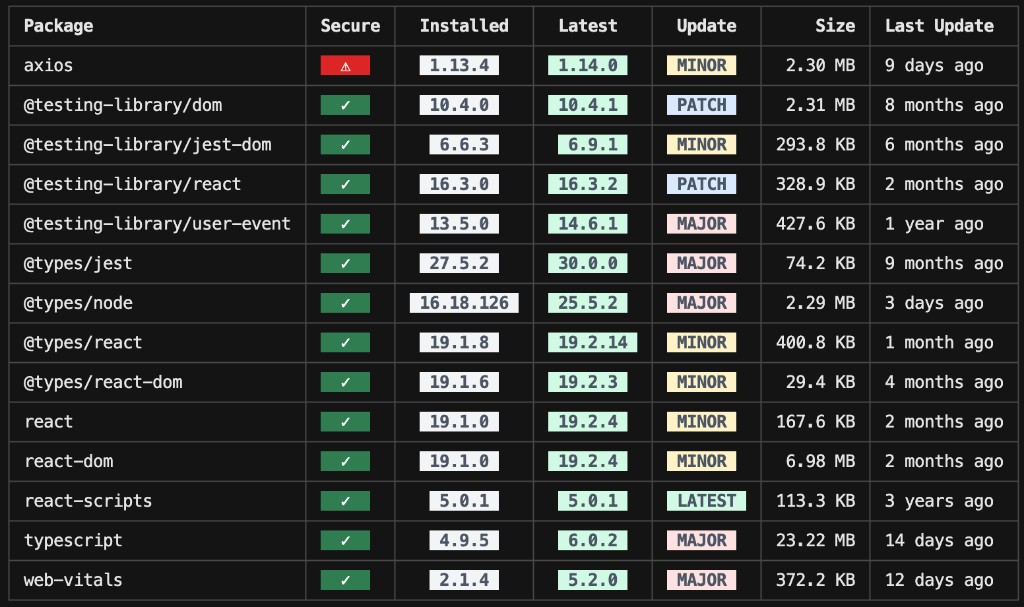
Table: package name, secure status, installed vs latest version, update type (patch / minor / major / latest), size, last publish. The table is always printed when there is at least one analyzed package. If you choose “only packages that match your severity choice” but none match (for example the project has no known vulnerabilities at that threshold), the tool still prints the full dependency table and a short note explaining why the filter had nothing to show.
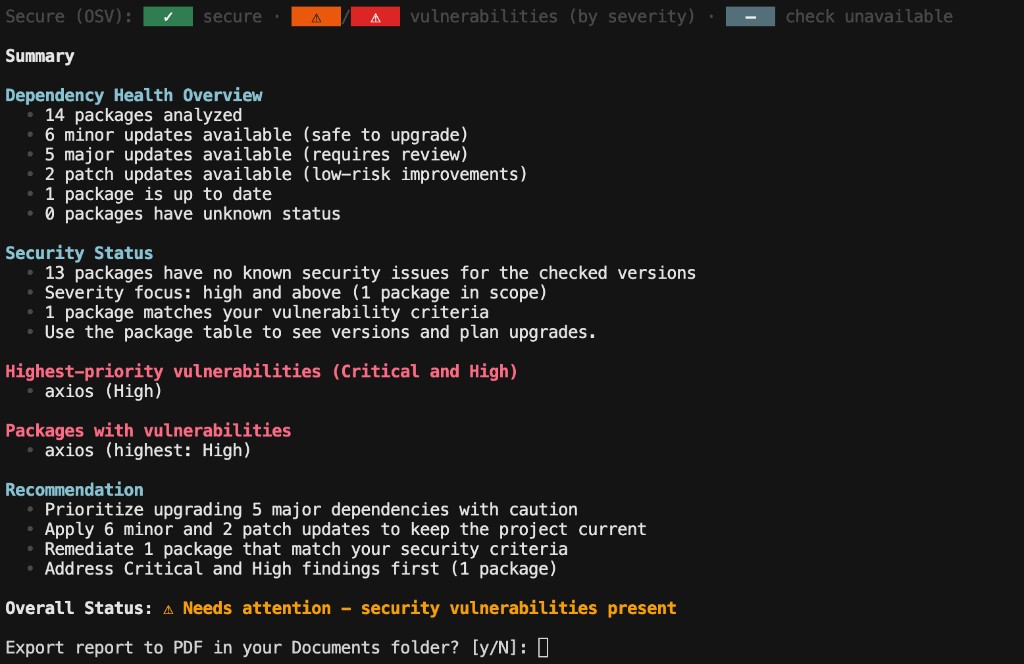
Summary: dependency health counts, security status, highest-priority (critical / high) items, packages with vulnerabilities (per your severity focus), recommendations, overall status, and optionally a prompt to export a PDF. Summary counts and vulnerability lists still use the full analyzed set, not the filtered table.
Examples
Dependency table
Summary
License
MIT