
nsf-clawguard
v1.0.4
Published
NSF-ClawGuard - Real-time monitoring of the security status on the client side, intelligently identifying risks and providing handling solutions

Maintainers
 nsf-aiguard
Readme
NSF-ClawGuard
NSF-ClawGuard is a comprehensive real-time security monitoring plugin for OpenClaw and ClawdBot. It provides multi-layered security protection including configuration scanning, runtime command monitoring, skill code analysis, content safety checks, and a web-based security dashboard.
中文文档请参阅 README-CN.md
✨ Key Features
🔍 Multi-Layered Security Scanning
- Configuration Security Scanner — Static analysis of
~/.openclaw/openclaw.jsonwith 30+ built-in security rules covering token security, network security, session security, data protection, plugin security, execution security - SOUL.md Prompt Injection Detection — Identifies prompt injection attacks in SOUL.md configuration files
- Skill Code Static Scanner — Deep analysis of installed skills covering SSRF, prompt injection, RCE, credential theft, sensitive path access, and dangerous function combinations
- npm Dependency Audit — Detects known vulnerabilities in project dependencies
- Node.js EOL Detection — Warns when running on unsupported Node.js versions
🛡️ Runtime Protection
- Command Security Monitoring — Intercepts and inspects dangerous shell commands before execution (reverse shells, file destruction, privilege escalation, credential theft, process injection, etc.)
- Command Blocking — When
block_on_violationpolicy is enabled, dangerous commands are actively blocked from execution, not just logged - Content Safety Check — Monitors both user input and AI output for malicious content via local rules or remote API
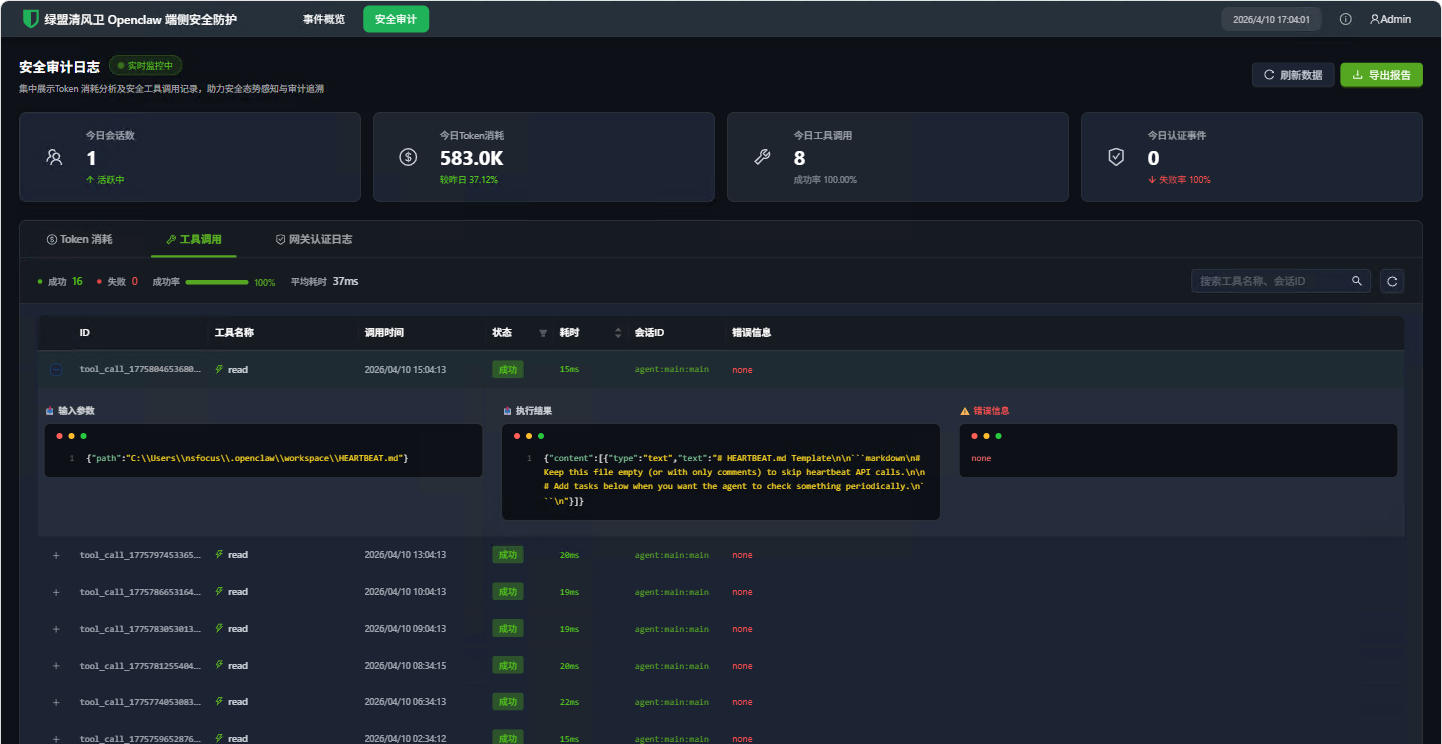
- Tool Call Auditing — Logs all tool invocations (
exec,write,edit) with duration, parameters, and success status - Gateway Authentication Monitoring — Real-time monitoring of Gateway WebSocket authentication events
📊 Observability
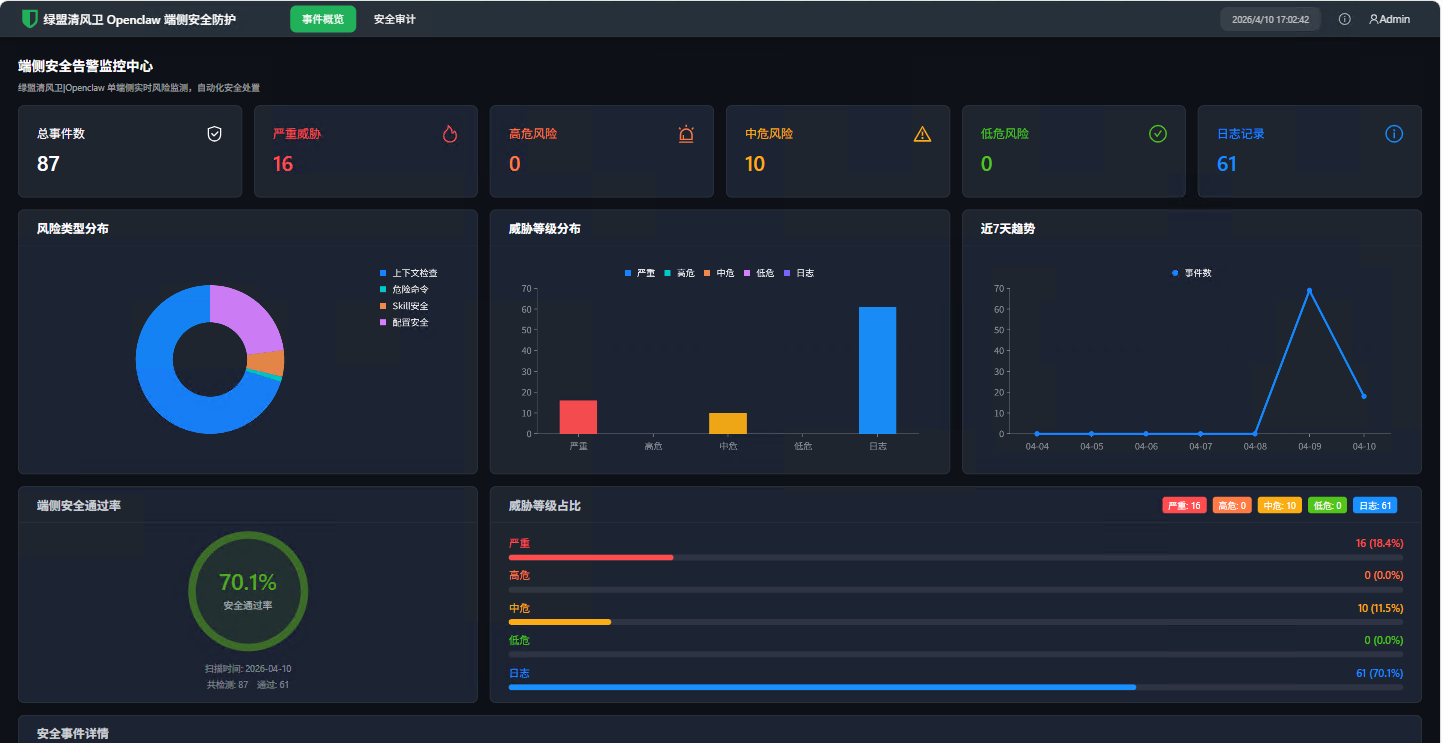
- Web Dashboard — React-based security dashboard with event overview, threat distribution charts, token usage statistics, and gateway auth logs
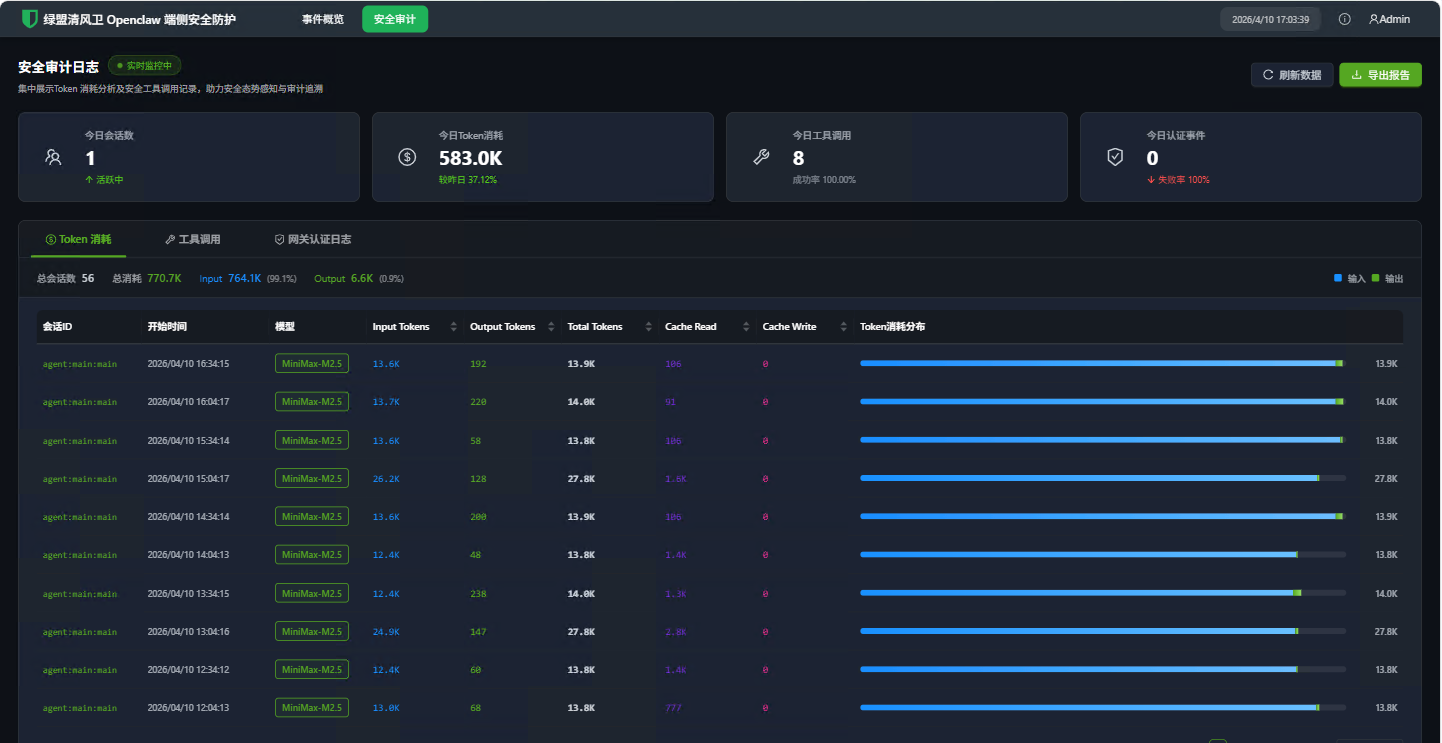
- Token Usage Tracking — Records AI model token consumption per session/model including cache hit metrics
- SQLite Event Storage — All security events persisted in a local SQLite database (
data/lm-security.db) with indexed queries - Violation Reporting — Automatic reporting of security violations to remote servers (configurable)
🔧 Additional Capabilities
- CLI Commands —
nsf-clawguard check,nsf-clawguard config-scan,nsf-clawguard config-scan-full - Port Scanning — Discovers and probes listening ports on
0.0.0.0for exposed services - Heartbeat Mechanism — Periodic health checks with plugin revocation detection
🏗️ Architecture
NSF-ClawGuard/
├── index.ts                     # Plugin entry point & event hooks
├── src/
│   ├── api.ts                   # Remote API: violation reporting, heartbeat, content check
│   ├── cloudPolicyConfig.ts     # Cloud policy fetching, LLM proxy mode management
│   ├── command-security.ts      # 80+ dangerous command pattern detection rules
│   ├── config-scanner.ts        # 30+ configuration security scan rules
│   ├── skill-scanner.ts         # 19-category skill code static analysis
│   ├── database.ts              # SQLite database (sql.js) with 6 tables
│   ├── event-store.ts           # Unified event storage & category mapping
│   ├── logger.ts                # Prefixed logging wrapper
│   ├── request.ts               # HTTP client with HMAC authentication
│   ├── monitor-log-file.ts      # Real-time log file monitor (pub/sub proxy)
│   ├── constants.ts             # Shared constants
│   ├── types.ts                 # TypeScript type definitions
│   ├── utils.ts                 # Utility functions
│   ├── cli/
│   │   └── index.ts             # CLI command registration
│   ├── scan-port/
│   │   └── index.ts             # Network port scanner (cross-platform)
│   └── server/
│       ├── index.ts             # HTTP route registration
│       ├── inspect.ts           # Security event & stats API handlers
│       ├── audit.ts             # Token usage & tool call API handlers
│       ├── router.ts            # Lightweight HTTP router
│       ├── static.ts            # Static file serving for web UI
│       ├── utils.ts             # Server utility functions
│       └── ui/                  # React dashboard (Vite + Ant Design)
├── tests/                       # Unit tests (Vitest)
├── scripts/
│   └── build.js                 # Full build script (UI + main package)
├── openclaw.plugin.json         # OpenClaw plugin manifest
├── clawdbot.plugin.json         # ClawdBot plugin manifest
├── tsup.config.ts               # Build configuration
├── tsconfig.json                # TypeScript configuration
└── vitest.config.ts             # Test configuration
📦 Installation
# Install dependencies
npm install

# Build the plugin
npm run build

# Full build (includes web dashboard)
npm run build:full
🚀 Development
# Build
npm run build

# Run tests
npm test

# Watch mode for tests
npm run test:watch

# Generate coverage report
npm run test:coverage

# Full build (UI + main package)
npm run build:full
🔐 Security Scanning Details
Configuration Scanner (30+ Rules)
Scans ~/.openclaw/openclaw.json across 7 security domains:
| Domain | Rules | Examples | |--------|-------|---------| | Token Security | 3 rules | Entropy check (< 48 chars), weak pattern detection (200+ patterns), hardcoded API keys | | Network Security | 7 rules | Gateway bind exposure, TLS requirement, CORS wildcard, API endpoint safety, proxy trust | | Session Security | 3 rules | Session TTL check, auth mode validation, session isolation | | Data Protection | 3 rules | Workspace restriction, verbose logging, sensitive info in logs | | Plugin Security | 3 rules | Plugin whitelist, source verification, internal hooks | | Execution Security | 6 rules | Exec security profile, write path restrictions, denied commands, MCP trust |
Additionally, the scanner detects:
- Dangerous Flags — Identifies insecure boolean flags (e.g.,
disableSafety,bypassAuth,noTLS) - Environment Variable Injection — Detects dangerous env var references like
LD_PRELOAD,PYTHONPATH,GIT_SSH_COMMAND - Private Key Leakage — Detects
.pem,.key,.p12file paths in configuration - Cryptocurrency Mnemonic Leakage — Detects BIP39 mnemonics, wallet seeds, and private keys
- Gateway Bind Exposure — Warns when Gateway binds to
0.0.0.0or::
Skill Scanner (19 Categories)
Performs static analysis on all installed skills:
- SSRF Detection — Detects user-controlled URLs in
fetch(),axios,http.get(), URL concatenation, and template literals - Prompt Injection — Detects user input concatenated into LLM prompts via string concatenation, template literals, or message array manipulation
- RCE / Dangerous Calls — Detects
child_process,eval(),vm.runInNewContext,__import__, PHP/Ruby/Java dangerous functions - Credential Theft — Detects access to
process.envsecrets, AWS/SSH/GitHub paths, key field names, and credential file writes - Sensitive Path Access — Detects access to
.ssh/,.gnupg/,/etc/passwd,.aws/,.kube/,.git/, Docker config, etc. - Dangerous Function Combinations — Detects high-risk pairs:
child_process + fetch,eval + fetch,writeFile + exec, etc. - Metadata Quality — Checks for missing/incomplete
package.jsonfields (description, author, etc.) - Install Hook Risks — Detects dangerous npm scripts like
curl | bash - Code Obfuscation Detection — Detects pickle deserialization, Base64 decode pipes,
String.fromCharCode, zero-width characters, Unicode RTL overrides,<script>/<iframe>injection - Command Execution Extended — Detects
importlib.import_module,subprocesswithshell=True,os.system(),pty.spawn,ctypes/cffinative code loading, Java/.NET deserialization - Infrastructure Abuse — Detects
chmod 777,0.0.0.0binding, Docker privileged mode,LD_PRELOADinjection, anonymous tunnel services (ngrok, serveo, cloudflare) - Persistence Detection — Detects crontab modification, LaunchAgent creation, shell RC file writes, SSH key injection, SOUL.md tampering, path traversal patterns
- Prompt Injection Extended — Detects jailbreak payloads (DAN mode), social engineering against AI reviewers, role reassignment, system prompt extraction, multi-language injection (Chinese/Russian), HTML comment-hidden instructions
- Data Exfiltration — Detects SSH key access, HTTP credential exfiltration, keystroke logging, clipboard access, DNS exfiltration, browser data access, environment variable echoing
- Lateral Movement — Detects sequential port scanning, DNS TXT queries, WebSocket connections to external hosts, Docker image export,
socatrelay tooling - Hardcoded Key Detection — Detects OpenAI/AWS/GitHub/Stripe API keys, JWT tokens, database connection strings with passwords, wallet seed phrases
- Autonomy Abuse — Detects self-modifying code, dynamic code generation+execution, obfuscation intent, remote instruction fetching, hallucinated package references
- Logic Vulnerability — Detects wildcard imports (
import *), bareexceptclauses, writes to sensitive paths, verbose error mode exposure - Financial Attack — Detects wallet draining patterns, cryptocurrency mining (XMRLg, Coinhive), memecoin launcher domains, pump-and-dump token spam
Command Security Monitor (80+ Patterns)
Intercepts tool calls in real-time, covering:
- Reverse Shells —
bash -i,nc -e,socat,awk,python -c,perl -e,php -r,ruby -e - System Destruction —
rm -rf /,mkfs,dd, block device redirects - Credential Theft —
procdump,comsvcs.dll,reg save,Sqldumper - Privilege Escalation —
BadPotato,JuicyPotato,SweetPotato,EfsPotato - Download & Execute —
curl | bash,wget | sh,base64 | bash - Process Injection —
gdb -p,ptrace,strace -p - Kernel Modules —
insmod,modprobe,rmmod - Encoding Obfuscation — Base64 decode pipes, command reversal via
rev - Registry Manipulation —
REG ADD/DELETE/SAVE,wevtutillog manipulation - Cron Injection —
echo | crontab, pipe tocrontab -
🪝 Plugin Hooks
| Hook | Trigger | Action |
|------|---------|--------|
| message_received | User sends a message | Content safety check on input |
| agent_end | AI agent finishes | Content safety check on output |
| before_tool_call | Before tool execution | Command safety check for exec, write, edit; blocks if block_on_violation is enabled |
| after_tool_call | After tool execution | Log tool call with duration & result |
| llm_output | LLM response received | Record token usage metrics |
💾 Data Storage
All events are stored in a local SQLite database (<pluginRoot>/data/lm-security.db):
| Table | Purpose | Key Fields |
|-------|---------|------------|
| security_events | All security findings | category, sub_category, threat_level, event_time, source, action |
| token_usage | AI token consumption | session_key, model, input/output/total tokens, cache_read/write |
| tool_call | Tool invocation records | tool_name, params, result, duration_ms, action |
| gateway_auth_logs | Gateway auth events | event_type, conn_id, remote_ip, client |
| policy_config | Cloud policy configuration | policy_version, skill/command/config_check_enabled, block_on_violation, llm_mode |
| default_model_config | Default LLM model backup | provider_id, model_id |
🖥️ Web Dashboard
Access the security dashboard at: http://localhost:18789/web (where 18789 is the Control UI port)
Screenshots
Event Overview — Security event summary, threat distribution charts, 7-day trend, and endpoint security pass rate:
Token Consumption — Token usage statistics per session and model with input/output breakdown:
Tool Calls — Tool invocation history with parameters, results, and timing details:
Dashboard Pages
| Page | Description | |------|-------------| | Overview | Summary of security events, threat distribution, and recent activity | | Security Events | Filterable list of all security findings with severity levels | | Token Usage | Token consumption trends per session and model | | Tool Calls | Detailed tool invocation history with timing | | Gateway Auth | Authentication event log with connection details |
API Endpoints
| Endpoint | Description |
|----------|-------------|
| GET /lm-securty/overview | Dashboard overview statistics |
| GET /lm-securty/events | Security event list |
| GET /lm-securty/securityEventStats | 7-day event trend chart data |
| GET /lm-securty/eventStats | Event statistics summary |
| GET /lm-securty/riskDistribution | Risk distribution chart data |
| GET /lm-securty/tokenUsage | Token usage records |
| GET /lm-securty/toolCall | Tool call records |
| GET /lm-securty/gatewayAuthLogs | Gateway auth logs |
⚙️ Configuration
Plugin Manifest
The plugin is configured via openclaw.plugin.json:
{
  "id": "nsf-clawguard",
  "name": "nsf-clawguard",
  "description": "Real-time monitoring of the security status on the client side, intelligently identifying risks and providing handling solutions",
  "version": "1.0.0",
  "configSchema": {
    "type": "object",
    "properties": {
      "mcpPaths": {
        "type": "array",
        "items": { "type": "string" },
        "description": "Paths to MCP config files to monitor"
      }
    }
  }
}
Remote API Configuration
Create a config.json in the plugin root directory:
{
  "baseUrl": "https://your-security-server.example.com",
  "secretKey": "your-hmac-secret-key",
  "accessKey": "your-access-key",
  "appId": "your-app-id",
  "verifySsl": true,
  "mode": "online"
}- Set
modeto"online"to enable remote API features (violation reporting, content check, heartbeat) - Set
modeto any other value to run in offline mode — only local security detection is active
🖱️ CLI Commands
# Upload and scan skills/plugins
nsf-clawguard check

# Scan configuration for security issues (failures only)
nsf-clawguard config-scan

# Full configuration scan with all rule statuses
nsf-clawguard config-scan-full

# JSON output
nsf-clawguard config-scan --json
nsf-clawguard config-scan-full --json
🧪 Testing
# Run all tests
npm test

# Watch mode
npm run test:watch

# Generate coverage report
npm run test:coverage
Tests use Vitest with V8 coverage provider. Test files are located in the tests/ directory.
🤝 Contributing
- Fork the repository
- Create a feature branch (
git checkout -b feature/amazing-feature) - Commit your changes (
git commit -m 'Add amazing feature') - Push to the branch (
git push origin feature/amazing-feature) - Open a Pull Request
📄 License
MIT License — Copyright (c) 2026 NSFOCUS Technologies Group Co., Ltd. See LICENSE for details.