
nudgekit-react-native
v0.1.14
Published
Server-driven home cards & conditional widgets for React Native, powered by NudgeKit.

Maintainers
 mohdadnaanazam
Readme
nudgekit-react-native
Server-driven home cards for React Native, powered by NudgeKit journeys.
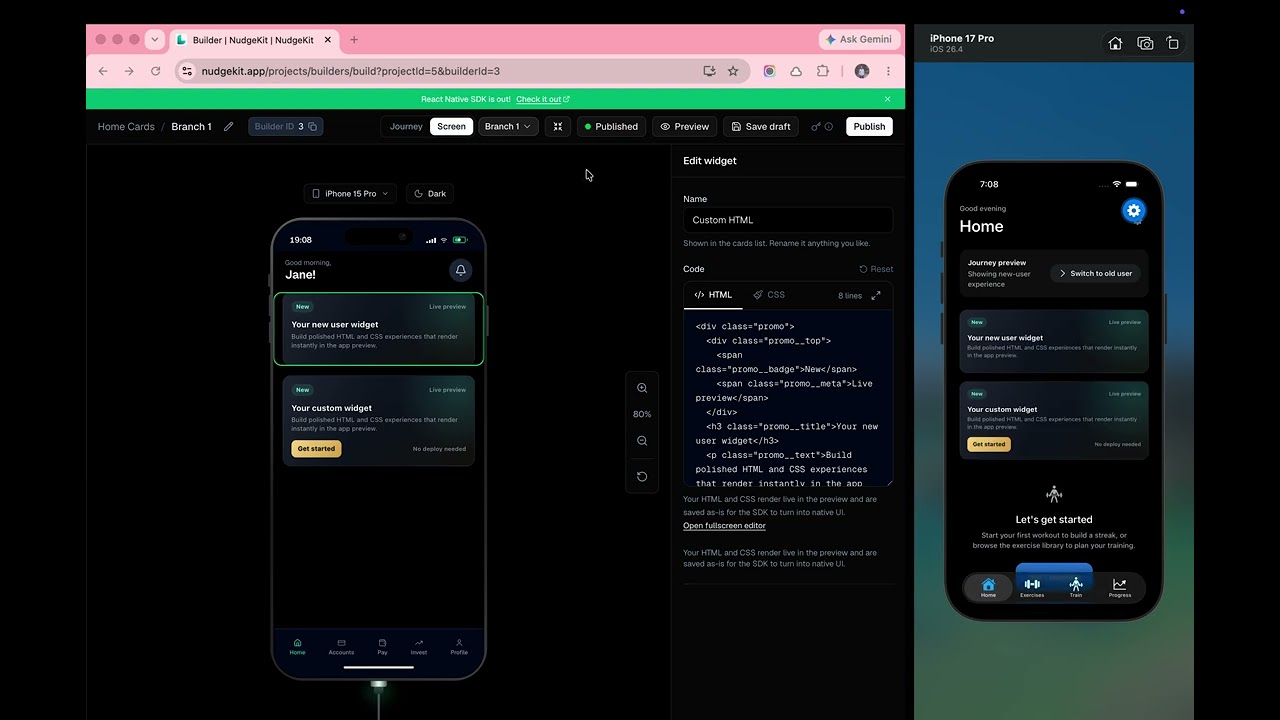
Design a journey (audience branches + default screen) in the NudgeKit admin, Publish, then render the winning screen in any RN/Expo app. The backend picks the branch from enter-when rules; the SDK still resolves card-level variants on the device.
Demo
Test key vs Live key
| Key | Prefix | Use in | Content |
|-----|--------|--------|---------|
| Test | lk_test_… | Expo, simulators, internal builds | Draft + published (preview before ship) |
| Live | lk_live_… | App Store / Play Store | Only published — draft never reaches real users |
Same Builder ID for both; the key decides draft vs live visibility.
Install
npm install nudgekit-react-native react-native-webview
# or
yarn add nudgekit-react-native react-native-webviewreact-native-view-shot, used by development live preview, is installed with the
SDK. react, react-native, and react-native-webview are peer dependencies.
On bare RN, run cd ios && pod install after installing.
Get your API key & Builder ID
Sign in at nudgekit.app, open a project, and open your home-cards builder.
| Value | Where | Provider prop |
|-------|--------|----------------|
| API key | Project → API Keys (Test or Live) | apiKey |
| Builder ID | Builder header badge “Builder ID” | builderId (required) |
| User id | Your auth / device id | userId (recommended) |
Admin: design journey → Save draft → Publish
App:   builderId + Live key  → users see published journey
Dev:   builderId + Test key  → you can preview drafts
Quick start
import { NudgeKitProvider, NudgeKitCards } from "nudgekit-react-native";

export default function Home() {
  return (
    <NudgeKitProvider
      apiKey="lk_live_xxx"   // or lk_test_xxx while developing
      builderId={3}          // from admin "Builder ID" badge
      userId="user_123"      // stable id for targeting / enter-when
    >
      <NudgeKitCards />
    </NudgeKitProvider>
  );
}
What happens on mount:
GET /api/sdk/builders/{builderId}/home?userId=…— server picks the journey branch.GET /api/sdk/users/{userId}/properties— properties for card variants.- Cards render; first matching variant per card wins on the client.
Live simulator preview
In development, the same NudgeKitProvider also listens for the temporary
Inspector link generated by the builder. Wrap the app at its root and click
Connect simulator in the builder—no Inspector route or app-specific capture
code is needed.
export default function App() {
  return (
    <NudgeKitProvider apiKey="lk_test_xxx" builderId={3}>
      <RootNavigator />
    </NudgeKitProvider>
  );
}
The Inspector accepts the official https://nudgekit.app relay (including its
subdomains) and local simulator relays. The capture client is inactive in
production app builds. Pass inspector={false} to disable it in development.
baseUrl is optional (defaults to the deployed NudgeKit API). Set it only for local backends.
Example app
linklygym — Expo app wired to this SDK.
# .env
EXPO_PUBLIC_NUDGEKIT_API_KEY=lk_test_xxx
EXPO_PUBLIC_NUDGEKIT_BUILDER_ID=3
EXPO_PUBLIC_NUDGEKIT_USER_ID=demo-user
# optional:
# EXPO_PUBLIC_NUDGEKIT_BASE_URL=http://localhost:8080
Tracking events (card variants + future targeting)
import { useNudgeKit } from "nudgekit-react-native";

function AddToCartButton() {
  const { track } = useNudgeKit();
  return (
    <Button
      title="Add to cart"
      onPress={() => track("add_to_cart", { cartItemCount: 3 })}
    />
  );
}
Properties are stored on the backend and merged locally so variant UI can update without a full reload.identify(userId) switches user and re-fetches journey home (branch can change after login).
API
<NudgeKitProvider>
| Prop | Type | Notes |
|------|------|--------|
| apiKey | string | Required. lk_test_… (dev) or lk_live_… (prod). |
| builderId | number | Required. Journey owner from admin Builder ID. |
| userId | string | Current user for properties + branch resolution. |
| baseUrl | string | Backend base URL. Default: deployed API. |
| timeoutMs | number | Request timeout. Default 10000. |
| onAction | (event) => void | Optional callback for clicks on annotated actions and standard interactive HTML controls. |
| trackActionEvents | boolean | Auto-track action event names. Default true. |
| inspector | boolean | Development live preview. Default true; inactive in production. |
useNudgeKit()
Returns { widgets, userProperties, loading, error, userId, track, identify, refresh, onAction }.
| Field | Meaning |
|-------|---------|
| widgets | Ordered widgets for the resolved build |
| userProperties | Latest property map for the user |
| track(eventName, properties?) | POST /api/sdk/events + local merge |
| identify(userId) | Switch user and reload journey + properties |
| refresh() | Re-fetch config + properties |
<NudgeKitCards>
| Prop | Type | Notes |
|------|------|--------|
| style | StyleProp<ViewStyle> | Container style |
| gap | number | Vertical gap. Default 16 |
| loadingComponent | ReactElement \| null | First load |
| renderError | (error: string) => ReactElement \| null | Load failure |
| emptyComponent | ReactElement \| null | No widgets (e.g. not published on Live key) |
Widget types
CUSTOM_HTML— HTML/CSS card viaCustomCard(auto height, or fill when CSS usesvh/100%/flex: 1).CAROUSEL— horizontal cards viaCarouselCard(metadata.config: width, height, dots, title, …).
Lower-level exports
NudgeKitWidget, CustomCard, CarouselCard, NudgeKitClient, NudgeKitError, evaluateCondition, resolveContent, resolveCustomWidget, resolveCarouselCards, getCarouselCards, parseWidgetMetadata, parseCarouselConfig, buildCustomSrcDoc, buildCardSrcDoc, usesFillLayout, and TypeScript types.
Backend endpoints used by the SDK
| Method | Path | Purpose |
|--------|------|---------|
| GET | /api/sdk/builders/{builderId}/home?userId= | Journey resolve → winning build + widgets |
| GET | /api/sdk/users/{userId}/properties | User property map |
| POST | /api/sdk/events | Track events / update properties |
All requests send header: X-API-Key: <apiKey>.
License
MIT