
nuxt-color-picker
v1.2.8
Published
[](https://raw.githubusercontent.com/LorexIQ/nuxt-color-picker/master/docs/poster.png)

Maintainers
 lorexiq
Readme





Nuxt Color Picker
A module that adds a convenient, customizable ColorPicker component to select colors in your application.
This module works with Nuxt 3 only
Features
- Easy connection
- Full component customisation
- Two use cases (as color-picker and as color-picker-block)
- EyeDropper support
- Color selection history
- Initial color display
- Alpha range availability
Usage
Install the module:
npm install nuxt-color-pickerConfiguration
export default defineNuxtConfig({
  modules: ["nuxt-color-picker"]
})
Components
ColorPicker
The component is a wrapper for any html block, to implement its own ColorPicker menu disclosure button.
type Props = {
  modelValue?: string;
  storageKey?: string;
  withAlpha?: boolean;
  withInitialColor?: boolean;
  withEyeDropper?: boolean;
  withHexInput?: boolean;
  withRgbInput?: boolean;
  withColorsHistory?: boolean | number;
  immediateEmit?: boolean;
};
type Emits = {
  (e: 'update:modelValue', v: string): void;
  (e: 'change', v: ModuleColorMultiType): void;
  (e: 'close'): void;
};
type Slot = {
  color: Ref<string | undefined>;
  hide: () => void;
  show: (event: MouseEvent) => void;
};
<script lang="ts" setup>
const refVariable = ref('#000');
</script>
<template>
<color-picker
v-model="refVariable"
v-slot="{ color, show }"
@change="console.log('New color:', $event)"
@close="console.log('ColorPicker is closed')"
>
Current color: {{ color }}
<button @click="show">OPEN</button>
</color-picker>
</template>ColorPickerBlock
The component is the main block of the Color Picker. It is always open and can be integrated as a block, anywhere in the application.
type Props = {
  modelValue?: string;
  storageKey?: string;
  withAlpha?: boolean;
  withInitialColor?: boolean;
  withEyeDropper?: boolean;
  withHexInput?: boolean;
  withRgbInput?: boolean;
  withColorsHistory?: boolean | number;
  immediateEmit?: boolean;
};
type Emits = {
  (e: 'update:modelValue', v: string): void;
  (e: 'change', v: ModuleColorMultiType): void;
};
<script lang="ts" setup>
const refVariable = ref('#000');
</script>
<template>
Current color: {{ refVariable }}
<color-picker-block
v-model="refVariable"
@change="console.log('New color:', $event)"
/>
</template>Components configuration
Properties
| Name | Type | Default | Description |
|-------------------|:-----------------:|:-------:|-----------------------------------------------------------------------------------------------------------------------------------------------------------------------------------------------------------------------------------------|
| modelValue | string | #000000 | v-model variable that adds two-way communication |
| storageKey | string | history | A modifier key in the storage to save the color history |
| withAlpha | boolean | false | It includes an alpha spectrum block and the ability to work with the alpha range of colors |
| withInitialColor | boolean | false | Enables the display of the initial color with which the block was originally opened with the possibility of rolling back |
| withEyeDropper | boolean | false | Includes the EyeDropper block (if supported), which allows you to use color copying |
| withHexInput | boolean | false | Includes a block for manually entering the hex value color. When WithAlpha is enabled, the alpha range is added |
| withRgbInput | boolean | false | Includes a block for manually entering the rgb color value. When WithAlpha is enabled, the alpha range is added |
| withColorsHistory | boolean | number | false | Includes the color history block. Specifying a number - sets the number of colors to display (1<=n<=9). Specifying true sets the maximum possible number of colors. When withAlpha is turned off, the maximum number of colors is 8 |
| immediateEmit | boolean | false | Enables calling a color change event when mounting a component |
Events
| Name | Type | Description | |-------------------|:--------------------:|-----------------------------------------------------------------------------------| | update:modelValue | string | v-model system event for updating the value | | change | ModuleColorMultiType | Called when the color changes and returns a new color in rgba, hsv and hex values | | close | void | Called when the ColorPicker window is closed |
Slots
| Name | Type | Description | |-------|-----------------------------|--------------------------------------------------------------------------------------------------------------| | color | Ref<string | undefined> | Current, selected, reactive color | | hide | () => void | The function that closes the ColorPicker window | | show | (event: MouseEvent) => void | The function that opens the ColorPicker window (requires MouseEvent to calculate the position of the window) |
Types
type ModuleRGB = {
  r: number;
  g: number;
  b: number;
};
type ModuleRGBA = ModuleRGB & {
  a: number;
};
type ModuleHSV = {
  h: number;
  s: number;
  v: number;
};
type ModuleHEX = string;

type ModuleColorMultiType = {
  rgba: ModuleRGBA;
  hsv: ModuleHSV;
  hex: ModuleHEX;
};
Configuration examples
| | 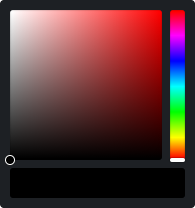 |
| 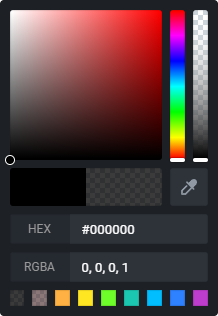 |
| 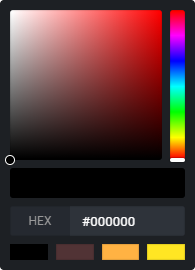 |
|------------|:-----------------------------------------------------------------------------------------------------:|:---------------------------------------------------------------------------------------------------------------:|:-----------------------------------------------------------------------------------------------------------------------------------:|
| Equipment | Basic | Full | Only HEX with 4 colors |
| Properties | | with-alphawith-initial-colorwith-eye-dropperwith-hex-inputwith-rgb-inputwith-colors-history | with-hex-input:with-colors-history="4" |
| |
|
|------------|:-----------------------------------------------------------------------------------------------------:|:---------------------------------------------------------------------------------------------------------------:|:-----------------------------------------------------------------------------------------------------------------------------------:|
| Equipment | Basic | Full | Only HEX with 4 colors |
| Properties | | with-alphawith-initial-colorwith-eye-dropperwith-hex-inputwith-rgb-inputwith-colors-history | with-hex-input:with-colors-history="4" |
| | 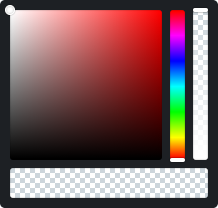 |
| 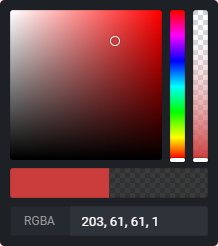 |
| 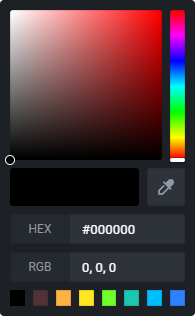 |
| Equipment | Only alpha | RGBA with initial | All without alpha |
| Properties | with-alpha | with-alphawith-initial-colorwith-rgb-input | with-initial-colorwith-eye-dropperwith-hex-inputwith-rgb-inputwith-colors-history |
|
| Equipment | Only alpha | RGBA with initial | All without alpha |
| Properties | with-alpha | with-alphawith-initial-colorwith-rgb-input | with-initial-colorwith-eye-dropperwith-hex-inputwith-rgb-inputwith-colors-history |
Development
- Run
npm run dev:prepareto generate type stubs. - Use
npm run devto start playground in development mode.
Deploy
Deploy the application on the Edge with NuxtHub on your Cloudflare account:
npm run deployThen checkout your server logs, analaytics and more in the NuxtHub Admin.
You can also deploy using Cloudflare Pages CI.