
nx-feature-cli
v2.2.2
Published
Enterprise CLI Feature Generator untuk Next.js (Mantine + RTK Query), Golang (Fiber Clean Arch) & Flutter (Riverpod Clean Arch)

Maintainers
 resdeby
Readme
🔥 Enterprise Dev Suite (nx-feature)
All-in-One Scaffold & Module Generator untuk Next.js (Mantine + RTK Query), Golang (Fiber v3 Clean Architecture) & Flutter (Riverpod Clean Architecture)



📖 Daftar Isi
Fitur Utama
- 🖥️ Terminal UI Interaktif — Jalankan
nx-featuretanpa argumen untuk memilih aksi dari menu yang rapi, lengkap dengan spinner dan notifikasi visual. - 📦 Full App Boilerplate — Generate starter project untuk 3 framework dari repository GitLab:
- Backend Go Clean Architecture (Fiber)
- Frontend Next.js Mantine
- Flutter Riverpod Clean Architecture
- ⚙️ Feature Module Generator — Buat modul lengkap dari masing-masing framework dalam hitungan detik:
- Next.js: Domain, RTK Query (Redux), Components, Pages, Columns
- Golang: Domain, Usecase, Delivery (HTTP/gRPC), Repository (GORM/MySQL)
- Flutter: Controller (Riverpod), Provider, Entity, Usecase, Repository, Model, State, Page, Detail Page, Form
- 🧹 Safe Removal — Hapus modul secara steril tanpa meninggalkan jejak: bersihkan
registry.go,store.ts, router dan referensi lainnya. - 🚀 Cross-Platform — Berjalan di Windows, macOS, dan Linux tanpa dependensi tambahan.
Instalasi
Instalasi Global
Package di npm bernama
nx-feature-cli, sedangkan perintah (binary) yang dipakai adalahnx-feature.
# Menggunakan npm
npm install -g nx-feature-cli

# Menggunakan yarn
yarn global add nx-feature-cli

# Menggunakan pnpm
pnpm add -g nx-feature-cli
Menggunakan npx (tanpa instalasi global)
npx nx-feature-cliSetelah terinstall, kamu bisa langsung memanggil perintahnya di terminal:
nx-feature          # masuk ke TUI menu interaktif
nx-feature --help   # bantuan semua command
nx-feature --version
Setup Environment
Untuk meng-clone repository template private (create-app / create-backend / flutter:create), buat file .env di direktori kerja atau set variabel lingkungan:
GITLAB_TOKEN=glpat-xxxxxxxxxxxxxxxxxxxxToken ini diperlukan untuk akses ke template private. Jika tidak diset, CLI akan meminta token secara interaktif saat dibutuhkan.
Cara Penggunaan
🖥️ TUI Mode (Rekomendasi)
Cukup jalankan perintah berikut tanpa argumen:
nx-featureMaka akan muncul menu interaktif yang memungkinkan kamu memilih aksi dengan mudah:
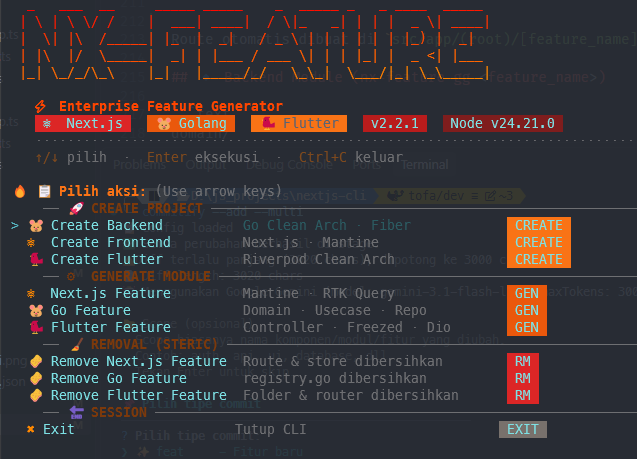
Menu lengkapnya:
| Aksi | Deskripsi | | ----------------------------- | ------------------------------------------ | | Create New Backend | Clone template Go Clean Arch | | Create New Frontend | Clone template Next.js Mantine | | Create New Flutter | Clone template Flutter Riverpod Clean Arch | | Generate Next.js Feature | Buat module Next.js (Mantine + RTK) | | Generate Go Feature | Buat module Golang Clean Arch | | Generate Flutter Feature | Buat module Flutter Clean Arch | | Remove Next.js / Go / Flutter | Hapus module secara steril | | Exit / Keluar | Keluar dari menu |
Setiap pilihan akan memandu kamu melalui pertanyaan-pertanyaan interaktif dan menampilkan spinner selama proses berlangsung. Setelah selesai, kamu akan kembali ke menu utama.
⚡ CLI Commands (Power User)
Untuk pengguna yang lebih suka perintah langsung, semua command tetap tersedia:
1. Project Generator
# Generate backend Go Clean Architecture
nx-feature create-backend <app-name>    # alias: cb

# Generate frontend Next.js Mantine
nx-feature create-app <app-name>        # alias: cf

# Generate project Flutter Riverpod Clean Arch
nx-feature flutter:create <app-name>    # alias: fc
Jika <app-name> tidak diberikan, CLI akan meminta input secara interaktif.
2. Next.js Generator
# Generate modul Next.js baru (dengan prompt konfigurasi)
nx-feature next:gen <feature-name>      # alias: ng

# Generate tanpa konfirmasi (YOLO mode, semua opsi default)
nx-feature next:gen <feature-name> --yolo

# Hapus modul Next.js secara steril (import, route & store dibersihkan)
nx-feature next:rm <feature-name>       # alias: nr
# gunakan -f untuk hapus tanpa konfirmasi
nx-feature next:rm <feature-name> -f
3. Golang Generator
# Generate modul Go Clean Architecture
nx-feature go:gen <feature-name>        # alias: gg

# Generate dengan custom flags (protocol & ORM)
nx-feature go:gen <feature-name> -d grpc -r gorm

# Hapus modul Go secara steril (termasuk registry.go)
nx-feature go:rm <feature-name>         # alias: gr
nx-feature go:rm <feature-name> -f      # tanpa konfirmasi
4. Flutter Generator
# Generate modul Flutter (Riverpod + Freezed + Dio)
nx-feature flutter:gen <feature-name>   # alias: fg
# contoh: nx-feature flutter:gen sales_config

# Hapus modul Flutter secara steril (folder + referensi di router)
nx-feature flutter:rm <feature-name>    # alias: fr
nx-feature flutter:rm <feature-name> -f # tanpa konfirmasi
Catatan Flutter: setelah
flutter:gen, jalankan code generator Riverpod/Freezed lalu daftarkan halamannya di router:dart run build_runner build --delete-conflicting-outputsRegister
<feature_name>_page.dartdilib/router/app_router.dart.
Arsitektur Output
🔹 Frontend Module (nx-feature ng <feature_name>)
src/modules/
└── [feature_name]/
    ├── components/
    │   ├── [FeatureName]Form.tsx
    │   └── [FeatureName]sPage.tsx
    ├── redux/
    │   ├── index.ts
    │   ├── services/
    │   │   └── index.ts
    │   └── slices/
    │       └── index.ts
    ├── schemes/
    │   └── formFields.ts
    ├── types/
    │   └── index.d.ts
    ├── columns.tsx
    └── constants.ts
Route otomatis dibuat di src/app/(root)/[feature_name]/ dan Redux Store diperbarui di src/redux/store.ts.
🔹 Backend Module (nx-feature gg <feature_name>)
domain/
└── [feature_name]/
    ├── contracts.go
    ├── entity.go
    ├── request.go
    └── response.go

module/
└── [feature_name]/
    ├── delivery/
    │   └── http/
    │       └── [feature_name]_handler.go
    ├── repository/
    │   └── gorm/
    │       └── [feature_name]_repository.go
    └── usecase/
        └── [feature_name]_usecase.go

registry.go   <-- Auto-registered Dependency Injection
🔹 Flutter Module (nx-feature fg <feature_name>)
lib/features/
└── [feature_name]/
    ├── application/
    │   ├── controllers/
    │   │   └── [feature_name]_controller.dart   # @riverpod Notifier
    │   └── providers/
    │       └── [feature_name]_provider.dart     # Dio → RemoteDS → Repo → Usecase
    ├── domain/
    │   ├── entities/
    │   │   └── [feature_name].dart              # Freezed
    │   ├── repositories/
    │   │   └── [feature_name]_repo.dart         # Interface
    │   └── usecases/
    │       └── [feature_name]_usecase.dart
    ├── data/
    │   ├── datasources/
    │   │   └── [feature_name]_remote_ds.dart    # Dio + ApiException
    │   ├── models/
    │   │   └── [feature_name]_model.dart        # Freezed + fromJson
    │   ├── repositories/
    │   │   └── [feature_name]_repo_impl.dart
    │   └── state/
    │       └── [feature_name]_state.dart        # Freezed State
    └── presentation/
        ├── pages/
        │   ├── [feature_name]_page.dart
        │   └── [feature_name]_detail_page.dart
        └── widgets/
            └── [feature_name]_form.dart
FAQ / Troubleshooting
❓ Error saat clone template: "Token invalid"?
Pastikan .env berisi GITLAB_TOKEN yang valid dan punya akses membaca repository template. Bisa juga menjalankan:
git clone https://oauth2:<GITLAB_TOKEN>@gitlab.com/cassava1/<nama_repo_template>.gituntuk memastikan token bekerja.
❓ Perintah nx-feature tidak dikenali setelah install?
nx-feature --versionJika error, cek binary sudah terpasang: npm ls -g --depth=0 | grep nx-feature. Pastikan juga kamu menginstall package yang benar: nx-feature-cli (bukan nx-feature).
❓ File .g.dart / .freezed.dart tidak ada setelah generate Flutter?
Kode bertanda @riverpod dan @freezed membutuhkan build_runner:
dart run build_runner build --delete-conflicting-outputsLisensi
