
octopus-agent
v1.4.0
Published
🐙 Terminal AI agent — speak naturally, execute instantly

Maintainers
 codewithpabitra
Readme
Octopus
Terminal AI Agent — speak naturally, execute instantly.
No GUI. No workflow builder. Just your terminal and plain English.






What is Octopus?
Octopus is a terminal-based autonomous AI agent powered by Groq + Llama 3.3 70B. Tell it what you want in plain English and it executes real tasks — no setup wizards, no drag-and-drop, no configuration files.
npx octopus-agent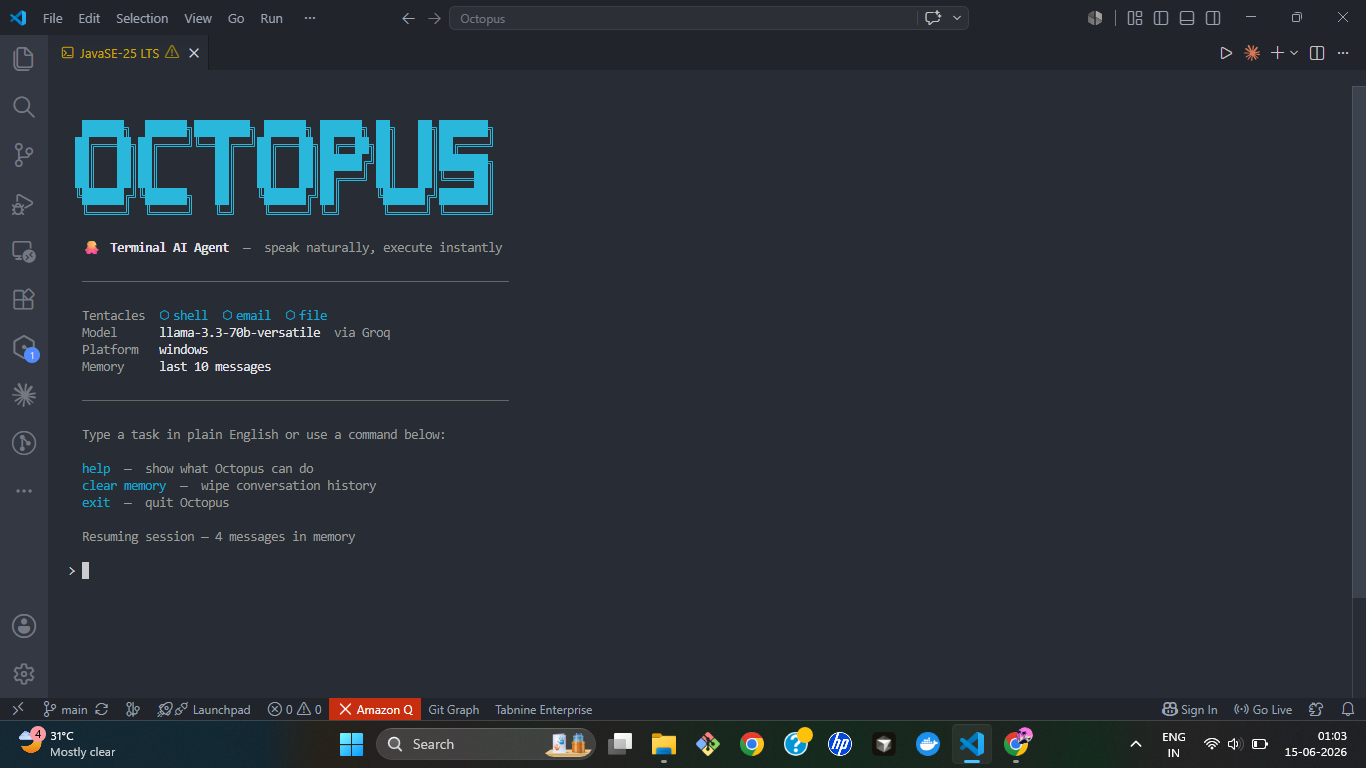
Tentacles (what it can do)
⚡ Shell
Run any terminal command in plain English. Cross-platform Windows, Mac, Linux.
"show my running processes"
"what is my IP address"
"list files in downloads"
📁 File
Read, write, search, and list files across your system.
"read ~/notes.txt"
"write my ideas to ~/ideas.txt"
"search for invoice files in documents"Send emails via Gmail. Octopus writes the subject and body from your description.
"email john that the meeting is cancelled"
"send priya the project update"
🌐 Web
Scrape, screenshot, summarize pages and search the web via Google News RSS.
"search for latest AI news"
"summarize https://dev.to/some-article"
"take a screenshot of github.com/Codewithpabitra"
"get the content from https://nodejs.org"
🐼 Git
AI-powered git operations — from smart commits to repo intelligence.
Local operations:
"show git status"
"commit my changes with a good message"
"show last 5 commits"
"what changed in my files"
"undo my last commit"
"create a branch called feature/auth"
"what's in my stashes"
"show stale branches older than 30 days"
Remote operations:
"push my changes"
"pull latest from remote"
"am I ahead or behind remote"
"how many branches in remote repo"
"what is the remote origin"
"fetch latest from remote"
AI powered:
"generate my standup"
"write a PR description"
"is it safe to push"
"who has committed the most"
"show repo stats"
⎇ Supervisor
Multi-step tasks across tentacles, automatically detected — no special syntax needed.
"check if safe to push, run tests, then push"
"generate my standup and email it to my manager"
"scrape a page, summarize it, save to a file"
"run a full security check before I deploy"
Octopus plans the steps, asks for anything missing before running, executes in order, and stops cleanly if a step fails.
Quick start
Option 1 — Run instantly (no install)
npx octopus-agentOption 2 — Install globally
npm install -g octopus-agent
octopus
Option 3 — Clone and run locally
git clone https://github.com/Codewithpabitra/Octopus.git
cd Octopus
npm install
npm run dev
Configuration
Run the setup wizard:
npm run setupOr create .env manually:
GROQ_API_KEY=gsk_your_key_here
GROQ_MODEL=llama-3.3-70b-versatile
[email protected]
GMAIL_APP_PASSWORD=xxxx xxxx xxxx xxxx
Get your free Groq API key at console.groq.com
Gmail App Password: myaccount.google.com → Security → App passwords
Commands
| Command | What it does |
| -------------- | ------------------------------- |
| help | Show all tentacles and examples |
| clear memory | Wipe conversation history |
| exit | Quit Octopus |
Memory
Octopus remembers your last 10 messages across sessions. Context is stored locally at ~/.octopus/memory.db — nothing leaves your machine except the Groq API call.
Platform support
| Platform | Status | | -------- | ------------ | | Windows | ✅ Supported | | macOS | ✅ Supported | | Linux | ✅ Supported |
Tech stack
| Layer | Technology | | -------- | ---------------------------- | | Runtime | Node.js 18+ | | Language | TypeScript | | AI / LLM | Groq — Llama 3.3 70B | | Email | Nodemailer + Gmail OAuth | | Web | Playwright + Google News RSS | | Git | simple-git | | Supervisor | Multi-agent Supervisor Architecture | | Memory | SQLite via better-sqlite3 | | CLI | Chalk + Ora |
Roadmap
- [x] Shell tentacle
- [x] File tentacle
- [x] Email tentacle
- [x] Web tentacle (scrape, screenshot, summarize, search)
- [x] Git tentacle (15+ operations with AI)
- [x] Cross-platform Windows + Mac + Linux
- [x] Persistent SQLite memory
- [x] Landing page
- [x] Supervisor mode (multi-step, multi-tentacle task orchestration)
- [ ] WhatsApp tentacle
- [ ] Google Calendar tentacle
- [ ] Session login for web (LinkedIn, GitHub private)
- [ ] Plugin API for community tentacles
Contributing
PRs are welcome. To add a new tentacle:
- Create
src/tentacles/yourname.ts - Export an
executefunction - Add the action type to
src/core/intentParser.ts - Wire it in
src/core/router.ts
Built with Octopus by Codewithpabitra | MIT License