
ohsee-qa
v0.1.9
Published
Visual regression testing: capture prod and dev URLs at multiple breakpoints, then pixel- and semantic-diff them


Readme
Ohsee
Visual regression testing from a JSON config. Ohsee captures your production and dev URLs at multiple breakpoints, then shows you exactly what changed — pixel diffs and semantic diffs (layout shifts, color, typography, and content changes).
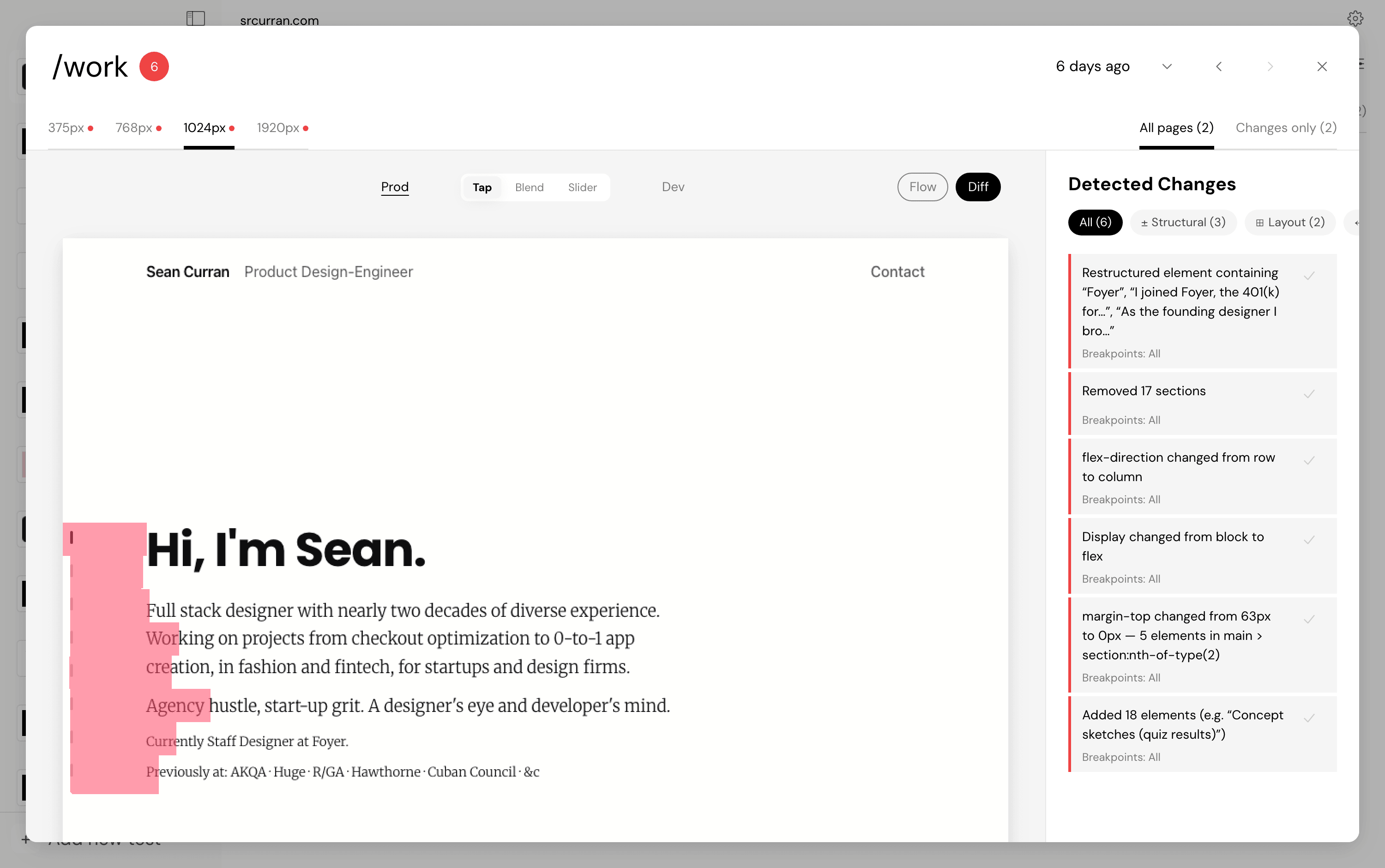
Quickstart
cd your-project
npx ohsee-qa           # no config yet? guided setup — then lists your tests
npx ohsee-qa marketing # runs one
Setup asks for your test's name, URLs, breakpoints, and pages right in the terminal — or type wizard (or run ohsee init --wizard) to build the test in the visual wizard instead, which is the easy path for sign-in flows and scripted steps. Either way the result is a committed ohsee.config.json.
The first run downloads Chromium (one-time). When a run finishes, the report opens automatically — in the Ohsee desktop app if you have it, otherwise in your browser.
Config
Tests live in a committed ohsee.config.json, so your teammates and CI run exactly the same checks:
{
  "$schema": "https://unpkg.com/ohsee-qa/schema/ohsee.config.schema.json",
  "name": "acme",
  "prodUrl": "https://acme.com",        // the baseline
  "devUrl": "http://localhost:3000",    // the comparison
  "breakpoints": [1440, 768, 375],      // optional (default: 1920–375)
  "variants": ["light", "dark"],        // optional light/dark capture
  "tests": {
    "marketing": {
      "pages": ["/", "/pricing", "/about"]
    },
    "staging-vs-prod": {                // per-test URL pairs for multi-env setups
      "prodUrl": "https://acme.com",
      "devUrl": "https://staging.acme.com",
      "pages": ["/"]
    },
    "signed-in-dashboard": {            // authenticated pages: sign in once per env,
      "pages": ["/dashboard"],          // the session seeds every breakpoint
      "login": {
        "scriptFile": "./ohsee/login.js",
        "credentials": {
          "email": "${OHSEE_EMAIL}",    // ${VAR} pulls from the environment —
          "password": "${OHSEE_PASSWORD}" // keep secrets out of the file
        }
      }
    },
    "checkout-flow": {                  // scripted steps for interactions
      "steps": [
        { "type": "url", "url": "/store" },
        { "type": "script", "name": "add to cart", "scriptFile": "./ohsee/add-to-cart.js" },
        { "type": "url", "url": "/cart" }
      ]
    }
  }
}
Scripts are Playwright function bodies receiving page — anything you can do in Playwright, you can capture. Login scripts support $EMAIL$ / $PASSWORD$ / $OTP$ placeholders, TOTP seeds (totpSeed), and interactive one-time codes (otp: "manual" prompts in your terminal).
Commands
| Command | What it does |
|---|---|
| ohsee | List the config's tests and when they last ran |
| ohsee <test> | Run one test |
| ohsee run [names…] | Run named tests, or all of them — CI-friendly |
| ohsee init | Scaffold an ohsee.config.json — --wizard opens the visual wizard |
| ohsee reports | List past reports, newest first |
| ohsee open [what] | Reopen a report: the latest, a number from ohsee reports, a test name, or an id |
| ohsee ui | Launch the full web UI |
Useful flags: --config <path>, --data-dir <path> (default ~/.ohsee/data), --json for machine-readable results, --no-open, --browser (open in the browser rather than the desktop app), --port <n>, --hostname <host>, --all (for reports/open: every report, not just this config's), --fail-on-changes.
Choosing where the report is served
Reports and the web UI come from a local Next server, on 127.0.0.1 and a free port by default. Two flags move that:
npx ohsee-qa open --port 4300                      # predictable URL
npx ohsee-qa open --hostname 0.0.0.0 --port 4300   # reachable from other machines
--port <n>(orOHSEE_PORT=<n>) pins the port — for container port mappings, firewall rules, or a bookmark.--port 0means the default: any free port.--hostname <host>(orOHSEE_HOSTNAME=<host>) picks the address to bind. The default,127.0.0.1, is loopback only: nothing else on your network can reach it. Use0.0.0.0to serve on every interface — inside a container, or to open the report on your phone — or name a single address to bind just that one. When you bind beyond loopback, the URLs other machines can use are printed alongside the local one.
Either flag serves the report in your browser rather than handing it to the desktop app, which picks its own address. Both are checked before a run starts, so a busy port or a host that isn't yours fails in a second instead of after the capture work.
Anything that can reach the bound address can read your reports — screenshots, DOM text, and all — with no authentication. Only go beyond loopback on a network you trust.
CI
npx ohsee-qa run --fail-on-changes --jsonExit codes: 0 clean · 1 a run failed · 2 changes were found (with --fail-on-changes). No browser ever opens in CI; progress prints as plain log lines. Pass credentials as environment variables via ${VAR} references in the config.
Good to know
- Config scripts execute real code.
script/scriptFile/login.scriptrun as Playwright code in Node with your privileges — treat anohsee.config.jsonfrom a repo you don't trust like you'd treat itsnpm installscripts. - Credentials: use
${VAR}env references instead of inline values, and don't commit real passwords or TOTP seeds. Credentials are never written to disk; cached login sessions live in~/.ohsee/data. - Your data stays local. Screenshots, reports, and sessions are files in
~/.ohsee/data. Nothing is uploaded anywhere. - The Ohsee desktop app (macOS) reads the same data directory — CLI runs appear there too.
License
FSL-1.1-MIT — free to use, modify, and redistribute for anything except a competing product; each release becomes plain MIT two years on.