
olchipanel
v0.8.2
Published
A living situation board your AI agent draws for you — goal, journey map, branches, interrupts — live, agent-agnostic, via MCP.

Maintainers
 olchilab
Readme
OlchiPanel

A living situation board your AI agent draws for you — live.
No API key. No token cost of its own. OlchiPanel never calls a model — it visualizes the agent you already run (Claude Code, Cursor, Codex…), which works inside your own ChatGPT/Claude subscription. Nothing is added on top of the usage your agent already consumes.
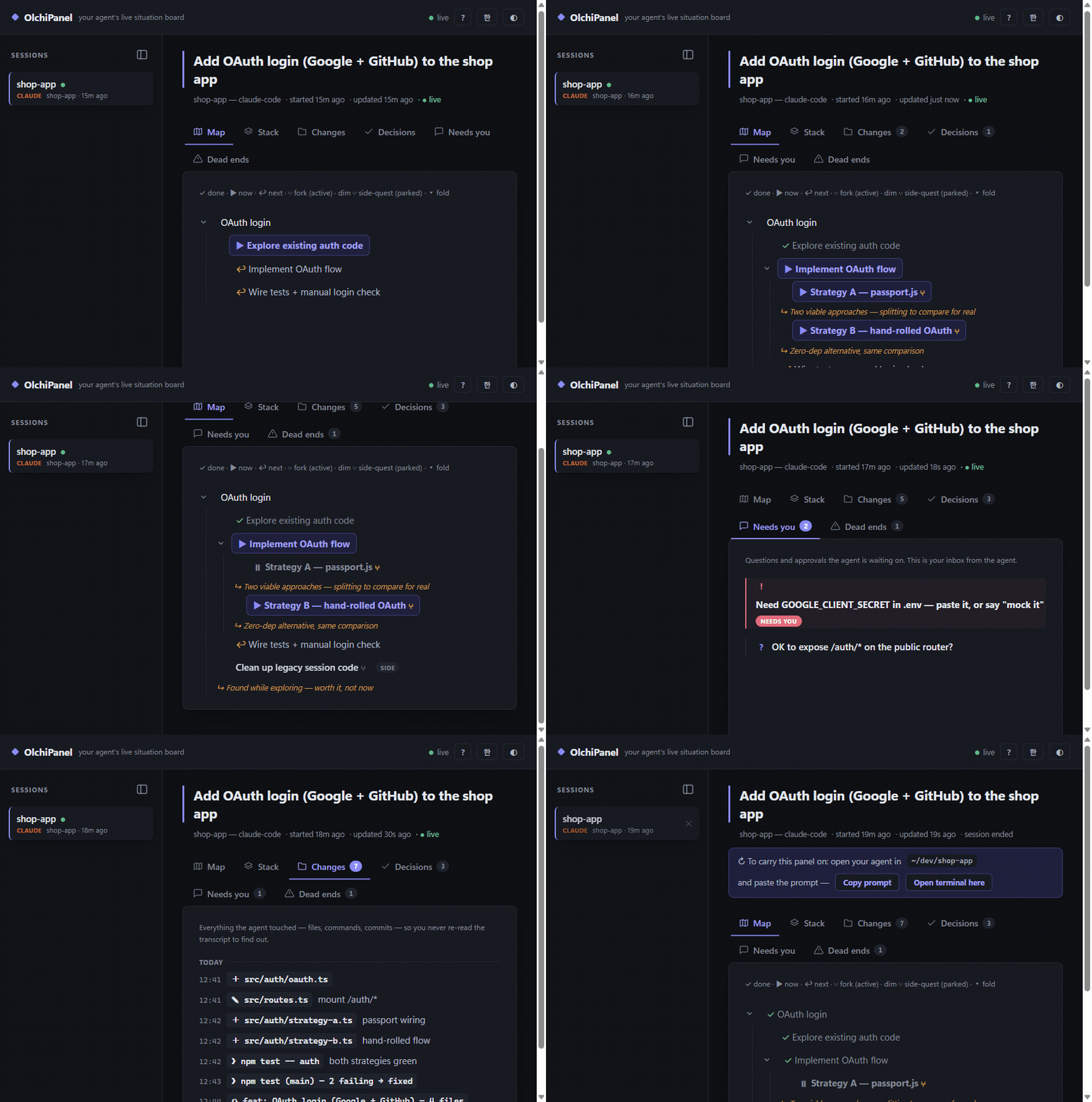
Your agent tells you what it's doing in a wall of text you'll never re-read. OlchiPanel gives it a canvas instead: a pinned goal, a journey map that actually branches when the agent forks into parallel paths, an interrupt stack so nothing you said gets lost, and decisions/blockers — all updating live in your browser while the agent works.
Works with any MCP-capable agent — Claude Code, Cursor, Codex CLI, and friends. No SDK, no build step, zero dependencies. One file of config and the panel bakes itself.
Quick start
One command in your project folder — no install step, npx handles it:
Claude Code:
claude mcp add olchipanel -s project -- npx -y olchipanel@latestCodex CLI:
codex mcp add olchipanel -- npx -y olchipanel@latestCursor (no CLI — paste into .cursor/mcp.json; Claude Code's .mcp.json takes the same shape):
{
  "mcpServers": {
    "olchipanel": { "command": "npx", "args": ["-y", "olchipanel@latest"] }
  }
}
The panel's help screen (?) also has Add for me buttons that write these configs for you.
(Running from a clone instead: "command": "node", "args": ["<path-to>/bin/olchipanel.js"].)
Then add one line to your agent's rules file (CLAUDE.md / .cursorrules / AGENTS.md):
Maintain your OlchiPanel situation board while you work: set_goal when you understand the task, add_step/set_status as you progress, push_interrupt on topic changes.
That line matters: measured head-to-head, agents with only the MCP config finish tasks without touching the board; with the rules line they bake it unprompted. Two lines total — that's the whole integration.
Who can connect: any agent that can spawn a local process (stdio MCP). Confirmed working:
Claude Code, Codex CLI, Cursor, and the ChatGPT desktop app's agent/"Work" mode (its Codex
workspaces read ~/.codex/config.toml, so the same codex mcp add line covers them — tested on
Windows: olchipanel shows up and runs). What does not get the tools: the ChatGPT app's plain
chat, and browser-only sessions (chatgpt.com / claude.ai) — those can't launch a local process,
and OlchiPanel is local-only by design.
Then open the panel — as the agent works, its situation appears and updates live.
The port is picked automatically (6711, or the next free one); the actual URL is
written to ~/.olchipanel/viewer.json.
Auto-open the window. npx olchipanel open opens the panel in its own
app window — no address bar, shows in the taskbar like a native app (Edge/Chrome;
falls back to a normal tab). If a viewer is already running it reuses it; if the
last one died it starts a fresh one. To have the window pop automatically when
an agent connects, add an env flag to the MCP config:
{ "mcpServers": { "olchipanel": {
  "command": "npx", "args": ["-y", "olchipanel@latest"],
  "env": { "OLCHIPANEL_OPEN": "app" }
} } }OLCHIPANEL_OPEN: app (windowed, default when set) · tab (normal browser tab) ·
0 (never). Left unset in MCP mode, nothing pops — so headless/CI runs stay quiet.
What the agent gets
Twelve tools, self-explanatory enough that agents use them unprompted:
| tool | what it does |
|---|---|
| resume_project | inherit the project's previous panel — goal, journey, decisions, dead ends — as memory; the old panel is archived |
| name_session | name this session ("call this one Master") — big in the sidebar |
| set_goal | pin the north-star goal at the top |
| add_step | grow the journey map — single step or a whole plan at once (steps:[...]); branch: true + why-note marks a fork |
| set_status | now / next / done / pause — live progress, incl. per-branch |
| push_interrupt / pop_interrupt | topic changed mid-task? the old task + resume point is saved, visibly |
| log_change | every file/command/commit touched — read this, not the transcript |
| add_decision | decisions made — and silent assumptions, surfaced |
| log_deadend | tried & failed, with why — nobody walks it twice |
| need_human | the agent's inbox to you: questions, approvals, blockers |
| get_panel | read back state + viewer URL |
Sessions are auto-grouped by vendor (Claude / Codex / Cursor / Gemini) with color coding — the agent identifies itself in the MCP handshake, so this needs zero config.
Parallel subagents inherit the tools — each one updates its own branch, so you watch alternatives develop side by side, live.
Sessions die. The panel doesn't.
Every panel belongs to a project (its working directory), not just a session.
When a new agent connects where a previous panel exists, the server tells it up
front, and one resume_project call hands over the whole situation — goal,
journey so far, decisions, dead ends, open asks — as an inherited memory the new
agent actually reads. The old panel is archived; the board keeps one living
panel per project. This works across vendors: a panel baked by Claude Code can
be inherited by Codex, and vice versa.
Joined mid-task with no previous panel? The instructions tell the agent to backfill: a panel that starts at step 5 should still show steps 1–4.
Optional: deterministic Changes via hooks (Claude Code)
The rules line makes agents fill the board unprompted — measured — but it still relies on model discipline. For the Changes tab you can remove that reliance entirely: a hook logs every file edit, command, and commit automatically, even when the model forgets.
.claude/settings.json in your project:
{
  "hooks": {
    "PostToolUse": [
      { "matcher": "Edit|Write|Bash|NotebookEdit",
        "hooks": [{ "type": "command", "command": "npx -y olchipanel hook" }] }
    ]
  }
}
Repeated edits of the same file coalesce; read-only commands are skipped. The MCP core stays agent-agnostic — hooks are a per-agent enhancer, not a requirement.
Codex CLI note: Codex has no equivalent hook yet, so its bootstrap is the rules line
in AGENTS.md. If a Codex board sits in "not initialized", paste the one-liner the empty
board shows you — it tells the agent to resume_project / set_goal / backfill.
Optional: stable workspace identity
Panels normally belong to a working directory. For role-based setups where one logical
role runs from several folders, set OLCHIPANEL_WORKSPACE=<key> in the agent's MCP env —
sessions sharing a key inherit each other (resume_project) regardless of folder.
How it works
- One
olchipanelprocess per agent (stdio MCP, handrolled JSON-RPC — that's why zero deps). - State = plain JSON files in
~/.olchipanel/sessions/. Multiple agents, one board. - Whichever process gets the port serves the viewer (HTTP + SSE). Port taken → someone already serves. Default port 6711, walks up if reserved;
OLCHIPANEL_PORToverrides. - The viewer's sidebar lists every session, labeled by the agent's own
clientInfo.name— that's how it stays agent-agnostic with zero config. - If the viewer ever dies (red "reconnecting…" dot), recovery is one command:
npx olchipanel viewer. The board is stateless — a fresh viewer re-reads everything from disk, and open tabs heal themselves viaEventSourceauto-retry.
Updates
@latest in the MCP config means every agent start picks up the newest release —
measured: a bare npx -y olchipanel freezes on the first version npx ever cached.
The viewer shows a small ⬆ chip when a newer version exists; click it to copy the
one-line update command.
Locked-down Windows (no admin rights)
Field notes from a corporate-laptop install:
- No Node and
wingetneeds admin → use the official ZIP distribution from nodejs.org, unzip into your user folder, add it to your userPATH. npm/npxblocked by PowerShell execution policy → callnpx.cmd(the.cmdshims bypass the.ps1policy):codex mcp add olchipanel -- npx.cmd -y olchipanel@latest.- The Store/desktop-app
codex.exeunderWindowsAppsmay refuse to run from a shell → use the CLI path recorded in your Codex config instead. npm error ENOTCACHED … cache mode is 'only-if-cached'→ the agent's sandbox ran npm offline; re-run the command with network access approved — first run needs one download, after that the cache serves.
Scope & privacy
OlchiPanel is a local developer tool: it runs on your machine, binds only to
127.0.0.1 (never exposed to the network) and has zero runtime dependencies.
The only network call it ever makes is an optional once-a-day version check against
the npm registry (a plain GET, nothing attached; disable with OLCHIPANEL_NO_UPDATE_CHECK=1).
Nothing else is sent anywhere. Panel state lives in plain JSON under ~/.olchipanel/ —
readable by anything on your account, so don't have your agent write secrets into
the goal/steps/changes (it shouldn't anyway). Nothing is uploaded, tracked, or shared.
Token cost, measured: the panel's tool surface is ~2.6k tokens nominal, but measured end-to-end (same task run with and without the panel attached, headless Codex) the difference was within noise — about 1–3% of a typical task, likely thanks to client-side caching of tool definitions. And it's a trade, not a tax: the board replaces the "wait, where were we?" re-explanations that routinely cost far more than that.
Hardening, because localhost servers deserve it: every request is Host-checked (DNS-rebinding guard), every write endpoint is Origin-checked (CSRF guard) and runs fixed server-side templates only — no request ever carries a command, a path, or config content. And at ~115 kB of dependency-free source, auditing it yourself is a ten-minute read.
Status
v0.1 — working vertical slice (MCP server, live viewer, branch-aware journey map). Pre-release.
License
AGPL-3.0-or-later (from v0.7.0). Versions 0.6.x and earlier were released under
the MIT License and remain available under MIT. See LICENSE.