
omo-herdr-dag
v1.3.1
Published
Live OmO workflow DAGs in a Herdr side pane.


Readme
OmO Herdr DAG
Live OmO workflow DAGs in a Herdr side pane.
English | 한국어
omo-herdr-dag is an OmO extension that opens a dedicated TUI in Herdr when a workflow DAG appears. Follow dependencies and node states beside your conversation, with focus kept in the original pane.
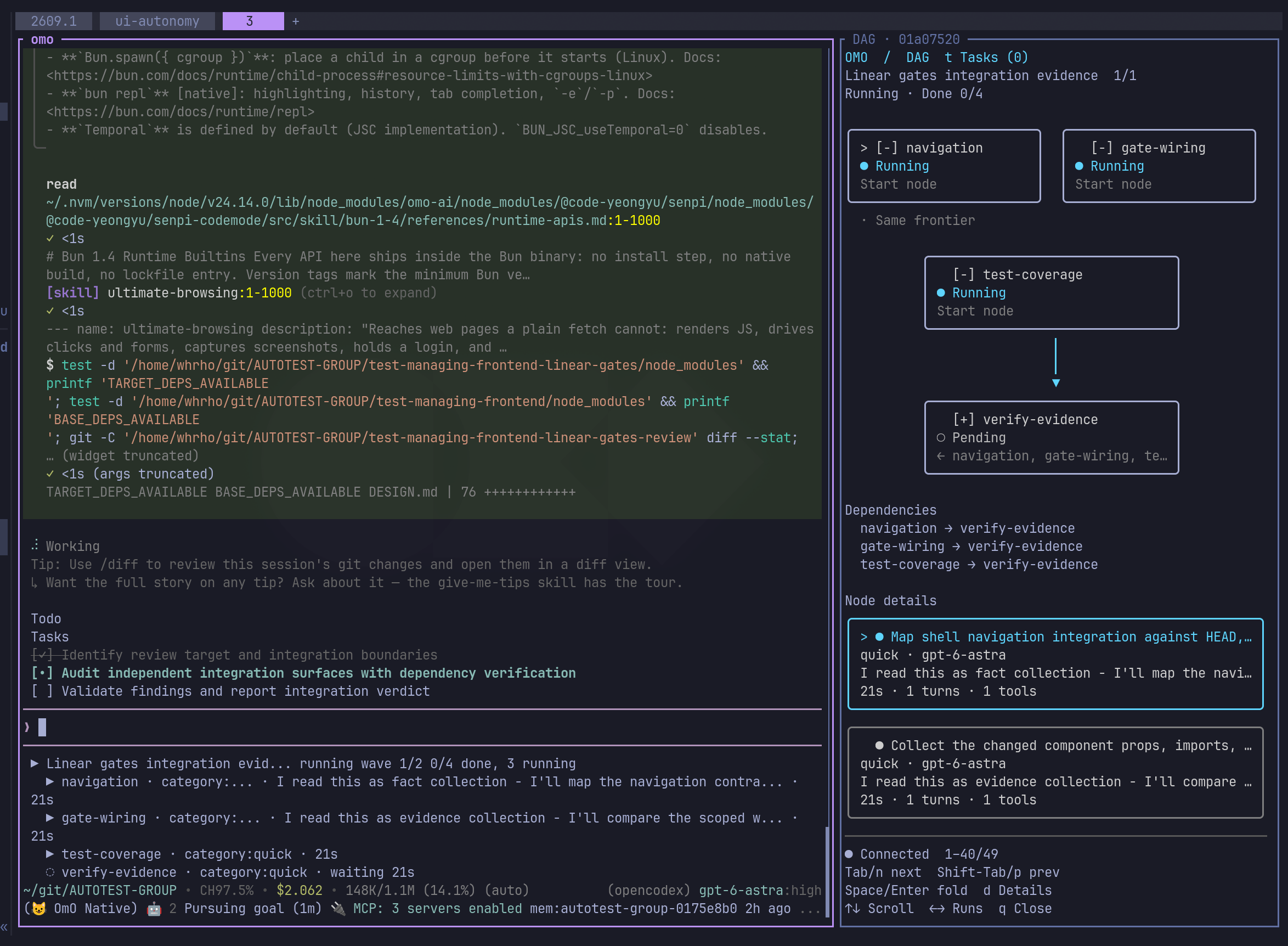
An integration review in progress: navigation, gate-wiring, and test-coverage run in parallel; verify-evidence depends on all three. The right pane shows node states, dependencies, and task details beside the conversation.
The screenshots show the English interface, which is the default for new installations; select Korean with --lang ko. Node labels come from your workflow and are displayed unchanged. The viewer also shows an explicit close hint after disconnection.
Features
- Opens a right-hand pane using about 35% of the original pane's width.
- Updates node states and dependencies from OmO workflow snapshots.
- Reuses the session's pane across updates and extension reloads.
- Keeps completed and failed runs visible after the session ends.
- Supports scrolling and switching between runs.
- Automatically expands running task details and folds other states unless you saved a different choice.
- Displays ordinary subtasks from the current session even when no workflow DAG exists.
- Remembers each node's expanded or collapsed state across updates and viewer restarts.
- Respects manual closure: use
/dag-paneto reopen the viewer. - Uses Node built-ins, with no npm dependencies or changes to the OmO package.
Requirements
| Component | Requirement |
| --- | --- |
| Node.js | 24 or later. Tested with 24.14.0 and 26.7.0. |
| OmO | A version exposing the omo.dag.updated event. Verified with 5.0.0-0.beta.42 and Senpi 2026.9.4-3. |
| Herdr | Installed, running, and available as herdr on PATH; must support the pane commands described below. Integration tested against protocol 20. |
| Terminal | Run OmO inside a Herdr pane, with a UTF-8 terminal and font that supports box-drawing characters. |
Custom OmO agent registration in Herdr is not required by this extension. Open a normal Herdr terminal pane and run omo yourself. The extension uses pane IDs and ordinary herdr pane commands; it does not call herdr agent start or depend on sidebar agent recognition.
The architecture supports that setup, but a clean, unmodified Herdr installation has not yet been verified end to end. See verification and compatibility for the exact coverage. Windows PowerShell viewer launch and real saved-workflow rendering have been verified locally; native macOS remains unverified. Windows panes are expected to use PowerShell, not cmd.exe or Git Bash.
Install
Install OmO and Herdr separately first. The package is available on npm.
From npm
npx omo-herdr-dag@latest install --dry-run
npx omo-herdr-dag@latest install
The first installation defaults to English. To choose Korean:
npx omo-herdr-dag@latest install --lang koTo explicitly select English, including when switching back from Korean, use npx omo-herdr-dag@latest install --lang en. Updates keep the saved language unless you select another one.
You can also install the CLI globally with npm install -g omo-herdr-dag, then run omo-herdr-dag install. Fetching the npm package alone does not modify your OmO configuration; the explicit install command copies the extension into place. Herdr and OmO remain separate prerequisites.
From source (available now)
Clone this repository and run the installer:
git clone https://github.com/jc01rho/omo-herdr-dag.git
cd omo-herdr-dag
npm ci --ignore-scripts
npm test
node scripts/install.mjs --dry-run
node scripts/install.mjs
There are no runtime npm dependencies. Windows tests use the development-only node-pty ConPTY bridge; POSIX tests use Python 3 and a Unix PTY. --dry-run prints the destinations without changing files. The source installer also accepts --lang en or --lang ko.
The installer uses --agent-dir, then OMO_CODING_AGENT_DIR, then SENPI_CODING_AGENT_DIR, falling back to ~/.omo/agent. For example, with OMO_CODING_AGENT_DIR=~/.omo, the entry is ~/.omo/extensions/herdr-dag.js, not ~/.omo/agent/extensions/herdr-dag.js. The default fallback layout is:
~/.omo/agent/
├── extensions/herdr-dag.js          # Extension entry point
└── herdr-dag/integration/
    ├── current.json                # Active installation generation
    └── generation-000001/           # Extension, src/, locale.json, LICENSE
Start a new OmO session inside Herdr, or run /reload in an existing session. The first workflow DAG snapshot opens the viewer automatically. You can also run /dag-pane in OmO to open an empty viewer while waiting for a DAG.
Custom agent directory
If your OmO installation loads extensions from a different agent directory:
node scripts/install.mjs --agent-dir /path/to/your/agent-directoryThis changes the installation destination. It does not configure OmO's extension discovery or change the default runtime state directory.
The npm CLI accepts the same --agent-dir option.
Controls
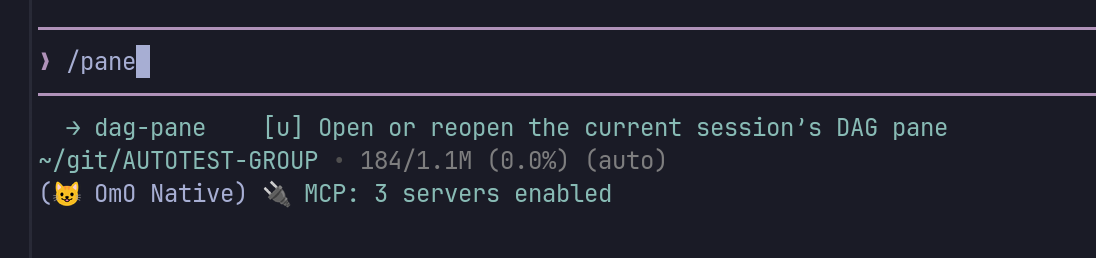
Type /dag-pane in OmO to open the viewer before a workflow starts, or to reopen a pane you closed. It waits for a workflow snapshot, then displays the graph as updates arrive.
On startup, the extension also restores the current session's saved DAG checkpoints from <task state directory>/dag/runs/ and joins their task details. If the viewer cache is empty, /dag-pane attempts the same recovery without rerunning any tasks. Checkpoints from other sessions are not displayed. Installing new files does not replace code already loaded by a running OmO session: reload the extension before using the recovery.
| Where | Command or key | Action |
| --- | --- | --- |
| OmO | /dag-pane | Open or reopen the current session's viewer. |
| OmO | /reload | Load or reload the extension. |
| DAG pane | ↑ / ↓, k / j | Scroll. |
| DAG pane | Page Up / Page Down | Scroll by a page. |
| DAG pane | ← / → | Switch between runs. |
| DAG pane | t | Switch between DAG and ordinary Tasks. Without a DAG, Tasks is the default view. |
| DAG pane | Tab / n, Shift+Tab / p | Select the next or previous node and bring its details into view. |
| DAG pane | Space / Enter | Collapse or expand the selected node's details, including its child tasks. |
| DAG pane | d | Toggle full details for the selected task or node without changing its saved collapse preference. |
| DAG pane | q, Ctrl+C, Ctrl+D | Close the viewer and its generated pane. |
> marks the selected node, [-] means expanded, and [+] means collapsed. The graph and dependency list remain above the detail panels. Preferences live in <snapshot path>.view.json; this viewer-owned file is not overwritten by workflow updates.
DAG detail cards show the graph's node label in their top border, even when folded, without adding a row. Long labels are clipped to the pane width; d shows the full label and node ID.
The same selection and collapse keys work in Tasks. Running tasks appear first, and ordinary task preferences are stored by task ID separately from DAG node preferences. The task count remains visible from the DAG view.
Expanded task cards default to four compact lines: status and task description, agent and short model name, one line of progress, and elapsed time with turn/tool counts. Long progress is clipped in this view. Press d for the task ID, exact timestamps, full model name and the supplied progress text; press it again to return to the compact card. Full-detail viewing is temporary and does not replace the saved expand/collapse setting.
When the OmO session ends, the last graph remains visible with a disconnected indicator and an explicit close hint:
○ Disconnected · snapshot saved
You can close this pane with q.
You may keep the snapshot open for reference or press q to close the viewer and its generated pane. Closing the viewer does not cancel workflow tasks or delete the saved snapshot. The close hint appears only while disconnected; it does not mean every workflow task completed successfully.
Configuration and local data
| Variable | Default | Purpose |
| --- | --- | --- |
| OMO_HERDR_DAG_STATE_DIR | ~/.omo/agent/herdr-dag/ | Directory for snapshots and pane records. Set before starting OmO. |
| OMO_HERDR_DAG_TASK_STATE_DIR | <project>/.omo/senpi-task/ | OmO task store root, containing tasks/. Set this to the same directory when using a custom OmO task.state_dir. |
| OMO_HERDR_DAG_LANG | Saved installation language, initially en | Override the interface language with en or ko. Set before starting OmO or reloading the extension. |
| OMO_HERDR_DAG_NODE | Validated host Node, otherwise node on PATH | Node.js 24+ executable for the viewer. Set before starting OmO; paths containing spaces are supported. |
install --lang ko saves the selection in the active generation's locale.json. The installer prints that directory as integration; integration/current.json identifies the current generation. Updates retain the language unless you pass another --lang value. Use install --lang en to switch back to English. The environment override takes precedence; unsupported override values fall back to English.
Herdr supplies HERDR_ENV, HERDR_PANE_ID, and HERDR_SOCKET_PATH to its panes. Outside that environment, the extension stays inactive. Do not set those variables manually to target another pane. When supplied, HERDR_BIN_PATH selects Herdr's executable directly; otherwise it is resolved on PATH.
Standalone builds such as omob still need a separate Node.js 24+ installation for the viewer. The extension checks the runtime before opening a pane and resolves the actual Node executable, including when node is a version-manager shim. It does not launch the viewer through the compiled OmO binary. To select Node explicitly, start OmO with OMO_HERDR_DAG_NODE=/absolute/path/to/node omob. An invalid explicit path produces a warning instead of falling back to another runtime.
Snapshots are local JSON files. They contain session and run IDs, names, node labels, states, task IDs, dependency edges, and error messages. Workflow prompts are omitted, but labels and errors may still contain project information. Keep runtime files out of public issue reports and source control. The extension adds no external network service or telemetry.
Task details are linked to workflow nodes by their task IDs. Available task descriptions, agent/model information, progress, timestamps, and counters appear alongside explicitly linked child tasks. Missing details are not estimated. A child-task relationship is separate from a workflow dependency; the viewer does not turn dependency edges into parent/child links.
Progress is a selected latest assistant excerpt with the current tool when supplied by OmO, not a transcript. Stored progress is limited to 512 characters and descriptions to 2,000; the detail panels wrap the supplied text. Full task prompts, output, and final responses are not copied into these snapshots.
Without a saved choice, running tasks expand automatically and every other state stays folded. Automatically expanded tasks fold when they finish. Your explicit expanded/collapsed choices always take priority: a running task you fold stays folded across updates, and a task you expand stays open after completion. Choices are saved separately from workflow snapshots, keyed by run ID and node ID within the session, and survive retries, run switches and viewer restarts. Automatic state changes are not saved. Space/Enter changes your saved choice; d temporarily reveals full details and then returns to the current effective fold state without changing that choice. Task descriptions and progress text may also contain project information, so keep these local records private.
Update and uninstall
To update, run npx omo-herdr-dag@latest install again. For a source installation, obtain the new source and rerun the installer. Each installation creates a fresh generation directory, so /reload loads new transitive modules rather than cached code. Previous generations remain as backups; legacy flat installations are moved to a backup directory. Runtime records and language are preserved. The installed copy is independent of the source checkout or npm cache. Run /reload in existing OmO sessions afterward. Existing viewer processes also need restarting to load UI changes.
To uninstall, remove ~/.omo/agent/extensions/herdr-dag.js, then reload or restart OmO. Close any existing DAG panes yourself. You may keep ~/.omo/agent/herdr-dag/ as a record, or remove it separately. For a custom installation, remove the entry point from that agent directory instead.
FAQ
Is this an OmO plugin or a Herdr plugin?
It is an OmO extension. The installer places it in OmO's agent directory, where it listens for workflow updates. It uses Herdr's ordinary pane commands to open and manage the DAG viewer; no plugin is installed into Herdr itself.
What happens if Herdr is missing or I start OmO outside Herdr?
| Environment | Behavior |
| --- | --- |
| Herdr is not installed | You can install the extension, but it stays inactive in an ordinary terminal. |
| Herdr is installed, but OmO runs in an ordinary terminal | The extension stays inactive and does not register /dag-pane. Having the Herdr application open is not enough. |
| OmO runs inside a Herdr pane | The extension activates, registers /dag-pane, and opens the viewer when a workflow DAG arrives. |
| Herdr environment variables are present, but its CLI or socket is unavailable | A pane operation reports a warning when it fails. You can continue the OmO conversation. |
Activation requires HERDR_ENV=1 and nonempty HERDR_PANE_ID and HERDR_SOCKET_PATH, supplied by Herdr. Inactive sessions do not subscribe to DAG updates or open viewer panes. To use the viewer, start a new OmO session inside a Herdr pane rather than setting these variables manually.
Must I register OmO as a custom agent in Herdr?
No. Run omo or omob directly in a normal Herdr terminal pane. The extension uses pane IDs and CLI commands, so it does not require Herdr's agent registration or sidebar recognition. A clean, unmodified Herdr installation has not yet been verified end to end; see VERIFICATION.md for the tested scope.
Troubleshooting
| Symptom | Check |
| --- | --- |
| /dag-pane is unavailable | Reload OmO, confirm the extension was installed in its active agent directory, and confirm OmO is running inside Herdr. |
| No pane opens automatically | The extension opens for workflow DAGs or current-session OmO tasks. Generic parallel() calls without OmO task records are not tasks. Check the OmO version and custom task-store path; manually closed panes require /dag-pane. |
| A pane was closed and stays closed | This is intentional. Run /dag-pane to reopen it. |
| omob reports Unknown options: --state, --close-pane | Update this extension, close the failed DAG pane, run /reload in OmO, then /dag-pane. The old launcher mistook the compiled OmO binary for Node. |
| A DAG pane: warning appears | Confirm herdr is on PATH and supports pane split, get, rename, and run. A failed or uncertain launch suppresses automatic retries to avoid duplicate panes. Inspect and close any incomplete viewer pane before retrying. |
| An edge is hard to follow | Inspect the incoming IDs inside each node and the complete edge list below the graph. Scroll if necessary. |
How it works
OmO workflow snapshot: omo.dag.updated
OmO task progress: omo.task.updated + local task records
Startup recovery: current-session DAG checkpoints
    → Senpi shared event bus: senpi:extension-rpc-event
    → Filter by the current parent session ID
    → Write a normalized local snapshot
    → Open/reuse a Herdr pane; its TUI watches the snapshot file
Ordinary subtasks appear in a separate task list rather than as fabricated dependency nodes. Tasks already linked to any displayed DAG are excluded from that list; their children remain under the owning task. Only current-session tasks and their explicitly linked descendants are collected.
The bridge listens to the installed Senpi event bus. It uses herdr pane split --ratio 0.65 --no-focus, rename, and run to create the viewer. Herdr's ratio refers to the original pane, leaving approximately 35% for the new pane.
This integration depends on OmO/Senpi internal event contracts, which may change between versions. It reads explicit workflow edges; it does not infer dependencies between unrelated tasks. Wide frontiers wrap, and dependencies that skip a frontier are represented by incoming IDs and the edge list. Long labels and errors are clipped to the terminal width.
Development
npm test
npm run build
npm run test:package
The tests run without OmO or Herdr and use temporary local files and mocked pane commands. build assembles the dependency-free JavaScript distribution in dist/ and checks its syntax. test:package packs it, installs the tarball offline in a temporary project, and verifies the CLI, installation, updates, and language selection. npm run check runs all three steps.
GitHub Actions runs these checks on Node 24 and 26 on Linux, then uploads an npm .tgz artifact. Installed-runtime and manual live-pane checks are documented in CONTRIBUTING.md.
Distribution
GitHub hosts the source and CI artifacts. The npm registry distributes the versioned CLI and extension package. The installer copies the runtime files into your OmO agent directory, where they run locally; this project needs no hosted application server. A downloaded CI tarball can be installed with npm install -g ./omo-herdr-dag-1.0.0.tgz, followed by omo-herdr-dag install.
Pushing a version tag such as v1.0.0 runs the Release to GitHub and npm workflow: it tests Node 24 and 26, checks that the tag matches the package version, then publishes the verified package. It also creates a GitHub Release with generated release notes and the .tgz download. npm authentication must be configured first for npm publication; GitHub Releases use the built-in GitHub token and can succeed independently. Ordinary branch pushes run CI; manually running the publish workflow performs a dry run. Prerelease versions use npm's next tag. Setup and release steps are in RELEASING.md.
Contributions, compatibility reports, and improvements to terminal rendering are welcome. Please read CONTRIBUTING.md before submitting a change.
License
MIT. This is an independent community extension, not an official OmO or Herdr component.