
omo-tmux-dag
v0.1.1
Published
Live OmO workflow DAGs in a tmux side pane.


Readme
omo-tmux-dag


Live OmO workflow DAGs in a tmux side pane.
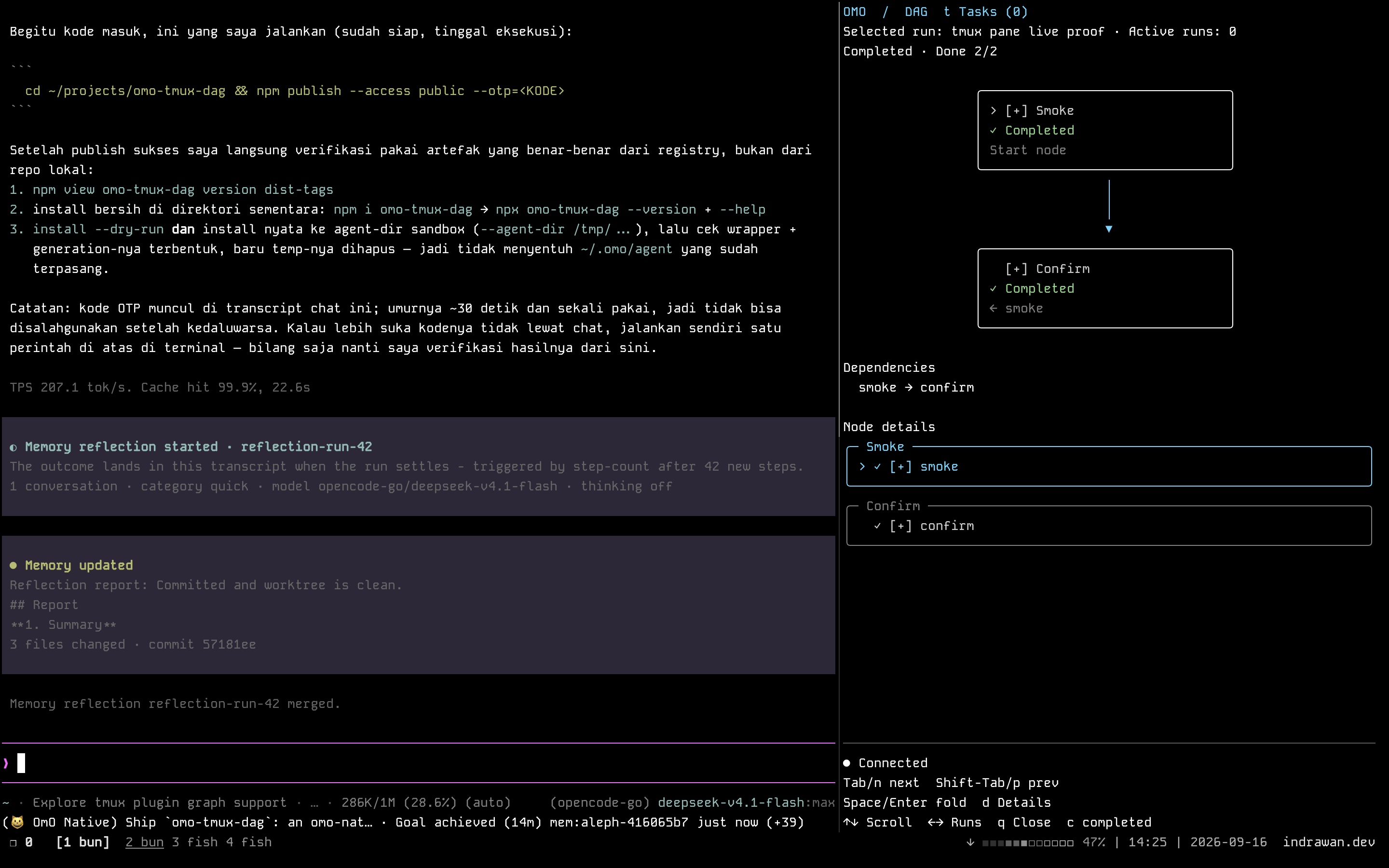
A real session: the conversation keeps the left pane while the DAG pane follows the workflow — node states, dependencies, node details, and connection status beside it.
omo-tmux-dag is an OmO extension that opens a
dedicated TUI pane in tmux when a workflow DAG appears — mass-ulw, /dag, or any
sdk.start run. Follow dependencies and node states beside your conversation, with focus kept in
the original pane.
It is a tmux port of omo-herdr-dag (MIT); the viewer,
renderer, and checkpoint recovery are derived from that project. See NOTICE.
Features
- Opens a right-hand pane using about 35% of the window width, without stealing focus.
- Updates node states and dependencies from OmO workflow snapshots (
omo.dag.updated). - Reuses the session's pane across updates and extension reloads.
- Keeps completed and failed runs visible after the session ends.
- Supports scrolling, switching between runs, folding, and a Tasks view.
- Restores the current session's saved DAG checkpoints from
<task state>/dag/runs/. - Respects manual closure: press
qin the pane, ortmux kill-pane;/dag-panereopens it. - Uses Node built-ins only — no runtime npm dependencies.
Requirements
| Component | Requirement |
| --- | --- |
| Node.js | 24 or later (the viewer is spawned with a real node, not a compiled binary). |
| OmO | A version exposing the omo.dag.updated event. Verified with omo-ai 5.0.0-0.beta.63 and senpi 2026.9.15-2. |
| tmux | 3.0 or later. Verified with 3.7c. |
| Terminal | UTF-8 with box-drawing glyph support. |
Run OmO inside a tmux pane; the extension is inert anywhere else (no Herdr, no bare terminal).
Install
From npm
npx omo-tmux-dag@latest install --dry-run
npx omo-tmux-dag@latest install
Or install the CLI globally — npm install -g omo-tmux-dag, then omo-tmux-dag install.
Arguments: --agent-dir PATH (default $OMO_CODING_AGENT_DIR, $SENPI_CODING_AGENT_DIR, then
~/.omo/agent), --lang en|ko (default en), --dry-run.
From source
git clone https://github.com/itokun99/omo-tmux-dag.git
cd omo-tmux-dag
npm test
node scripts/install.mjs --dry-run
node scripts/install.mjs
The installer writes:
~/.omo/agent/
├── extensions/tmux-dag.js              # Extension entry point
└── tmux-dag/integration/
    ├── current.json                    # Active installation generation
    └── generation-000001/              # Extension, src/, locale.json, LICENSE, NOTICE
Start a new OmO session inside tmux, or run /reload. The first DAG snapshot opens the viewer
automatically. /dag-pane opens an empty viewer while waiting for a DAG, or reopens a pane you
closed.
To uninstall, delete ~/.omo/agent/extensions/tmux-dag.js and ~/.omo/agent/tmux-dag/, then run
/reload.
Controls
| Where | Key | Action |
| --- | --- | --- |
| OmO | /dag-pane | Open or reopen the current session's viewer. |
| OmO | /reload | Load or reload the extension. |
| DAG pane | ↑ / ↓, k / j | Scroll. |
| DAG pane | Page Up / Page Down | Scroll by a page. |
| DAG pane | ← / → | Switch between runs. |
| DAG pane | t | Switch between DAG and ordinary Tasks. |
| DAG pane | Tab / n, Shift+Tab / p | Select the next or previous node. |
| DAG pane | Space / Enter | Collapse or expand the selected node's details. |
| DAG pane | d | Toggle full details without changing the saved fold state. |
| DAG pane | q, Ctrl+C, Ctrl+D | Close the viewer and its pane. |
Environment overrides
| Variable | Meaning |
| --- | --- |
| OMO_TMUX_DAG_STATE_DIR | Viewer/pane state directory (default ~/.omo/agent/tmux-dag). |
| OMO_TMUX_DAG_TASK_STATE_DIR | Task state root (default <cwd>/.omo/senpi-task). |
| OMO_TMUX_DAG_NODE | Node executable used for the viewer. |
| OMO_TMUX_DAG_LANG | Viewer language override (en/ko). |
| TMUX_BIN_PATH | tmux executable used for pane control. |
How it works
The extension registers on session_start, subscribes to OmO's RPC bridge
(senpi:extension-rpc-event, events omo.dag.updated and omo.task.updated), and restores durable
checkpoints. When a run exists it splits a detached pane
(tmux split-window -h -d -l 35% -t $TMUX_PANE -P -F '#{pane_id}'), renames it to
DAG · <session>, and launches the viewer with a state-file path. The viewer watches that file and
renders the graph; q kills its own pane.
Panes are identified by the DAG · title prefix inside the same window, and a pane record under
the state directory makes manual closure stick until /dag-pane.
Verification
npm test covers the tmux argv contract, pane listing/parsing, missing-pane handling, view keys,
deduplication, manual-close semantics, and an end-to-end pass through a process boundary with a fake
tmux binary. npm run qa drives the real tmux binary in a scratch session (open, dedupe, focus,
keys, close) and writes captures under qa/artifacts/. Rendering a capture to PNG
(bun qa/screenshot.mjs <capture.ansi> <out.png>) downloads xterm.js 5.5 (MIT) into qa/vendor/ on
first use.
License
MIT. Portions derived from omo-herdr-dag v1.3.1 — see NOTICE and LICENSE.upstream.