
onion-interceptor
v1.0.5
Published
Universal Network Request Interceptor Tool

Maintainers
 ericwxy
Readme
onion-interceptor
onion-interceptor 是一个受 Koa 洋葱模型和 Angular Interceptor 启发的请求拦截器工具,它允许您以 Koa 中间件的形式为 axios、fetch 等 HTTP 客户端编写请求拦截器。
特点
- 跨平台且不受框架限制, 支持浏览器和 Node.js
- 支持 axios、fetch 等 HTTP 请求方式
- 针对 HTTP 请求和响应进行更灵活更自由的拦截
安装
使用 npm :
npm install onion-interceptor使用 yarn:
yarn add onion-interceptor使用 pnpm:
pnpm add onion-interceptor使用方法
初始化
/// http.ts
import { createInterceptor } from "onion-interceptor";
import {
  loadingInterceptor,
  errorInterceptor,
  authInterceptor,
  dataInterceptor,
} from "../interceptors";
import axios from "axios";

const http = axios.create({
  baseURL: "https://api.github.com",
  timeout: 1000 * 10,
  headers: {
    "Content-Type": "application/json",
  },
});

/// createInterceptor接收一个类 AxiosInstance 实例作为参数
createInterceptor(http).use(
  dataInterceptor,
  errorInterceptor,
  loadingInterceptor,
  authInterceptor
);
/// 调用 use 方法 (可链式调用也可一次传入多个拦截器作为参数)
// 或者 createInterceptor(http).use(errorInterceptor).use(loadingInterceptor).use(authInterceptor)

export default http;
拦截器书写
import type { Next, Context, Middleware } from "onion-interceptor";

export async function authInterceptor(ctx: Context, next: Next) {
  console.log("authInterceptor start", ctx);
  await next();
  console.log("authInterceptor end", ctx);
}

export async function errorInterceptor(ctx: Context, next: Next) {
  console.log("errorInterceptor start", ctx);
  try {
    await next();
  } catch (error) {
    console.log(error);
    return Promise.reject(error);
  } finally {
    console.log("errorInterceptor end", ctx);
  }
}

export async function loadingInterceptor(ctx: Context, next: Next) {
  console.log("loadingInterceptor start", ctx);
  try {
    await next();
  } finally {
    console.log("loadingInterceptor end", ctx);
  }
}

// 函数拦截器类型亦可用 Middleware 来描述
export const dataInterceptor: Middleware = async function (ctx, next) {
  console.log("dataInterceptor start", ctx);
  await next();
  console.log("dataInterceptor end", ctx);
  //// 处于洋葱最外层的拦截器 可通过 return 返回特定数据(不写 return 则会按原数据返回)
  return ctx.res.data;
};
当然还可以安装 @onion-interceptor/pipes 模块,使用封装的一系列操作管道
@onion-interceptor/pipes - npm (npmjs.com)
import type { Next, Context } from 'onion-interceptor'
import { catchError, finalize} from '@onion-interceptor/pipes'

export async function errorInterceptor(ctx: Context, next: Next) {
  console.log('errorInterceptor start', ctx)
  await next(
    catchError(err => {
      console.log(error)
      return Promise.reject(error)
    }),
    finally(() => console.log('errorInterceptor end', ctx))
  )
}

export async function loadingInterceptor(ctx: Context, next: Next) {
  console.log('loadingInterceptor start', ctx)
  await next(finally(() => console.log('loadingInterceptor end', ctx)))
}
console.log
以下是浏览器控制台输出截图
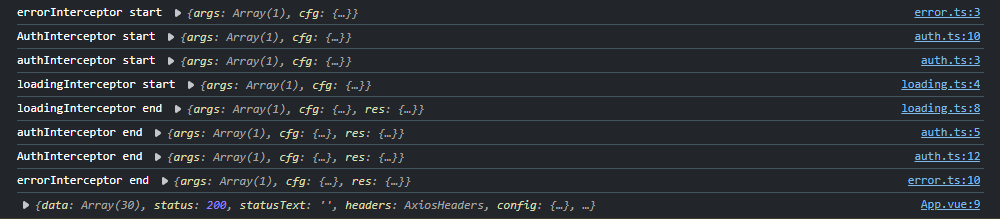
从控制台输出可以看出,拦截器按照洋葱模型执行顺序执行,并且每个拦截器都可以修改请求和响应数据。
fetch 封装示例
推荐封装一个 AxiosInstanceLike 也就时类 Axios 的实例,用以下的方式 理论上不局限于 fetch 、axios (其他环境例如 小程序开发,只要 AxiosInstanceLike 接口定义即可使用洋葱拦截器)。
// fetch.ts
import { createInterceptor, type AxiosInstanceLike } from "onion-interceptor";

// 封装时注意 public defaults ,和 request(url:string,options?:RequestInit) 函数时必须的 (洋葱拦截器内部对 类 Axios 实例的定义)
class XFetch implements AxiosInstanceLike<RequestInit, Response> {
  constructor(public defaults: RequestInit & { baseURL: string } = {}) {}

  async request(url: string, options?: RequestInit = {}) {
    config = {
      ...this.defaults,
      ...config,
    }; /// 这里简单处理下,正式使用的时候可以写一个 configMerge 的函数

    return await fetch(this.defaults.baseURL + url, config as RequestInit); // 实际封装时可考虑 baseUrl 的空值处理
  }
}

const xFetch = new XFetch({
  baseURL: "https://api.github.com",
  headers: {
    "Content-Type": "application/json",
  },
});

// 将实例化后的 XFetch 实例传入 createInterceptor 并使用 use 方法添加拦截器
// 第二个参数 false 表示不是Axios示例(默认值为 true) 该参数只有在第一个参数传入 axios.create 结果时才建议传 true
createInterceptor(http, false).use(...interceptors);

export default xFetch;
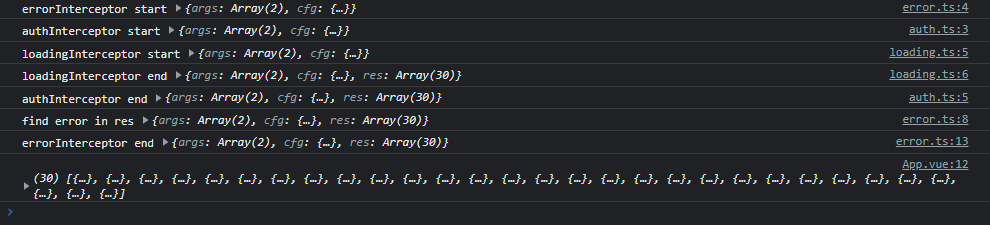
对 fetch 请求的结果进行进一步处理,以下是 errorInterceptor.ts 的简单示例
// errorInterceptor.ts
export async function errorInterceptor(ctx: Context, next: Next) {
  console.log("errorInterceptor start", ctx);

  await next(
    tap(
      (ctx) => console.log("find error in res", ctx),
      (error) => {
        console.log("errorInterceptor catchError", error);
        return error;
      },
      () => console.log("errorInterceptor end", ctx)
    ),
    // 对 res.ok 做判断并抛出异常
    finalize(() => {
      if (!ctx.res!.ok) throw new Error("fetch error");
    })
  );
  // 以上 tap 和 finalize 两个 pipe 中 finalize 处于洋葱更加内层,故可在 tap 捕获到 finalize 抛出的异常

  // 确保 errorInterceptor 是第一个被 use 的拦截器中间件,也就是说 对返回值的处理 需要在 洋葱模型最外层
  return ctx.res!.json();
}
createFetchInterceptor
如果觉得写类 Axios 实例还是麻烦,也可以使用 createFetchInterceptor 函数来对 fetch 请求进行拦截。
import { createFetchInterceptor } from "onion-interceptor";

createFetchInterceptor(...interceptors);

/// 在执行 createFetchInterceptor 之后,我们可以直接使用 fetch 请求,封装的拦截器中间件会自动生效。
注意: createFetchInterceptor 函数实现会污染 window 对象,所以不建议在复杂的项目中使用以避免不必要的影响
贡献
如果你有任何疑问或建议,欢迎提交 issue 或 PR。
许可
本项目使用 MIT 许可证。