
openclaw-code-agent
v6.0.1
Published
OpenClaw plugin that runs Claude Code, Codex, and OpenCode as managed background coding sessions from chat, with plan approval, isolated git worktrees, and merge/PR follow-through.

Maintainers
 goldmar
Readme
OpenClaw Code Agent



openclaw-code-agent (OCA) turns your OpenClaw chat into a control room for real coding agents. Claude Code, Codex, and OpenCode run as managed background sessions, and OCA adds what a bare agent CLI lacks: plan approval, session lifecycle, wake routing, isolated git worktrees, merge and PR follow-through, and explicit goal loops.
Start a job from Telegram, Discord, or any other OpenClaw channel, approve the plan with a button, and get the merged branch or the open PR back in the same thread. Every step stays observable after the first message.
Highlights
- Plan -> Review -> Execute.
planis the default launch mode, and plan approval defaults todelegate, so the orchestrator reviews the full plan before it approves or escalates to the user. All three harnesses feed the same approval UX. - Delegated worktree isolation. New sessions default to
delegate; opt intoask,off,manual,auto-merge, orauto-prwhen you want a different branch follow-through policy. Worktrees get your repo's.worktreeincludefiles and setup script. - State-driven decision UX.
asksends explicit action buttons for Merge, Open PR, Later, and Discard. The same action-token model backs Telegram and Discord interactive callbacks. - Lifecycle-first cleanup. Worktrees are temporary task sandboxes. The plugin distinguishes
mergedfromreleased, so different-SHA branches whose content already landed on the base branch can still be cleaned safely. - Routed outcome summaries. Merge and PR actions deliver the canonical status first, then wake the orchestrator to send one concise factual follow-up in the originating chat or thread.
- Full session lifecycle. Suspend, resume, fork, interrupt, and recover sessions across Gateway restarts with persisted metadata and output. Steer a running Codex turn, rewind or fork it from an earlier turn, and resume completed Claude Code sessions.
- Explicit goal-task loops. Opt into verifier-driven repair loops or Ralph-style completion loops when you need iterative autonomous execution toward a specific goal.
- Real operator visibility.
agent_sessions,agent_output, andagent_statsshow status, buffered output, duration, and USD cost, including the running cost of an open Codex or OpenCode turn, per-model Claude Code cost and context fill, and Codex usage-limit windows. - Multiple harnesses, one control plane. Claude Code, Codex, and OpenCode share the same tools, routing, notification pipeline, and worktree strategy model, while each backend runs on its own native protocol: the Claude Agent SDK, the Codex App Server, and the OpenCode server API.
- One continuation path. Follow-ups, approvals, revisions, question answers, interrupts, and redirects all continue the existing session instead of launching a duplicate.
This plugin is separate from OpenClaw's bundled acpx runtime plugin and bundled core codex plugin. Those own adjacent OpenClaw runtime and provider surfaces; openclaw-code-agent owns chat orchestration and repository follow-through for its own Claude Code, Codex, and OpenCode harnesses. See docs/ACP-COMPARISON.md for the boundary details.
What's New In v5
- Clearer chat updates. Decisions name the session; fewer notices and
/agent_statusmake pending work easier to track. - Simpler tools. Goal loops use
agent_goal; plan and worktree escalations useagent_escalate. - Native agent controls. Codex supports steering, rewind, compaction, and inline review; Claude Code uses native plan approval; OpenCode shares one server and supports multi-select questions.
- Worktree setup and durable delivery. Worktrees honor committed
.worktreeincludeand.openclaw/worktree-setup.sh; notifications use OpenClaw's durable queue, and git/GitHub operations run asynchronously. - Upgrade requirements. v5.2.1 requires OpenClaw
2026.10.1; Codex sessions require Codex CLI0.156.1or newer.
From 4.x: Back up session and goal-task stores before upgrading: v5 rewrites session state in place. Move removed flat model settings under harnesses.<name> and update tool allowlists. Unset Codex execution settings now follow the host's tools.exec.mode; bypassPermissions alone no longer grants full access. Follow the 4.x migration and rollback steps, including state-path changes. For v5.0.0 users, see the v5.0.1 upgrade notes for retired host Task Flow controls. Full release details are in the CHANGELOG.
From Chat To Resolved Work
- Ask OpenClaw to launch a coding session from chat.
- Choose the review style you want: direct execution, user plan approval, delegated review, or explicit worktree decisions.
- Let the agent finish in an isolated worktree when branch follow-through is enabled.
- Merge into the base branch, open a PR, defer the decision, or discard the sandbox from the same thread.
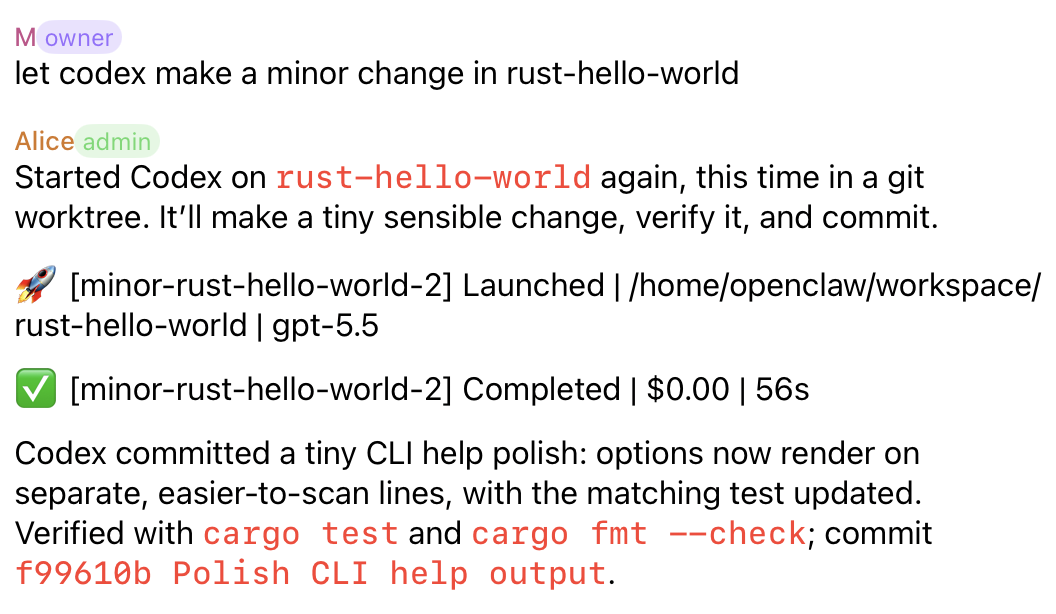
Direct Completion
For small trusted changes, an orchestrator can launch a session, let the selected harness finish, and report the verified outcome back to chat. The session stays observable through launch, completion, cost, duration, and commit summary.
Plan Review
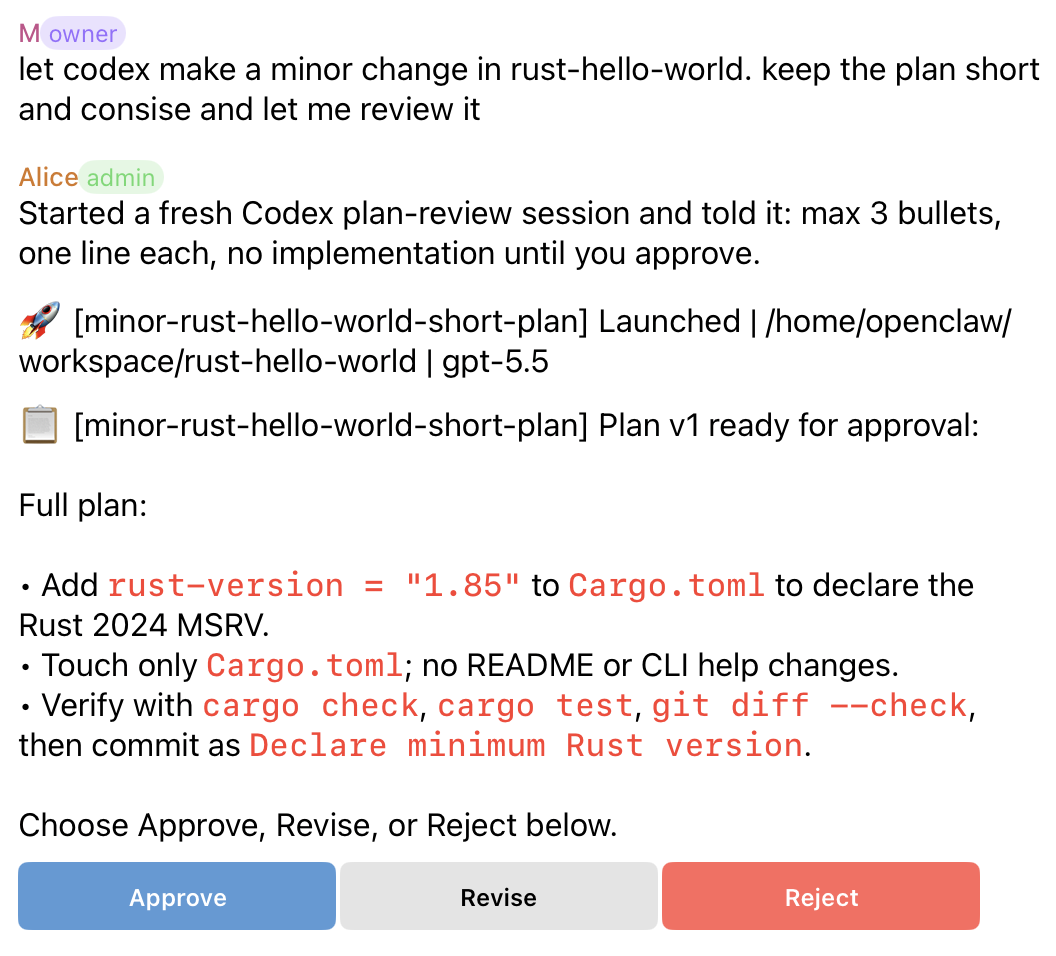
The default review loop is plan-first. Claude Code, Codex, and OpenCode feed the same approval UX: the plugin blocks implementation until approval, then continues the same session after the plan is approved.
- Claude Code submits its plan through its native
ExitPlanModerequest. OCA holds that request open until you decide, then sends approval or revision feedback back as the native answer, so the agent never has to re-read its plan from a prompt. - Codex can provide structured plan artifacts.
- OpenCode plans on its built-in read-only
planagent and continues on itsbuildagent after approval.
The user can approve, request a revision, or reject the plan from the originating thread.
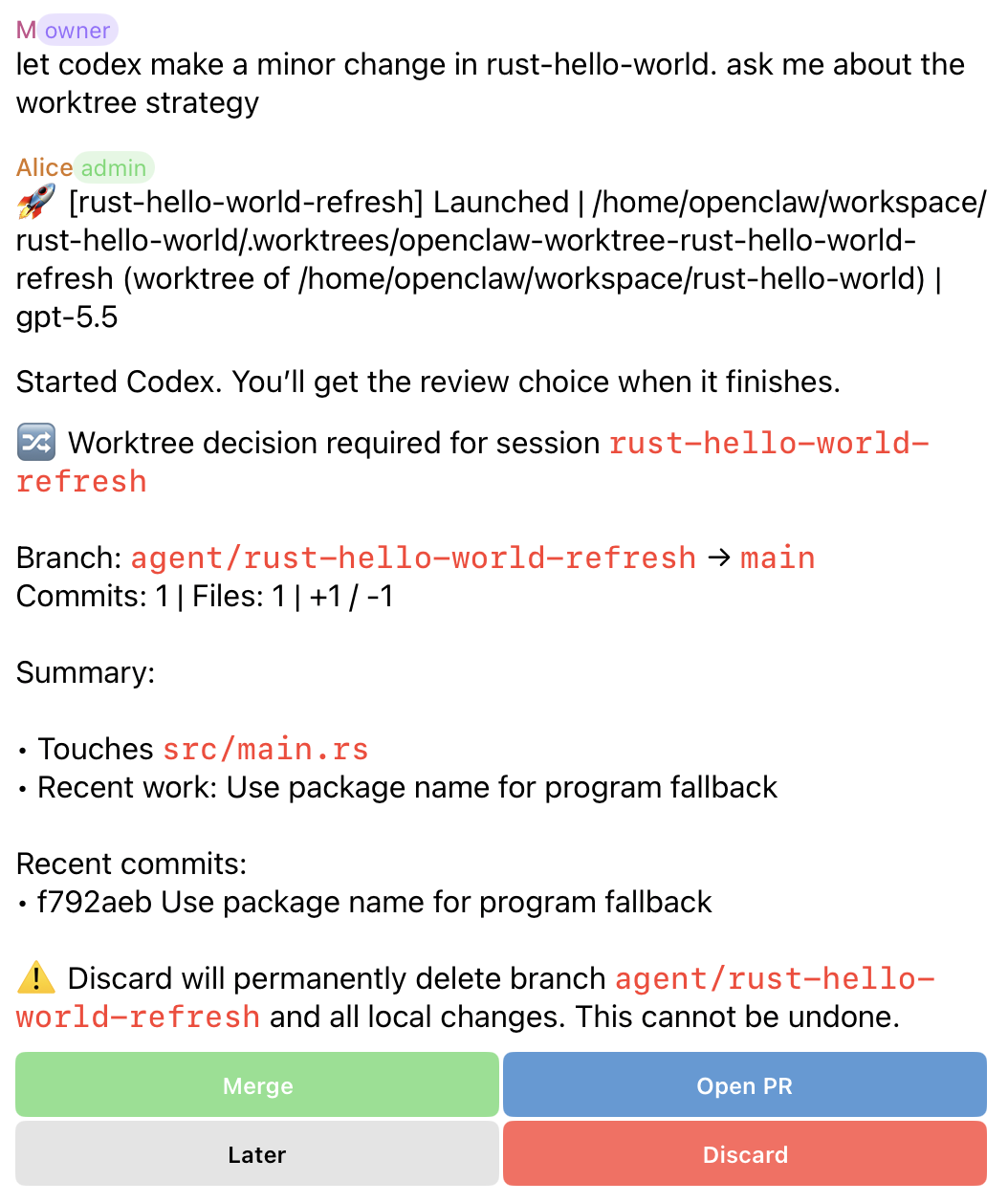
Worktree Decisions
In ask, the user controls branch follow-through after the agent finishes, with Merge and Open PR on the first row and Later and Discard on the second. Once a PR exists, Open PR becomes Sync PR and a View PR link button opens it.
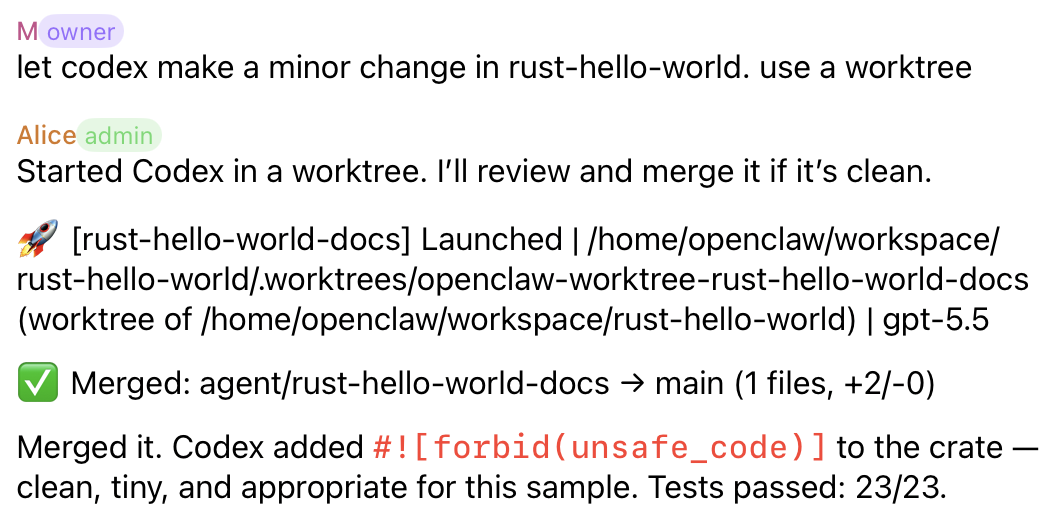
Delegated Worktrees
In delegate, the orchestrator reviews the completed worktree and attempts the merge follow-through when the change is clean. The agent edits files in the managed worktree so the main checkout is not touched during implementation; after review, delegated follow-through merges the finished branch back to the base branch unless a conflict, error, or explicit policy requires escalation. Before a PR, the orchestrator can ask Codex for an inline review of the branch diff with agent_session_action; a finished session is resumed with agent_respond first, because session actions need a running session.
The orchestrator merges with a one- or two-line summary, which appears under the merge line, so the user gets one message for the outcome. Without a summary (for example after the user pressed Merge), the orchestrator is asked for a short follow-up in the original chat or thread.
Worktree Lifecycle
Worktree-backed sessions move through product-facing lifecycle states, shown by agent_worktree_status as:
active: sandbox still in use (amanualworktree stays here after the session ends)needs decision: waiting for merge, PR, later, or discard follow-throughconflict resolving: the agent is resolving a merge conflictpr open: PR exists and the sandbox is being preservedmerged: branch landed by normal git ancestryreleased: content is already on the base branch after rebase, squash, or cherry-pickdismissed: user intentionally discarded the sandboxno change: session finished without a committed deltacleanup failed: removal failed and needs attention
Use agent_worktree_status for current state and agent_worktree_cleanup(mode="preview_safe") before removing resolved sandboxes.
Quick Start
Install and enable the plugin:
openclaw plugins install openclaw-code-agent
openclaw plugins enable openclaw-code-agent
openclaw gateway restart
openclaw plugins inspect openclaw-code-agent --runtime --json
OpenClaw 2026.7.1 no longer performs built-in dangerous-code blocking during
plugin installation. Review the subprocess rationale in
docs/SECURITY.md before installing this plugin because it
launches local coding harnesses and git tooling. Operators who require a local
allow/block decision should configure OpenClaw's security.installPolicy.
To replace an existing reviewed installation and pin the resolved version, use:
openclaw plugins install openclaw-code-agent --force --pinUse --force only for a package/source you already trust. When validating a
specific reviewed release, add its version after the package name.
Add the smallest useful config under plugins.entries["openclaw-code-agent"] in ~/.openclaw/openclaw.json:
{
  "plugins": {
    "entries": {
      "openclaw-code-agent": {
        "enabled": true,
        "config": {
          "defaultWorkdir": "/home/user/project",
          "defaultHarness": "claude-code"
        }
      }
    }
  }
}
For the first run, choose:
defaultWorkdir: a git repository root you expect to use often.defaultHarness:claude-code,codex, oropencode.
The default policy is intentionally review-first:
permissionMode: "plan"planApproval: "delegate"defaultWorktreeStrategy: "delegate"
Because worktree isolation defaults to delegate, defaultWorkdir should normally be a git repo. For non-git directories, set defaultWorktreeStrategy to off or launch with worktree_strategy: "off"; a launch that needs a worktree outside a git repository fails with a clear error.
Chat-launched sessions route updates back to their originating chat thread. For agent-launched tool sessions without an origin route, configure fallbackChannel or agentChannels in the reference guide.
OCA 6.0.1 targets the OpenClaw 2026.10.1 package and public SDK and requires 2026.10.1 for installation and loading. Published OCA 5.2.0 targets OpenClaw 2026.9.8. Telegram buttons now require their saved bot account, chat and topic; use the original message to approve or start a plan. The plugin API, Gateway, and npm peer compatibility floor remains 2026.9.7; Node >=24.16.0 <25 || >=26.1.0 is required. OCA imports only public plugin-SDK subpaths that untrusted external plugins may use, and its session store, wake routing, callbacks, worktree flows, and Codex/Claude model restrictions remain plugin-owned. OpenClaw's host-side model catalog does not widen Code Agent's harness-scoped allowlists. Disabled bundled plugins are not implicitly enabled, and installing this package changes no OpenClaw host configuration. Upgrading from 4.x is not migration-free, though: on first start 5.0 rewrites OCA's own session store in place (backing up any rows it drops) and moves its output transcripts and update state; it does not migrate plugin config, so move any flat defaultModel / model / reasoningEffort / allowedModels keys under harnesses.<name> first, because the 5.0 config schema rejects them. Restrictive tool allowlists must add the new agent_session_action tool. See Compatibility and upgrades.
Codex
Make sure the local codex command (or an OPENCLAW_CODEX_APP_SERVER_COMMAND override) is Codex CLI 0.156.1 or newer, available, and authenticated. OCA reads the version the App Server reports at startup and refuses to start a Codex session on an older (or unidentifiable) Codex with an error that names both versions. GPT-6.1 Sol (gpt-6.1-sol) is the default Codex model; GPT-6 Sol, Astra, Luna, and GPT-5.6 Sol, Terra, and Luna remain supported explicit overrides. Codex-specific defaults live under harnesses.codex:
reasoningEffortdefaults tomedium, preserving the previous effective level even when the Codex catalog default changes. Effort is validated against the Codex model catalog.fastMode: truerequests Codex'spriority(fast) service tier.permissionProfile,approvalPolicy, andapprovalsReviewerfollow the hosttools.exec.modewhen unset, like OpenClaw's bundled Codex plugin. By default (or withtools.exec.mode: "full") Codex runs with full access and no prompts. Withtools.exec.mode: "auto"it runs in the:workspacesandbox, andon-requestescalations are reviewed by Codex'sauto_reviewsubagent. Withask, those approvals come to chat as buttons. Explicit values always win (see REFERENCE.md).
The Codex harness starts the app server with stdio listener args by default, only sends UUID-shaped backend thread IDs to thread/resume, and reports startup timeouts with redacted recent stderr. When Codex auth is inconsistent, this is the recommended ~/.codex/config.toml setting:
forced_login_method = "chatgpt"For Codex sessions authenticated with an OpenAI API key, the plugin estimates token charges from the App Server's thread/tokenUsage/updated per-response usage and shows the cumulative amount, including the running cost of an open turn, in session listings and agent_stats. The Fast multiplier applies only when Codex reports the priority tier as active; effective GPT-6.1 Sol Flex responses use half the Standard rate. For ChatGPT-login sessions, agent_stats shows the latest Codex usage-limit windows instead, and a turn that hits the limit reports its reset time. ChatGPT OAuth/subscription sessions remain $0 because they are quota-backed rather than pay-as-you-go API calls. The estimator covers GPT-6.1 Sol, GPT-6 Astra, Sol, and Luna and GPT-5.6 Sol, Terra, and Luna, including cached input, cache writes, Fast mode, and long-context rates; unknown models, including unlisted GPT-6 snapshots, remain unpriced. Reasoning tokens are already included in App Server outputTokens and are not added a second time.
Claude Code
Claude Code launches use opus when no model is supplied. Provider-qualified Claude ids such as anthropic/claude-opus-5-5 are accepted and sent to Claude Code as the bare id (claude-opus-5-5), which Claude Code itself requires. Other explicit model choices remain subject to the existing allowlist. Claude Code loads your user and project MCP servers from its own settings; OCA no longer copies ~/.claude.json servers into each launch. Cost comes from Claude Code's per-model usage and is updated when each turn completes.
OpenCode
Install OpenCode 2.0.25 or later in 2.x from @opencode/cli; OCA prefers opencode2 on PATH, then opencode. OCA starts a private serve --stdio --hostname 127.0.0.1 --port 0 server and stores its sessions and credentials in <stateDir>/plugin-state/openclaw-code-agent/opencode/opencode.db. Your provider configuration still applies, but OAuth/subscription providers need a separate login in this database: OPENCODE_DB=<absolute path to OCA's opencode.db> opencode2 auth login (use opencode if that is your 2.x command). OCA never attaches to your shared server or database. The private server shuts down about 30 seconds after the last session ends. Leave harnesses.opencode.defaultModel unset to use OpenCode's configured default, or pass provider/model explicitly. See the OpenCode reference for readiness and private-server details.
First Session
In chat, ask OpenClaw to start work. The plugin ships with oca as a built-in short name, so no local alias config is needed for these launch phrases:
Let oca do the auth middleware bug fix.
Ask oca to add tests for the billing flow.
Have oca handle the failing dashboard smoke test.
You can also ask without the short name:
Start a coding session named fix-auth to fix the auth middleware bug.When the plan arrives, respond in the same thread:
Approve.Send follow-ups as ordinary chat replies:
Add unit tests too.
Show me the latest output.
Stop this session.
Core Workflows
Plan Review
By default, Claude Code, Codex, and OpenCode produce a plan before implementation. The plan can be approved, revised, or rejected through buttons when available, or with plain-text Approve, Revise, or Reject in the same thread.
Revisions stay attached to the same session, so the newest plan is the actionable one. With planApproval: "approve" the orchestrator may approve on its own, but only after reading and verifying the full plan; destructive, credential-touching, or out-of-scope plans still go to the user.
Questions, Steering, And Rewind
When an agent asks a question (Claude Code AskUserQuestion, Codex request_user_input, or an OpenCode question), answer in the thread or with agent_respond: option numbers, labels, several options for multi-select questions, or free text. An empty answer or an option number outside the list is rejected with the question shown again. A question answered, or a plan approved, after a Gateway restart resumes the session.
Messages sent while a Codex turn is running steer that turn instead of waiting in a queue; agent_respond(..., interrupt=true) still interrupts. To go back, launch with resume_session_id and rewind_turns=N: Codex and Claude Code drop the latest N turns in place, or fork a new session from before them with fork_session: true (OpenCode supports both). Rewind covers conversation history only; files are not reverted. For a running Codex session, agent_session_action can compact the context or run an inline review of the worktree branch diff, uncommitted changes, a commit, or custom instructions.
agent_respond, agent_merge, agent_escalate, and agent_output refuse unresolved session references with native structured errors. Recover the intended exact OCA ID from the original launch receipt or an existing session lookup you are authorized to use. A masked-looking transcript value does not prove the host changed the executed argument; OCA does not reconstruct IDs or select an unrelated recent session. Exact names and backend aliases keep their existing lookup semantics, including a literal *** name that actually resolves.
A repeated agent_respond call can send another message even when it uses the same call ID. If a backend handoff or host result wrapper fails, inspect existing session output/state and host evidence before retrying: failure does not prove the message was never accepted, and output observation is not a delivery receipt. This plugin change does not repair OpenClaw's transcript/result redaction or post-execution bookkeeping (upstream #120103, upstream #155374).
For Codex follow-ups, only verified pre-submission steer rejections permit an automatic queued fallback. An uncertain request or invalid acknowledgement returns response_delivery_unconfirmed and queues no fallback. Check the selected session's output before explicitly deciding to resend; that failure does not prove whether the backend accepted the message.
Session notification headings include a concise | reasoning: medium field when OCA knows the selected harness and model support the session's reasoning setting. agent_launch(reasoning_effort="high") overrides the harness default for that launch; resume and fork keep the saved setting unless overridden, also after a Gateway restart or a default change. Unknown historical settings and unsupported models or harnesses omit the field. OpenCode forwards the setting as the model's reasoning variant, which OpenCode ignores for models without that variant, so OCA does not display it. For Claude Code, once the session starts OCA uses Claude Code's own report of the applied effort and drops the field if Claude Code downgraded it. OCA does not infer a backend default.
Worktree Follow-Through
New sessions use delegated worktree follow-through unless configured otherwise. That keeps changes in an isolated branch and wakes the orchestrator with diff context. In ask mode, user-facing buttons depend on state:
| State | First row | Second row |
| --- | --- | --- |
| New branch and GitHub CLI available | Merge, Open PR | Later, Discard |
| Existing PR | Merge, Sync PR, View PR (link) | Later, Discard |
| GitHub CLI unavailable | Merge | Later, Discard |
Ask OpenClaw for worktree status before cleaning resolved sandboxes.
New worktrees honor the same repository conventions as OpenClaw managed worktrees: gitignored files listed in .worktreeinclude (such as .env) are copied in, and an executable .openclaw/worktree-setup.sh runs in the new worktree before the agent starts. A failing setup script fails the launch and removes the new worktree. See Worktree provisioning.
Merge and PR follow-through is governed by a per-repository integration policy (pr-required, pr-allowed, never-pr, or manual). agent_repo_policy and /agent_policy show, set, and reset it, also for a repository whose directory was deleted.
After a completion, merge or PR the plugin posts the status line first, then asks the orchestrator for one short factual summary in the session's original chat or thread. A merge or PR the orchestrator made with summary already carries it, so no second message follows.
Goal Tasks
Goal tasks are explicit autonomous loops for work that should keep iterating toward a defined finish line. They do not replace ordinary coding sessions.
Operators can configure repository goal verification policies. Each repository selects its complete required checks; task verifier_commands and --verify append additional checks. Linked worktrees share the same repository policy. Migrating from the removed requiredGoalVerifierCommands setting requires new goals; saved terminal evidence is preserved.
Goal iteration progress is controller progress: the counter advances only when the goal controller starts another agent turn after a missing completion promise or failed verifier. If the agent performs several review/implementation passes inside one successful turn, those internal passes should appear in the single completion summary rather than as separate goal iteration notifications.
Ask in normal chat:
Start a verifier goal in /repo: fix the failing auth flow and keep running pnpm test until it passes.
Start a Ralph-style goal for /repo: ship the draft workflow, and consider it complete when the output says DONE.
Show goal status.
Change the auth goal to also update the smoke tests.
Stop the auth goal.
OpenClaw agents can use the agent_goal tool directly when they need explicit loop control; humans can usually describe the goal in plain language.
Security
OCA is a high-trust developer automation plugin: anyone who can launch a session can make a coding agent run commands in the chosen repository. docs/SECURITY.md (shipped in the package) has the full review, and every release must pass ClawHub's static moderation scan over the exact files it publishes. In short:
- Subprocesses.
gitandghfor worktree, merge, and PR flows; the localopenclawCLI forchat.sendwakes and the self-update commands below;codex app-serverover stdio; one sharedopencode serveon127.0.0.1with a random per-spawn password, under a small watchdog that stops it with the Gateway; a repository's.openclaw/worktree-setup.sh, as committed on the base branch, in new worktrees; andbashfor goal verifier commands. Operator policy checks are approved by configuration; additional model-supplied commands require user confirmation unless pre-approved. Coding agents inherit the Gateway environment; the setup script and verifiers get a minimal one. Fixed commands use argument arrays, never a shell string. Notifications, system events, logging, and LLM summaries use OpenClaw's in-process plugin runtime. - Self-update. With
autoUpdate: true(default), OCA checks for a newer release about once a day and offers it with buttons. It runsopenclaw plugins install <package>@<version> --forceonly after a user presses Update now, andopenclaw gateway restartonly after a separate Restart Gateway press. SetautoUpdate: falseto disable update checks, installs, and restarts. - Network. OCA's only request of its own is the npm registry update check for npm installs. Coding backends talk to their model providers with their own credentials.
- Data. Session index, goal tasks, output transcripts, and update state live under the OpenClaw state directory (
~/.openclawby default) as private files; worktrees live in<repo>/.worktreesunlessworktreeDirsays otherwise.
Tools And Commands
Session-targeting tools use ocaSessionId, preferably the exact ID from the launch receipt. The old session key remains a deprecated input alias; if both are supplied they must match exactly. Blank, malformed, or conflicting references are refused. See the tool reference.
Most users interact in chat. The tool surface is for OpenClaw agents and advanced integrations.
| Agent-facing tool | Purpose |
| --- | --- |
| agent_launch | Start a background coding session, or resume, fork, or rewind an earlier one |
| agent_respond | Reply, steer, answer a question, forward the user's plan decision, or approve a delegated plan |
| agent_session_action | Compact context or run an inline review in a running Codex session |
| agent_escalate | Hand a delegated plan (kind='plan') or worktree decision (kind='worktree') to the user with buttons |
| agent_output | Read buffered session output |
| agent_sessions | List active and recent sessions; status="waiting" lists what needs a decision or answer |
| agent_kill | Stop or mark a session completed |
| agent_stats | Show aggregate usage, cost, and Codex usage-limit windows |
| agent_repo_policy | Show, set, reset, or clean up the per-repository merge and PR policy |
| agent_merge | Merge a worktree branch back to base, optionally with a summary for the user |
| agent_pr | Create or update a GitHub PR, optionally with a summary for the user |
| agent_worktree_status | Show worktree lifecycle state and cleanup safety |
| agent_worktree_cleanup | Clean safe worktrees or dismiss one pending decision |
| agent_goal | Launch, inspect, edit or stop an explicit verifier or Ralph-style goal loop |
| agent_send_plan_offer | Opt-in (planOfferTool: true): send a message with Start Plan / Dismiss buttons for a plan-gated follow-up |
Chat commands mirror the common workflows when you want explicit commands instead of natural-language chat, but most human use should start with plain requests like the examples above. Available commands are /agent, /agent_status, /agent_sessions, /agent_output, /agent_respond, /agent_kill, /agent_stats, /agent_policy, and /agent_goal (with status, edit and stop subcommands).
Docs
| Doc | What It Covers | | --- | --- | | docs/REFERENCE.md | Full operator reference: install, config, tools, commands, routing, worktrees, troubleshooting | | docs/ARCHITECTURE.md | Internal architecture and lifecycle design | | docs/DEVELOPMENT.md | Local setup, validation, release prep, extension points | | docs/SECURITY.md | Subprocess inventory, self-update, network, data locations, release security gates | | docs/ACP-COMPARISON.md | Boundary with OpenClaw ACPX and bundled Codex surfaces | | skills/code-agent-orchestration/SKILL.md | Operational skill for orchestrating sessions from an agent | | CHANGELOG.md | Release history |
License
MIT. See LICENSE.
OpenCode requires @opencode/cli >= 2.0.25 (prefer opencode2). OCA uses a private database/server; 1.x sessions remain visible but cannot resume. OpenCode supports steer, compact and in-place conversation rewind. See the reference for private-database authentication and configuration.