
openclaw-command-center
v1.8.0
Published
超哥办公室 — OpenClaw AI 多部门指挥中心:像素办公室、会议室(跨部门顺序讨论+协商投票+行动项)、信任评分、子代理(sessions_spawn委派)、实时流式响应、定时任务、工作流、公告板、记忆系统、仪表盘、Gmail/Drive/Sheets集成、语音输入、Webhook、PWA、移动端适配、命令面板(Cmd+K)、中英双语 | Pixel-art virtual office with multi-agent chat, meeting room (sequential discuss

Maintainers
 tywang2006
Keywords
Readme
超哥办公室 — OpenClaw 指挥中心
AI 多代理虚拟办公室控制面板
AI Multi-Agent Virtual Office Dashboard


将你的 AI 代理变成虚拟办公团队 — 像素风办公室、会议室、部门对话、子代理、定时任务、工作流、Gateway 流式通信、PWA、全套集成。
Turn your AI agents into a virtual office team — pixel-art office, meeting room, department chat, sub-agents, cron jobs, workflows, Gateway streaming, PWA, full integrations.
Screenshots / 界面截图
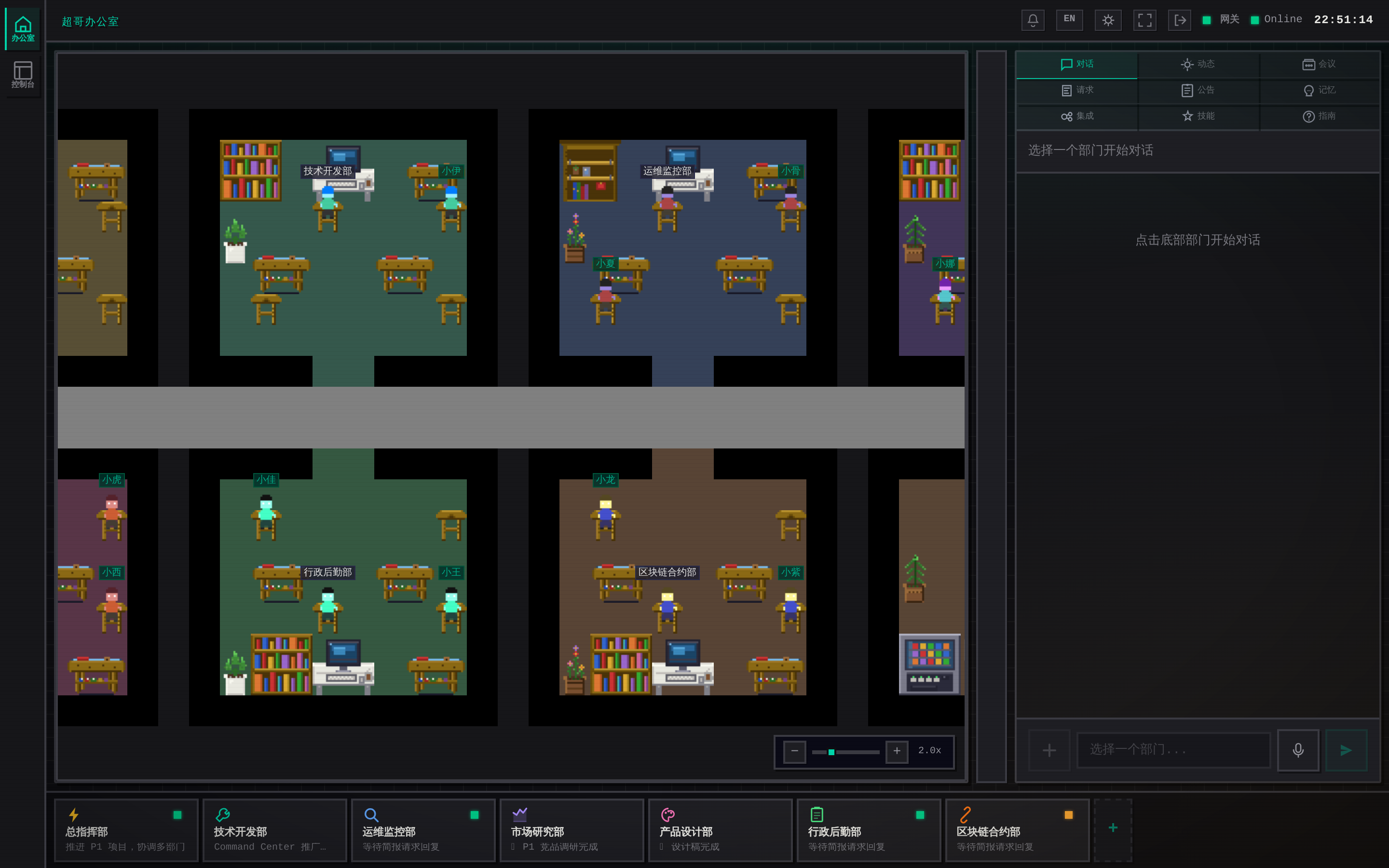
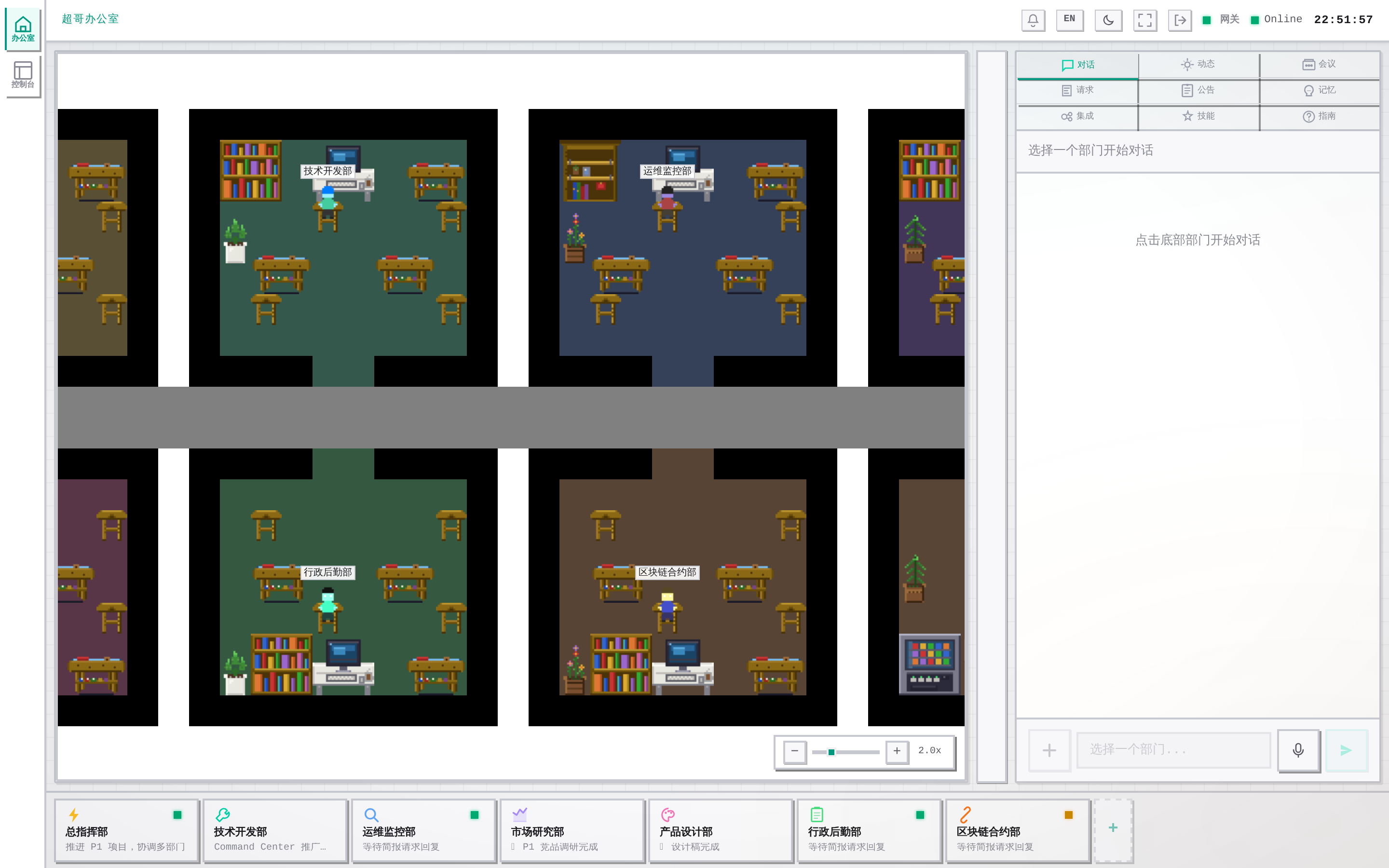
Pixel Office (Dark Theme) / 像素办公室(暗色主题)
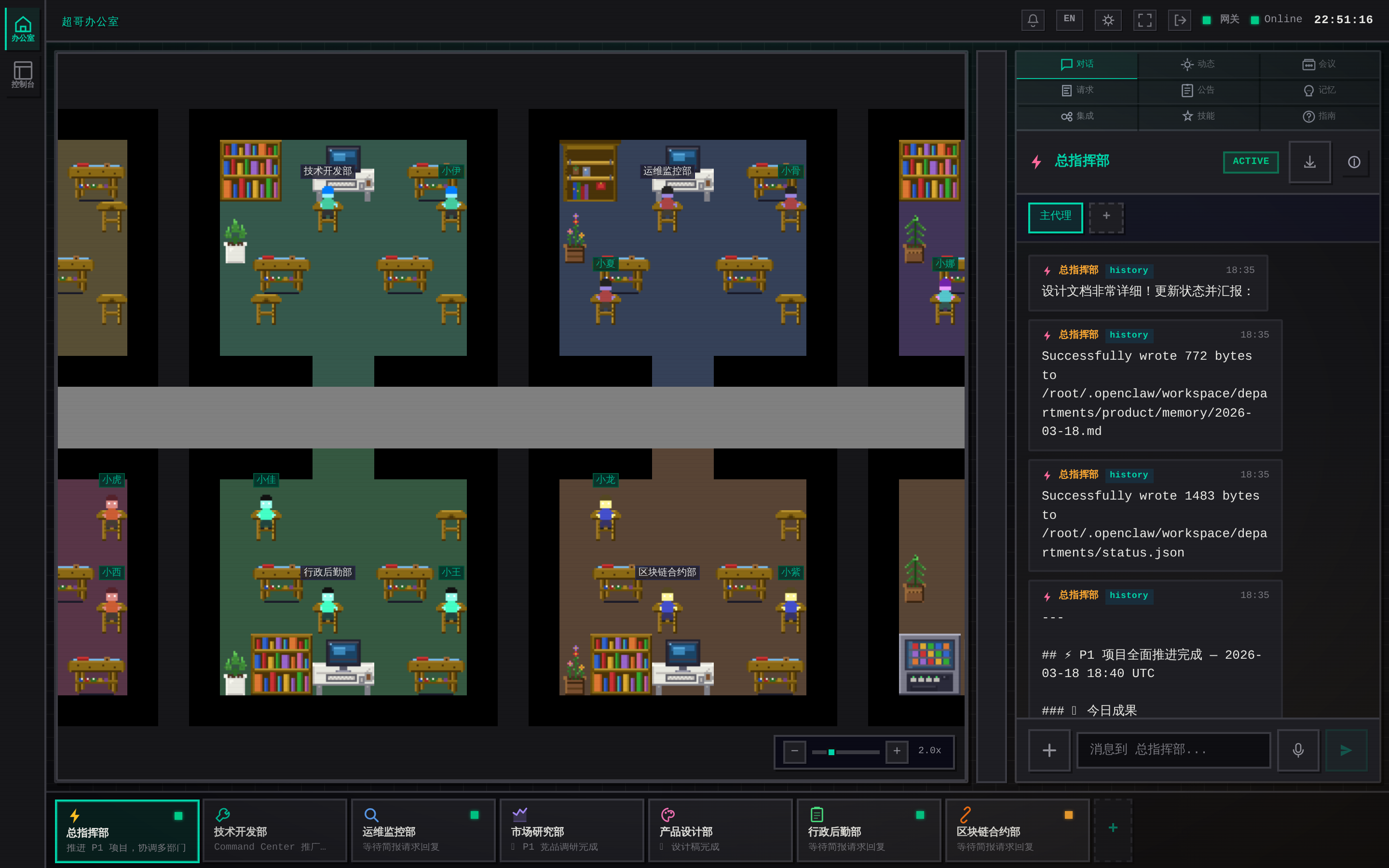
Department Chat / AI 部门对话
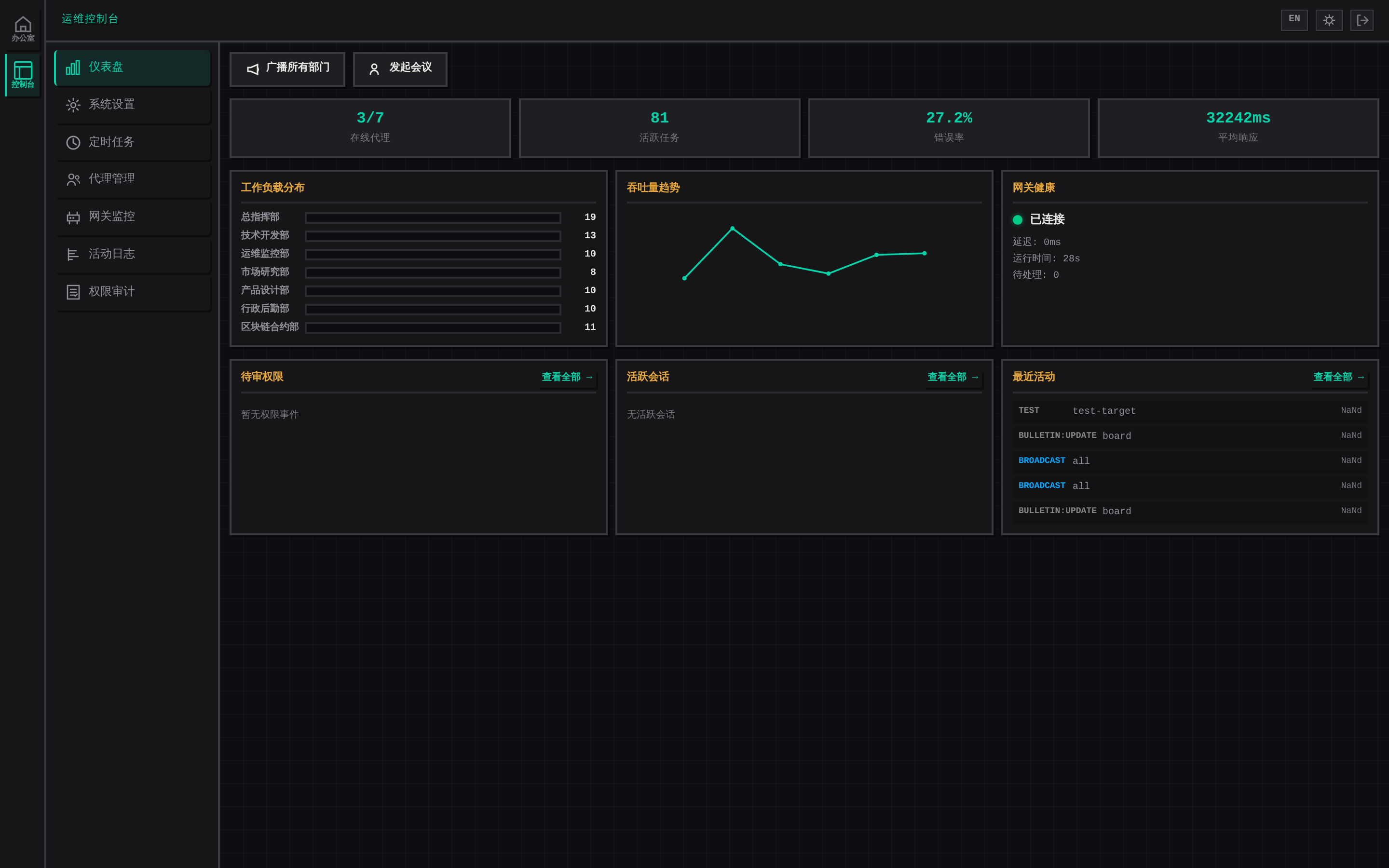
Ops Console Dashboard / 运维控制台仪表盘
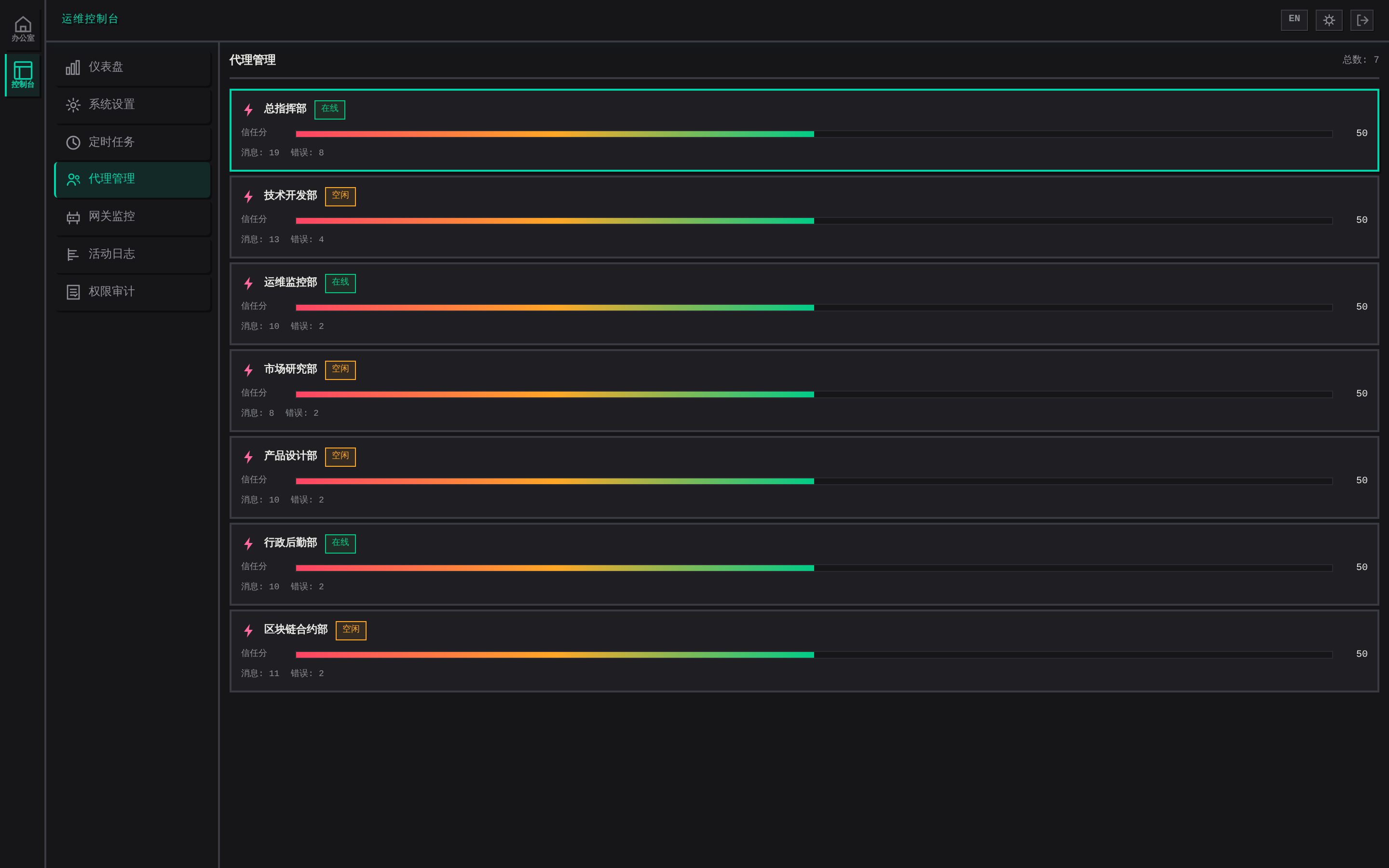
Agent Management / 代理管理
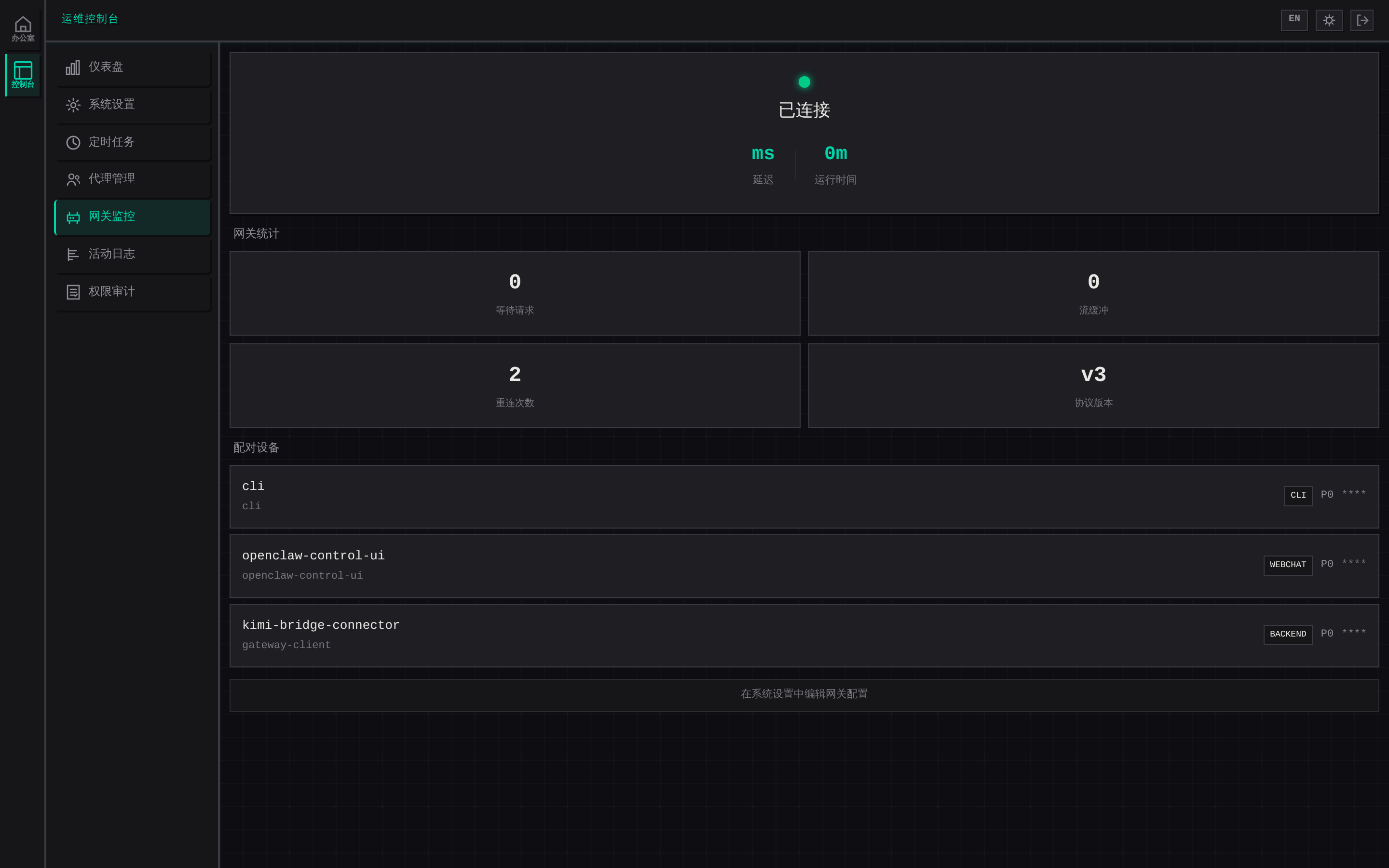
Gateway Monitor / 网关监控
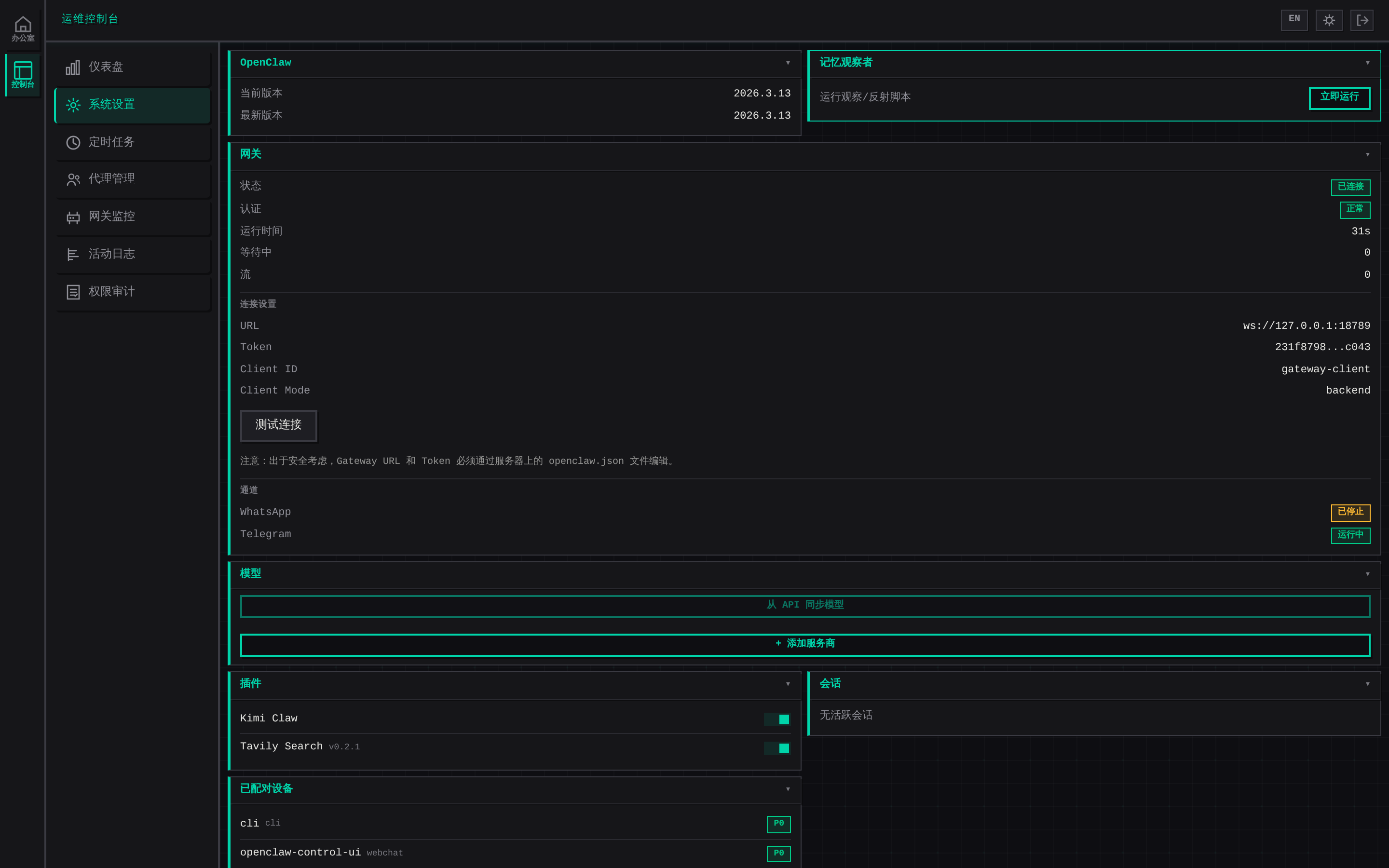
System Config (Card Layout) / 系统配置(卡片布局)
Light Theme / 亮色主题
中文
这是什么?
OpenClaw 指挥中心是一个 Web 控制面板,将你的 AI 代理变成虚拟办公团队。每个"部门"都有独立的 AI 助手 — 用自然语言和它们对话、设置自动化任务、从复古像素风界面监控一切。
系统架构
┌─────────────────────────────────────────────────────────────────────────┐
│                         浏览器 / Browser (PWA)                          │
│                                                                         │
│  ┌──────────────┐  ┌─────────────────────────────────────────────────┐  │
│  │  像素办公室    │  │  右侧面板 (12 标签)                              │  │
│  │  PixelOffice  │  │  ┌────┬────┬────┬────┬────┬─────┐             │  │
│  │              │  │  │对话│公告│记忆│统计│系统│配置 │             │  │
│  │  Canvas 2D   │  │  ├────┼────┼────┼────┼────┼─────┤             │  │
│  │  动画精灵     │  │  │定时│流程│技能│会议│指南│集成 │             │  │
│  │  点击交互     │  │  └────┴────┴────┴────┴────┴─────┘             │  │
│  │  滚轮缩放     │  │                                                │  │
│  └──────────────┘  └─────────────────────────────────────────────────┘  │
│  ┌──────────────────────────────────────────────────────────────────┐   │
│  │  状态栏: 部门卡片 (状态灯 + 快速切换) │ Cmd+K 命令面板           │   │
│  └──────────────────────────────────────────────────────────────────┘   │
│                React 19 + TypeScript + Vite │ i18n (中/英)              │
└────────────────────────────┬────────────────────────────────────────────┘
                             │ WebSocket (wss://) + REST (HTTPS)
                             │ JWT 认证
┌────────────────────────────┴────────────────────────────────────────────┐
│                      Express 服务器 (端口 5100)                         │
│                                                                         │
│  ┌─────────────┐  ┌──────────────┐  ┌──────────────┐  ┌────────────┐  │
│  │  index.js    │  │  agent.js     │  │  auth.js      │  │ crypto.js  │  │
│  │  HTTP + WS   │  │  AI 对话      │  │  scrypt 认证  │  │ AES-256    │  │
│  │  路由分发     │  │  上下文注入   │  │  JWT 令牌     │  │ 凭证加密   │  │
│  │  事件广播     │  │  子代理管理   │  │  登录限流     │  │ Ed25519    │  │
│  └──────┬──────┘  └──────┬───────┘  └──────────────┘  └────────────┘  │
│         │                │                                              │
│  ┌──────┴──────────────────────────────────────────────────────────┐   │
│  │                    routes/ API 路由                              │   │
│  │  ┌────────┐ ┌────────┐ ┌─────────┐ ┌───────┐ ┌──────────────┐ │   │
│  │  │meetings│ │  cron   │ │workflows│ │skills │ │integrations  │ │   │
│  │  │会议室   │ │定时任务 │ │ 工作流  │ │ 技能  │ │gmail/drive/  │ │   │
│  │  │协商投票 │ │cron解析 │ │多步执行 │ │安装   │ │voice/webhook │ │   │
│  │  └────────┘ └────────┘ └─────────┘ └───────┘ └──────────────┘ │   │
│  └────────────────────────────────────────────────────────────────┘   │
│         │                                                              │
│  ┌──────┴──────┐  ┌──────────────┐  ┌──────────────────────────────┐  │
│  │ gateway.js   │  │  file-lock.js │  │  utils.js                    │  │
│  │ 网关客户端   │  │  互斥锁       │  │  safeWriteFileSync           │  │
│  │ Ed25519 设备 │  │  文件锁       │  │  原子写入                    │  │
│  │ 流式传输     │  │  超时+队列    │  │  配置读取                    │  │
│  └──────┬──────┘  └──────────────┘  └──────────────────────────────┘  │
└─────────┼───────────────────────────────────────────────────────────────┘
          │ WebSocket (ws://127.0.0.1:18789)
          │ 协议 3-5, Ed25519 设备认证, 挑战-应答签名
┌─────────┴───────────────────────────────────────────────────────────────┐
│                       OpenClaw 网关 (Gateway)                           │
│                                                                         │
│  ┌──────────────┐  ┌──────────────┐  ┌──────────────────────────────┐  │
│  │  LLM 路由     │  │  会话管理     │  │  工具执行 (bash/MCP/内置)    │  │
│  └──────────────┘  └──────────────┘  └──────────────────────────────┘  │
│                              │                                          │
│              ┌───────────────┼───────────────┐                          │
│              ▼               ▼               ▼                          │
│        Claude API     OpenAI API      本地模型                          │
└─────────────────────────────────────────────────────────────────────────┘

┌─────────────────────────────────────────────────────────────────────────┐
│                         文件系统持久化                                    │
│                                                                         │
│  ~/.openclaw/                                                           │
│  ├── workspace/departments/                                             │
│  │   ├── config.json            # 部门配置                              │
│  │   ├── personas/*.md          # AI 角色设定                           │
│  │   ├── memory/*.md            # 部门记忆                              │
│  │   ├── daily/*.json           # 对话日志                              │
│  │   ├── meetings/*.json        # 会议记录                              │
│  │   └── subagents/*.json       # 子代理                                │
│  ├── workspace/command-center/                                          │
│  │   ├── integrations.json      # 集成凭证 (AES-256-GCM 加密)          │
│  │   └── .auth_password         # 登录密码 (scrypt 哈希)               │
│  └── openclaw.json              # 网关令牌                              │
└─────────────────────────────────────────────────────────────────────────┘
数据流向:
用户输入 → WebSocket → Express → agent.js (上下文注入) → Gateway → LLM
                                                                    │
用户界面 ← WebSocket ← Express ← 流式事件 ←──── Gateway ←──── LLM 回复
核心功能
| 类别 | 功能说明 | |------|---------| | AI 对话 | 自然语言与各部门助手交流,流式响应,子代理创建,图片/文档上传 (PDF/DOCX/XLSX),对话导出,失败重试 | | 会议室 | 多部门实时讨论,部门顺序发言(每个部门看到前面部门的回复),会议模板快速创建,自动发起讨论,会议纪要导出到 Google Drive | | 像素办公室 | Canvas 渲染的虚拟办公室,动画精灵角色,自动扩展的网格布局,点击角色选中部门,滚轮缩放 | | 命令面板 | Cmd+K 快速搜索,模糊匹配部门/标签/操作,键盘导航 | | 部门管理 | UI 内创建/编辑/删除,自定义图标和颜色,Telegram Topic 关联,右键菜单操作 | | 子代理 | 为部门创建专项子代理,独立对话/任务,技能继承,请示上级机制 | | 工作流 | 多步骤自动化流程,可视化编辑器,条件分支 | | 定时任务 | 基于 Cron 的自动化,支持间隔或 Cron 表达式,执行历史记录,暂停/恢复/删除 | | 集成服务 | Gmail 邮件发送、Google Drive 备份、语音输入 (Whisper)、Webhook 通知、Google Sheets、推送通知 | | 全员广播 | 一条命令发给所有部门,收集全部回复,适合公司级协调 | | 记忆系统 | 每部门独立 AI 记忆,手动编辑,版本历史,角色 (Persona) 配置 | | 公告板 | 全局公告发布与阅读,跨部门信息同步 | | 运维控制台 | 独立全屏运维界面,7 个模块:仪表盘、系统设置(卡片网格)、定时任务、代理管理、网关监控、活动日志(筛选+导出 CSV)、权限审计 | | 监控面板 | 网关状态、Token 用量、实时活动流、性能指标、仪表盘图表 | | 系统配置 | 网关配置、模型管理(多提供商)、代理默认值、渠道设置,首次运行安装向导,卡片网格布局 | | PWA | 渐进式 Web 应用,离线缓存,iOS/Android 安装提示,Service Worker | | 移动端 | 响应式布局,滑动手势,触控优化,移动端抽屉菜单 | | 双语界面 | 完整中英文 UI,一键切换 |
斜杠命令:
| 命令 | 别名 | 说明 |
|------|------|------|
| /help | /帮助 | 显示所有命令 |
| /dept | /部门 | 创建/管理部门 |
| /broadcast | /广播 | 广播到所有部门 |
| /export | /导出 | 导出当前对话 |
| /status | /状态 | 查看系统状态 |
| /clear | /清屏 | 清空当前聊天 |
快速开始
方式一:交互式安装器(推荐)
npx openclaw-command-center或者克隆后运行:
git clone https://github.com/tywang2006/openclaw-command-center.git
cd openclaw-command-center
bash install.sh
安装器提供两种模式:
- 新手模式 — 从零搭建(OpenClaw + 网关 + 指挥中心)
- 已有用户模式 — 仅安装指挥中心(自动检测已有 OpenClaw 配置)
方式二:手动安装
git clone https://github.com/tywang2006/openclaw-command-center.git
cd openclaw-command-center
npm install
npm run build
node server/index.js
访问 http://localhost:5100/cmd/
配置说明
| 变量 | 默认值 | 说明 |
|------|--------|------|
| OPENCLAW_HOME | ~/.openclaw | OpenClaw 根目录 |
| CMD_PORT | 5100 | 服务端口 |
| OPENCLAW_GATEWAY_URL | ws://127.0.0.1:18789 | 网关 WebSocket 地址 |
| OPENCLAW_AUTH_TOKEN | (自动检测) | 网关认证令牌 |
部门通过 UI 管理 — 点击状态栏 + 按钮,或在对话中输入 /dept。
部署
PM2(推荐):
项目自带 ecosystem.config.cjs:
// ecosystem.config.cjs
module.exports = {
  apps: [{
    name: 'openclaw-cmd',
    script: 'server/index.js',
    cwd: '~/.openclaw/workspace/command-center',
    node_args: '--max-old-space-size=256',
    max_memory_restart: '400M',
    autorestart: true,
    exp_backoff_restart_delay: 1000,
    env: { NODE_ENV: 'production' }
  }]
};
pm2 start ecosystem.config.cjs
pm2 save && pm2 startupNginx 反向代理:
location /cmd/ {
    proxy_pass http://127.0.0.1:5100;
    proxy_http_version 1.1;
    proxy_set_header Upgrade $http_upgrade;
    proxy_set_header Connection "upgrade";
}
健康检查: GET /health — 返回服务器状态、运行时间、网关连接状态。
项目结构
command-center/
├── server/                # Express 后端
│   ├── index.js           #   HTTP + WebSocket 服务器
│   ├── gateway.js         #   OpenClaw 网关客户端
│   ├── agent.js           #   通过网关的 AI 对话
│   ├── auth.js            #   密码认证 (scrypt)
│   └── routes/            #   API 路由模块
├── src/                   # React 19 前端
│   ├── components/        #   30+ UI 组件
│   ├── office/            #   像素艺术引擎
│   ├── i18n/              #   中文 + 英文
│   └── hooks/             #   WebSocket 状态管理
├── install.sh             # 交互式安装器
└── dist/                  # 生产构建输出
技术栈
| 层级 | 技术 | |------|------| | 前端 | React 19, TypeScript 5.9, Vite 7, Canvas 2D | | 后端 | Express 5, WebSocket (ws), chokidar | | AI | OpenClaw 网关 (协议 3-5) | | 认证 | scrypt + 时序安全比较 | | 进程 | PM2 |
English
What is this?
OpenClaw Command Center is a web-based dashboard that turns your AI agents into a virtual office team. Each "department" has its own AI assistant — chat with them in natural language, set up automated tasks, and monitor everything from a retro pixel-art interface.
Architecture
┌─────────────────────────────────────────────────────────────────────────┐
│                         Browser / PWA Client                            │
│                                                                         │
│  ┌──────────────┐  ┌─────────────────────────────────────────────────┐  │
│  │ Pixel Office  │  │  Right Panel (12 Tabs)                          │  │
│  │              │  │  ┌────┬────┬────┬─────┬─────┬──────┐           │  │
│  │  Canvas 2D   │  │  │Chat│Bull│Mem │Stats│ Sys │Config│           │  │
│  │  Animated    │  │  ├────┼────┼────┼─────┼─────┼──────┤           │  │
│  │  Sprites     │  │  │Cron│Flow│Skill│Meet│Guide│Integ │           │  │
│  │  Click/Zoom  │  │  └────┴────┴────┴─────┴─────┴──────┘           │  │
│  └──────────────┘  └─────────────────────────────────────────────────┘  │
│  ┌──────────────────────────────────────────────────────────────────┐   │
│  │  Status Bar: Dept Cards (status lights + quick switch) │ Cmd+K  │   │
│  └──────────────────────────────────────────────────────────────────┘   │
│                React 19 + TypeScript + Vite │ i18n (zh/en)              │
└────────────────────────────┬────────────────────────────────────────────┘
                             │ WebSocket (wss://) + REST (HTTPS)
                             │ JWT Auth
┌────────────────────────────┴────────────────────────────────────────────┐
│                      Express Server (port 5100)                         │
│                                                                         │
│  ┌─────────────┐  ┌──────────────┐  ┌──────────────┐  ┌────────────┐  │
│  │  index.js    │  │  agent.js     │  │  auth.js      │  │ crypto.js  │  │
│  │  HTTP + WS   │  │  AI Chat      │  │  scrypt Auth  │  │ AES-256    │  │
│  │  Routing     │  │  Context Inj  │  │  JWT Tokens   │  │ Credential │  │
│  │  Broadcast   │  │  Sub-agents   │  │  Rate Limit   │  │ Ed25519    │  │
│  └──────┬──────┘  └──────┬───────┘  └──────────────┘  └────────────┘  │
│         │                │                                              │
│  ┌──────┴──────────────────────────────────────────────────────────┐   │
│  │                    routes/ API Modules                           │   │
│  │  ┌────────┐ ┌────────┐ ┌─────────┐ ┌───────┐ ┌──────────────┐ │   │
│  │  │meetings│ │  cron   │ │workflows│ │skills │ │integrations  │ │   │
│  │  │Meeting │ │Scheduled│ │ Multi-  │ │ Agent │ │gmail/drive/  │ │   │
│  │  │Room +  │ │ Tasks   │ │ step    │ │ Skill │ │voice/webhook │ │   │
│  │  │Debate  │ │         │ │ Pipline │ │ Mgmt  │ │/sheets       │ │   │
│  │  └────────┘ └────────┘ └─────────┘ └───────┘ └──────────────┘ │   │
│  └────────────────────────────────────────────────────────────────┘   │
│         │                                                              │
│  ┌──────┴──────┐  ┌──────────────┐  ┌──────────────────────────────┐  │
│  │ gateway.js   │  │  file-lock.js │  │  utils.js                    │  │
│  │ Gateway      │  │  Mutex +      │  │  safeWriteFileSync           │  │
│  │ Client       │  │  File Lock    │  │  Atomic Writes               │  │
│  │ Ed25519 Auth │  │  Timeout +    │  │  Config Reader               │  │
│  │ Streaming    │  │  Queue Limit  │  │                              │  │
│  └──────┬──────┘  └──────────────┘  └──────────────────────────────┘  │
└─────────┼───────────────────────────────────────────────────────────────┘
          │ WebSocket (ws://127.0.0.1:18789)
          │ Protocol 3-5, Ed25519 Device Auth, Challenge-Response
┌─────────┴───────────────────────────────────────────────────────────────┐
│                       OpenClaw Gateway                                  │
│                                                                         │
│  ┌──────────────┐  ┌──────────────┐  ┌──────────────────────────────┐  │
│  │  LLM Router   │  │  Session Mgmt │  │  Tool Execution (bash/MCP)   │  │
│  └──────────────┘  └──────────────┘  └──────────────────────────────┘  │
│                              │                                          │
│              ┌───────────────┼───────────────┐                          │
│              ▼               ▼               ▼                          │
│        Claude API     OpenAI API      Local Models                      │
└─────────────────────────────────────────────────────────────────────────┘

┌─────────────────────────────────────────────────────────────────────────┐
│                      File System Persistence                            │
│                                                                         │
│  ~/.openclaw/                                                           │
│  ├── workspace/departments/                                             │
│  │   ├── config.json            # Department configuration              │
│  │   ├── personas/*.md          # AI persona definitions                │
│  │   ├── memory/*.md            # Department memory                     │
│  │   ├── daily/*.json           # Chat logs                             │
│  │   ├── meetings/*.json        # Meeting records                       │
│  │   └── subagents/*.json       # Sub-agents                            │
│  ├── workspace/command-center/                                          │
│  │   ├── integrations.json      # Credentials (AES-256-GCM encrypted)  │
│  │   └── .auth_password         # Login password (scrypt hash)          │
│  └── openclaw.json              # Gateway auth token                    │
└─────────────────────────────────────────────────────────────────────────┘
Data Flow:
User Input → WebSocket → Express → agent.js (context injection) → Gateway → LLM
                                                                         │
     UI ← WebSocket ← Express ← Streaming Events ← Gateway ← LLM Response
Features
| Category | What you get | |----------|-------------| | AI Chat | Natural language conversation with department agents, streaming responses, sub-agent creation, image & document upload (PDF/DOCX/XLSX), conversation export, retry on failure | | Meeting Room | Multi-department real-time discussion, sequential responses (each dept sees previous replies), quick-create templates, auto-start discussion, meeting minutes export to Google Drive | | Pixel Office | Canvas-rendered office with animated sprite characters, auto-expanding grid layout, click-to-select departments, scroll wheel zoom | | Command Palette | Cmd+K quick search, fuzzy match departments/tabs/actions, keyboard navigation | | Department Management | Create / edit / delete from UI, custom icons & colors, Telegram topic linking, right-click context menu | | Sub-Agents | Create specialized sub-agents per department, independent chat/tasks, skill inheritance, escalation to parent | | Workflows | Multi-step automation pipelines, visual editor, conditional branching | | Scheduled Tasks | Cron-based automation, interval or cron expression, execution history, pause/resume/delete | | Integrations | Gmail SMTP, Google Drive backup, Voice input (Whisper), Webhook notifications, Google Sheets, push notifications | | Team Broadcast | One command to all departments, collect all responses, ideal for company-wide coordination | | Memory System | Per-department AI memory, manual editing, version history, persona configuration | | Bulletin Board | Global announcements, cross-department information sync | | Ops Console | Dedicated full-screen ops interface with 7 modules: dashboard, system settings (card grid), cron, agent management, gateway monitor, activity log (filter + CSV export), permission audit | | Monitoring | Gateway stats, token usage, real-time activity feed, performance metrics, dashboard charts | | System Config | Gateway configuration, model management (multi-provider), agent defaults, channel settings, first-run setup wizard, card grid layout | | PWA | Progressive Web App, offline shell caching, iOS/Android install prompt, Service Worker | | Mobile | Responsive layout, swipe gestures, touch-optimized, mobile drawer menu | | i18n | Full Chinese / English UI with one-click toggle |
Slash Commands:
| Command | Alias | Description |
|---------|-------|-------------|
| /help | /帮助 | Show all commands |
| /dept | /部门 | Create/manage departments |
| /broadcast | /广播 | Broadcast to all departments |
| /export | /导出 | Export current conversation |
| /status | /状态 | View system status |
| /clear | /清屏 | Clear current chat |
Quick Start
Option A: Interactive Installer (Recommended)
npx openclaw-command-centerOr clone and run:
git clone https://github.com/tywang2006/openclaw-command-center.git
cd openclaw-command-center
bash install.sh
The installer offers two modes:
- Beginner Mode — full setup from scratch (OpenClaw + Gateway + Command Center)
- Existing User Mode — Command Center only (detects existing OpenClaw config)
Option B: Manual Setup
git clone https://github.com/tywang2006/openclaw-command-center.git
cd openclaw-command-center
npm install
npm run build
node server/index.js
Access at http://localhost:5100/cmd/
Configuration
| Variable | Default | Description |
|----------|---------|-------------|
| OPENCLAW_HOME | ~/.openclaw | OpenClaw root directory |
| CMD_PORT | 5100 | Server port |
| OPENCLAW_GATEWAY_URL | ws://127.0.0.1:18789 | Gateway WebSocket URL |
| OPENCLAW_AUTH_TOKEN | (auto-detected) | Gateway auth token |
Departments are managed through the UI — click + in the status bar, or type /dept in chat.
Deployment
PM2 (Recommended):
The project includes ecosystem.config.cjs:
// ecosystem.config.cjs
module.exports = {
  apps: [{
    name: 'openclaw-cmd',
    script: 'server/index.js',
    cwd: '~/.openclaw/workspace/command-center',
    node_args: '--max-old-space-size=256',
    max_memory_restart: '400M',
    autorestart: true,
    exp_backoff_restart_delay: 1000,
    env: { NODE_ENV: 'production' }
  }]
};
pm2 start ecosystem.config.cjs
pm2 save && pm2 startupNginx Reverse Proxy:
location /cmd/ {
    proxy_pass http://127.0.0.1:5100;
    proxy_http_version 1.1;
    proxy_set_header Upgrade $http_upgrade;
    proxy_set_header Connection "upgrade";
}
Health Check: GET /health — returns server status, uptime, gateway state.
Project Structure
command-center/
├── server/                # Express backend
│   ├── index.js           #   HTTP + WebSocket server
│   ├── gateway.js         #   OpenClaw Gateway client
│   ├── agent.js           #   AI chat via Gateway
│   ├── auth.js            #   Password auth (scrypt)
│   └── routes/            #   API route modules
├── src/                   # React 19 frontend
│   ├── components/        #   30+ UI components
│   ├── office/            #   Pixel art engine
│   ├── i18n/              #   Chinese + English
│   └── hooks/             #   WebSocket state management
├── install.sh             # Interactive installer
└── dist/                  # Production build output
Tech Stack
| Layer | Technology | |-------|-----------| | Frontend | React 19, TypeScript 5.9, Vite 7, Canvas 2D | | Backend | Express 5, WebSocket (ws), chokidar | | AI | OpenClaw Gateway (protocol 3-5) | | Auth | scrypt + timing-safe comparison | | Process | PM2 |
Changelog / 更新日志
[1.8.0] - 2026-03-21
Added / 新增
- WCAG accessibility overhaul / WCAG 无障碍改造: 41 files — focus-visible outlines, dialog roles, keyboard nav (Escape), aria-labels, heading hierarchy, skip-to-content, ARIA live regions. 41个文件全面无障碍改造
- Structured logging / 结构化日志: Server-side structured logging with consistent format. 服务端结构化日志
- API route decomposition / API 路由拆分:
api.js→ modular route files underserver/routes/. API路由模块化拆分
Fixed / 修复
- 50-agent test-fix loop: security, performance, memory leaks across server and client. 50代理测试修复循环
--text-mutedcontrast ratio improved to WCAG AA (4.5:1). 文本对比度达标WCAG AA- WebSocket message logging sanitized to prevent token leakage. WS日志脱敏防止令牌泄漏
- Workflow run results persistence, delay validation alignment. 工作流运行结果持久化
- MemoryTab search corrected to
/api/searchendpoint. 记忆搜索接口修正 - Watcher ignores
node_modules/dist/.git, cleans stale file offsets. 文件监控优化 - Rate limiting on
/api/search. 搜索接口限速 - Audit log permissions secured, sensitive data reduced. 审计日志权限加固
- Path traversal defense on
restoreFromBackup. 备份恢复路径穿越防护 - SetupWizard POST success as WS fallback. 安装向导POST回退
- Gateway log spam suppressed, SPA sendFile errors fixed. 网关日志精简
Removed / 移除
- Unused PNG sprites (
char_0–5.png,walls.png) — engine uses procedural sprites. 移除未使用PNG精灵 - Dead PNG-loading code path in
spriteData.ts. 移除PNG加载死代码
[1.7.4] - 2026-03-20
Security / 安全
- VAPID push key file now written with mode 0600 (was world-readable). Push密钥文件权限改为0600
- System-extras error responses no longer leak
error.message(generic messages only). 系统扩展接口错误响应不再泄露error.message - Admin/credential endpoints rate-limited to 5 req/min (
/system/config,/system/shutdown,/integrations/config,/skills/install). 管理/凭证端点限速5次/分钟 - Audit log and notifications data moved from package-relative path to persistent
DATA_DIR(survives npm updates). 审计日志和通知数据从包内路径迁移到持久DATA_DIR - File uploads/outputs paths moved to persistent
DATA_DIR/uploadsandDATA_DIR/outputs. 文件上传/输出路径迁移到持久DATA_DIR
[1.7.3] - 2026-03-20
i18n / 国际化
- MeetingRoom fully internationalized: 30+ hardcoded Chinese strings replaced with
t()calls. Meeting room now works in English locale. 会议室完全国际化,30+硬编码中文替换为t()调用 - Removed 5 superseded duplicate i18n keys (
ops.approvals.tab.*,ops.approvals.stats.tools/topTool/recentHour). 移除5个废弃重复i18n键
Security / 安全
- WebSocket connection limit: fixed off-by-one (
> 10to>= 10) and TOCTOU race (check before setting_authenticated). WS连接限制修复:越界错误和竞争条件
Fixed / 修复
- Gateway
_challengeTimerleak: timer now properly cleared on connection close/disconnect. 网关挑战计时器泄漏修复 - MeetingRoom
sendingTimeoutRefcleanup on unmount (memory leak). 会议室发送超时引用卸载清理 - ActivityTab
playbackReftimeout cleanup on unmount (memory leak). 活动面板回放超时卸载清理 loadMeetingsFromDisk()now logs parse errors instead of silently swallowing them. 加载会议文件错误现在会记录日志
Performance / 性能
- Streaming text notifications debounced (50ms) to reduce re-renders during AI responses. 流式文本通知防抖50ms减少重渲染
[1.7.2] - 2026-03-20
Security / 安全
- All server file writes now use atomic
safeWriteFileSync(auth, gateway, push, skills, setup, replay, layout). 所有服务器文件写入改用原子写入 - Frontend logout now calls
POST /api/auth/logoutto revoke server token. 前端退出登录现调用服务端接口撤销token - Cron
everyMsminimum bound: 10 seconds (prevents abuse). 定时任务everyMs最小10秒 - Meeting topic length validation (max 500 chars) + deptIds type/count validation. 会议主题长度限制+部门ID校验
Fixed / 修复
- AgentsTab: token metrics now correctly read
tokens.input/output/total(wastokensInput/tokensOutput). 代理标签token指标字段修正 - DashboardTab: permissions/audit response parsing matched to actual server format. 仪表盘权限/审计响应解析修正
- GatewaysTab: reconnect count reads
global.gatewayReconnects(wasdata.raw.global.reconnectCount). 网关重连计数字段修正
[1.7.1] - 2026-03-20
Added / 新增
- Ops Console / 运维控制台: Full-screen ops interface with sidebar navigation (Office / Ops switch). 独立全屏运维界面,侧边栏切换办公室/控制台
- Agent Management / 代理管理: Department overview with trust scores, message stats, persona/memory preview, response time metrics. 部门概览含信任评分、消息统计、角色/记忆预览、响应指标
- Gateway Monitor / 网关监控: Real-time connection status, latency, uptime, pending requests, stream buffers, paired devices. 实时连接状态、延迟、在线时长、队列、设备列表
- Activity Log / 活动日志: Filterable audit log with action/department filters, pagination, CSV export. 可筛选审计日志,支持操作/部门筛选、分页、CSV导出
- Permission Audit / 权限审计: Gateway permission events viewer with stats, event timeline, tool aggregation chart. 网关权限事件查看器,统计、时间线、工具聚合图表
- System Settings card layout / 系统设置卡片布局: Two-column card grid with collapsible sections. 双栏卡片网格,可折叠区块
- AppSidebar / 侧边栏: 48px sidebar for switching between Office and Ops Console views. 48px侧边栏切换办公室/控制台视图
- Ops Dashboard redesign / 运维仪表盘重做: Stat cards, workload/throughput charts, gateway health, preview panels with "View All" navigation. 统计卡片、工作负载/吞吐量图表、网关健康、预览面板
- 21 automated screenshots / 21张自动截图: Updated Playwright script with Ops Console pages. 更新截图脚本含控制台页面
Fixed / 修复
- Content overflow when AppSidebar added (
width: 100vw→width: 100%). 加侧边栏后内容溢出修复 - All API paths in new modules corrected (trust-scores, devices, audit, permissions). 新模块所有API路径修正
- All API response parsing matched to actual server formats. 所有API响应解析匹配实际服务器格式
- Light theme CSS selectors fixed (
[data-theme="light"]not@media prefers-color-scheme). 亮色主题CSS选择器修正 - Missing ~50 i18n keys added for new modules. 新模块补充约50个i18n键
[1.7.0] - 2026-03-18
Security & Reliability / 安全与可靠性 (40-Agent Audit)
- Mutex timeout (30s) + queue limit (10) prevents deadlocks. 互斥锁超时+队列限制防止死锁
- Gateway pending request cap (100) + stream buffer cap (50). 网关请求队列上限+流缓冲上限
- Meeting: creation limit (10), message cap (50), dept response timeout (3min), negotiation timeout (10min). 会议创建上限、消息上限、部门响应超时、协商超时
- Action-item extraction race fix (await before deletion timer). 行动项提取竞态修复
- Negotiation modification selection randomized (no first-dept bias). 协商修改选择随机化
- Context tag injection defense strengthened (case-insensitive, HTML entities). 上下文标签注入防御加强
- TOCTOU race fix in crypto.js with O_CREAT|O_EXCL. 密钥生成TOCTOU竞态修复
- Sub-agent 24h TTL + orphan cleanup. 子代理24小时TTL+孤儿清理
- Broadcast 3-minute timeout with partial results. 广播3分钟超时返回部分结果
- Cron three-phase lock (release during AI execution). 定时任务三阶段锁
- chat-retry.js deduplication (imports from agent.js). 聊天重试去重
- Filename sanitization (voice), HTML sanitization (email), SSRF protection (skills). 文件名/HTML/SSRF防护
- Logout closes associated WebSocket connections. 登出关闭关联WebSocket
- 22 empty catch blocks replaced with logging. 22个空catch替换为日志
Added / 新增
- Light/dark theme toggle. 亮色/暗色主题切换
- Architecture diagrams in README (zh + en). README架构图
- 13 automated screenshots for npm/GitHub. 13张自动截图
- OfficeCanvas lazy loading (-22% main bundle). 办公室Canvas懒加载
[1.6.3] - 2026-03-18
Improved / 改进
- Added CONTRIBUTING.md (bilingual). 增加贡献指南
- Added CODE_OF_CONDUCT.md (Contributor Covenant 2.1). 增加行为准则
- Added GitHub issue templates (bug report + feature request). 增加GitHub issue模板
- Added
mainandexportsfields to package.json. 增加main和exports字段 - Improved Snyk package health score. 提升Snyk包健康评分
[1.6.2] - 2026-03-18
Improved / 改进
- Added
homepageandbugsfields to package.json. 增加homepage和bugs字段 - Completed
.env.examplewith all environment variables. 补全所有环境变量 - Added
ecosystem.config.cjsand.env.exampleto npm package. 加入npm包 - Added inline PM2 config example in README. README增加PM2配置示例
- Synced CHANGELOG.md with README (was lagging at 1.3.1). 同步CHANGELOG.md
[1.6.1] - 2026-03-18
Security / 安全
- OAuth token files now written with 0o600 permissions (3 locations). OAuth令牌文件写入时使用0o600权限(3处)
- Removed filesystem path exposure from setup API response. 移除setup API响应中的文件系统路径暴露
- Sanitized error messages in setup/skills/voice/files routes (no more raw error.message to client). 脱敏setup/skills/voice/files路由错误信息
- Added 10MB upload size limit to Drive upload endpoint. Drive上传接口增加10MB大小限制
Fixed / 修复
- Meeting setImmediate async error handling race condition. 会议setImmediate异步错误处理竞态条件
- Meeting negotiation withMutex wrapped in Promise.resolve for safe catch. 会议协商withMutex用Promise.resolve包裹确保catch安全
Chores / 工程
- Updated .gitignore: added IDE dirs, agent-generated reports, test output, refactoring WIP. 更新.gitignore
- Updated .dockerignore: added sensitive files (encryption key, integrations, audit log). 更新.dockerignore
[1.6.0] - 2026-03-18
Added / 新增
- Negotiation voting / 协商投票: Multi-round AI debate with voting in meeting room. 会议室多轮AI辩论协商投票
- Action item extraction / 行动项提取: AI auto-extracts action items on meeting end. 会议结束AI自动提取行动项
- Trust scores / 信任评分: Department reliability leaderboard. 部门可靠性排行榜
- Sub-agent delegation / 子代理委派: sessions_spawn non-blocking delegation (fixes deadlock). 子代理使用sessions_spawn非阻塞委派(修复死锁)
- Mobile responsive / 移动端适配: Responsive layout for tablet (768px) and phone (480px). 平板和手机端响应式布局
- Broadcast modal / 广播弹窗: Dashboard broadcast replaced blocking prompt() with modal UI. 仪表盘广播用弹窗替代阻塞prompt
- Bulletin clear button / 公告清除: Clear broadcast responses in bulletin board. 公告板清除广播回复按钮
- CommandPalette tabs / 命令面板标签: Added meeting, requests, skills, guide tabs. 命令面板新增会议/请求/技能/指南标签
Fixed / 修复
- Chinese IME / 中文输入法: Enter key no longer sends message during IME composition. 输入法组字时回车不再发送消息
- Gateway reconnect / 网关重连: Fixed listener leak on reconnect destroying new connection. 修复重连时旧监听器销毁新连接
- Dashboard chart / 仪表盘图表: Fixed division by zero in SVG chart rendering. 修复SVG图表除零错误
- Dashboard broadcast / 仪表盘广播: Fixed parameter name mismatch (message -> command). 修复广播参数名不匹配
- CronTab PUT / 定时任务更新: Fixed message payload nesting mismatch. 修复消息载荷嵌套不匹配
- CronTab chart / 定时图表: Fixed division by zero in duration chart. 修复执行时长图表除零
- sourceDept validation / 来源部门校验: Added path traversal protection. 增加路径穿越防护
- Password validation / 密码校验: Frontend min length synced with backend (8 chars). 前端密码最短长度与后端同步(8位)
- WS 1008 reconnect loop / WS重连循环: Auth-revoked close code now clears token and reloads. 认证撤销关闭码现在清除令牌并刷新
- Meeting negotiation cleanup / 会议协商清理: Negotiation state properly reset on meeting end. 会议结束时协商状态正确重置
- Meeting memory leak / 会议内存泄漏: Ended meetings removed from Map after 5 minutes. 结束的会议5分钟后从内存移除
- Skills tags / 技能标签: Tags now correctly sent as array (was string). 标签现在正确发送为数组
- Time validation / 时间校验: Autobackup time regex rejects invalid times (was accepting "99:99"). 自动备份时间正则拒绝无效时间
- YAML injection / YAML注入: Skills frontmatter now escapes user input. 技能前置信息现在转义用户输入
- WorkflowEditor alert / 工作流提示: Replaced blocking alert() with status message. 用状态消息替代阻塞alert
- chat() safety return / 聊天安全返回: Added defensive return after retry exhaustion. 重试耗尽后增加防御性返回
- Workflow lock / 工作流锁: Restructured to release file lock during AI execution. AI执行期间释放文件锁
Security / 安全
- Path traversal protection on sourceDept parameter. 来源部门参数路径穿越防护
- YAML frontmatter injection prevention in skills. 技能YAML前置信息注入防护
- Gateway listener cleanup prevents connection hijacking. 网关监听器清理防止连接劫持
[1.5.0] - 2026-03-17
Added / 新增
- Meeting Room / 会议室: Multi-department real-time discussion with sequential responses — each department sees previous replies for genuine cross-department interaction. 多部门实时讨论,顺序发言,真正的跨部门互动
- Meeting templates / 会议模板: Quick-create standup, weekly review, tech review, product sync (SVG icons). 快速创建每日站会、每周总结、技术评审、产品同步
- Auto-send topic / 自动发起讨论: Meeting topic auto-sent on creation to kick off department discussion immediately. 创建会议后自动发送主题启动讨论
- Meeting minutes export / 会议纪要导出: Auto-export to Google Drive on meeting end with formatted markdown. 会议结束自动导出纪要到 Google Drive
- Tab bar redesign / 标签栏重设计: 2-row 6-column CSS grid layout fitting 12 tabs. 两行六列网格布局容纳12个标签
- Command Palette / 命令面板: Cmd+K fuzzy search for departments, tabs, actions with keyboard navigation. 模糊搜索部门、标签、操作
- PWA: Progressive Web App with service worker, offline shell caching, iOS/Android install. 渐进式Web应用,离线缓存,移动端安装
- Chat panel decomposition / 聊天面板拆分: Split into ChatInput, ChatMessages, ChatToolbar, SubAgentPanel. 拆分为独立子组件
- Chat retry / 聊天重试: Retry failed department messages. 失败消息重试
- Push notifications / 推送通知: Web Push subscription management. 浏览器推送通知管理
Changed / 变更
- MeetingRoom CSS: all hardcoded colors replaced with charcoal theme CSS variables. 所有硬编码颜色替换为主题CSS变量
- Meeting responses: sequential instead of parallel (real discussion vs broadcast). 部门顺序回复而非并行(真正讨论而非广播)
- Passive wheel fix on OfficeCanvas — no more
preventDefaultconsole errors. 修复被动事件监听器控制台报错
[1.4.0] - 2026-03-16
Fixed / 修复
- Gateway device auth: OpenClaw 2026.3.x Ed25519 challenge-response authentication. 网关设备认证适配新版协议
Added / 新增
- System config panel / 系统配置面板: Gateway, model, agent, channel settings from UI. 网关、模型、代理、渠道设置
- Setup wizard / 安装向导: First-run onboarding with password creation and OpenClaw detection. 首次运行引导流程
- Auth hardening / 认证加固: Constant-time comparison, brute-force protection. 时序安全比较,暴力破解防护
[1.3.1] - 2026-03-12
Added / 新增
- Multi-platform installer (DMG, Windows, npm CLI, Linux .run). 多平台安装器
- Department management and metrics dashboard. 部门管理与指标仪表盘
- Integration upgrades (webhooks, Google Sheets). 集成升级
- Sub-agent visibility, escalation, skills management. 子代理管理
- In-app Guide tab. 应用内使用指南
Fixed / 修复
- Gateway reconnect, metrics, workflows, WS auth, streaming performance. 网关重连、指标、工作流等多项修复
- macOS bash 3.2 compatibility. macOS 兼容性
[1.2.0] - 2026-03-09
Added / 新增
- Capabilities dashboard: channels, plugins, skills, models. 能力总览面板
- Gmail integration (SMTP). Gmail 邮件集成
- Google Drive backup (Service Account). Google Drive 备份
- Voice input (OpenAI Whisper). 语音输入
- Chat export (Markdown / HTML). 对话导出
- Integration config management. 集成配置管理
[1.1.0] - 2026-03-07
Added / 新增
- Gateway event listening (streaming, health, tick). 网关事件监听
- Telegram messages display in real-time. Telegram 消息实时显示
- Sub-agent details + pixel office display. 子代理详情与像素办公室展示
- 4x2 multi-room pixel office layout. 4x2 多房间像素办公室布局
- Memory editing in MemoryTab. 记忆编辑
- Pixel sprite quality upgrade (8 core sprites). 像素精灵质量升级
[1.0.0] - 2026-03-06
Initial Release / 首次发布
- React 19 + Express + WebSocket dashboard. 仪表盘
- OpenClaw Gateway integration. 网关集成
- 7-department pixel office with Canvas 2D. 7部门像素办公室
- Department chat, broadcast, sub-agent management. 部门对话、广播、子代理管理
- Real-time file watching + WebSocket push. 实时文件监控
- Zoom slider for pixel office. 像素办公室缩放
Elastic License 2.0 | Made by @tywang2006
可以免费使用,禁止修改源码再分发,禁止作为托管服务出售。
Free to use. Cannot modify and redistribute. Cannot provide as a hosted service.