
opencode-cost
v0.1.4
Published
Native OpenCode TUI dashboard for persistent cost and token usage tracking

Maintainers
 zackarysantana
Readme
opencode-cost

Persistent cost and token tracking with a native OpenCode TUI dashboard.
/cost opens a full-screen dashboard with date, project, and model filters. Costs come directly from OpenCode's assistant-message records, so this plugin does not maintain a separate provider pricing table.
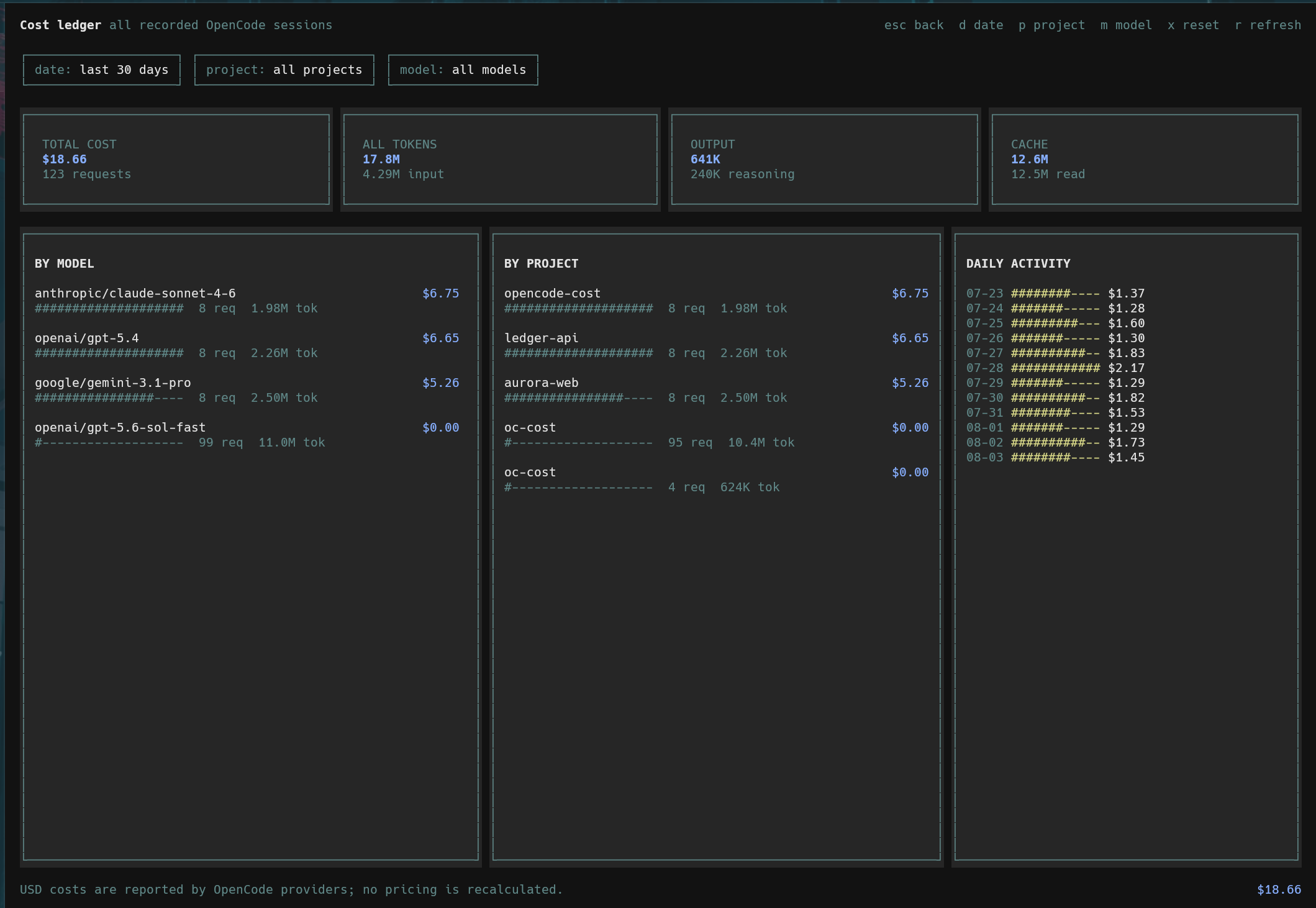
Published on npm as opencode-cost.
Requirements
- OpenCode 1.18.11 or newer within the 1.x release line
- Bun, which is already used by OpenCode's plugin runtime
The TUI plugin API is new and version-coupled. This package declares an engines.opencode range so incompatible OpenCode versions skip it rather than loading an unsupported interface.
Install
Install globally so usage from every project is recorded:
opencode plugin --global opencode-costThe package exposes separate server and TUI entrypoints. OpenCode detects both and updates:
~/.config/opencode/opencode.jsonoropencode.jsoncfor collection~/.config/opencode/tui.jsonfor the native dashboard
Quit and restart OpenCode after installation. Plugin configuration is loaded only at startup.
Then run:
/costDashboard
d: choose today, 7 days, 30 days, or all timep: filter by projectm: filter by provider/modelx: reset filtersr: refresh immediatelyesc: return to the session or home screen that opened the dashboard
The screen also refreshes automatically while it is open.
Storage
The server plugin stores an idempotent SQLite ledger at:
<opencode-state>/opencode-cost/cost.sqliteEach assistant message is keyed by its OpenCode message ID. Repeated message updates replace the existing values instead of double-counting cost.
Recorded costs remain in the ledger if their original OpenCode session is later deleted. To clear all history, quit OpenCode and remove the database file.
Existing sessions
The first time a project is opened with the plugin enabled, its existing sessions are backfilled. A project is marked complete only after every session was read successfully; interrupted imports retry on the next startup. Projects that are never opened after installation cannot be discovered by the server plugin and are imported when they are next opened.
Custom Database Path
Both plugin targets accept a database option. Configure the same path in opencode.jsonc and tui.json:
{
  "plugin": [["opencode-cost", { "database": "/absolute/path/cost.sqlite" }]]
}
A relative path is resolved from OpenCode's state directory.
Development
bun install
bun test
bun run typecheck
bun run build
To load a local checkout, reference its absolute directory in both OpenCode plugin configurations, then restart OpenCode.
Data Model
The ledger records:
- OpenCode project, directory, session, and message IDs
- Provider and model IDs
- Message creation and completion timestamps
- Provider-calculated USD cost
- Input, output, reasoning, cache-read, and cache-write tokens
No prompts, responses, tool arguments, file contents, or credentials are stored.