
opencode-fold-tools
v0.1.1
Published
One row per OpenCode tool call. Click to reveal its output, with native file diffs and no exploration grouping.

Maintainers
 ningzimu
Readme
opencode-fold-tools
为 OpenCode TUI 提供紧凑、可展开的工具输出。每次工具调用按原顺序保留一行输入摘要,点击后在下方展开输出;输入行只改变箭头。
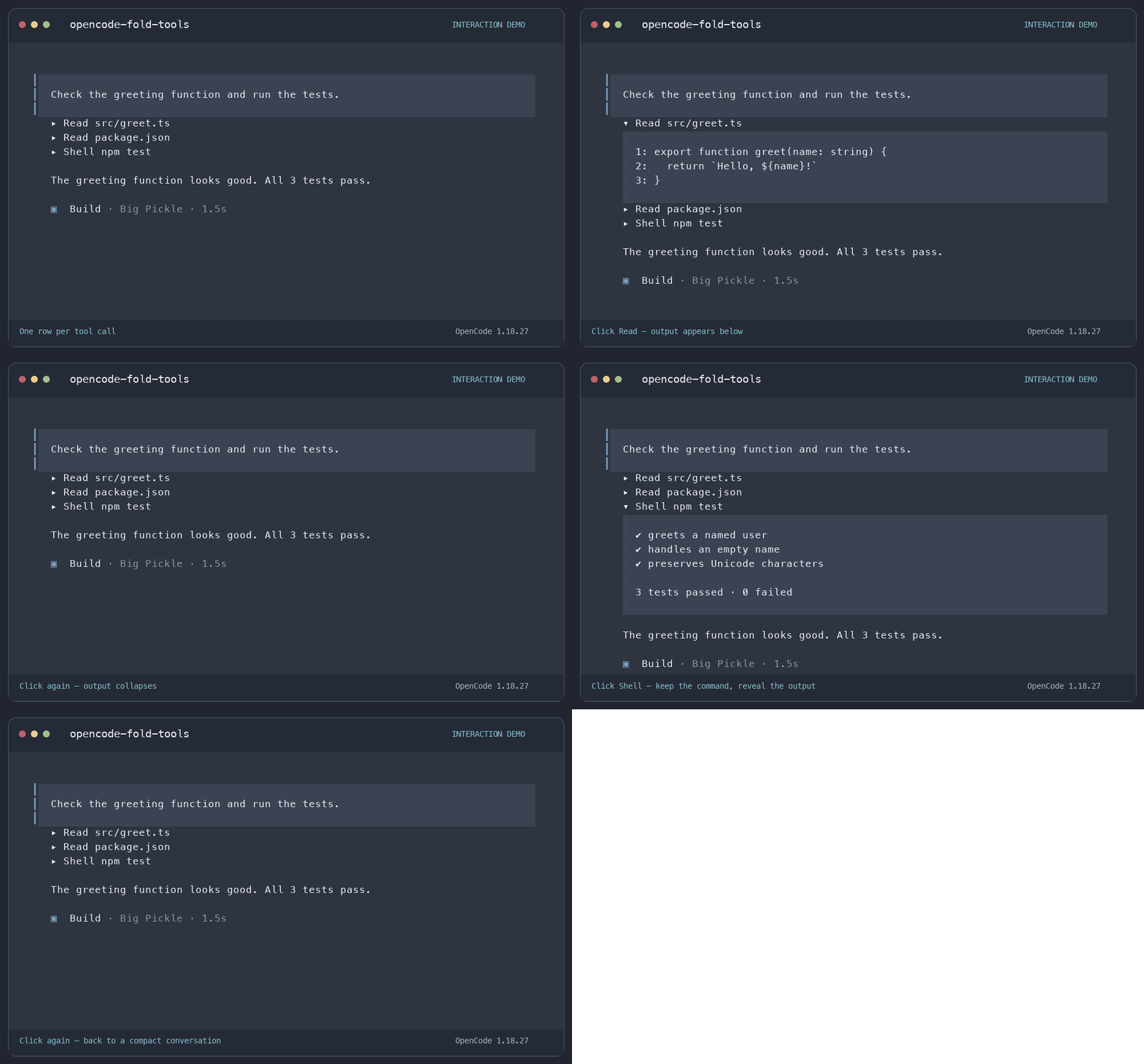
展开的输出区域使用主题背景色和左侧边线,收起后输出及背景一起消失。连续的读取和搜索不会合并分组。
功能
- 点击工具摘要展开或收起输出,长文本输出可在面板内滚动。
- Edit、Write、Apply Patch 在可用时保留原生 diff 高亮和行号。
- Ctrl+O:统一展开或收起所有已匹配的工具行。
- Ctrl+P → 所有工具详情:查看工具记录,包括尚未匹配到行内展示的运行中调用。此备用入口同时展示输入和输出。
- Task 存在子会话时保留 打开子任务 → 入口。
当前命令名称和状态提示使用中文,工具名及输出保留原文。
兼容性
已在 OpenCode 1.18.27 + Otty 中验证。插件依赖 OpenCode 内部渲染树,其他版本或终端的表现可能不同;不会修改 OpenCode 可执行文件。
请勿同时启用 opencode-fold-diffs 或其他改写相同工具行的插件。安装前先从 TUI 配置中移除旧插件条目。
安装
通过 OpenCode 全局安装 npm 包:
opencode plugin opencode-fold-tools -g重启 OpenCode 后加载插件。此方式无需额外安装 Node.js 或克隆 Git 仓库。
更新
opencode plugin opencode-fold-tools@latest -g --force更新后重启 OpenCode。
从源码安装
本地源码安装需要 Node.js 22 或更高版本、Git 和 OpenCode。npm 包与源码安装请选择一种,不要同时启用。
git clone https://github.com/ningzimu/opencode-fold-tools.git
cd opencode-fold-tools
npm ci --ignore-scripts
npm run install:plugin
安装器将此仓库中的 index.js 以绝对文件 URL 加入全局 tui.json 或 tui.jsonc,保留其他设置。请保留仓库目录,OpenCode 会从这里加载插件。安装后重启 OpenCode。
指定配置文件:
npm run install:plugin -- --config /path/to/tui.jsonc更新源码安装时,在原仓库目录中运行,然后重启 OpenCode:
git pull --ff-only
npm ci --ignore-scripts
npm run install:plugin
如果安装时指定了配置文件,更新时同样添加 -- --config /path/to/tui.jsonc。
验证与排障
在源码仓库中运行自动化检查(需要 Node.js 22 或更高版本):
npm test重启 OpenCode 后,打开包含工具调用的会话。在 Ctrl+P 中确认存在 所有工具详情,然后点击 Read 或 Shell 摘要:下方应出现带背景的输出,输入摘要保持不变,仅箭头变化。再次点击应隐藏输出面板;使用 Ctrl+O 检查所有已匹配行的统一切换。
如果快捷键有效但点击无效,先清除文本选区,并检查终端是否向应用转发鼠标事件。Otty 中需开启 Settings → Advanced → All Settings → Allow Mouse Capture。
无法匹配当前 OpenCode 布局的工具行,可从 所有工具详情 查看。插件只能展示 OpenCode 仍保留的输出,无法恢复已压缩或截断的历史内容。自动化测试不代表所有 OpenCode 版本或终端都已兼容。
卸载
npm 安装:从全局 tui.json 或 tui.jsonc 的 plugin 数组中移除 opencode-fold-tools 条目(包括可能存在的版本后缀),然后重启 OpenCode。
源码安装:在仓库目录中运行:
npm run uninstall:plugin使用自定义配置时,添加 -- --config /path/to/tui.jsonc。卸载仅移除此插件的配置条目。重启 OpenCode 后,即可按需删除仓库目录。
许可与致谢
MIT 开源许可。受 Tanner Bruhn 的 opencode-fold-diffs 启发。