
opencode-go-quota-bar
v0.1.0
Published
OpenCode Desktop bottom-bar widget for OpenCode Go usage

Maintainers
 viczh06
Readme
OpenCode Go Usage
A local-only bottom bar for OpenCode Desktop that shows your OpenCode Go quota.
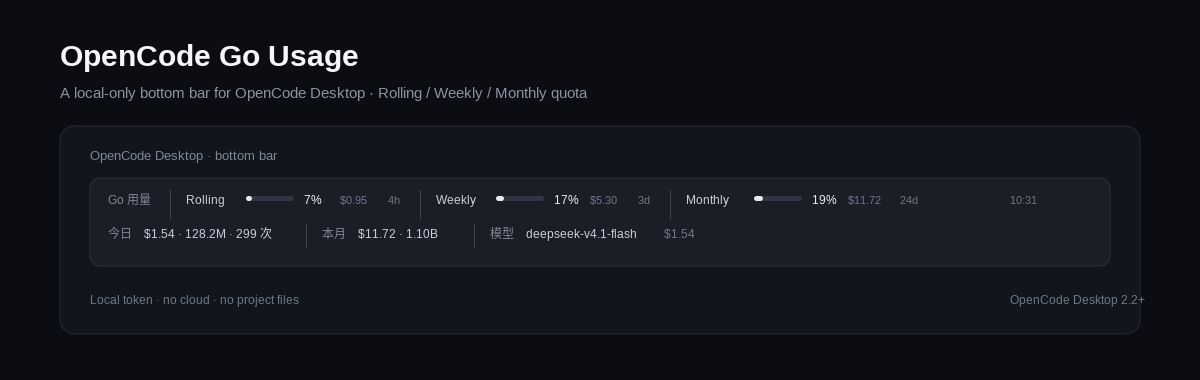



非官方个人插件。只支持 OpenCode Go 套餐;普通 API key 用户不适用。
只在本机运行:token 存在 OpenCode 插件存储里,不经过任何第三方服务器。
功能
- 底部横条:常驻 OpenCode Desktop 窗口底部,横向显示 Rolling / Weekly / Monthly 额度
- 完整信息:百分比、进度条、已用金额、重置倒计时
- 今日 / 本月:花费、token、请求数
- 模型拆分:今日 top 模型及各自花费
- 自动刷新:每分钟一次;token 到期前自动续
- 纯本地:登录用 device flow,token 由 OpenCode 插件存储管理;没有云端中转、没有项目文件
安装
GitHub
opencode plugin add github:zhangyuantong/opencode-go-usage或在 ~/.config/opencode/opencode.jsonc 里加:
{
  "$schema": "https://opencode.ai/config.json",
  "plugins": [
    "github:zhangyuantong/opencode-go-usage"
  ]
}
ZIP(GitHub 直连不通时)
公司网络访问不了 github.com:443 时,opencode plugin add github:... 会失败。直接在 GitHub 页面点 Code → Download ZIP,解压到:
~/.config/opencode/plugins/opencode-go-usageOpenCode 会自动发现并加载,不需要改 opencode.jsonc。
npm
opencode plugin add opencode-go-quota-bar首次登录
- 打开命令面板,搜 “Go 用量:登录 / 重新授权”;
- 浏览器会打开 Console 授权页,界面会提示 6 位验证码;
- 在 Console 点 Authorize;
- 底部横条会在几秒内自动刷新出数据。
退出登录:命令面板搜 “Go 用量:退出登录”。
换账号、token 失效、刷新失败,也重新跑一次登录命令即可。
隐私
- 不经过任何第三方服务器;只请求 OpenCode Console 官方接口。
- token 存在 OpenCode 插件存储里,不写入项目目录,也不会被提交到 git。
- 插件不记录你的会话内容;只读额度、花费、token 数、模型名。
- 依赖 OpenCode Console 的网页内部接口;接口字段变化时需要更新插件。
兼容性
- OpenCode Desktop 2.2.0+(当前验证 2.2.5)
- 需要 OpenCode Go 套餐账号
- 桌面 GUI 插件 API 仍是 experimental;OpenCode 升级后可能需要跟进
常见问题
底部横条没出现?
Settings → Extensions → Plugins 里确认 go-usage 是 active;如果是刚安装,重启一次 OpenCode。
显示“未登录”?
命令面板运行 “Go 用量:登录 / 重新授权”。
opencode plugin add github:... 失败?
先确认能访问 github.com:443;不行就用上面的 ZIP 方式。
数字不动 / 获取失败?
先点横条右侧的「刷新」;还不行就重新登录。Console 接口偶发 500 时会保留上次数字并显示错误。
开发
git clone https://github.com/zhangyuantong/opencode-go-usage.git
cd opencode-go-usage
npm install --no-save @opencode/[email protected] vite@^7 vite-plugin-solid@^2.11 solid-js@^1.9 @types/node@^22
npm run build
运行时不需要 node_modules:OpenCode 自己提供 @opencode/plugin,dist/gui-experimental.cjs 是预构建的。
本地加载:
"plugins": [
  "C:/path/to/opencode-go-usage"
]
License
MIT