
opencode-history
v0.5.1
Published
Local web dashboard for browsing OpenCode session history across projects

Maintainers
 felixli-ct
Readme
OpenCode Dashboard
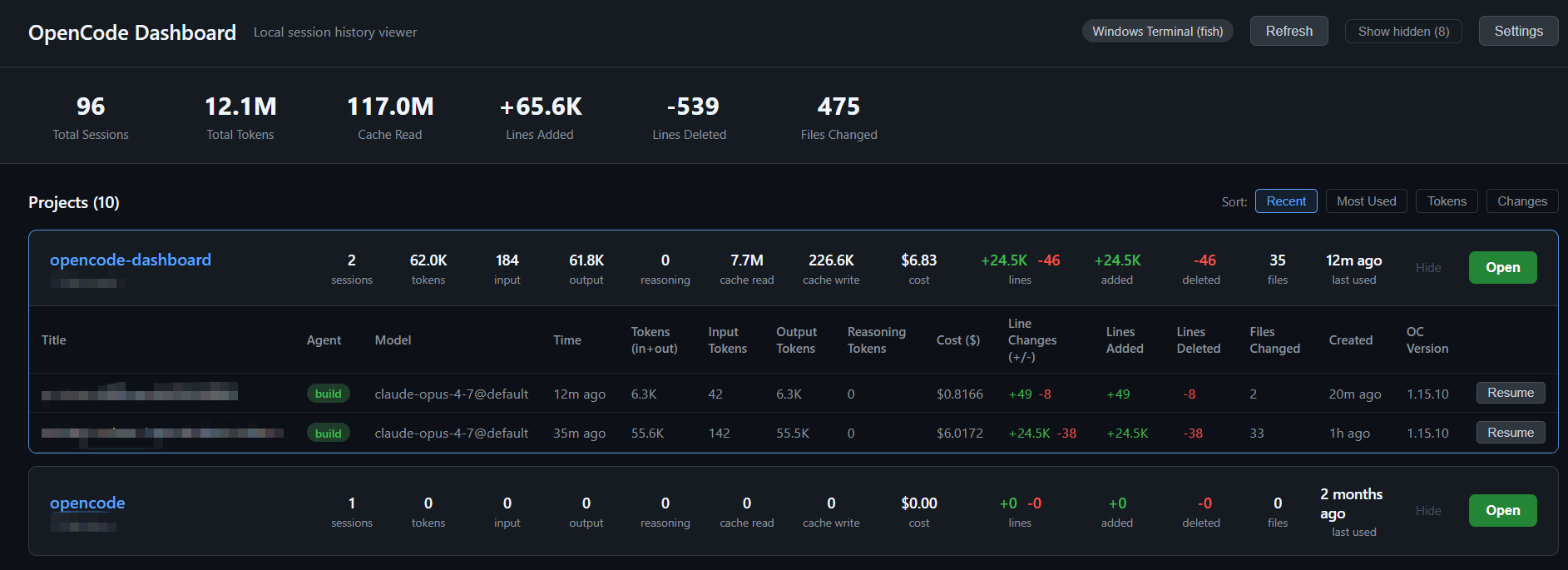
A local-first web dashboard for browsing your OpenCode session history across every project — token usage, cost, code changes, and one-click resume in your favorite terminal.




📦 Package renamed: The npm package is now
opencode-history. The previous package@felixli-ct/opencode-dashboardhas been deprecated and will no longer receive updates. If you have it installed, switch with:npm uninstall -g @felixli-ct/opencode-dashboard npm install -g opencode-history
Why?
If you use OpenCode across many projects, all your session history lives in a single SQLite database — but the CLI only shows the project you're currently in. This dashboard gives you a bird's-eye view of every project, every session, and lets you jump back in with one click.
- Zero config — auto-detects your
opencode.dbon Windows / macOS / Linux - Local-first & private — binds to
127.0.0.1only, DB opened read-only, nothing leaves your machine - No native build — pure Node + WASM SQLite (works behind corporate firewalls, no toolchain needed)
- Resume in your terminal — one click launches
opencodein the right directory
Quick Start
Try it instantly without installing:
npx opencode-historyOr install globally:
npm install -g opencode-history
opencode-history
Note: Starting in
0.5.1the CLI binary is namedopencode-history(matching the package name). Older versions installed it asopencode-dashboard; reinstall to pick up the new name.
The dashboard auto-opens at http://127.0.0.1:19860. Press Ctrl+C to stop.
Requirements: Node.js >= 16 (you already have it if you're using OpenCode).
Features
- 📊 Project overview — every project with session counts, total tokens, cost, and code-change stats
- 🔍 Session drill-down — expand any project to see its recent sessions (title, agent, model, tokens, lines changed)
- 🌍 Global stats — total sessions, tokens, lines added/deleted, files changed across everything
- ⚡ One-click resume —
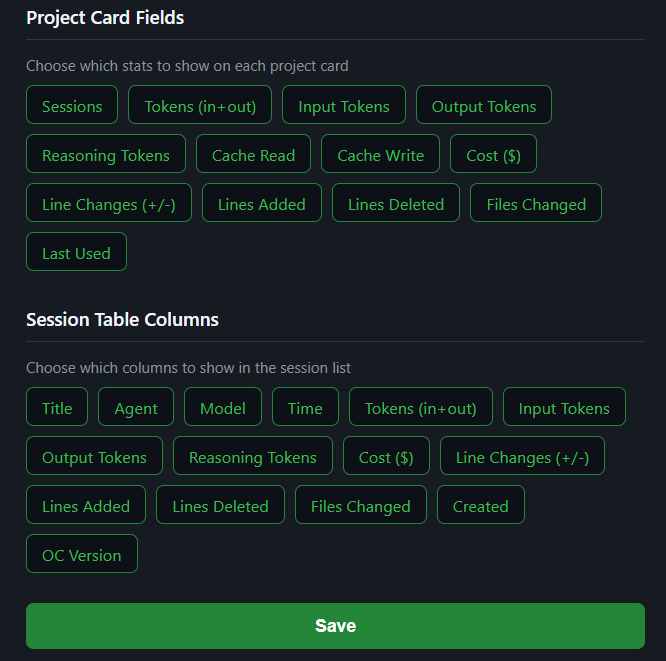
Openbutton spawns your terminal in the project directory and runsopencode - 🎨 Fully customizable — pick which stats appear on each card and which columns show in the session table
- 🌐 i18n — English & 简体中文 built in
- 🕒 Time filter — show only sessions from the last N days
- 🙈 Hide noise — hide projects you don't care about
- 🔔 Update notifications — knows when a new version is published
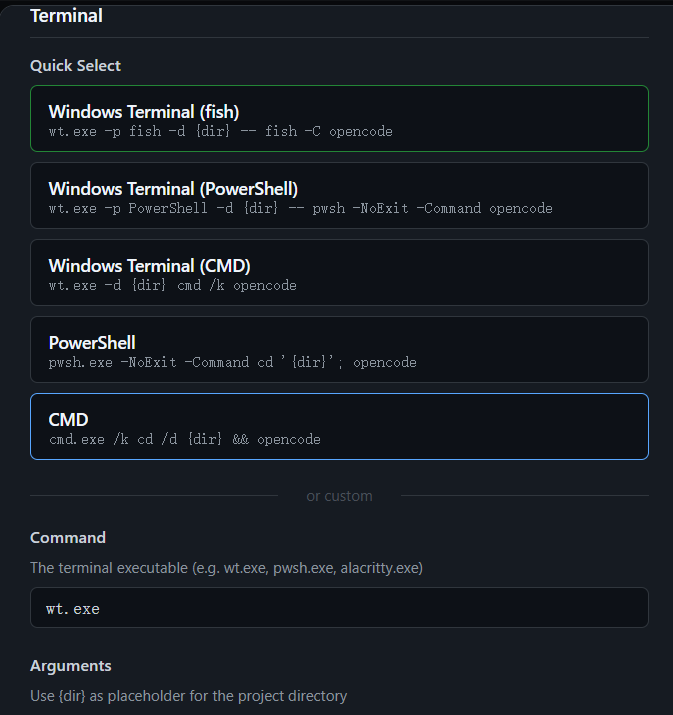
- 🖥️ Cross-platform terminals — Windows Terminal, PowerShell, CMD, plus custom commands for
alacritty,wezterm,kitty,gnome-terminal, iTerm2, etc.
Screenshots
Pick the terminal you actually use
Customize project cards & session columns
How It Works
- Locates your
opencode.dbSQLite database automatically - Reads it read-only with
better-sqlite3 - Serves a self-contained HTML dashboard via Node's built-in HTTP server (no Express, no React, no build step)
- The
Openbutton spawns a terminal in the selected project directory and runsopencode
Database Locations
The tool auto-detects opencode.db in this order:
| Platform | Path |
|----------|------|
| Linux | $XDG_DATA_HOME/opencode/opencode.db or ~/.local/share/opencode/opencode.db |
| macOS | ~/.local/share/opencode/opencode.db or ~/Library/Application Support/opencode/opencode.db |
| Windows | %USERPROFILE%\.local\share\opencode\opencode.db |
You can override the path in Settings → Database path.
Configuration
Open Settings (top-right gear icon) to customize:
- Language — English / 简体中文
- Terminal command — preset or custom, with
{dir}and{cmd}placeholders - Project card fields — pick which stats appear on each card
- Session table columns — pick which columns show in the per-project table
- Time filter — last 7 / 30 / 90 / all days
- Auto-update check — toggle on/off
- Database path — point to a custom
opencode.dblocation
Config is stored at ~/.config/opencode-history/config.json (XDG-aware).
Security
- HTTP server binds to
127.0.0.1only — not accessible from your network - Database is opened in read-only mode — the dashboard never writes to it
- No telemetry, no external network calls (except an opt-in npm version check)
- All data stays on your machine
FAQ
Does this modify my OpenCode data? No. The DB is opened read-only.
Will it work with future OpenCode versions? Schema columns are detected at runtime, so older and newer schemas both work. If something breaks, please open an issue.
Can I run it on a server / remote machine?
By design it binds to localhost only. If you need remote access, use SSH port forwarding: ssh -L 19860:127.0.0.1:19860 your-server.
Why not a TUI? A web UI gives you sortable tables, clickable links, and screenshots you can share — without leaving the terminal you already have open.
Contributing
Issues and PRs welcome! See CONTRIBUTING.md.
Quick dev loop:
git clone https://github.com/felix-lj-ct/opencode-history.git
cd opencode-history
npm install
node dashboard.js
License
MIT © Felix
If this tool helps you, please ⭐ the repo — it really helps others discover it.