
opencode-preview-plus
v0.14.1
Published
OpenCode plugin for Markdown and DrawIO preview with live reload

Maintainers
 mike652638
Readme
效果预览
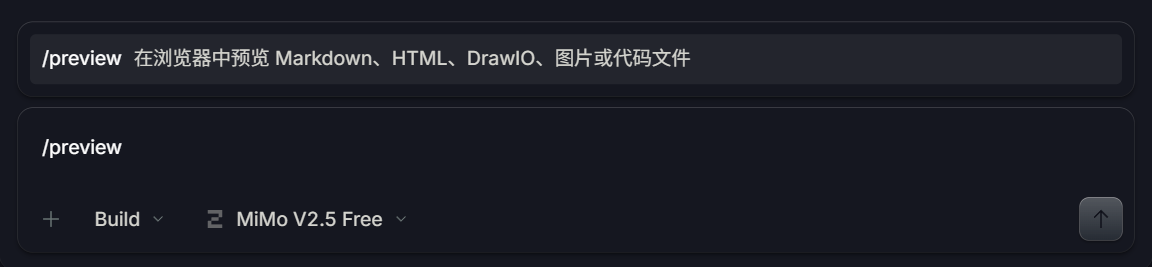
指令面板快速预览
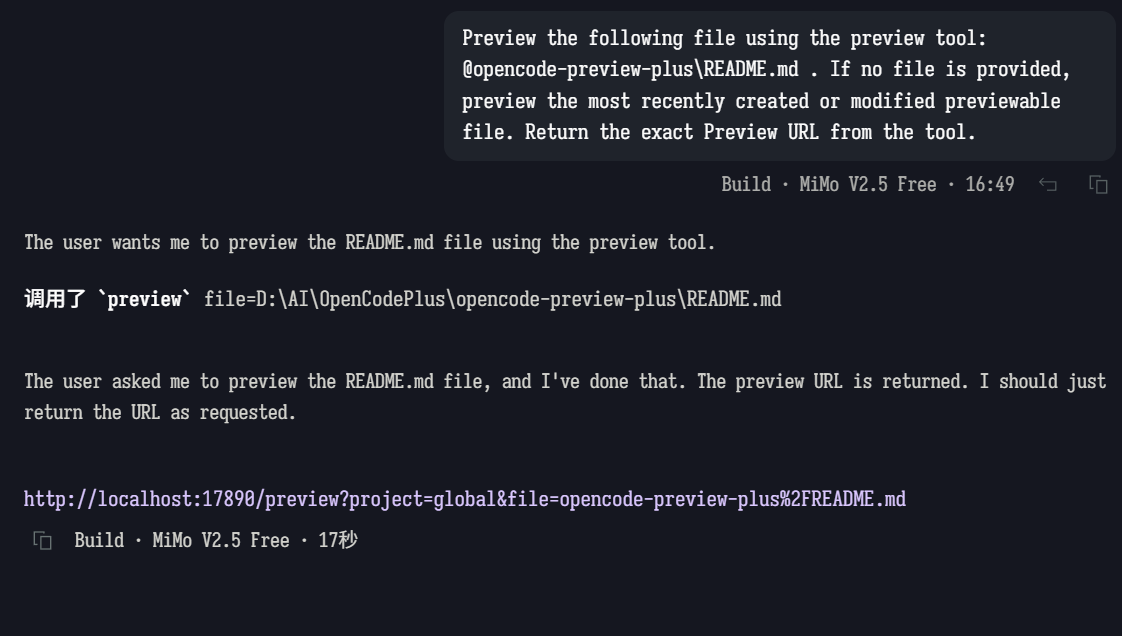
AI 智能调用预览工具
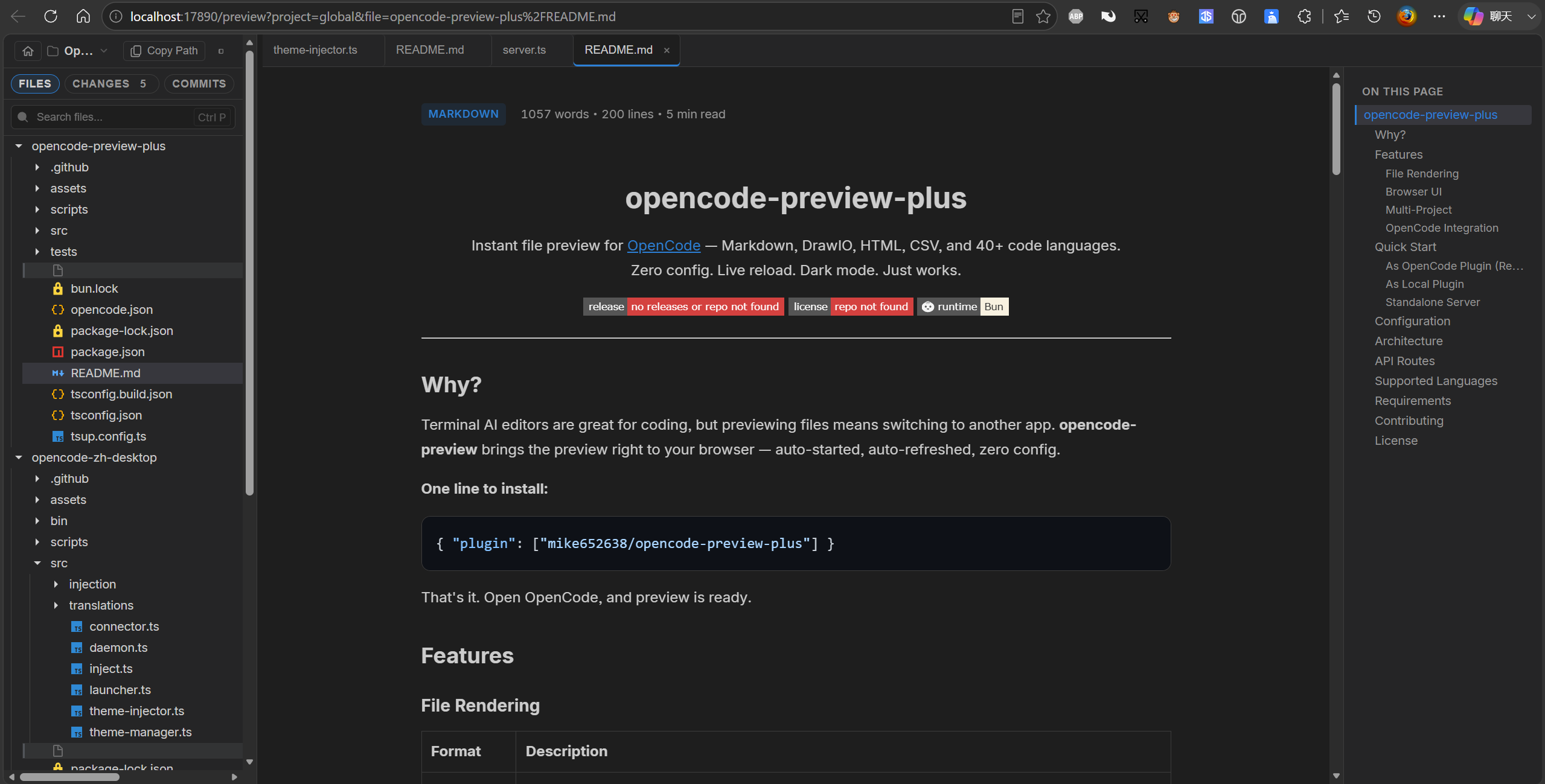
浏览器预览界面(文件树 + 目录大纲 + Markdown 渲染)
为什么需要?
终端 AI 编辑器非常适合编码,但预览文件需要切换到其他应用。opencode-preview-plus 将预览直接带到你的浏览器中 — 自动启动、自动刷新、零配置。
一行安装:
{ "plugin": ["mike652638/opencode-preview-plus"] }就这样。打开 OpenCode,预览即可使用。
功能特性
文件渲染
| 格式 | 说明 | |---|---| | Markdown | 基于 marked 的 GFM 渲染,代码块语法高亮,字数统计,阅读时长估算,自动生成目录 | | DrawIO | 嵌入式 draw.io 查看器,支持多页、缩放、图层和页面导航 | | HTML | 沙箱 iframe 预览,支持"在新标签页中打开" | | CSV | 表格渲染,彩虹条纹行,行列统计 | | PNG | 图片预览,自动缩放居中,提供原始文件下载链接 | | 代码 | 通过 highlight.js 支持 40+ 种语言语法高亮 — TypeScript、Python、Rust、Go、Java、Kotlin、C/C++、Ruby、PHP、Swift、Scala、Zig、Elixir、Erlang、Haskell、OCaml、Lua、R、SQL、GraphQL、Protobuf、HCL、Vue、Svelte 等 |
浏览器界面
| 功能 | 说明 |
|---|---|
| SPA 导航 | 单页应用,客户端路由 — 文件切换无需整页刷新 |
| 标签页界面 | 多文件标签页打开、切换、关闭,状态通过 localStorage 持久化 |
| 文件树侧边栏 | 可折叠文件夹树,带文件类型图标,记忆文件夹展开/折叠状态 |
| 可调侧边栏 | 拖拽调整侧边栏宽度,跨会话持久化 |
| Markdown 目录 | 自动生成"本页目录",滚动时高亮当前标题 |
| 工作树切换器 | 侧边栏下拉菜单切换 Git 工作树 |
| 复制路径 | 一键复制项目根目录路径 |
| 实时刷新 | 基于 WebSocket 的文件保存自动刷新 — 所有打开的标签页同步更新 |
| 深色模式 | 跟随系统 prefers-color-scheme 偏好 |
多项目
| 功能 | 说明 |
|---|---|
| 项目发现 | 通过 API 自动发现运行中的 OpenCode 实例注册的所有项目 |
| 项目列表 | 根页面(/)显示所有项目,支持搜索筛选和快速跳转 |
| URL 隔离 | 每个项目通过 ?project=<id> 查询参数访问 |
OpenCode 集成
| 功能 | 说明 |
|---|---|
| Server Plugin | 暴露 preview 工具,AI 代理可调用它在浏览器中打开任意可预览文件 |
| TUI Plugin | 侧边栏组件显示可预览的变更文件 + 命令面板条目 |
| 自动启动 | OpenCode 启动时预览服务器在后台自动启动 — 非阻塞 |
| 文件事件 | 监听 OpenCode 的 file.edited 事件用于日志记录 |
| 路径安全 | 仅提供项目目录内的文件 — 路径遍历攻击被阻止 |
快速开始
作为 OpenCode 插件(推荐)
在 opencode.json 中添加:
{
"plugin": ["mike652638/opencode-preview-plus"]
}或固定特定版本:
{
  "plugin": ["mike652638/[email protected]"]
}
OpenCode 启动时预览服务器会自动运行。preview 工具将可供 AI 在浏览器中打开文件。
作为本地插件
git clone https://github.com/mike652638/opencode-preview-plus.git
ln -s $(pwd)/opencode-preview-plus .opencode/plugins/opencode-preview-plus
独立服务器
无需 OpenCode 即可直接运行预览服务器:
cd opencode-preview-plus
bun install
bun run dev                             # 启动服务器
设置 OPENCODE_SERVER_URL 以启用项目自动发现:
OPENCODE_SERVER_URL=http://localhost:10013 bun run dev然后在浏览器中打开 http://localhost:17890。
配置
| 环境变量 | 默认值 | 说明 |
|---|---|---|
| PREVIEW_PORT | 17890 | 服务器端口 |
| PREVIEW_HOST | localhost | 生成预览 URL 时使用的主机名。从远程机器访问预览时(如 SSH),设置为远程机器的主机名或 IP |
| PREVIEW_MAX_TABS | 10 | 浏览器界面中最大打开标签页数 |
| OPENCODE_SERVER_URL | — | OpenCode 服务器 URL,用于项目发现(仅独立模式;作为插件运行时自动配置) |
架构
src/
├── index.ts           # OpenCode server plugin 入口 — 注册 preview 工具 + 文件事件
├── tui.tsx            # OpenCode TUI plugin — 侧边栏组件 + 命令面板
├── server.ts          # HTTP 服务器 (node:http) + WebSocket (ws) + 文件监听 + SPA 壳
├── renderers/
│   ├── code.ts        # 语法高亮代码预览(40+ 种语言)
│   ├── csv.ts         # CSV 表格渲染器(彩虹行)
│   ├── drawio.ts      # draw.io 查看器(CDN)
│   ├── html.ts        # 沙箱 iframe HTML 预览
│   └── markdown.ts    # 基于 marked 的 GFM 渲染 + 字数统计 + 阅读时长
└── templates/
    ├── browser.html   # 传统独立浏览器模板
    └── styles.css     # 共享样式(深色/浅色主题)
API 路由
所有项目范围的路由需要 ?project=<id> 查询参数。工作树路由额外接受 ?worktree=<name>。
| 路由 | 说明 |
|---|---|
| GET / | 项目列表页面(搜索 + 快速跳转) |
| GET /browse | 项目的文件浏览器 SPA 壳 |
| GET /preview?file=<path> | 预览文件(Markdown、DrawIO、HTML、CSV 或代码) |
| GET /api/projects | 所有已发现项目的 JSON 列表 |
| GET /api/files | 项目中可预览文件的 JSON 列表 |
| GET /api/file?path=<path> | 原始文件内容 |
| GET /api/render?file=<path> | 渲染后的内容片段(JSON:{ title, body, contentClass }) |
| GET /api/worktrees | 项目的 Git 工作树 JSON 列表 |
| GET /styles.css | 样式表 |
| WS /ws | 实时刷新通知 |
支持的语言
代码渲染器识别 40+ 种文件扩展名和特殊文件名:
按扩展名:.ts、.tsx、.js、.jsx、.mjs、.cjs、.py、.rs、.go、.java、.kt、.c、.cpp、.h、.hpp、.cs、.rb、.php、.swift、.sh、.bash、.zsh、.fish、.sql、.css、.scss、.less、.json、.yaml、.yml、.toml、.xml、.graphql、.gql、.proto、.dockerfile、.lua、.r、.scala、.zig、.ex、.exs、.erl、.hs、.ml、.vue、.svelte、.tf、.ini、.conf、.env、.gitignore、.editorconfig
按文件名:Dockerfile、Makefile、Jenkinsfile、Vagrantfile、Gemfile、Rakefile、Justfile
环境要求
- Bun v1.0+
- OpenCode v1.3+(插件使用)
注意:本包直接导出
.ts/.tsx入口,需要 Bun 作为运行时。不兼容原生 Node.js。
贡献
欢迎提交 Issue 和 PR!本项目使用 Bun 进行开发:
git clone https://github.com/mike652638/opencode-preview-plus.git
cd opencode-preview-plus
bun install
bun test
bun run dev