
opencode-sessions-all
v0.1.2
Published
Cross-project session search and navigation for OpenCode

Maintainers
 zackarysantana
Readme
opencode-sessions-all

Cross-project session search and navigation with a native OpenCode TUI.
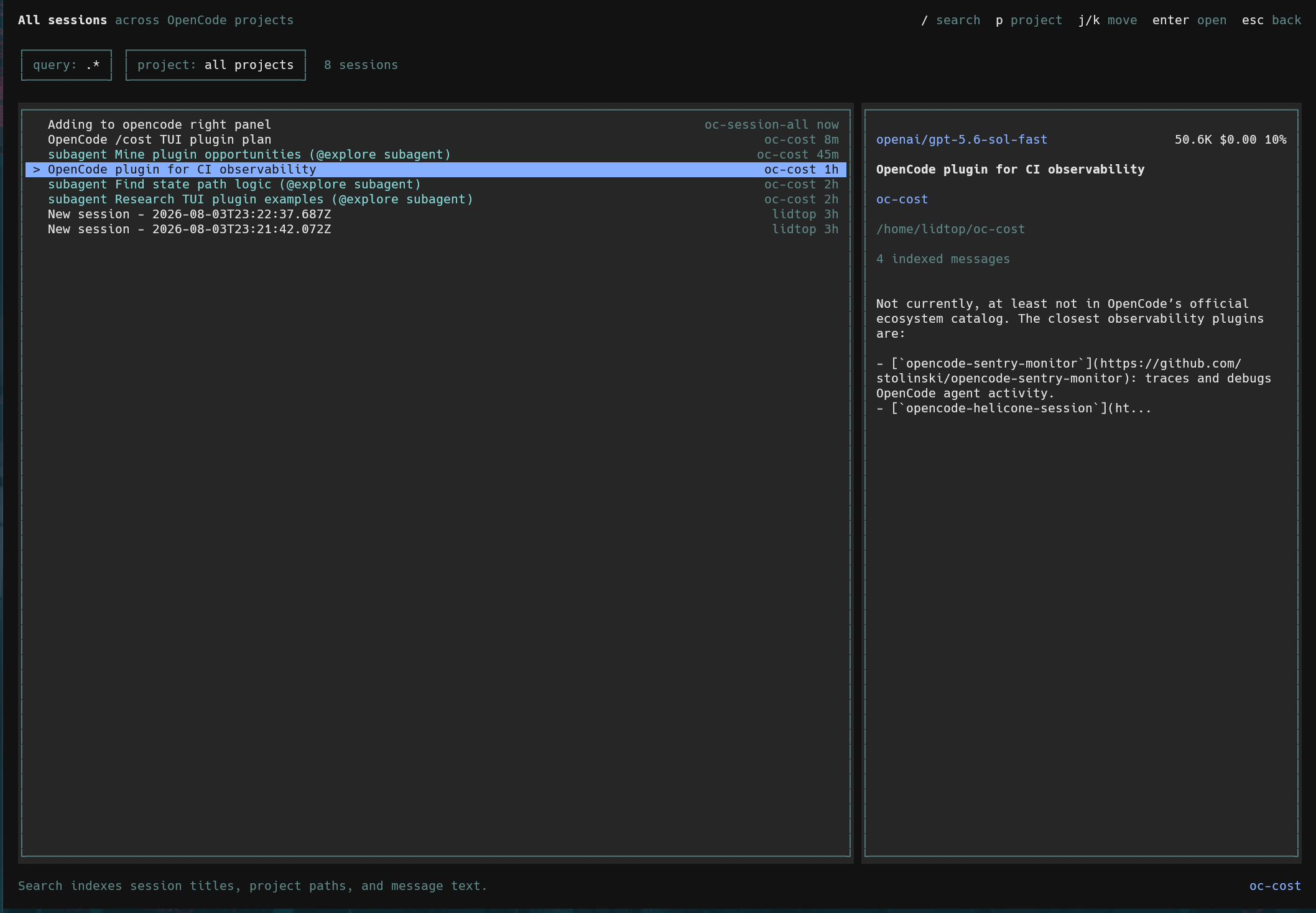
/sessions-all opens a keyboard-first browser over sessions indexed from every project you use after installing the plugin. Search session titles, project paths, and message text without leaving OpenCode.
Published on npm as opencode-sessions-all.
Requirements
- OpenCode 1.18.11 or newer within the 1.x release line
- Bun, which is already used by OpenCode's plugin runtime
The TUI plugin API is new and version-coupled. This package declares an engines.opencode range so incompatible OpenCode versions skip it rather than loading an unsupported interface.
Install
Install globally so every opened project contributes to the shared index:
opencode plugin --global opencode-sessions-allThe package exposes separate server and TUI entrypoints. OpenCode detects both and updates:
~/.config/opencode/opencode.jsonoropencode.jsoncfor indexing~/.config/opencode/tui.jsonfor the native session browser
Quit and restart OpenCode after installation. Plugin configuration is loaded only at startup.
Then run:
/sessions-allSession Browser
/: search titles, paths, and messagesp: filter by projects: show or hide subagents (hidden by default)j/kor arrow keys: move selectionenter: open the selected sessionx: clear search and project filtersr: refreshesc: return to the session or home screen that opened the browser
The screen also refreshes automatically while it is open.
Sessions in the current project open immediately. OpenCode does not yet expose an in-process directory switch API, so selecting another project's session copies a shell-safe opencode <directory> --session <id> command for a new terminal.
Indexing
The SQLite index is stored at:
<opencode-state>/opencode-sessions-all/sessions.sqliteSession and message events update existing records instead of creating duplicates.
Existing Sessions
The first time a project is opened with the plugin enabled, its existing sessions are backfilled. Projects that are never opened after installation cannot be discovered by the server plugin and are indexed when they are next opened.
Custom Database Path
Both plugin targets accept a database option. Configure the same path in opencode.jsonc and tui.json:
{
  "plugin": [["opencode-sessions-all", { "database": "/absolute/path/sessions.sqlite" }]]
}
A relative path is resolved from OpenCode's state directory.
Development
bun install
bun test
bun run typecheck
bun run build
To load a local checkout, reference its absolute directory in both OpenCode plugin configurations, then restart OpenCode.
Data Model
The index records:
- OpenCode project, directory, session, and parent-session IDs
- Session titles and creation/update timestamps
- Provider and model IDs
- Message roles and searchable message text
- Cost and input, output, reasoning, cache-read, and cache-write tokens
Tool payloads, credentials, file contents, and attachments are not stored.