
opencode-shell-magazine
v0.1.4
Published
OpenCode TUI plugin monitoring shell commands in real time

Maintainers
 tiagoaiev
Readme
opencode-shell-magazine
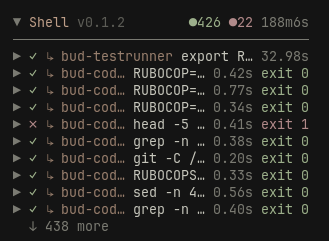
A TUI sidebar plugin for OpenCode that monitors shell commands in real time. Agent-run commands and your own !commands show up in the panel with status, elapsed time, exit code and background output.
- Real status: reads the host shell registry and
session.shell.*events —running / exited / timeout / killed,exit,pidandtime_started/completedall come from the host. No time-based guessing. - Foreground + background: foreground commands are registered while they run; background commands (
sh_…) keep their output file, which the panel can tail. - History: scans session messages on mount (tool parts + user shell messages) so older commands are backfilled.
- Actions: kill a running command, copy the command, open its output file, and get a system notification when long commands finish.
- Multi-TUI safe: state is persisted through the host's atomic read-modify-write storage, so concurrent TUI instances never overwrite each other.
- Lightweight history: independent session stores, compressed large text, on-demand output, and no writes/repaints for unchanged idle entries.
OpenCode V2 only (
opencode2/@opencode/cli2.x).
Screenshot
Install
npm install -g opencode-shell-magazine
opencode-shell-magazine
Or add it to ~/.config/opencode/cli.json manually:
{
  "plugins": ["opencode-shell-magazine"]
}
For local development, point at the repository path:
{
  "plugins": ["/path/to/opencode-shell-magazine"]
}
Restart the TUI and the Shell panel appears at the bottom of the sidebar.
Commands
| Command | Description |
| --- | --- |
| /shell-magazine | Open the interactive settings menu (Esc to close) |
| /shell-magazine-config | Show the current settings summary |
| /shell-magazine-clear | Remove finished command records |
| /shell-magazine-version | Show the plugin version |
| /shell-magazine-lang | Choose the language |
| /shell-magazine-max | Choose how many entries are shown |
| /shell-magazine-order | Choose the sort order |
| /shell-magazine-scroll | Choose the paging mode |
| /shell-magazine-time-format | Choose the elapsed-time format |
| /shell-magazine-threshold | Choose the notification threshold |
| /shell-magazine-show-time | Toggle elapsed time in the list |
| /shell-magazine-show-cwd | Toggle working directory in the list |
| /shell-magazine-show-exit | Toggle exit code in the list |
| /shell-magazine-show-subagents | Toggle commands run by subagents |
| /shell-magazine-footer-status | Toggle the footer running indicator |
| /shell-magazine-border | Toggle the panel border |
| /shell-magazine-notify | Toggle the finish notification |
Panel
- Header: right-aligned status dots —
● done(green),● running(yellow) and● failed(red) — followed by the elapsed time, plus the plugin version. - Click the title to collapse/expand the panel; click an entry to expand details.
- Subagent commands carry a
↳ agentbadge (long names are truncated; the full name is in the details). - Details include: source (agent/user), subagent, full command, directory, shell, PID, timeout, exit code, output file and output tail.
- Running commands expose
[Kill]; background commands expose[Open output file](opens the.outwith the system default app). - Wheel paging (or click paging via settings).
Settings (defaults)
| Setting | Default | Notes |
| --- | --- | --- |
| Max entries | 10 | Entries shown at once (paged) |
| Order | Descending | Newest first |
| Scroll | Wheel | Wheel / click paging |
| Time format | short | short / decimal / clock / compact / seconds |
| Show elapsed time | On | Duration in the list |
| Show directory | Off | cwd in the list |
| Show exit code | On | exit N for finished entries |
| Show subagent commands | On | Include shells from subagent sessions, tagged with a ↳ agent badge |
| Footer indicator | Off | ● N shell in the prompt footer while commands are running (the host also shows ↓ N shell) |
| Border | On | Draw a border around the panel |
| Notify on finish | On | System notification when threshold is reached |
| Notify threshold | 30s | 10s / 30s / 1m / 2m / 5m |
How it works
- Registry:
context.data.shell.list(location)returns every running shell (including foreground agent commands);metadata.sessionIDattributes it to a session. - Events:
session.shell.started/session.shell.endedupdate entries live;endedcarries the final status, exit code and output snapshot. - History: session messages are scanned — assistant tool parts (
name: "shell", withtime.{created,ran,completed}andmetadata.{exit,truncated,shellID}) and user shell messages (type: "shell"). - Settling: the host registry only keeps running shells. After a plugin restart, still-running background commands appear in the registry; a "running" entry that is absent from the registry has ended (its
endedevent was missed). The panel settles it from that evidence — never from a timeout. - Subagents: tool parts named
subagent/taskreference descendant sessions; those sessions are scanned recursively (depth-limited) and their shells are tagged with the agent name, so a subagent's commands show up next to yours (toggleable).
History storage and migration
OpenCode's live-reloaded tui directory stores only a tiny revision pointer for each
session — not its list of commands. History metadata and large commands, errors and
outputs are losslessly compressed in immutable, content-addressed files outside
that directory. Outputs are decoded only on row expansion. Navigating through many
sessions therefore cannot accumulate large history stores in the host reload loop.
Compression/decompression uses asynchronous workers rather than the rendering thread.
Unchanged registry polls do not rewrite history, and completed panels stop their clock.
Older versions used one shell_magazine.session_data JSON string for every session.
On first access to each session, the plugin imports its record from that file without
registering the large legacy file with OpenCode's live-reloaded storage. The original
file remains untouched for backup and rollback. Nothing is truncated or expired by this
migration. Concurrent instances publish complete immutable records, then atomically
compare-and-swap the revision under the host's per-session storage lock. A conflicting
writer retries its merge against the latest revision; it never overwrites fresh data.
The legacy path respects XDG_STATE_HOME and the OpenCode release channel. For a
nonstandard state directory, use a plugin option legacyHistoryFile with the full path
to the old JSON file and historyDirectory for the separate payload directory. Payload
files are published atomically, use private permissions, and are verified by SHA-256
when read. Identical text is deduplicated safely across concurrent TUIs.
After upgrading from a version with monolithic history, reopen existing TUIs once. OpenCode 2.0.22–2.0.24 retains previously registered stores even after plugin hot reload; the plugin cannot unregister that old store through the public API. The background service and sessions do not need to be restarted. Newly opened TUIs load only the new per-session stores.
Development
npm install
npm run version
npm run typecheck
npm run build
npm test
License
MIT