
opencode-system-metrics-tui
v0.1.29
Published
OpenCode TUI sidebar plugin for live system metrics


Readme
OpenCode System Metrics TUI
Install globally in OpenCode
npm install -g [email protected]
opencode plugin -g [email protected] --force
This is the primary copy/paste installation path. The first command installs the package globally with Node/npm; the second registers it globally in OpenCode and refreshes its package cache. The version must match package.json. The helper below skips OpenCode when the expected artifact is already current. Verify the actual installed artifact afterward:
npm run install-plugin
npm run verify-installation
npm run install-plugin runs the same global OpenCode installer command with the current package.json version. The explicit command above is provided for users installing without this checkout.
Restart OpenCode after installation. This installs the plugin globally for all projects. The OpenCode cache directory name, including @latest, is only a package-specifier label and does not prove the package version. Verification reads the nested package's own package.json and checks dist/tui.js; it reports stale entries without deleting anything.
Uninstall safely
This project provides a safe helper; OpenCode does not provide a native uninstall command. It defaults to both observed global configuration roots (~/.config/opencode and ~/.opencode), shows a plan, and requires --yes before changing anything. It removes only this plugin from OpenCode plugin arrays and verified cache entries. It never removes OpenCode, Node, Bun, shared dependencies, or repository files.
npm run uninstall-plugin -- --dry-run
npm run uninstall-plugin -- --yes
npm run uninstall-plugin -- --purge-cache --yes  # also remove all verified stale versions
npm run uninstall-plugin -- --local              # current project's .opencode config
Use --dry-run first. Without --yes, no changes are made. An unversioned package entry removes all verified cache entries for this package; --purge-cache explicitly removes all verified entries even when no package entry is configured.
OpenCode TUI plugin that adds live CPU, RAM, GPU, GPU VRAM, temperature, and network metrics to the sidebar_content slot.
The README is available in Español, English, and Português.
Screenshots
Spanish locale with Nerd Font icons

Spanish locale with Unicode icons
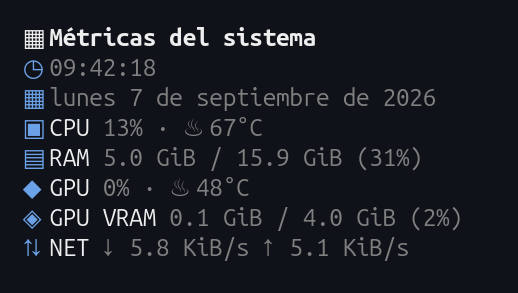
English locale with Unicode icons
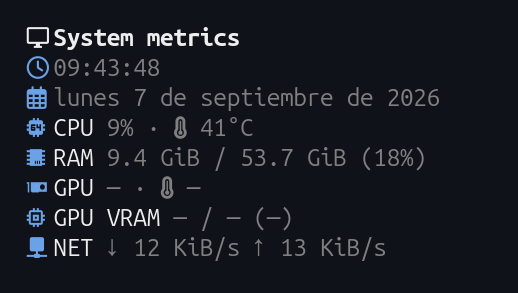
Español
Características
- CPU: utilización y temperatura.
- RAM: memoria usada, total y porcentaje.
- GPU: utilización y temperatura.
- GPU VRAM: memoria usada, total y porcentaje.
- En Apple Silicon, la fila se muestra como RAM y usa los contadores generales de memoria del sistema.
- Red: velocidad de descarga y subida en tiempo real.
- Uso de Codex: cuotas de sesión y semanales, horarios de restablecimiento, saldo de créditos, créditos de reinicio y límites adicionales. Solo aparece cuando el proveedor seleccionado es
openai; leeauth.openaiOAuth y consultahttps://chatgpt.com/backend-api/wham/usage. Se actualiza cada cinco minutos; los datos ausentes se muestran como no disponibles. - Uso de OpenCode Go: porcentaje restante de las ventanas móvil de 5 horas, semanal y mensual, estado y fecha de restablecimiento. El porcentaje restante se calcula como 100 menos el porcentaje consumido, limitado entre 0 y 100; se conserva el estado
rate-limited. Solo aparece cuando el proveedor seleccionado esopencode-go; lee la clave API deauth["opencode-go"]. La ruta y respuesta de Go son observadas públicamente y no están documentadas como API estable. Ambos paneles son mutuamente excluyentes; las métricas del sistema siguen visibles con cualquier proveedor. Se actualizan cada cinco minutos; la falta de credenciales o los errores de API no afectan las métricas del sistema. - El proveedor del panel prioriza el modelo seleccionado para el siguiente mensaje, luego el modelo de sesión y, por último, el modelo del mensaje más reciente del usuario. La integración Codex envía el token OAuth y, si existe,
accountIdal endpoint de uso de Codex. La integración Go envía su clave API únicamente al endpoint de uso observado de OpenCode Go. Ninguna credencial se almacena ni se registra; los lectores nunca intercambian ni comparten credenciales. - El panel muestra la hora y la fecha actuales, actualizadas cada segundo.
- CPU, RAM y red se consultan con una cadencia general de 2 segundos; GPU, VRAM y temperaturas usan una caché expirable de 10 segundos para reducir el coste sin congelar los sensores.
- Colores compatibles con el tema activo de OpenCode.
- Iconos Unicode por defecto en Windows (la detección de fuentes instaladas no cambia la selección); Linux/macOS usan Nerd Font solo si está instalada y mantienen fallback Unicode.
- En Windows usa iconos Unicode visibles de forma predeterminada, porque OpenCode no puede detectar la fuente activa de la terminal.
- Soporte para Linux, macOS y Windows cuando el sistema expone las métricas.
- En macOS, la utilización de GPU usa
ioregy las temperaturas usan el helper de Stats si está instalado; si cualquiera de ellos falta, esa métrica queda como no disponible sin interrumpir el plugin. En Intel se conserva el fallback de GPU discreta desysteminformation. - En Windows, la temperatura de CPU requiere LibreHardwareMonitor ejecutándose como administrador con Remote Web Server activo en
http://127.0.0.1:8085. - En Windows, la velocidad de red usa una llamada nativa
GetIfTable2deiphlpapi.dllmediante Koffi; bajo Bun se reutiliza un helper Node persistente y la ruta PowerShell queda como fallback acotado si el helper o la API nativa no están disponibles. - La agregación nativa incluye interfaces de hardware activas, excluye interfaces de filtro, loopback y túnel, y suma sus contadores
InOctets/OutOctets. - Las lecturas opcionales de Windows se hacen bajo demanda, con timeout y caché; no hay timers globales de PowerShell.
- La detección de Nerd Font en Linux/macOS está limitada a rutas conocidas, 2 niveles de profundidad y 256 entradas por directorio; una ruta ausente o inaccesible usa Unicode. Windows no escanea fuentes salvo con
OPENCODE_MONITOR_NERD_FONT=1. - Si una fuente de métricas no responde a tiempo, su intento en caché se abandona de forma segura para permitir reintentos sin cancelar APIs que no aceptan
AbortSignal.
Requisitos
- OpenCode
1.18.29o posterior con soporte para plugins TUI. - Node.js 18 o superior.
- Bun para compilar el plugin.
Instalación local
npm install
npm run build
npm run install-font
opencode
npm run install-font ejecuta el instalador compilado incluido en dist/, instala Hack Nerd Font únicamente para el usuario actual, no se ejecuta automáticamente durante npm install y solicita confirmación antes de descargar la fuente oficial.
Desinstalación segura
Este proyecto incluye un asistente seguro; OpenCode no tiene un comando nativo de desinstalación. Por defecto actúa sobre ambas raíces globales observadas (~/.config/opencode y ~/.opencode), muestra un informe y requiere --yes antes de cambiar archivos. Solo elimina este paquete de las listas de plugins y sus entradas de caché verificadas.
npm run uninstall-plugin -- --dry-run
npm run uninstall-plugin -- --yes
npm run uninstall-plugin -- --purge-cache --yes  # también elimina versiones antiguas verificadas
npm run uninstall-plugin -- --local              # configuración .opencode del proyecto actual
Usa primero --dry-run. Sin --yes no se realizan cambios. Una entrada de paquete sin versión elimina todas las entradas de caché verificadas de este paquete; --purge-cache las elimina explícitamente.
Comandos adicionales:
npm run install-font -- --check  # comprobar sin descargar
npm run install-font -- --yes    # instalar sin confirmación interactiva
Hack Nerd Font
Se recomienda seleccionar Hack Nerd Font Mono en la configuración de la terminal. El instalador utiliza la distribución oficial de Nerd Fonts y descarga los archivos desde el repositorio oficial de Hack.
La fuente se instala solo para el usuario actual:
- Linux:
~/.local/share/fonts - macOS:
~/Library/Fonts - Windows:
%LOCALAPPDATA%\\Microsoft\\Windows\\Fonts
Después de instalarla, selecciona Hack Nerd Font Mono en la terminal y reinicia la terminal y OpenCode. En Windows, para optar explícitamente por iconos Nerd Font define OPENCODE_MONITOR_NERD_FONT=1; no se activa solo por detectar archivos instalados.
Publicación e instalación desde npm
Para publicar este paquete existente, no cambies su nombre. La cuenta de npm debe tener permiso de publicación para opencode-system-metrics-tui. Comprueba tu sesión con npm whoami --registry=https://registry.npmjs.org/ y mantén la misma versión en package.json y package-lock.json.
npm run build
npm publish
En otro equipo:
opencode plugin [email protected]El paquete exporta tanto la raíz (opencode-system-metrics-tui) como ./tui; ambas rutas cargan el mismo bundle TUI.
El instalador de OpenCode configura el plugin TUI automáticamente. Reinicia OpenCode después de instalarlo.
Publicar en npm e instalar en OpenCode son pasos distintos:
npm publishpublica el paquete en npm.opencode plugin [email protected]lo instala solo en el proyecto actual.opencode plugin -g [email protected] --forcelo instala globalmente para todos los proyectos.
Verificación
npm run install-plugin
npm run verify-installation
npm test
npm run typecheck
npm run build
English
Current release: 0.1.29. On Windows, Codex authentication is read from XDG_DATA_HOME\opencode\auth.json, falling back to %USERPROFILE%\.local\share\opencode\auth.json when XDG_DATA_HOME is unset.
Features
- CPU: utilization and temperature.
- RAM: used memory, total memory, and percentage.
- GPU: utilization and temperature.
- GPU VRAM: used memory, total memory, and percentage.
- On Apple Silicon, the row is labeled RAM and uses the system-wide memory counters.
- Network: live download and upload speeds.
- Codex usage: session/weekly quotas, reset times, credit balance, reset credits, and additional limits. It appears only when the selected provider is
openai; it reads the OAuthauth.openaientry and requestshttps://chatgpt.com/backend-api/wham/usage. - OpenCode Go usage: remaining percentage for rolling 5-hour, weekly, and monthly windows, plus status and reset time. Remaining is
100 - consumed percent, clamped to 0–100;rate-limitedis preserved. It appears only for selected provideropencode-goand reads that provider's API key. Its endpoint and response are observed publicly, not a stable documented API. The panels are mutually exclusive; system metrics remain visible for every provider. Both refresh every five minutes; missing credentials or API errors do not affect system metrics. - The panel provider prefers the model selected for the next message, then the session model, then the latest user-message model. Codex sends its OAuth token and optional account ID to its usage endpoint; Go sends its API key only to the observed Go endpoint. Credentials are never stored or logged, and the two readers do not share credentials.
- The panel shows the current time and date, updated every second.
- CPU, RAM, and network use the 2-second general cadence; GPU, VRAM, and temperatures use an expiring 10-second cache to reduce cost without freezing sensors.
- Uses the active OpenCode theme colors.
- Windows uses Unicode icons by default (installed-font detection does not change selection); Linux/macOS use Nerd Font only when installed and retain Unicode fallback.
- On Windows, visible Unicode icons are used by default because OpenCode cannot detect the terminal's active font.
- Supports Linux, macOS, and Windows when the operating system exposes the metrics.
- CPU and RAM use native, read-only paths without subprocesses during normal operation: Linux reads
/proc/statand/proc/meminfo; Windows usesGetSystemTimesandGlobalMemoryStatusExthrough the lazy Koffi integration; macOS uses Mach host statistics andhw.memsizeon both Intel and Apple Silicon. If native loading or a read fails, the existingsysteminformationpath is used with the existing timeout and cache protections. - Native CPU percentages are deltas between consecutive samples; the first sample is intentionally unavailable. Counter resets, malformed data, and API failures fall back safely. Apple Silicon retains unified-memory semantics and does not treat system RAM as discrete VRAM.
- On macOS, GPU utilization uses
ioregand temperatures use the Stats helper when installed; missing helpers leave only that metric unavailable without interrupting the plugin. Intel retains the discrete-GPUsysteminformationfallback. - On Windows, CPU temperature requires LibreHardwareMonitor running as administrator with Remote Web Server enabled at
http://127.0.0.1:8085. - On Windows, network speed uses one native
GetIfTable2call fromiphlpapi.dllthrough Koffi; under Bun it reuses a persistent Node helper, with PowerShell retained as a bounded fallback when the helper or native API cannot load. - Native aggregation includes active hardware interfaces, excludes filter, loopback, and tunnel interfaces, and sums their
InOctets/OutOctetscounters. - Optional Windows reads are on demand, timeout-bounded, and cached; no global PowerShell timers are used.
- Linux/macOS Nerd Font detection is limited to known paths, two directory levels, and 256 entries per directory; missing or inaccessible paths safely fall back to Unicode. Windows does not scan fonts unless
OPENCODE_MONITOR_NERD_FONT=1is set. - When a metric source does not respond in time, its cache attempt is safely abandoned so retries remain possible without cancelling APIs that do not accept
AbortSignal.
Requirements
- OpenCode
1.18.29or newer with TUI plugin support. - Node.js 18 or newer.
- Bun to build the plugin.
Local installation
npm install
npm run build
npm run install-font
opencode
npm run install-font runs the compiled installer included in dist/, installs Hack Nerd Font for the current user only, is not executed automatically by npm install, and asks for confirmation before downloading the official font.
Safe uninstall
This project provides a safe helper; OpenCode does not provide a native uninstall command. It targets both observed global configuration roots (~/.config/opencode and ~/.opencode) by default, prints a report, and requires --yes before changing anything. It removes only this package from plugin lists and its verified cache entries.
npm run uninstall-plugin -- --dry-run
npm run uninstall-plugin -- --yes
npm run uninstall-plugin -- --purge-cache --yes  # also remove all verified stale versions
npm run uninstall-plugin -- --local              # current project's .opencode config
Run --dry-run first. Without --yes, no changes are made. An unversioned package entry removes all verified cache entries for this package; --purge-cache explicitly removes all verified entries. Neither mode removes OpenCode, Node, Bun, shared dependencies, or repository files.
Extra commands:
npm run install-font -- --check  # check without downloading
npm run install-font -- --yes    # install without an interactive prompt
Hack Nerd Font
Select Hack Nerd Font Mono in your terminal settings. The installer uses the official Nerd Fonts distribution and downloads files from the official Hack repository.
The font is installed for the current user only:
- Linux:
~/.local/share/fonts - macOS:
~/Library/Fonts - Windows:
%LOCALAPPDATA%\\Microsoft\\Windows\\Fonts
After installation, select Hack Nerd Font Mono in the terminal and restart the terminal and OpenCode. On Windows, explicitly opt into Nerd Font icons with OPENCODE_MONITOR_NERD_FONT=1; installed-font detection alone never enables them.
Publishing and npm installation
To publish this existing package, keep its name unchanged. The npm account must have publish rights for opencode-system-metrics-tui. Check the active session with npm whoami --registry=https://registry.npmjs.org/, and keep the version identical in package.json and package-lock.json.
npm run build
npm publish
On another machine:
opencode plugin [email protected]The package exports both the root (opencode-system-metrics-tui) and ./tui; both paths load the same TUI bundle.
The OpenCode installer configures the TUI plugin automatically. Restart OpenCode after installation.
Publishing to npm and installing in OpenCode are separate steps:
npm publishpublishes the package to npm.opencode plugin [email protected]installs it for the current project only.opencode plugin -g [email protected] --forceinstalls it globally for all projects.
Verification
npm run install-plugin
npm run verify-installation
npm test
npm run typecheck
npm run build
Português
Funcionalidades
- CPU: utilização e temperatura.
- RAM: memória usada, total e porcentagem.
- GPU: utilização e temperatura.
- GPU VRAM: memória usada, total e porcentagem.
- No Apple Silicon, a linha de memória compartilhada é exibida como RAM e usa os contadores gerais de memória do sistema.
- Rede: velocidades de download e upload em tempo real.
- Uso do Codex: cotas de sessão e semanais, horários de redefinição, saldo e créditos de reinicialização, além de limites adicionais. Aparece somente quando o provedor selecionado é
openai; lê o OAuth deauth.openaie consultahttps://chatgpt.com/backend-api/wham/usage. - Uso do OpenCode Go: porcentagem restante das janelas móvel de 5 horas, semanal e mensal, além do status e horário de reinicialização. O restante é
100 - percentual consumido, limitado entre 0 e 100; o statusrate-limitedé preservado. Aparece somente para o provedor selecionadoopencode-goe lê a chave de API desse provedor. O endpoint e a resposta são observados publicamente, mas não são documentados como uma API estável. Os painéis são mutuamente exclusivos; as métricas do sistema continuam visíveis para todos os provedores. Ambos atualizam a cada cinco minutos; credenciais ausentes ou erros da API não afetam as métricas do sistema. - O painel prioriza o modelo selecionado para a próxima mensagem, depois o modelo da sessão e, por último, o modelo da mensagem mais recente do usuário. Codex envia o token OAuth e o
accountIdopcional ao endpoint de uso correspondente; Go envia sua chave de API somente ao endpoint Go observado. Nenhuma credencial é armazenada ou registrada, e os leitores não compartilham credenciais. - O painel mostra a hora e a data atuais, atualizadas a cada segundo.
- CPU, RAM e rede usam a cadência geral de 2 segundos; GPU, VRAM e temperaturas usam uma cache expirável de 10 segundos para reduzir o custo sem congelar os sensores.
- Usa as cores do tema ativo do OpenCode.
- No Windows, os ícones Unicode são usados por padrão (detectar fontes instaladas não muda a seleção); Linux/macOS usam Nerd Font apenas quando instalada e mantêm fallback Unicode.
- No Windows, ícones Unicode visíveis são usados por padrão porque o OpenCode não consegue detectar a fonte ativa do terminal.
- Suporte para Linux, macOS e Windows quando o sistema disponibiliza as métricas.
- No Windows, a temperatura da CPU requer o LibreHardwareMonitor executado como administrador com o Remote Web Server ativo em
http://127.0.0.1:8085. - No Windows, a velocidade da rede usa uma chamada nativa
GetIfTable2deiphlpapi.dllvia Koffi; sob Bun, reutiliza um helper Node persistente, e o PowerShell permanece como fallback limitado quando o helper ou a API nativa não podem ser carregados. - A agregação nativa inclui interfaces de hardware ativas, exclui interfaces de filtro, loopback e túnel, e soma os contadores
InOctets/OutOctets. - As leituras opcionais do Windows são sob demanda, têm timeout e cache; não há timers globais do PowerShell.
- A detecção de Nerd Font no Linux/macOS é limitada a caminhos conhecidos, dois níveis de profundidade e 256 entradas por diretório; caminhos ausentes ou inacessíveis usam Unicode. O Windows não verifica fontes sem
OPENCODE_MONITOR_NERD_FONT=1. - Quando uma fonte de métricas não responde a tempo, a tentativa em cache é abandonada com segurança para permitir novas tentativas sem cancelar APIs que não aceitam
AbortSignal.
Requisitos
- OpenCode
1.18.29ou posterior com suporte a plugins TUI. - Node.js 18 ou superior.
- Bun para compilar o plugin.
Instalação local
npm install
npm run build
npm run install-font
opencode
npm run install-font executa o instalador compilado incluído em dist/, instala a Hack Nerd Font somente para o usuário atual, não é executado automaticamente durante npm install e pede confirmação antes de baixar a fonte oficial.
Desinstalação segura
Este projeto inclui um assistente seguro; o OpenCode não oferece um comando nativo de desinstalação. Por padrão, ele usa ambas as raízes globais observadas (~/.config/opencode e ~/.opencode), mostra um relatório e exige --yes antes de alterar arquivos. Remove apenas este pacote das listas de plugins e suas entradas de cache verificadas.
npm run uninstall-plugin -- --dry-run
npm run uninstall-plugin -- --yes
npm run uninstall-plugin -- --purge-cache --yes  # também remove versões antigas verificadas
npm run uninstall-plugin -- --local              # configuração .opencode do projeto atual
Execute primeiro com --dry-run. Sem --yes, nenhuma alteração é feita. Uma entrada de pacote sem versão remove todas as entradas de cache verificadas deste pacote; --purge-cache remove explicitamente todas as entradas verificadas.
Comandos adicionais:
npm run install-font -- --check  # verificar sem baixar
npm run install-font -- --yes    # instalar sem confirmação interativa
Hack Nerd Font
Selecione Hack Nerd Font Mono nas configurações do terminal. O instalador usa a distribuição oficial da Nerd Fonts e baixa os arquivos do repositório oficial da Hack.
A fonte é instalada somente para o usuário atual:
- Linux:
~/.local/share/fonts - macOS:
~/Library/Fonts - Windows:
%LOCALAPPDATA%\\Microsoft\\Windows\\Fonts
Depois da instalação, selecione Hack Nerd Font Mono no terminal e reinicie o terminal e o OpenCode. No Windows, opte explicitamente pelos ícones Nerd Font com OPENCODE_MONITOR_NERD_FONT=1; detectar arquivos instalados sozinho nunca os ativa.
Publicação e instalação pelo npm
Para publicar este pacote existente, mantenha o nome sem alterações. A conta npm precisa ter permissão para publicar opencode-system-metrics-tui. Verifique a sessão ativa com npm whoami --registry=https://registry.npmjs.org/ e mantenha a mesma versão em package.json e package-lock.json.
npm run build
npm publish
Em outro computador:
opencode plugin [email protected]O pacote exporta tanto a raiz (opencode-system-metrics-tui) quanto ./tui; os dois caminhos carregam o mesmo bundle TUI.
O instalador do OpenCode configura o plugin TUI automaticamente. Reinicie o OpenCode após a instalação.
Publicar no npm e instalar no OpenCode são etapas diferentes:
npm publishpublica o pacote no npm.opencode plugin [email protected]instala o plugin apenas no projeto atual.opencode plugin -g [email protected] --forceinstala o plugin globalmente para todos os projetos.
Verificação
npm run install-plugin
npm run verify-installation
npm test
npm run typecheck
npm run build
License
This plugin is released under the MIT License. The Hack Nerd Font files are third-party assets; see the official Hack Nerd Fonts repository for their applicable license and notices.
Este plugin está publicado bajo la licencia MIT. Los archivos Hack Nerd Font son recursos de terceros; consulta el repositorio oficial para conocer su licencia y avisos.
Este plugin é distribuído sob a licença MIT. Os arquivos Hack Nerd Font são recursos de terceiros; consulte o repositório oficial para obter a licença e os avisos aplicáveis.