
opencode-total-spend
v1.0.3
Published
One extra sidebar line showing total session spend, including all subagents.


Readme
OpenCode Total Spend

Calculates the total spend for your session, including all subagents, and puts it on one extra line underneath OpenCode's existing price.
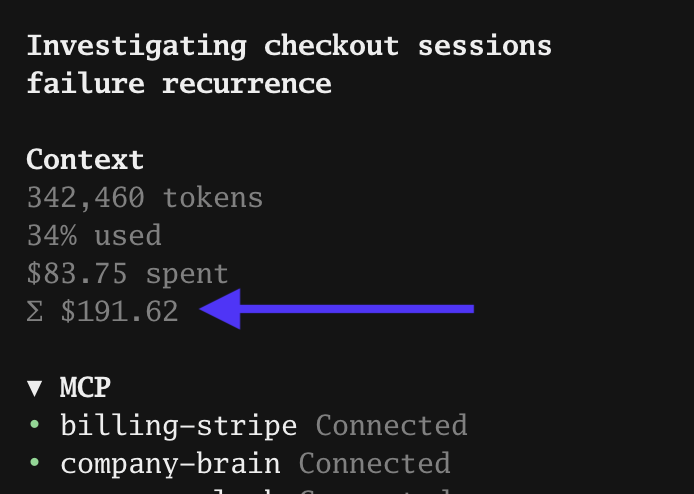
That's it. The original price is this agent's spend. Σ includes this session and every nested subagent, at any depth. It updates as they work and includes earlier spend when you reopen a session.
Install
For OpenCode 1.18.34 or newer in the 1.x series:
opencode plugin --global opencode-total-spendRestart OpenCode. The command installs the npm package and adds it to your global TUI configuration. No cloning or build step is needed. OpenCode 2 uses a different plugin API and isn't supported by this release.
Alternatively, add the package to ~/.config/opencode/tui.json (keep any existing plugins):
{
  "plugin": ["opencode-total-spend"]
}
If you previously installed from a clone, remove the local dist/tui.js entry from tui.json when switching to the npm package, so it is only loaded once.
Install from source
git clone https://github.com/nabilfreeman/opencode-total-spend.gitAdd the absolute path to the included, prebuilt dist/tui.js to the plugin array in ~/.config/opencode/tui.json. No build or npm install is needed.
How it works
The plugin reads session costs through OpenCode's API, recursively includes child sessions, and counts each session once. Session events update the figure live; a refresh every minute catches anything missed during a reconnect. It uses OpenCode's recorded dollar costs, including its cache pricing, rather than estimating tokens at a separate rate. These are the same cost records OpenCode uses, not a provider invoice.
OpenCode doesn't expose a slot immediately below the price, so the plugin replaces the small Context block with the same layout and adds the sigma line. It follows your current theme. While loading it shows Σ …; if costs can't be read it shows Σ unavailable instead of a partial total.
Remove
Remove its entry from tui.json and restart OpenCode. If Context is hidden, enable internal:sidebar-context in the command palette's Plugins menu.
Development
npm install
npm run build
npm test
The built JavaScript is committed so a clone is ready to use. Runtime UI dependencies are supplied by OpenCode.
Releases
Pushes and merges to main automatically bump the patch version, build the plugin, publish it to npm, and create a GitHub release. The release workflow uses npm trusted publishing (OIDC) with provenance. No manual version bump, tag, npm token secret, or sign-in is needed for these releases.
MIT licensed. Context layout and token calculation adapted from OpenCode.