
opencode-voice2text
v0.1.21
Published
Provider-based speech-to-text tool for OpenCode TUI and terminal CLI

Maintainers
 chenxuan520
Readme
opencode-voice2text
这是一个采用 provider 架构的语音识别工具,既可以作为 OpenCode TUI 插件使用,也可以作为独立终端命令使用。目前内置的 provider 是火山引擎 ASR 和小米 MiMo ASR。
按一次快捷键开始识别。麦克风音频始终先在本地采集,然后由不同 provider 按各自 API 方式处理。火山引擎会在你说话过程中持续追加稳定文本;小米 MiMo 会在你停止录音后把音频封装成 WAV 上传,再追加最终识别结果。
演示
特性
- 单个快捷键控制开始 / 停止语音识别
- 可以在 macOS/Linux 终端里直接运行,并把识别文本输出到 stdout
- 同时支持实时流式和停止后上传两类 ASR provider
- 配置错误或运行失败时会显示 warning/error toast
- 支持 macOS 和 Linux
- 凭证放在插件仓库之外,避免误提交
行为说明
- 第一次按
Ctrl+S:开始采集麦克风音频并启动识别 - 说话过程中:支持实时 partial 的 provider 会持续追加稳定识别文本
- 第二次按
Ctrl+S:停止采集,等待 provider 返回最终结果,并补上剩余尾部文本 - 录音期间会显示一个持续存在的 recording toast,识别停止后自动消失
为什么是切换式而不是按住说话
OpenCode 当前的 TUI 插件 API 支持匹配快捷键,但还没有暴露按键释放事件。所以在插件里实现真正可靠的“按住录音 / 松开停止”目前不可行。
依赖要求
- 使用 TUI 插件入口时,需要 OpenCode 并启用 TUI plugin 支持
- 你所选 ASR provider 的可用凭证
- 本地安装 Sox(macOS/Linux 使用
rec,Windows 使用sox.exe)
macOS:
brew install soxUbuntu / Debian:
sudo apt install soxWindows:
- 从 https://sourceforge.net/projects/sox/ 下载并安装 SoX
- 确保
sox.exe已加入PATH - 用下面命令确认安装成功:
sox --version安装
OpenCode 插件
推荐全局安装:
opencode plugin opencode-voice2text@latest --global这和 opencode-dynamic-context-pruning 的安装方式一致。OpenCode CLI 会自动安装 npm 包,并更新你的 OpenCode 插件配置。
如果只想安装到当前项目而不是全局,去掉 --global:
opencode plugin opencode-voice2text@latest独立 CLI
如果要在 macOS/Linux 终端里直接使用,先确保本机有 Node.js/npm,然后把同一个 npm 包安装成全局命令:
npm install -g opencode-voice2text
voice2text
或者不全局安装,直接运行:
npx opencode-voice2textnpm 包名仍然是 opencode-voice2text,安装后的可执行命令是 voice2text。
OpenCode 插件安装和独立 CLI 安装是两个入口:需要 TUI 插件时用 opencode plugin ...,需要普通终端命令时用 npm 安装或 npx 运行。
终端 CLI
默认情况下,命令启动后会立刻开始录音,把麦克风音频发送给已配置的 provider,并把识别文本输出到 stdout。实时 provider 会在录音过程中持续输出稳定文本;停止后上传类 provider 会在最终结果返回后一次性输出。按 Ctrl+C、Ctrl+S 或回车停止录音。停止后命令会等待 ASR 返回最终结果,补齐剩余尾部文本,然后退出。
单次 CLI 模式里的 Ctrl+S 也依赖终端真的把这个按键交给进程。如果你的终端启用了 XON/XOFF 流控,Ctrl+S 可能还是不会生效;这时 Ctrl+C 仍然是稳定兜底,或者先执行 stty -ixon 再试。
执行 voice2text --help 可以查看完整参数、示例和 provider 说明;执行 voice2text --version 可以确认当前安装的 CLI 版本。现在遇到未知参数时也会直接报错退出,不会误触发语音录制。
如果想直接从 npm 自更新 CLI,可以执行 voice2text update。它本质上会运行 npm install -g opencode-voice2text@latest 来安装最新已发布版本。
如果希望启动后常驻,并用快捷键反复开始 / 停止,可以使用 toggle 模式:
voice2text --toggletoggle 模式下:
- 按一次
Ctrl+S开始录音 - 再按一次
Ctrl+S停止录音并补齐最终结果 - 可以继续按下一次开始新一轮语音输入
- 按
Ctrl+C退出程序
也可以指定其他快捷键:
voice2text --toggle --toggle-key ctrl+gmacOS/Linux 下 Ctrl+S 可能会先被终端流控截获,导致 CLI 收不到快捷键。如果按了没反应,先执行:
stty -ixon常用选项:
voice2text --config ~/.config/opencode/voice2text.local.json
voice2text --language zh-CN
voice2text --max-duration 10
voice2text --provider mimo
voice2text --toggle --toggle-key ctrl+s
voice2text --no-trailing-space
voice2text --version
voice2text update
CLI 和 OpenCode 插件默认共用同一个本地配置文件,也共用 OPENCODE_VOICE2TEXT_* 环境变量,所以凭证只需要配置一次。
TUI 配置
安装器会默认写入一条 TUI 插件配置,其中包含:
commandKeybind: "ctrl+s"
你仍然需要确认 terminal_suspend 不会和这个快捷键冲突。
推荐的 ~/.config/opencode/tui.json:
{
  "$schema": "https://opencode.ai/tui.json",
  "keybinds": {
    "terminal_suspend": "none"
  }
}
如果你想改成别的快捷键,可以在安装后手动编辑 tui.json 里生成的插件配置。
默认快捷键是 Ctrl+S。如果按了没有反应,通常是终端在 OpenCode 收到按键前,就把它当成了 XON/XOFF 流控快捷键。
当前 shell 会话内临时修复:
stty -ixonzsh 持久化修复:
把 stty -ixon 加到 ~/.zshrc,然后重启终端。
bash 持久化修复:
把 stty -ixon 加到 ~/.bashrc 或 ~/.bash_profile,然后重启终端。
如果你不想改终端流控,也可以在 tui.json 里手动把 commandKeybind 改成别的键。
Windows 终端没有同样的 Ctrl+S XON/XOFF 流控问题,所以 stty -ixon 只适用于 macOS/Linux shell。
重启 OpenCode
如果 OpenCode 已经在运行,安装完后请重启一次,确保插件和依赖树被重新加载。
凭证配置
在目标机器上创建本地配置文件。CLI 和 OpenCode 插件默认共用这同一个文件:
切换 provider 时,默认配置文件路径不会变化。
同一个配置文件也可以同时保存多个 provider 的凭证,外层的 provider 字段决定当前实际使用哪个 provider。
macOS/Linux:
~/.config/opencode/voice2text.local.json
Windows:
%APPDATA%\opencode\voice2text.local.json
{
  "provider": "volcengine",
  "providerConfig": {
    "appId": "your-volcengine-app-id",
    "accessToken": "your-volcengine-access-token",
    "resourceId": "volc.seedasr.sauc.duration",
    "endpoint": "wss://openspeech.bytedance.com/api/v3/sauc/bigmodel_async"
  },
  "language": "zh-CN",
  "chunkMs": 200,
  "endWindowSize": 800,
  "maxDurationSeconds": 180,
  "appendTrailingSpace": true,
  "rate": 16000,
  "bits": 16,
  "channels": 1
}
示例模板也放在 examples/voice2text.local.example.json(火山引擎)和 examples/voice2text.mimo.local.example.json(小米 MiMo)。
如果你想在一个配置文件里同时保存多个 provider,可以把 providerConfig 写成按 provider id 分组的嵌套结构:
{
  "provider": "volcengine",
  "providerConfig": {
    "volcengine": {
      "appId": "your-volcengine-app-id",
      "accessToken": "your-volcengine-access-token",
      "resourceId": "volc.seedasr.sauc.duration",
      "endpoint": "wss://openspeech.bytedance.com/api/v3/sauc/bigmodel_async"
    },
    "mimo": {
      "apiKey": "your-mimo-api-key",
      "model": "mimo-v2.5-asr",
      "endpoint": "https://api.xiaomimimo.com/v1/chat/completions"
    }
  },
  "language": "zh"
}
这个多 provider 示例也放在 examples/voice2text.multi-provider.local.example.json。
火山引擎配置
当前内置的 volcengine provider 需要你先在火山引擎准备好以下配置,插件才能正常工作:
- 火山引擎 ASR 产品页:https://www.volcengine.com/product/asr
- 单 provider 配置:
providerConfig.appId、providerConfig.accessToken、providerConfig.resourceId、providerConfig.endpoint - 多 provider 配置:
providerConfig.volcengine.appId、providerConfig.volcengine.accessToken、providerConfig.volcengine.resourceId、providerConfig.volcengine.endpoint
典型配置流程:
打开 官网 登录火山引擎控制台, 如果没登录注册先注册登录账号, 打开语音识别 / ASR 服务页面
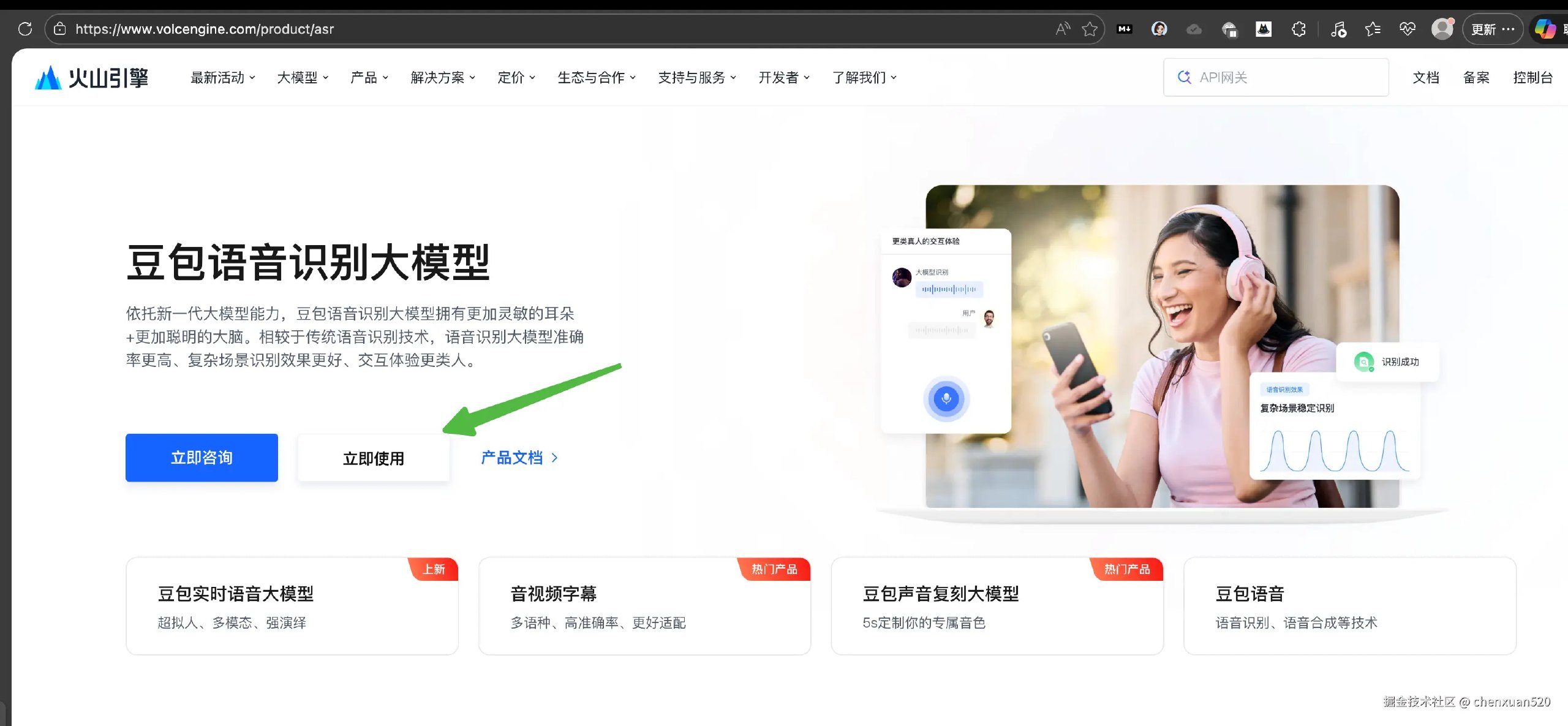
创建或选择一个应用
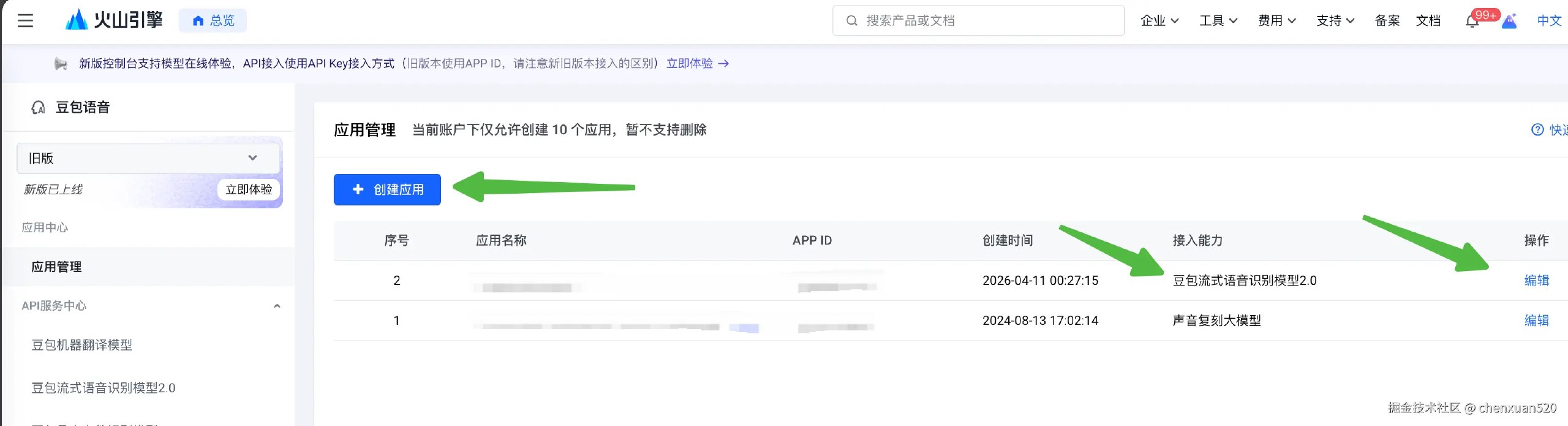
获取应用对应的凭据和资源配置
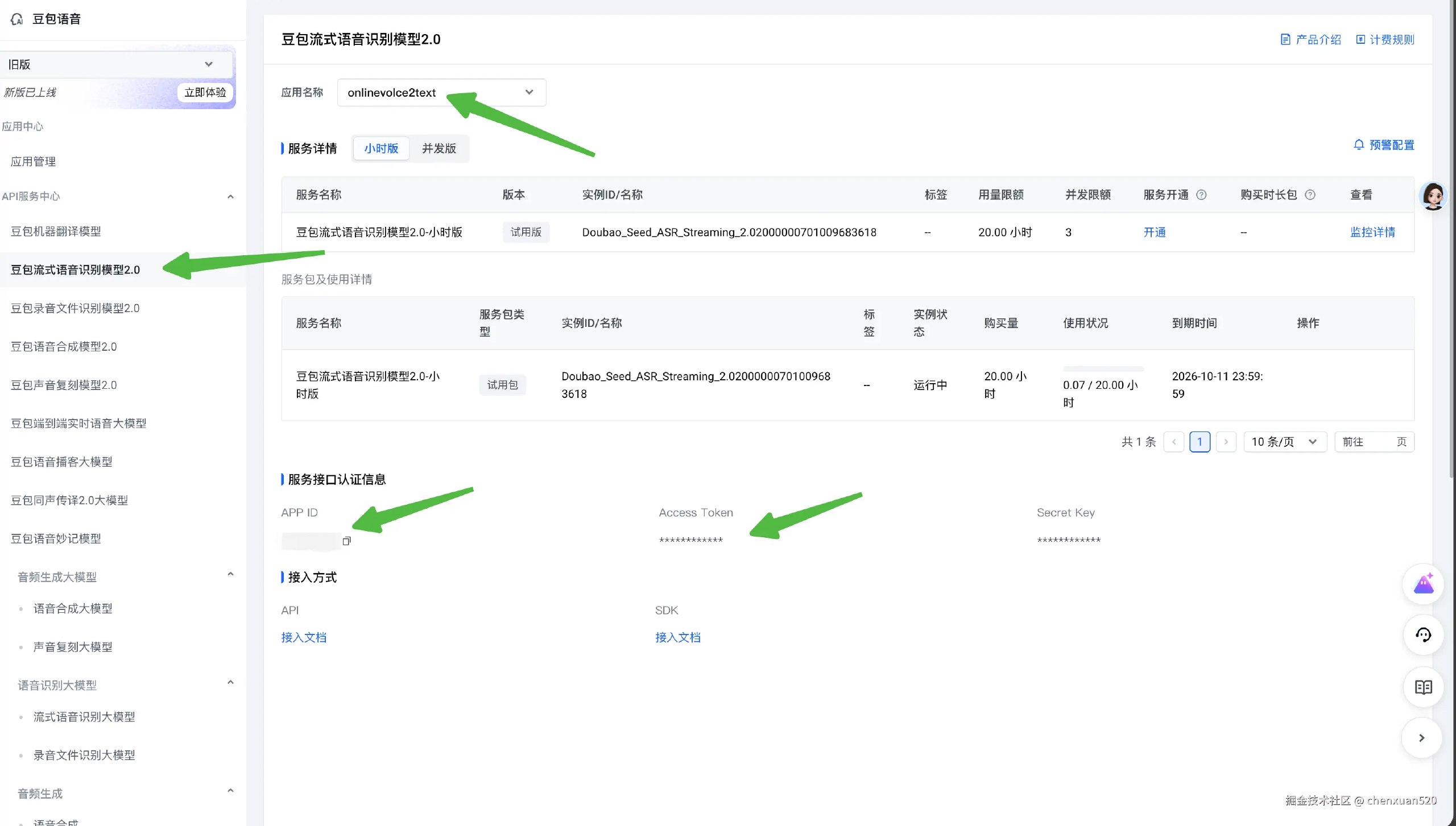
填进本地
voice2text.local.json。macOS/Linux 默认路径是~/.config/opencode/voice2text.local.json,Windows 默认路径是%APPDATA%\opencode\voice2text.local.json。其中 Resource-Id 在 大模型流式语音识别API--豆包语音-火山引擎 这里找,推荐直接填volc.seedasr.sauc.duration,endpoint 则使用wss://openspeech.bytedance.com/api/v3/sauc/bigmodel_async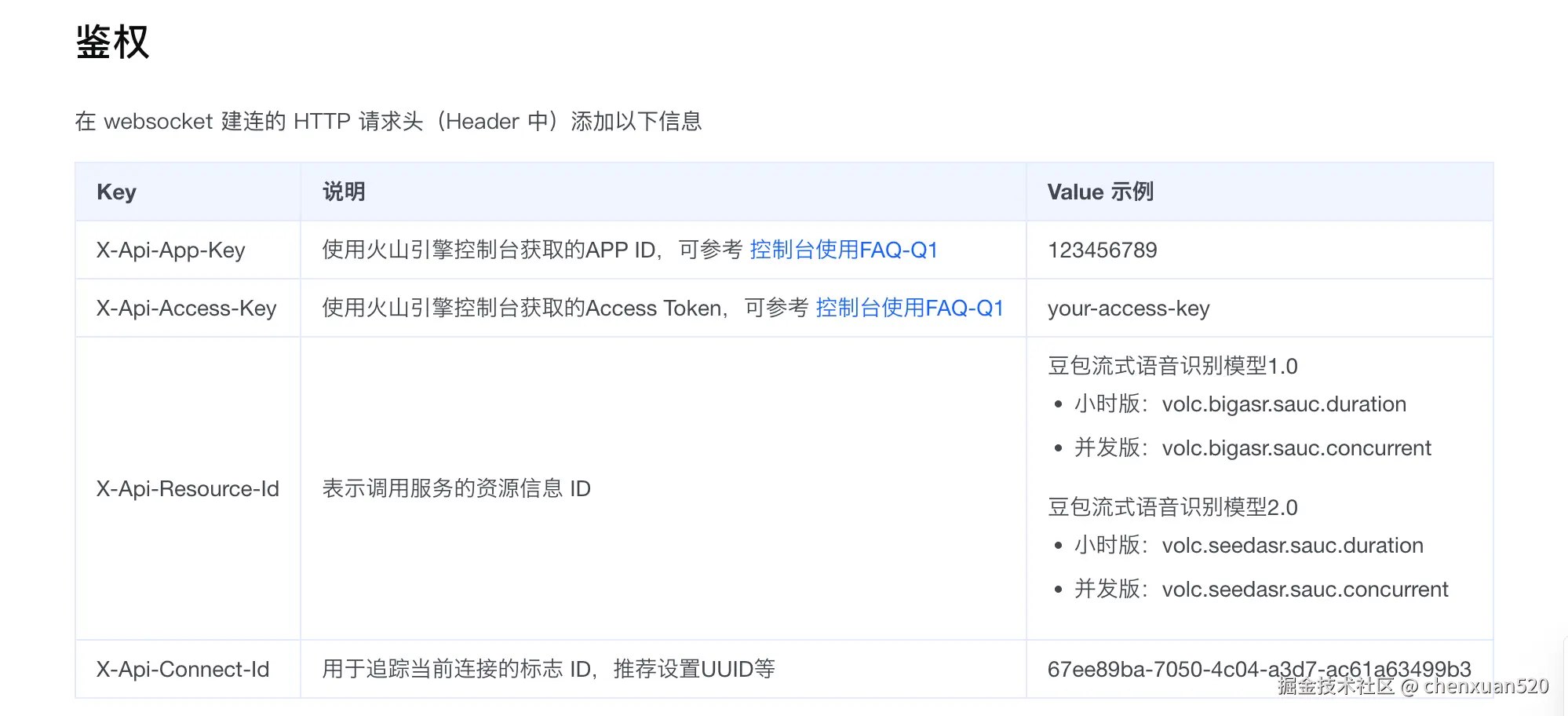
对当前这个插件的火山引擎实现来说:
providerConfig.endpoint一般是wss://openspeech.bytedance.com/api/v3/sauc/...下面的 websocket 地址providerConfig.resourceId需要和你在火山引擎启用的模型 / 资源一致providerConfig.appId和providerConfig.accessToken必须属于同一个火山引擎应用
示例:
{
  "provider": "volcengine",
  "providerConfig": {
    "appId": "your-app-id",
    "accessToken": "your-access-token",
    "resourceId": "volc.seedasr.sauc.duration",
    "endpoint": "wss://openspeech.bytedance.com/api/v3/sauc/bigmodel_async"
  }
}
如果在没有有效火山引擎凭证的情况下触发插件,它会显示 warning toast,而不是静默失败。
小米 MiMo 配置
当前内置的 mimo provider 需要你先在小米 MiMo 准备好以下配置:
- 小米 MiMo ASR 文档:https://mimo.mi.com/docs/zh-CN/quick-start/usage-guide/audio/Speech-Recognition
- 单 provider 配置:
providerConfig.apiKey、providerConfig.model、providerConfig.endpoint - 多 provider 配置:
providerConfig.mimo.apiKey、providerConfig.mimo.model、providerConfig.mimo.endpoint
当前 MiMo provider 的行为:
- 麦克风音频仍然和火山引擎一样在本地采集
- 停止录音后,插件会把 PCM 封装成 WAV 再上传给 MiMo
- MiMo 不会在你说话过程中持续追加文本,而是在上传识别完成后追加最终文本
language应填写auto、zh或en;像zh-CN、en-US这类值会自动归一化
示例:
{
  "provider": "mimo",
  "providerConfig": {
    "apiKey": "your-mimo-api-key",
    "model": "mimo-v2.5-asr",
    "endpoint": "https://api.xiaomimimo.com/v1/chat/completions"
  },
  "language": "zh"
}
你也可以用下面这个环境变量覆盖配置文件路径:
export OPENCODE_VOICE2TEXT_LOCAL_CONFIG=/path/to/voice2text.local.json环境变量
下面这些环境变量可以覆盖,或者直接替代本地配置文件中的值:
export OPENCODE_VOICE2TEXT_PROVIDER=volcengine
export OPENCODE_VOICE2TEXT_LANGUAGE=zh-CN
export OPENCODE_VOICE2TEXT_CHUNK_MS=200
export OPENCODE_VOICE2TEXT_END_WINDOW_SIZE=800
export OPENCODE_VOICE2TEXT_MAX_DURATION_SECONDS=180
export OPENCODE_VOICE2TEXT_APPEND_TRAILING_SPACE=true
export OPENCODE_VOICE2TEXT_SAMPLE_RATE=16000
export OPENCODE_VOICE2TEXT_BITS=16
export OPENCODE_VOICE2TEXT_CHANNELS=1
当前内置的火山引擎 provider 也兼容旧版扁平环境变量:
export OPENCODE_VOICE2TEXT_APP_ID=...
export OPENCODE_VOICE2TEXT_ACCESS_TOKEN=...
export OPENCODE_VOICE2TEXT_RESOURCE_ID=volc.seedasr.sauc.duration
export OPENCODE_VOICE2TEXT_ENDPOINT=wss://openspeech.bytedance.com/api/v3/sauc/bigmodel_async
如果你使用的是小米 MiMo,也支持下面这些 provider 专属环境变量:
export OPENCODE_VOICE2TEXT_PROVIDER=mimo
export OPENCODE_VOICE2TEXT_MIMO_API_KEY=...
export OPENCODE_VOICE2TEXT_MIMO_MODEL=mimo-v2.5-asr
export OPENCODE_VOICE2TEXT_MIMO_ENDPOINT=https://api.xiaomimimo.com/v1/chat/completions
插件选项
你也可以通过 tui.json 传入同样的运行时配置:
commandKeybindproviderproviderConfiglanguagechunkMsendWindowSizemaxDurationSecondsappendTrailingSpaceratebitschannels
实际使用里,凭证更适合放在本地配置文件或环境变量里,而不是直接写进 tui.json。
Provider 设计
当前配置结构是面向 provider 的,这样后续新增 ASR 后端时不需要改安装入口形态。
- 当前 provider:
volcengine、mimo - 未来 provider 可以复用同一套插件入口和 TUI 行为
- provider 专属密钥统一放到
providerConfig下 - 单个 provider 的配置可以继续使用平铺的
providerConfig - 多 provider 的配置可以把凭证放到
providerConfig.<providerId>下,再通过顶层provider切换
如果你要在代码里新增一个 provider:
- 在
src/providers/下新增一个文件。 - 实现
src/providers/types.ts里的VoiceProvider接口。 - 在
src/providers/index.ts中注册它。 - 在本地配置里使用
provider+providerConfig。
如果缺少 provider 配置,按下快捷键后会显示一个 toast,提示你去填写对应的本地配置文件,而不是静默失败。
开发
安装依赖并构建:
npm install
npm run build
只做类型检查:
npm run typecheck发布
通过 GitHub Actions 自动发布
仓库已经包含 .github/workflows/publish.yml。
它使用 GitHub Actions OIDC + npm trusted publishing,所以不需要在 GitHub 里保存长期有效的 NPM_TOKEN。
行为如下:
- 每次 push 到
master都会执行 typecheck 和 build - workflow 会检查
package.json当前的name@version是否已经发布到 npm - 如果该版本还不存在,就执行
npm publish - 如果该版本已经存在,workflow 会正常结束而不是失败
npm 侧需要做的配置:
- 在 npm 包设置里把当前仓库配置成 trusted publisher
在 npmjs.com 打开 opencode-voice2text 这个包的设置页,然后配置:
- Trusted Publisher
- provider: GitHub Actions
- owner:
chenxuan520 - repository:
opencode-voice2text - workflow filename:
publish.yml
重要发布规则:
- 如果你希望 push 到
master后发布新版本,先更新package.json里的版本号 - 如果代码变了但版本号没变,CI 会跳过发布,因为 npm 版本号不可重复
版本升级示例:
npm version patch或者:
npm version minor手动发布
npm publishprepublishOnly 会自动先执行构建。
如果是紧急情况下手动发布,可以在本地使用自己的 npm 登录态,或者使用短期有效的 bypass-2FA token。不要在启用了 trusted publishing 的 GitHub Actions 中保存长期 publish token。
备注
- 内置的火山引擎 provider 直接对接火山引擎 websocket ASR 协议
- 故意不显示 success toast;录音状态通过持续存在的 toast 表达,停止后会自动消失
- 错误仍然会通过 OpenCode toast 暴露出来
opencode plugin ...会更新tui.json中的插件配置,但不会覆盖theme、keybinds之类无关的 TUI 设置