
opencode-webui
v3.1.2
Published
Web UI for the OpenCode coding agent — chat, streaming, tool cards, and extensions over the OpenCode engine's HTTP API.


Readme
OpenCode WebUI (Beta)
An instantly-extensible web interface for OpenCode — one folder in, live in seconds.
Inspired by DeepSeek Harness and its everything-is-a-plugin architecture.





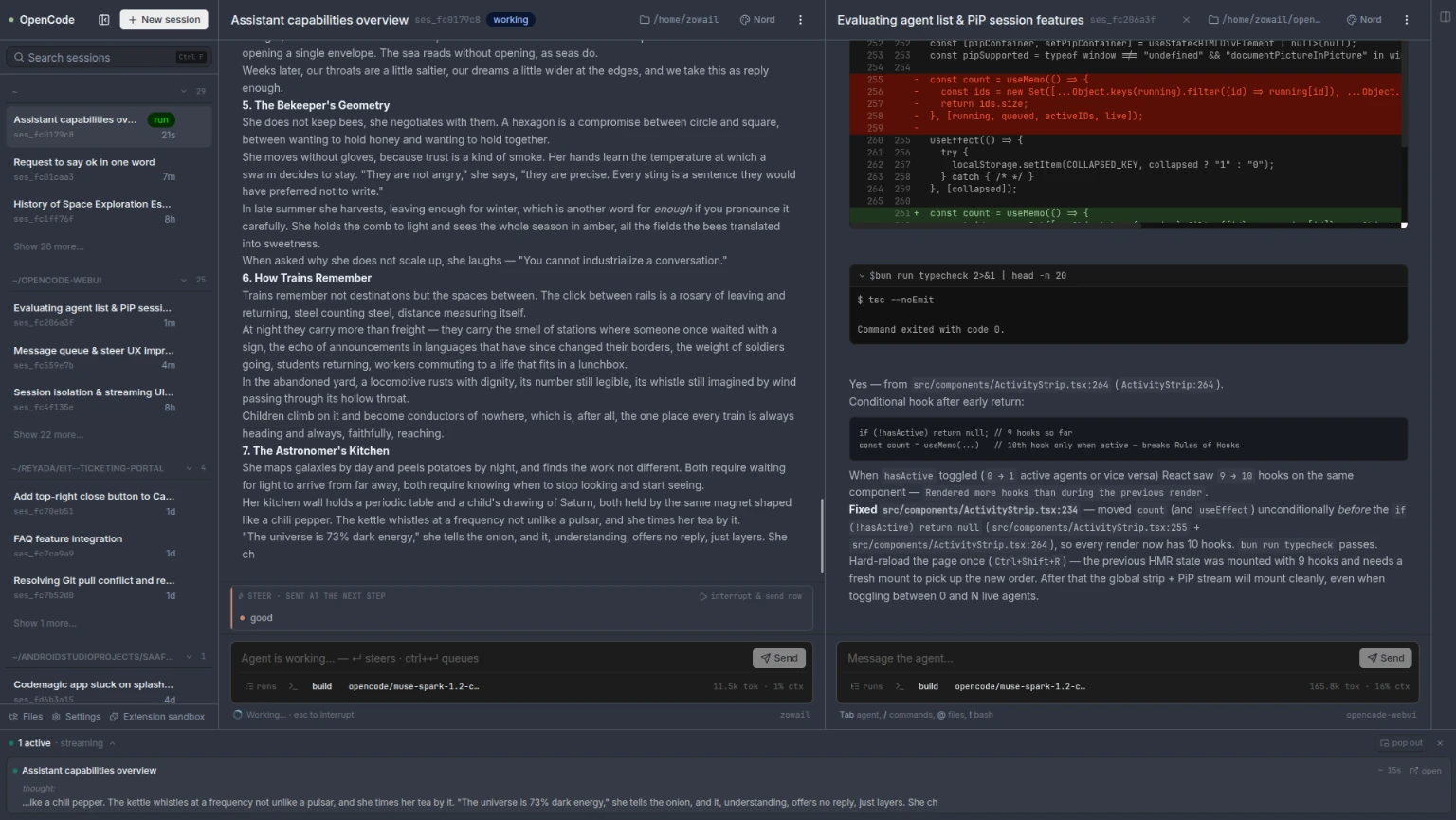
Quick start · Everything is an extension · Instant, everywhere · Features · Built for phones · Security · FAQ
OpenCode WebUI is a self-hosted, open-source browser frontend for the OpenCode coding agent engine — the same engine that powers the opencode terminal UI. Chat with your agent, watch it reason and run tools live, approve prompts, and keep coding from any device — desktop, tablet, or phone. Same sessions, same history, two frontends.
What makes it different is how it's built. Like DeepSeek Harness, it treats every part of the product as replaceable: the UI's seams are open, so you can wrap any component, take over any screen, contribute to any collection, hook any event, or provide a service other extensions consume — without touching the source, and without anything restarting underneath you.
It's in public beta: actively developed and daily-driven, with rough edges still being filed down. Issues welcome — there's a built-in /report command that files a prefilled issue with diagnostics.
Everything is an extension
One extension = one folder, dropped in — no build step, no restart:
~/.config/opencode/webui-extensions/<name>/— per-user<project>/.opencode/webui-extensions/<name>/— per-project
my-extension/
  manifest.json    id, version, description; optional disabled, settings, requires
  index.tsx        browser stratum: register() and/or activate(ctx)
  dom.ts           DOM stratum (portals, canvas, post-render tweaks)
  server.ts        proxy stratum (routes, middleware, event tap, pollers)
  engine/          opencode plugin payload (model tools, prompt hints)
A folder can carry code in four strata — the page, the DOM under it, the proxy process, and the engine itself:
| Stratum | Runs in | Reaches | | --- | --- | --- | | Browser | the page | React tree, store, API, logic modules | | DOM | the page, post-render | any node — portals, canvas, iframes | | Proxy | the proxy process | fs, spawn, engine credentials, the always-on event stream, every client | | Engine | the engine process | tools the model calls, system prompt |
Inside the browser stratum, five kinds, one job each:
| Kind | What it does |
| --- | --- |
| wrap | A flow-through tweak of an existing unit — the default path, stale-proof by construction |
| replace | Take ownership of one target — the marked escape hatch |
| contribute | Add an item to a named collection: palette entries, slash commands, pages, settings, context menus |
| hook | React to open event strings: api.pre / api.post, message.render, session.adopted, pane.focused, … |
| service | Provide or consume named logic — doubles as value overrides (e.g. the timestamp formatter) |
One gate, owned by the folder itself. Presence = installed, disabled: true = paused, delete = uninstalled. No enable lists, no config files, no forks: a higher-precedence folder with the same id shadows the shipped one (user → project → shipped), so your customizations survive every core update — the core lands underneath, and yours still wins.
Hot reload everywhere. Browser edits rebuild and same-id-swap live — the page repaints in under a second, no refresh. Proxy server.ts modules reload with no proxy restart. In a repo checkout, Vite HMR covers every file.
We dogfood the same API you get. The app's own optional features ship as extensions in the shipped source — core stays minimal, and the public surface can't rot.
Every boot also syncs an agent skill to ~/.config/opencode/skills/webui/SKILL.md, so your agent knows the webui exists, what its extension system can do, and how to file reports for it (--install-skill runs the same sync manually).
The full authoring guide — kinds, activation context, event bus, declared settings, slots, peer composition, the DOM kit, server.ts mounts, precedence, and a worked example — is webui-extensions/README.md.
Sandbox
A second, private instance for testing extensions and settings without touching your main webui — no clone, no build:
bunx opencode-webui sandbox          # bun users
./opencode-webui-linux-x64 sandbox   # binary users
bun run sandbox                      # inside a repo checkout (adds Vite + HMR)
It binds 127.0.0.1:4099 — loopback only, no password (the bind address is the guarantee), attaches to your already-running engine, and loads extensions from an isolated scratch dir. Iterate there; "ship" = copy the folder into ~/.config/opencode/webui-extensions/.
Instant, everywhere
- Instant start —
bunx opencode-webui. The engine starts if it isn't running, first boot installs the global command and plugin, and your existing sessions are already there. - Instant extension — drop a folder in. It's discovered, loaded, and live in seconds; delete it and it's gone. No build step, no restart, no refresh.
- Instant iteration — edit an extension and watch the page repaint itself, sub-second; edit the proxy side and the module swaps without a server restart.
- Instant catch-up — reload the tab mid-run and a per-session replay buffer fills the gap. No lost tokens, no stuck agents.
Features
| | Feature | What you get | | --- | --- | --- | | 🧩 | Extensible to the bone | One folder, four strata, five kinds — see Everything is an extension. | | 🔁 | Same sessions as the TUI | Open a session in the terminal, continue it in the browser — same engine, same history, nothing to migrate. | | 📡 | Live streaming | Text, reasoning, and tool calls render in real time; reconnect mid-run and catch up gap-free via the replay buffer. | | ✅ | Full agent control | Approve permission prompts, answer mid-task questions and forms — all in-page, all queued so nothing blocks. | | 🪟 | Split view | Up to four sessions side by side, each fully interactive with its own composer. | | ⌨️ | Keyboard-first | TUI-parity bindings: prompt history, arrow-key session navigation, type-anywhere focus, two-step Esc to interrupt. | | 🛡️ | Credentials stay server-side | The browser never holds service credentials; a Bun proxy fronts the engine and owns the auth. | | 📱 | Mobile-responsive + PWA | A phone-first layout that adapts every control to a small screen — and installs to your home screen as an app with live activity updates. | | 🤖 | Agent-aware | An agent skill ships with the UI, so your agent knows it exists and how to extend it. |
Built for phones
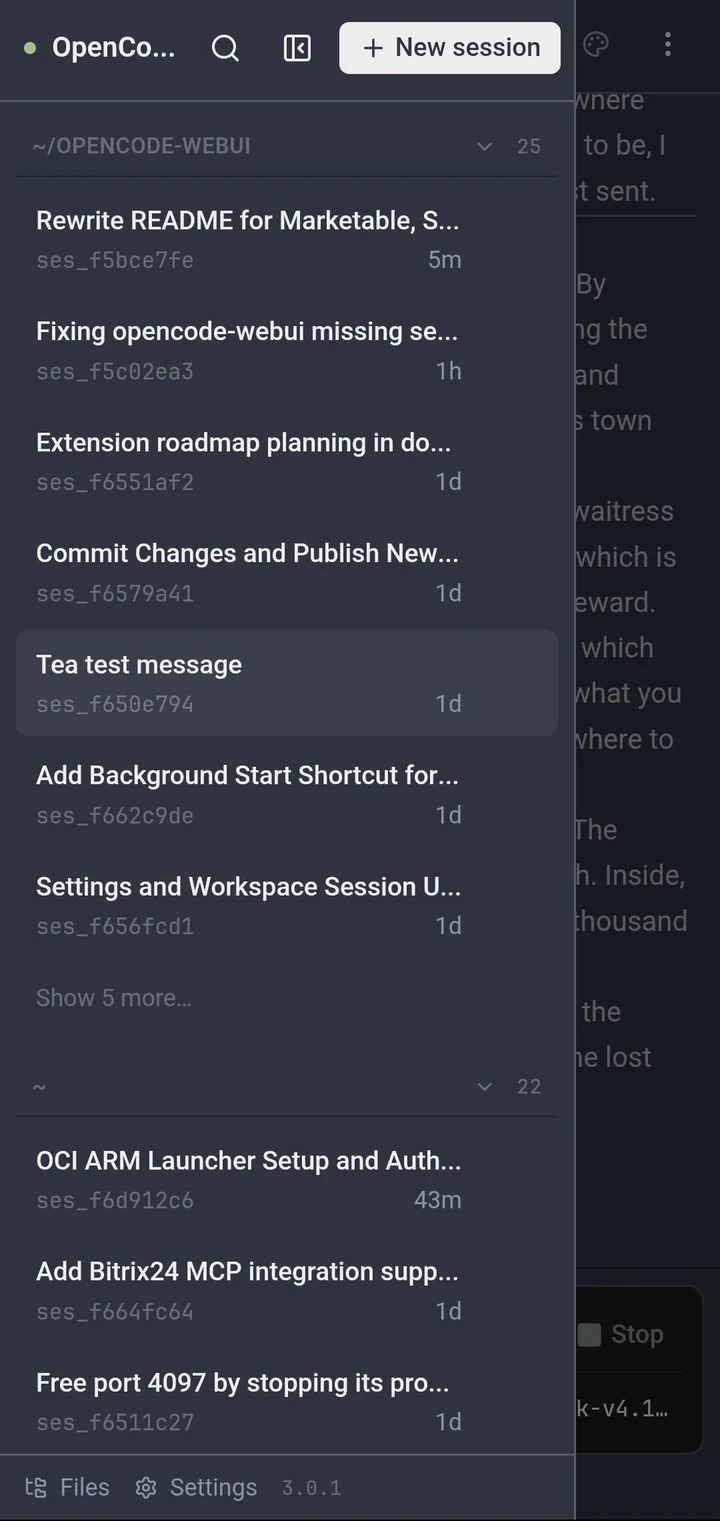
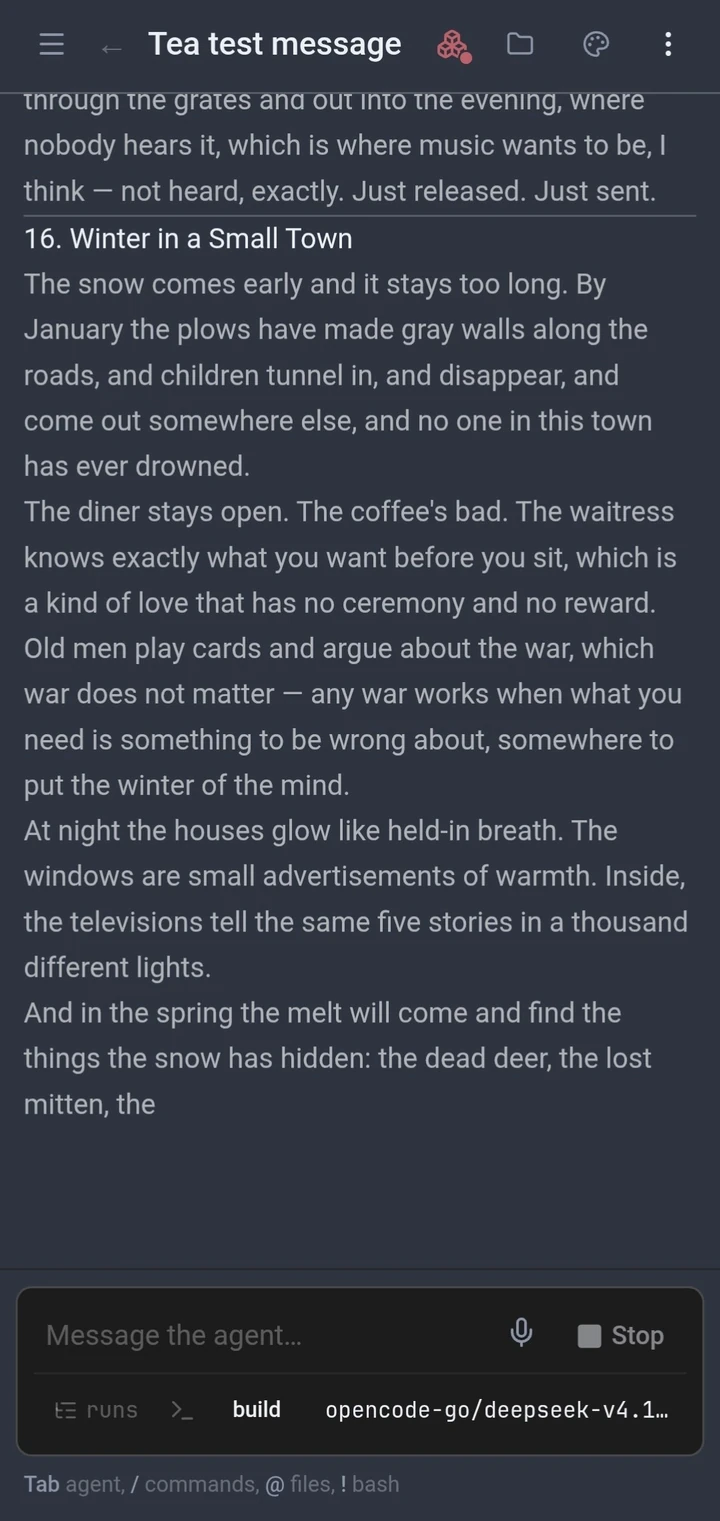
The interface is mobile-responsive by design — not a shrunken desktop. The composer, tool cards, pickers, and permission prompts all adapt to a small screen, so you can steer a run, approve a tool, or answer a question from your phone while the agent works.
Over HTTPS (e.g. Tailscale serve) it installs as a PWA: standalone window, home-screen icon, splash screen, and a live activity tile — a silent notification that follows active sessions, opens the right one on tap, and clears itself when idle. (Install needs a secure context — plain-LAN HTTP stays a browser tab.)
| 📱 | 📱 |
| :---: | :---: |
|  |
|  |
|
Quick start
Requires Bun — or grab a prebuilt binary below. One command; the OpenCode engine starts automatically if it isn't already running:
bunx opencode-webuiFirst boot prints the URL and a generated password — shown once:
  opencode-webui
  → http://localhost:4097

  password    patch-orbit-vault-glare
              generated for this install — shown once
              set WEBUI_PASSWORD to choose your own
Open the URL, paste the password, and you're in. Your existing OpenCode sessions are right there — no import, no setup wizard.
Install without Bun
Binaries are attached by CI to every release — grab one for your platform from
GitHub Releases, chmod +x, run. Same env vars, same first boot:
chmod +x opencode-webui-linux-x64
./opencode-webui-linux-x64
What makes it different
- Extensible like a harness, not like an app. Inspired by DeepSeek Harness's everything-is-a-plugin architecture, every UI unit registers itself on open seams. Your customizations live beside the shipped ones — shadowing them, not forking them — and survive every update.
- It's a client, not a second agent. OpenCode WebUI talks to the same engine as the
opencodeTUI over its HTTP API — one agent, one history, two frontends. Start a run in the browser, finish it in the terminal. - The browser never holds credentials. Unlike web UIs that keep API keys in localStorage, a local Bun proxy owns the auth and attaches it server-side. Login is a signed HttpOnly
SameSite=Strictcookie; the engine's credentials never leave the machine. - Built for coding agents, not chat. Tool cards with diffs and shell output, permission prompts, subagent strips, steer-vs-queue while busy, staged reverts — the things a coding session actually needs.
It starts with OpenCode (first-run setup)
First boot self-installs two things so the webui comes up with OpenCode and you never pay for bunx on every start:
- A global
opencode-webuicommand (~/.local/bin/opencode-webui) that launches the installed entry directly. - A built-in OpenCode lifecycle plugin that starts the webui in the background whenever you use OpenCode — detached, fire-and-forget, never a second copy.
opencode-webui            # start (starts the opencode service first if needed)
opencode-webui update     # update to the latest version and restart
opencode-webui status     # command, plugin, launch command, running pid
opencode-webui restart    # restart the background webui
opencode-webui stop       # stop it
opencode-webui uninstall  # remove the command + plugin (remembered; no auto-reinstall)
A repo checkout (bun run dev / bun run start) never self-installs. WEBUI_NO_SETUP=1 skips setup for one run, WEBUI_NO_PLUGIN=1 installs the command but not the plugin, and autostart: false (the Startup toggle in Settings › Access) turns it off persistently.
Configuration
Serve/security settings work as env vars or durably in ~/.config/opencode/webui/config.json — edited from Settings › Access in the UI or opencode-webui config on the CLI. Precedence per key: explicit env var → config file → default. Changes apply after a restart (the Access tab has a "Restart now" button). The file is 0600; a password set there is stored as a SHA-256 hash, never plaintext.
| Variable | Default | |
| --- | --- | --- |
| WEBUI_PASSWORD | generated on first boot | Log in with this passphrase. Set it to pin your own instead of the generated one. |
| WEBUI_HOST | 127.0.0.1 | Bind address. A wildcard (0.0.0.0 / ::) is refused without a password. |
| WEBUI_ALLOWED_HOSTS | loopback + bind host | Extra hostnames/IPs accepted (comma-separated, e.g. 192.168.1.5,myserver.lan). * accepts everything — your call, your risk. |
| WEBUI_TRUST_PROXY | unset | Set to 1 when a trusted reverse proxy sits in front, so X-Forwarded-Host/Proto are honored. Without it those headers are ignored. |
| WEBUI_PROXY_PORT | 4097 | Port for the UI and /api/*. |
| WEBUI_EXTENSION_DIR | the global + project dirs | Adds a higher-precedence source shadowing both (the sandbox uses this to keep WIP isolated; shipped extensions still load underneath). |
| WEBUI_NO_SETUP | unset | 1 skips first-run setup for this run (CI, one-offs). |
| WEBUI_NO_PLUGIN | unset | 1 installs the global command but not the OpenCode lifecycle plugin. |
| WEBUI_SETUP | unset | 1 forces setup even in a repo checkout (testing). |
opencode-webui config                          # show effective serve settings + source
opencode-webui config set host 0.0.0.0
opencode-webui config set allowed-hosts 192.168.1.5,myserver.lan
opencode-webui config set password             # read from stdin
opencode-webui config set auth none --confirm  # no login (warned)
opencode-webui restart                         # apply
A reachable instance with no password needs an explicit confirmation — deliberate, logged, and warned about.
Security
- One shared passphrase for the whole UI, generated on first boot if
WEBUI_PASSWORDis unset. - Login sets a signed HttpOnly
SameSite=Strictcookie —Securetoo over https (X-Forwarded-Proto, honored withWEBUI_TRUST_PROXY=1). - Login is rate-limited per IP with constant-time comparison;
Host/Originheaders are validated against loopback + bind host +WEBUI_ALLOWED_HOSTS. - Wildcard bind is refused unless a password is set.
- Remote access in one line:
WEBUI_HOST=<this-machine's-LAN-IP> WEBUI_PASSWORD='<you-pick>' bunx opencode-webui, then openhttp://<that-IP>:4097on the other device.
Behind a reverse proxy (Caddy / nginx samples, including websocket + SSE timeouts): docs/reverse-proxy.md.
FAQ
Is OpenCode WebUI a separate AI agent?
No — it's a frontend. It connects to the same OpenCode engine your TUI uses, over its HTTP API. One agent, one config, one set of sessions.
Will my existing OpenCode sessions show up?
Yes, automatically. Same engine, same history — open a session in the TUI, continue it in the browser, and vice versa.
What does "inspired by DeepSeek Harness" mean?
DeepSeek Harness is DeepSeek's open-source agent harness, built on the idea that everything is a plugin — no privileged core, every capability swappable. OpenCode WebUI brings that philosophy to the interface layer: every UI unit registers itself on open seams, and the app's own optional features ship as extensions on the same public API. We're not affiliated with DeepSeek — it's an architecture homage.
Can I use it from my phone or another machine?
Yes. Set WEBUI_HOST to your machine's LAN IP and a password, then open http://<that-IP>:4097 on the other device — or put it behind Tailscale to get HTTPS and PWA install (home-screen icon, live activity notifications).
How is it different from other AI chat web UIs?
Those are chat apps that happen to call a model, with a settings page if you're lucky. OpenCode WebUI is built for coding agents specifically — tool cards with diffs and shell output, permission prompts, subagent and shell strips, steering a run mid-flight, staged reverts — and it's self-hosted and extensible to the bone: seams all the way down, harness-style.
What does "beta" mean?
The UI is daily-driven and the core is stable, but the product is still moving: features shift, and edge cases are being filed down. If something breaks, the built-in /report command files a prefilled GitHub issue with a diagnostics bundle.
Is it free?
Yes — MIT licensed, self-hosted, no telemetry, no account. Run it on your own machine.
Development
bun install
bun run dev        # proxy (config port, default 4097) + Vite (5173), HMR
bun run sandbox    # isolated second instance (4099 / 5175, Vite in dev)
bun run typecheck
bun run build && bun start   # production: dist/ + API on 4097
To open the dev UI from a phone/Tailscale, set the bind address to 0.0.0.0 and add your host under Settings › Access — Vite honors the same values.
- Extension authoring guide: webui-extensions/README.md
- Extension contract check:
bun run scripts/uitest/extensions-check.ts - Setup check:
bun run check:setup(isolated HOME/XDG) - Config check:
bun run check:config - Architecture, editing rules, roadmap: AGENTS.md
Contributing
Issues and PRs are welcome. For extension-system changes, the E2E battery (bun run scripts/uitest/ext-battery-*.ts, 76 checks across four files) must pass — please keep extension-system and unrelated changes in separate commits.
License
MIT © Abdelftah Zowail